
CamVidは、正式名称「Cambridge-driving Labeled Video Database」の略称で、自動運転やロボティクス分野におけるセマンティックセグメンテーション(画像のピクセル単位での意味分類)の研究・評価に用いられる標準的なベンチマークデータセットです。
走行中の自動車からの視点で撮影された映像など、研究用途で広く使われています。
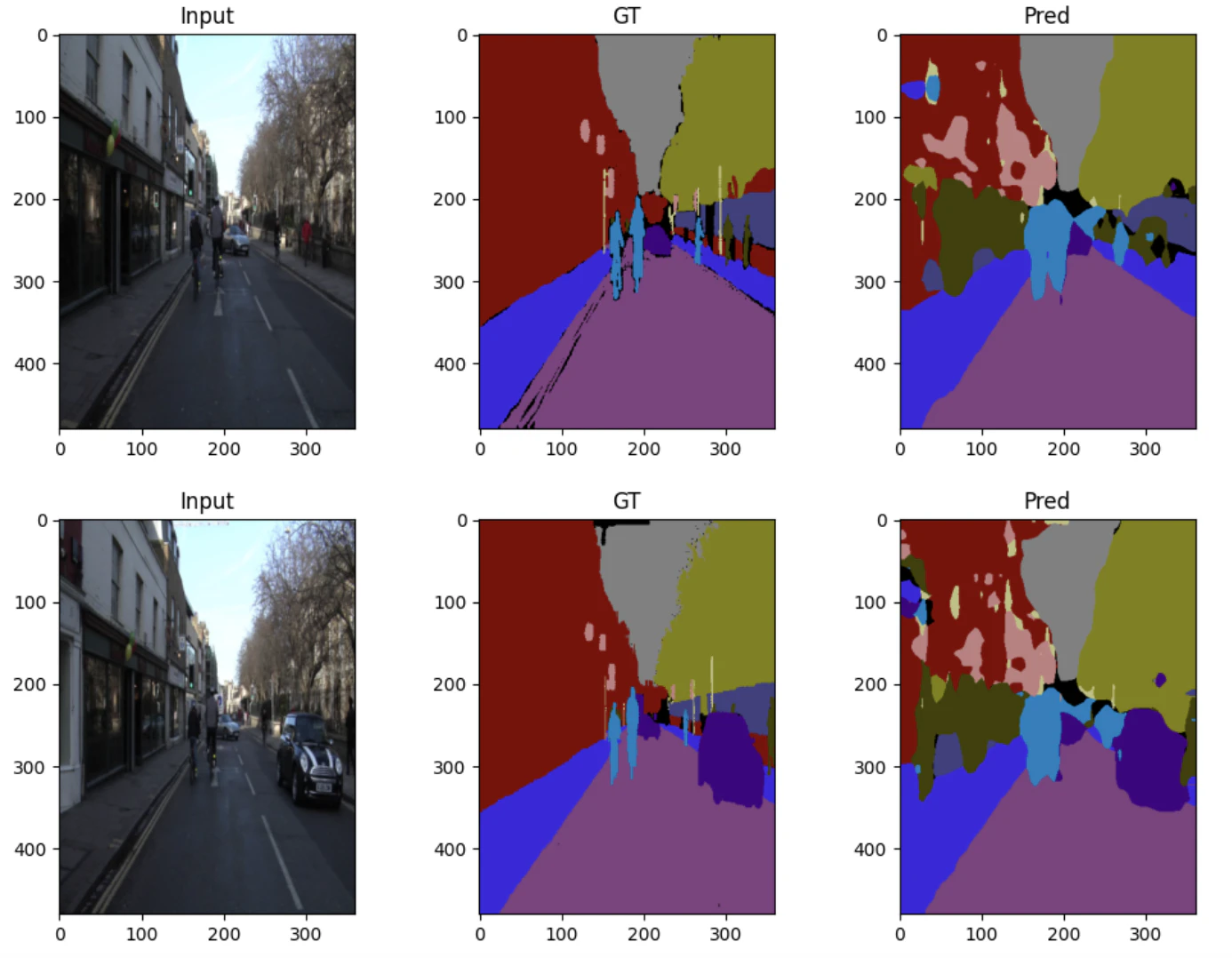
今回はこのCamVid データセットを用いて FCN(完全畳み込みネットワーク) によるセマンティックセグメンテーションを行う一連の流れを実装してみます。
セマンティックセグメンテーションとは、画像内のすべてのピクセル(画素)を、それが属するカテゴリ(例:人、車、空、道路など)に分類(セグメンテーション)する技術です。インスタンスセグメンテーションのように複数台の車を「車A」「車B」「車C」と個別に領域分割して認識することはできませんが、ピクセル単位で「人」「車」などのクラスラベルを割り当てます。
※ 最終的にやることイメージ
前提
- 実行環境はGoogle Colab。ランタイムはPython3(T4 GPU)を使用
※ 参照:機械学習・深層学習を勉強する際の検証用環境について - 本記事のコード全容はこちらからダウンロード可能。ipynbファイルであり、そのまま自身のGoogle Driveにアップロードして実行可能
- 数学的知識や用語の説明について、参考文献やリンクを最下部に掲載 (本記事内で詳細には解説しませんが、流れや実施内容がわかるようにしたいと思います)
全体の流れ
大きく分けると 6ステップ になります。
- データセット準備
- DataLoader とクラス数算出
- モデル定義(FCN-8s)
- 学習
- 評価(Mean IoU)
- 可視化
実装
1. データセット準備
セマンティックセグメンテーション用の画像とアノテーションを読み込み、
入力画像の前処理(リサイズ・正規化)およびラベル画像のクラスID変換を行う。
# git cloneしていますが方法はなんでも
!git clone https://github.com/alexgkendall/SegNet-Tutorial.git

import os
import torch
from torch.utils.data import Dataset
from PIL import Image
import torchvision.transforms as T
import numpy as np

# 入力画像とピクセル単位ラベルをペアで返すための Dataset
class CamVidDataset(Dataset):
    def __init__(self, img_dir, label_dir, transform=None, label_transform=None):
        self.img_dir = img_dir
        self.label_dir = label_dir
        self.images = sorted(os.listdir(img_dir))
        self.transform = transform
        self.label_transform = label_transform

    def __len__(self):
        return len(self.images)

    def __getitem__(self, idx):
        img_path = os.path.join(self.img_dir, self.images[idx])
        label_path = os.path.join(self.label_dir, self.images[idx])

        image = Image.open(img_path).convert("RGB")
        label = Image.open(label_path)

        if self.transform:
            image = self.transform(image)

        if self.label_transform:
            label = self.label_transform(label)

        label = label.squeeze(0).long()

        return image, label
2. DataLoader とクラス数算出
学習・検証・テストに分割し、モデル学習に適した形式でデータローダを構築する。
import numpy as np
from torch.utils.data import DataLoader

label_transform = T.Compose([
    T.Resize((480, 360), interpolation=T.InterpolationMode.NEAREST),
    T.PILToTensor()   # ★ 明示的に Tensor 化
])

image_transform = T.Compose([
    T.Resize((480, 360)),
    T.ToTensor()
])

train_dataset = CamVidDataset(
    "SegNet-Tutorial/CamVid/train",
    "SegNet-Tutorial/CamVid/trainannot",
    image_transform,
    label_transform
)

val_dataset = CamVidDataset(
    "SegNet-Tutorial/CamVid/val",
    "SegNet-Tutorial/CamVid/valannot",
    image_transform,
    label_transform
)

train_loader = DataLoader(train_dataset, batch_size=4, shuffle=True)
val_loader = DataLoader(val_dataset, batch_size=1)

# 可視化専用(順番をシャッフル)
val_loader_vis = DataLoader(
    val_dataset,
    batch_size=1,
    shuffle=True
)

# データから 実際に存在する最大クラスID を取得
labels = [y.max().item() for _, y in train_dataset]
num_classes = max(labels) + 1
print("num_classes:", num_classes)
3. モデル定義(FCN-8s)
分類ネットワークをベースに全結合層を畳み込み層へ置き換え、スキップ接続を用いた FCN-8s 構造を定義します。
また低解像度の意味情報と高解像度の空間情報を融合し、ピクセル単位での高精度なクラス予測を可能にします。
import torch.nn as nn
import torch.nn.functional as F
from torchvision.models import vgg16

class FCN(nn.Module):
    def __init__(self, num_classes):
        super().__init__()

        vgg = vgg16(pretrained=True).features

        self.pool3 = vgg[:17]   # pool3 まで
        self.pool4 = vgg[17:24] # pool4 まで
        self.pool5 = vgg[24:]   # pool5 以降

        self.score_pool3 = nn.Conv2d(256, num_classes, kernel_size=1)
        self.score_pool4 = nn.Conv2d(512, num_classes, kernel_size=1)
        self.score_pool5 = nn.Conv2d(512, num_classes, kernel_size=1)

    def forward(self, x):
        input_size = x.shape[2:]

        x3 = self.pool3(x)          # 1/8
        x4 = self.pool4(x3)         # 1/16
        x5 = self.pool5(x4)         # 1/32
        s5 = self.score_pool5(x5)
        s5 = F.interpolate(s5, size=x4.shape[2:], mode="bilinear", align_corners=False)
        s4 = self.score_pool4(x4)
        s4 = s4 + s5                # FCN-16s
        s4 = F.interpolate(s4, size=x3.shape[2:], mode="bilinear", align_corners=False)
        s3 = self.score_pool3(x3)
        s3 = s3 + s4                # FCN-8s
        x = F.interpolate(s3, size=input_size, mode="bilinear", align_corners=False)

        x = F.interpolate(
            x, size=input_size,
            mode="bilinear", align_corners=False
        )
        return x
4. 学習
- クラス不均衡への対応
出現頻度の低いクラスが学習で無視されないよう、クラスごとの出現頻度に基づいて損失関数へ重み付けを行う。これにより、道路や空などの多数クラスへの偏りを抑え、少数クラスの予測性能向上を図る。 - 損失関数の最適化
定義したモデルと損失関数を用いて、訓練データに対するパラメータ最適化を行う。
エポックごとに損失を監視し、モデルが安定して収束しているかを確認する。
device = "cuda" if torch.cuda.is_available() else "cpu"
model = FCN(num_classes=num_classes).to(device)

# --- class weight を train データから自動計算 ---
class_counts = torch.zeros(num_classes)

for _, y in train_dataset:
    y = y.view(-1)
    for cls in range(num_classes):
        class_counts[cls] += (y == cls).sum()

# 頻度の逆数を weight に(0割防止)
class_weights = 1.0 / (class_counts + 1e-6)

# 正規化(平均1に)
class_weights = class_weights / class_weights.mean()

class_weights = class_weights.to(device)

criterion = nn.CrossEntropyLoss(
    weight=class_weights,
    ignore_index=255
)

optimizer = torch.optim.Adam(model.parameters(), lr=1e-3)

for epoch in range(10):
    model.train()
    total_loss = 0

    for x, y in train_loader:
        x, y = x.to(device), y.to(device)

        optimizer.zero_grad()
        out = model(x)
        loss = criterion(out, y)
        loss.backward()
        optimizer.step()

        total_loss += loss.item()

    print(f"Epoch {epoch+1}, Loss: {total_loss:.3f}")
5. 評価(Mean IoU)
テストデータを用いてモデルの性能を評価する。
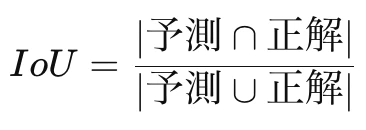
各クラスの Intersection over Union(IoU)を計算し、その平均値である Mean IoU を指標として、セグメンテーション全体の精度を定量的に比較する。
※ IoUの数式イメージ
def compute_iou(pred, target, num_classes, ignore_index=255):
    ious = []
    pred = pred.view(-1)
    target = target.view(-1)

    for cls in range(num_classes):
        if cls == ignore_index:
            continue

        pred_inds = pred == cls
        target_inds = target == cls

        intersection = (pred_inds & target_inds).sum().item()
        union = pred_inds.sum().item() + target_inds.sum().item() - intersection

        if union == 0:
            ious.append(float('nan'))
        else:
            ious.append(intersection / union)

    return np.nanmean(ious)

model.eval()

import random
torch.manual_seed(torch.seed())
np.random.seed()
random.seed()

total_inter = np.zeros(num_classes)
total_union = np.zeros(num_classes)

with torch.no_grad():
    for x, y in val_loader:
        x = x.to(device)
        y = y.to(device)

        pred = model(x).argmax(1)
        for cls in range(num_classes):
            pred_inds = (pred == cls)
            target_inds = (y == cls)
            inter = (pred_inds & target_inds).sum().item()
            union = pred_inds.sum().item() + target_inds.sum().item() - inter
            total_inter[cls] += inter
            total_union[cls] += union

iou_per_class = total_inter / np.maximum(total_union, 1)
print(f"Mean IoU: {np.nanmean(iou_per_class):.4f}")
6. 可視化
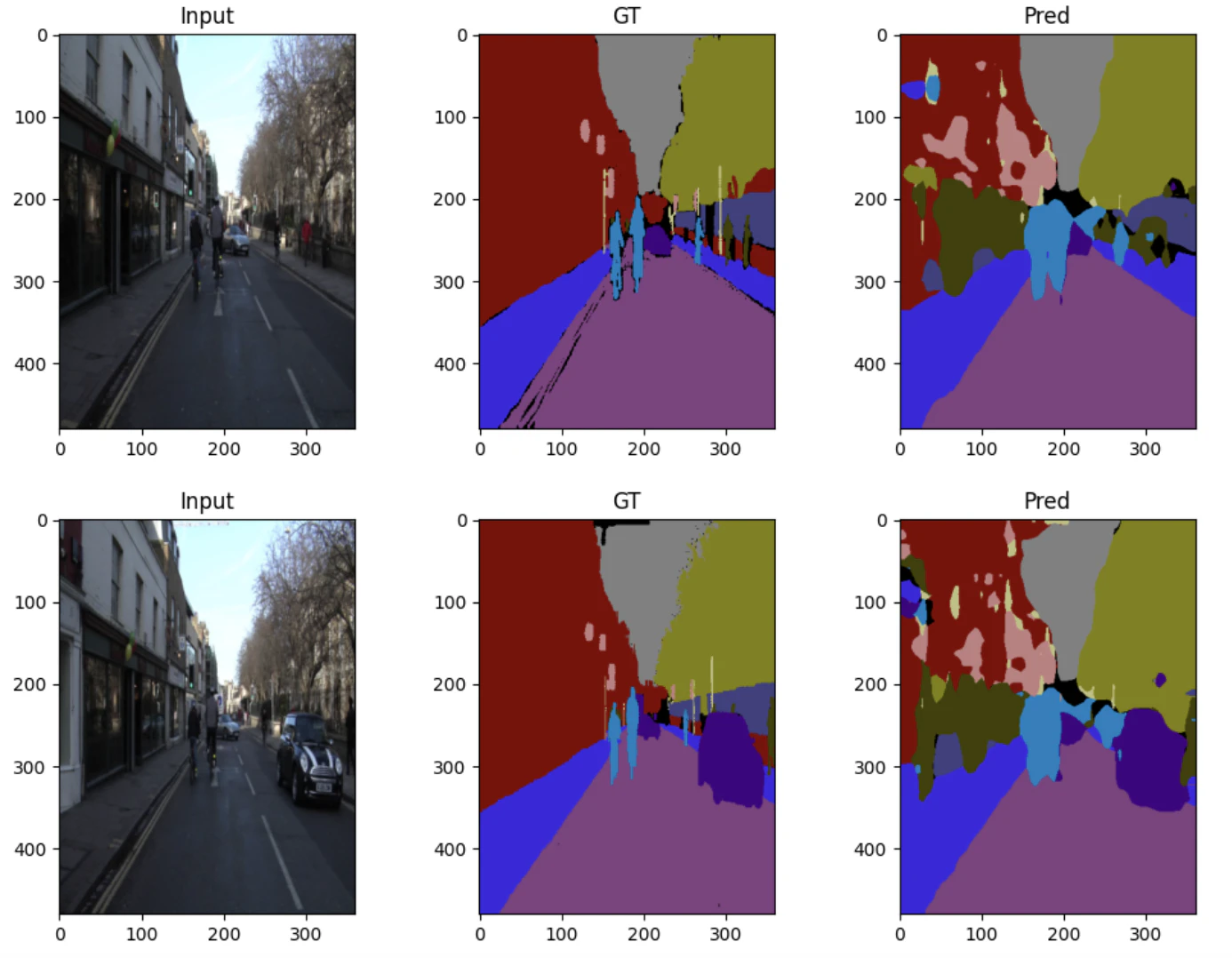
入力画像、正解ラベル、モデル予測結果を並べて可視化する。
定量指標だけでは分かりにくい境界の精度や誤分類傾向を直感的に確認し、モデルの挙動や改善点を把握する。
import matplotlib.pyplot as plt
import numpy as np

def decode_segmap(segmentation, color_map):
    h, w = segmentation.shape
    rgb = np.zeros((h, w, 3), dtype=np.uint8)

    rgb[segmentation == 255] = (0, 0, 0)

    for cls_id, color in color_map.items():
        rgb[segmentation == cls_id] = color

    return rgb

CAMVID_COLORS = {
    0: (128,128,128),  # Sky(空)
    1: (128,0,0),      # Building(建物)
    2: (192,192,128),  # Pole(ポール・標識柱)
    3: (128,64,128),   # Road(道路)
    4: (60,40,222),    # Pavement(歩道)
    5: (128,128,0),    # Tree(木・植生)
    6: (192,128,128),  # SignSymbol(標識・看板)
    7: (64,64,128),    # Fence(フェンス)
    8: (64,0,128),     # Car(車)
    9: (64,64,0),      # Pedestrian(歩行者)
    10: (0,128,192),   # Bicyclist(自転車)
    11: (0,0,0)        # Unlabelled / Void(未ラベル領域)
}

model.eval()

for i, (x, y) in enumerate(val_loader_vis):
    if i >= 3:  # 3枚だけ表示
        break

    x = x.to(device)
    with torch.no_grad():
        pred = model(x).argmax(1).cpu().numpy()[0]

    img = x.cpu().numpy()[0].transpose(1, 2, 0)
    gt = y.numpy()[0]

    plt.figure(figsize=(12,4))

    plt.subplot(1,3,1)
    plt.imshow(img)
    plt.title("Input")

    plt.subplot(1,3,2)
    plt.imshow(decode_segmap(gt, CAMVID_COLORS))
    plt.title("GT")

    plt.subplot(1,3,3)
    plt.imshow(decode_segmap(pred, CAMVID_COLORS))
    plt.title("Pred")

    plt.show()
※可視化画像(抜粋)
最後に
本コードでは CamVid データセットを用いて FCN-8s によるセマンティックセグメンテーションを実装しました。
VGG16 を Encoder とし、pool3・pool4・pool5 の特徴マップを skip connection により融合することで、高レベルな意味情報と低レベルな空間情報を両立させています。
またクラス不均衡に対してはクラス頻度の逆数を用いた重み付き CrossEntropyLoss を採用し、
評価指標として Mean IoU を用いています。
FCN-8sを選択した理由としては、FCN-8sは、最終層の粗い特徴マップだけで予測を行うFCN-32sやFCN-16sに比べて、浅い層からのスキップ接続を活用することで高解像度な空間情報を保持できる点が特徴です。これにより、物体の輪郭や境界付近の予測精度が向上し、道路や歩行者、自転車などの細かい構造を含むクラスに対してより正確なセグメンテーションが可能となり、本タスクではピクセル単位での位置精度が重要であるため、精度と実装の複雑さのバランスが良いFCN-8sを採用しました。
参考文献、リンク
- ゼロからつくるPython機械学習プログラミング入門
-
詳解ディープラーニング第2版
※ 詳解とありますが、入門的な内容から丁寧に解説してあります。 -
YouTubeチャンネル - 予備校のノリで学ぶ「大学の数学・物理」
※ 数学的知識の学習としては、世界一わかりやすかったです。