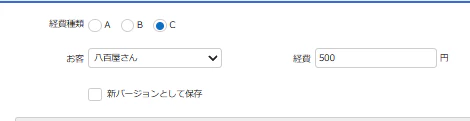
基本環境
Pleasanter 1.5.2.0
やりたいこと

Aテーブルで経費種類をA,B,Cから選択し、ルックアップでお客を選択すると、Bマスターテーブルでそれぞれのお客に登録された経費A、経費B、経費Cを転記する

Aテーブルにルックアップ登録
テーブルの管理>エディタ>お客(ClassA)
[
    {
        "SiteId": BマスターテーブルのサイトID,
        "SearchFormat": "[Title] - 経費A:[NumA] - 経費B:[NumB] - 経費C:[NumC]",
        "View": {
            "ColumnSorterHash": {
                "Name": "asc"
            }
        },
        "Lookups": [
           {
                "From": "Title",
                "To": "ClassA"
            },
            {
                "From": "NumA",
                "To": "NumA"
            },
            {
                "From": "ResultID", //あるいはIssueID
                "To": "NumB"
            }
        ],
    }
]
「ドロップダウンリスト」を選択
検索機能を使うに「✓」
新規入力>「お客」ドロップダウンリストをクリックすると、
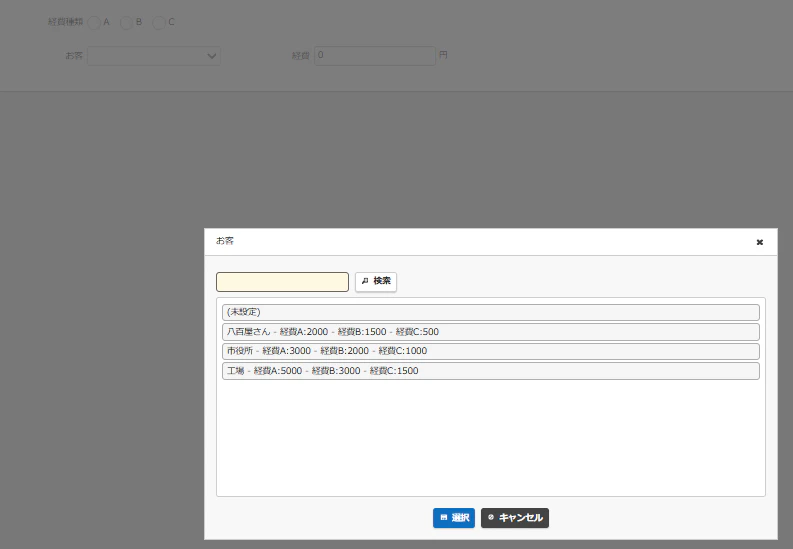
「経費A」→「経費」
「レコードID」→「お客ID」
へ転記される

「経費種類」でスイッチング
「経費種類」Aを選択し「お客」八百屋さんを選択した場合、「経費」に2000円
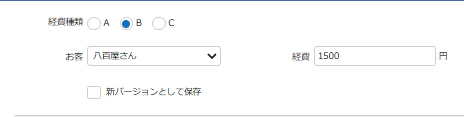
「経費種類」Bを選択し「お客」八百屋さんを選択した場合、「経費」に1500円
「経費種類」Cを選択し「お客」八百屋さんを選択した場合、「経費」に500円
とスイッチングするコードをサーバースクリプトへ記載
Aテーブルのサーバースクリプト
const linkId = model.NumB; //マスターテーブルのレコードIDを取得
const selected = model.ClassA; // 経費種類の値を取得

// 経費の種類で転記元を切り替え
const results = items.Get(linkId);
if (selected === 'A') {
    assembleFee = results[0].NumA;
} else if (selected === 'B') {
    assembleFee = results[0].NumB;
} else if (selected === 'C') {
    assembleFee = results[0].NumC;
}

model.NumA = assembleFee; // 「経費」へ値を入力
「条件」:更新前
結果
経費種類A

経費種類B
経費種類C