
この記事は グラフィックス全般 Advent Calendar 2025 5日目の記事です。
作者は個人でElectron&Webなお絵かきアプリを制作中です(9年目)
今回の記事のソースコードはGitHubで公開しています。
背景
個人でお絵かきウェブアプリを作成しています。
グラデーション機能を実装することになりまして、1頂点に複数の色を登録して重みづけで合成する処理が必要になりました。
色の合成の方法にも色々ありますが、今回の場合、合成する順番によって結果が変わらないほうがよいため、乗算済みアルファによるアルファブレンドを使うことにしました。他にもOKLChも最近流行りなので、それも試してみたので、ご紹介します。
ストレートアルファ(順序依存)
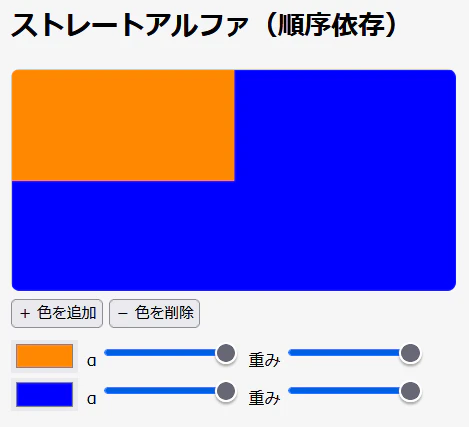
比較のために、まずはストレートアルファ(=いわゆる無印のアルファブレンディング)の合成の例です。
ストレートアルファのの場合、先に描いた色の上に後の色を乗せる感じの処理なので、合成順序依存になります。そのため、下の例では重みもアルファも1なので、完全に二色目の色になっています。
class Color {
  constructor(public r: number, public g: number, public b: number, public a = 1.0) {}
}

// ストレートアルファ合成
function blendColors_StraightAlpha(colors: Color[], weights: number[]): Color {
  let rSum = 0,
    gSum = 0,
    bSum = 0,
    aSum = 0;
  for (let i = 0; i < colors.length; i++) {
    const { r, g, b, a } = colors[i];
    const w = weights[i];
    const alpha = a * w
    rSum = rSum * (1 - alpha) + r * alpha;
    gSum = gSum * (1 - alpha) + g * alpha;
    bSum = bSum * (1 - alpha) + b * alpha;
    aSum = aSum * (1 - alpha) + a * alpha;
  }
  return new Color(rSum, gSum, bSum, aSum);
}
乗算済みアルファ
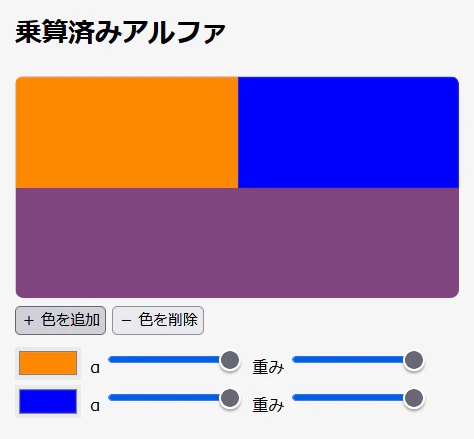
次に乗算済みアルファの場合、計算が順序非依存なので、一色目の色と二色目の色が平等に出ています。
RGBを単純に加重平均するので、RGBの値の組み合わせによっては合成結果が感覚的にイメージしづらい場合があります。下の例だと、合成前より彩度と明度が下がった感じになっています。
一方で計算は単純なので、色のチャンネルごとの値はイメージしやすいという面もあります。
// 乗算済みアルファ合成
function blendColors_PreMultipliedAlpha(colors: Color[], weights: number[]): Color {
  let wSum = 0,
    rSum = 0,
    gSum = 0,
    bSum = 0,
    aSum = 0;
  for (let i = 0; i < colors.length; i++) {
    const { r, g, b, a } = colors[i];
    const w = weights[i];
    wSum += w;
    rSum += w * r * a;
    gSum += w * g * a;
    bSum += w * b * a;
    aSum += w * a;
  }
  if (wSum === 0) {
    return new Color(0, 0, 0, 0);
  }
  if (wSum < 1.0) {
    wSum = 1.0; // ウェイトが1未満の場合、残り分の透明色が存在するとみなして補正する
  }
  let A = aSum / wSum;
  if (A === 0) {
    return new Color(0, 0, 0, 0);
  }
  return new Color(rSum / (wSum * A), gSum / (wSum * A), bSum / (wSum * A), A);
}
OKLCh
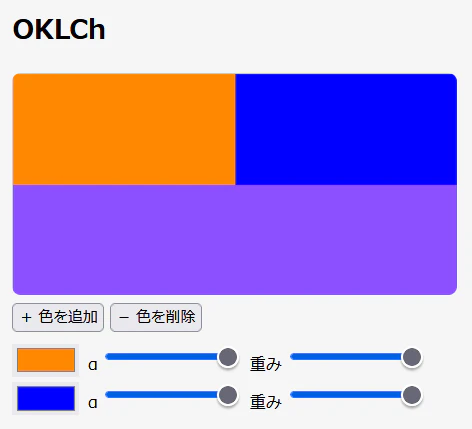
最後にOKLChです。明度Lと彩度Cは加重平均で計算し、色相hはその角度を二次元ベクトルとして考え、ベクトルの加重平均をしてから角度を再計算します。これも順序非依存になります。
乗算済みアルファと比べると明度や彩度が保たれた結果が得られています。
// OKLCh色空間での色合成
function blendColors_OKLch(colors: Color[], weights: number[]): Color {
  let wSum = 0,
    lSum = 0,
    cSum = 0,
    aSum = 0;
  const hVec = { x: 0, y: 0 };
  for (let i = 0; i < colors.length; i++) {
    const { r, g, b, a } = colors[i];
    const w = weights[i];
    const [ l, c, h ] = chroma.rgb(r * 255, g * 255, b * 255).oklch();
    wSum += w;
    lSum += w * l * a;
    cSum += w * c * a;
    aSum += w * a;
    if (!isNaN(h)) {
      hVec.x += w * c * Math.cos(h / 180 * Math.PI) * a;
      hVec.y += w * c * Math.sin(h / 180 * Math.PI) * a;
    }
  }
  if (wSum === 0) {
    return new Color(0, 0, 0, 0);
  }
  if (wSum < 1.0) {
    wSum = 1.0; // ウェイトが1未満の場合、残り分の透明色が存在するとみなして補正する
  }
  let A = aSum / wSum;
  if (A === 0) {
    return new Color(0, 0, 0, 0);
  }
  const L = lSum / (wSum * A);
  const C = cSum / (wSum * A);
  let H = Math.atan2(hVec.y, hVec.x);
  if (H < 0) {
    H += Math.PI * 2;
  }
  const [r, g, b] = chroma.oklch(L, C, H * 180 / Math.PI).rgb();
  return new Color(r / 255, g / 255, b / 255, A);
}
なお、今回の実装ではRGBとの相互変換にchroma.jsを使用しています。
ちなみに、OKLChのOKってなんだ?と思いますが、OKLChの元となったOKLabのOKが「OKな」くらいの意味なんだそうです。
そしてhだけが小文字なのは一説によると数学で角度の変数は小文字で書くのが慣習だからなのだそうな…(AI情報のため真実かは不明)
ライブデモ
See the Pen 順序に依存しない重み付き色合成 by 柏崎ワロタロ (@warotarock) on CodePen.
おわりに
3色以上の色を合成する必要はあまり無いかもしれませんが、いつか誰かのお役に立てれば幸いです。