

はじめに
株式会社ビザスク - VisasQ Inc. Advent Calendar 2025 と slack Advent Calendar 2025 の 22日目 としての投稿です (空いてたので埋めさせていただきました🙏)
対象
- (表題のとおり) Slackにて任意のチャンネルから期間指定で会話エクスポートしたい方
- エンタープライズプランなど、Proプランなどと違い会話エクスポートを行うと"いろいろ"出力されてしまう(らしい)プランを使っているので、任意のチャンネル(BOT を招待したチャンネル)のみで会話の期間を指定してエクスポートしたい方
- 全チャンネルのデータを引き出すのは怖いなぁって方にもオススメ
-
conversations.historychannels:historyの権限をもたせた BOT アカウントの作成ができる方- もしくは既にそのような BOT アカウントをお持ちの方
- プライベートチャンネルでも使いたい場合は
groups:historyも必要
- (標準を除く) 依存関係なしでサクッと使えるコードが欲しい方
-
Node.jsの実行環境がある、用意できる方 - 機能とコードのボリュームのあるサードパーティのツールではなく無理なくコードの内容をチェックしてから使いたい方
step1:以下のコードを保存
例: slack_exporter.js
const fs = require('fs');
const path = require('path');

class SlackMessageExporter {
  constructor() {
    this.token = process.env.SLACK_BOT_TOKEN || process.env.SLACK_TOKEN;
    if (!this.token) {
      throw new Error('Slack token not found. Please set SLACK_BOT_TOKEN or SLACK_TOKEN environment variable.');
    }
  }

  /**
   * 日付文字列(yyyy-mm-dd)をUNIXタイムスタンプに変換
   * @param {string} dateString - yyyy-mm-dd形式の日付文字列
   * @returns {number} UNIXタイムスタンプ
   */
  dateToTimestamp(dateString) {
    const date = new Date(dateString + 'T00:00:00.000Z');
    return Math.floor(date.getTime() / 1000);
  }

  /**
   * Slack APIを呼び出してメッセージを取得
   * @param {string} channelId - チャンネルID
   * @param {number} oldest - 開始時間のUNIXタイムスタンプ
   * @param {number} latest - 終了時間のUNIXタイムスタンプ
   * @param {string} cursor - ページネーション用のカーソル
   * @returns {Promise<Object>} APIレスポンス
   */
  async fetchMessages(channelId, oldest, latest, cursor = null) {
    const baseUrl = 'https://slack.com/api/conversations.history';
    const params = new URLSearchParams({
      channel: channelId,
      oldest: oldest.toString(),
      latest: latest.toString(),
      // 対象のチャンネルの投稿数が1000を越えていても後述のコードにより全件取得できるよう対策済
      limit: '1000',
      inclusive: 'true'
    });

    if (cursor) {
      params.append('cursor', cursor);
    }

    const url = `${baseUrl}?${params}`;

    const response = await fetch(url, {
      method: 'GET',
      headers: {
        'Authorization': `Bearer ${this.token}`,
        'Content-Type': 'application/x-www-form-urlencoded'
      }
    });

    if (!response.ok) {
      throw new Error(`HTTP error! status: ${response.status}`);
    }

    const data = await response.json();

    if (!data.ok) {
      throw new Error(`Slack API error: ${data.error}`);
    }

    return data;
  }

  /**
   * 全メッセージを取得(ページネーション対応)
   * @param {string} channelId - チャンネルID
   * @param {string} startDate - 開始日(yyyy-mm-dd)
   * @param {string} endDate - 終了日(yyyy-mm-dd)
   * @returns {Promise<Array>} 全メッセージの配列
   */
  async getAllMessages(channelId, startDate, endDate) {
    const oldest = this.dateToTimestamp(startDate);
    const latest = this.dateToTimestamp(endDate) + 86400; // 終了日の23:59:59まで含める

    let allMessages = [];
    let cursor = null;
    let hasMore = true;

    console.log(`Fetching messages from ${startDate} to ${endDate}...`);

    while (hasMore) {
      try {
        const response = await this.fetchMessages(channelId, oldest, latest, cursor);

        allMessages = allMessages.concat(response.messages || []);

        if (response.has_more && response.response_metadata?.next_cursor) {
          cursor = response.response_metadata.next_cursor;
          console.log(`Fetched ${allMessages.length} messages so far...`);
        } else {
          hasMore = false;
        }

        // API rate limit対策で少し待機
        await new Promise(resolve => setTimeout(resolve, 1000));

      } catch (error) {
        console.error('Error fetching messages:', error.message);
        throw error;
      }
    }

    return allMessages.reverse(); // 時系列順にソート
  }

  /**
   * メッセージをJSONファイルに保存
   * @param {Array} messages - メッセージ配列
   * @param {string} channelId - チャンネルID
   * @param {string} startDate - 開始日
   * @param {string} endDate - 終了日
   * @returns {string} 保存されたファイルパス
   */
  saveToJson(messages, channelId, startDate, endDate) {
    const timestamp = new Date().toISOString().replace(/[:.]/g, '-');
    const filename = `slack-messages-${channelId}-${startDate}_to_${endDate}-${timestamp}.json`;

    const outputData = {
      metadata: {
        channel_id: channelId,
        start_date: startDate,
        end_date: endDate,
        total_messages: messages.length,
        exported_at: new Date().toISOString()
      },
      messages: messages
    };

    try {
      fs.writeFileSync(filename, JSON.stringify(outputData, null, 2), 'utf8');
      console.log(`Messages saved to: ${path.resolve(filename)}`);
      return filename;
    } catch (error) {
      console.error('Error saving file:', error.message);
      throw error;
    }
  }

  /**
   * メイン実行関数
   * @param {string} channelId - チャンネルID
   * @param {string} startDate - 開始日(yyyy-mm-dd)
   * @param {string} endDate - 終了日(yyyy-mm-dd)
   */
  async exportMessages(channelId, startDate, endDate) {
    try {
      console.log('Starting Slack message export...');
      console.log(`Channel ID: ${channelId}`);
      console.log(`Date range: ${startDate} to ${endDate}`);

      const messages = await this.getAllMessages(channelId, startDate, endDate);

      if (messages.length === 0) {
        console.log('No messages found in the specified date range.');
        return;
      }

      const filename = this.saveToJson(messages, channelId, startDate, endDate);

      console.log(`✅ Export completed successfully!`);
      console.log(`📁 File: ${filename}`);
      console.log(`📊 Total messages: ${messages.length}`);

    } catch (error) {
      console.error('❌ Export failed:', error.message);
      process.exit(1);
    }
  }
}

// 使用例
async function main() {
  // 設定値(実際の値に変更してください)
  const channelId = 'C1234567890';  // チャンネルID
  const startDate = '2024-01-01';   // 開始日
  const endDate = '2024-01-31';     // 終了日

  const exporter = new SlackMessageExporter();
  await exporter.exportMessages(channelId, startDate, endDate);
}

// コマンドライン引数から値を取得する場合
if (require.main === module) {
  const args = process.argv.slice(2);

  if (args.length !== 3) {
    console.log('Usage: node slack_exporter.js <channelId> <startDate> <endDate>');
    console.log('Example: node slack_exporter.js C1234567890 2024-01-01 2024-01-31');
    process.exit(1);
  }

  const [channelId, startDate, endDate] = args;

  const exporter = new SlackMessageExporter();
  exporter.exportMessages(channelId, startDate, endDate);
}

module.exports = SlackMessageExporter;
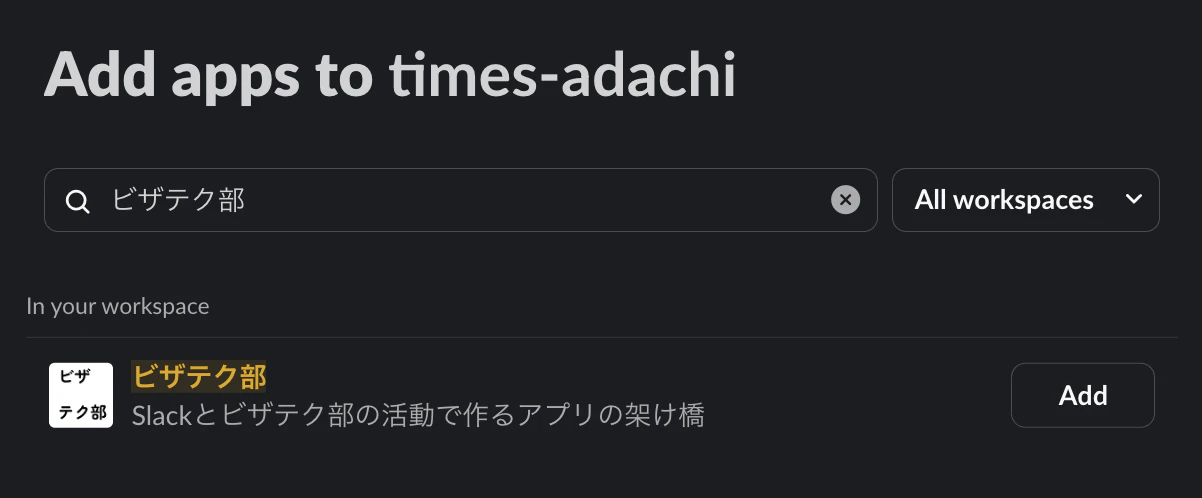
step2:SlackBOTを対象のチャンネルへ招待
例1: チャンネル: #times-adachi
例2: BOT名: ビザテク部 (名前はご自由に設定ください(コードの動作に影響なし))

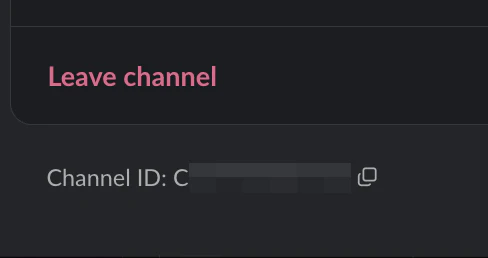
※TIPS: ↑のモーダルのAboutタブの下部でチャンネルIDをコピーできます👍️
step3:SlackAPIToken,チャンネルID,開始期間,終了期間を指定し会話エクスポート
フォーマット
[~]> SLACK_TOKEN="<slackAPIToken>" node slack_exporter.js <channelId> <startDate> <endDate>
利用例
[~]> SLACK_TOKEN="<slackAPIToken>" node slack_exporter.js C0123456789 2022-05-18 2025-12-04
Starting Slack message export...
Channel ID: C0123456789
Date range: 2022-05-18 to 2025-12-04
Fetching messages from 2022-05-18 to 2025-12-04...
Fetched 1000 messages so far...
Messages saved to: ~/slack-messages-C0123456789-2022-05-18_to_2025-12-04-2025-12-31T02-03-14-501Z.json
✅ Export completed successfully!
📁 File: slack-messages-C03FWSESWHZ-2022-05-18_to_2025-12-04-2025-12-31T02-03-14-501Z.json
📊 Total messages: 1490
出力されるファイルの内容
TypeScript の型で表現するとだいたいこんな感じの JSON ファイルが取得されます
// Slack Export JSON Structure Types

export interface SlackExportData {
  metadata: ExportMetadata;
  messages: SlackMessage[];
}

export interface ExportMetadata {
  channel_id: string;
  start_date: string; // yyyy-mm-dd format
  end_date: string;   // yyyy-mm-dd format
  total_messages: number;
  exported_at: string; // ISO datetime string
}

export interface SlackMessage {
  type: string; // typically "message"
  ts: string;   // timestamp
  user?: string; // user ID

  // Message content
  text?: string;
  client_msg_id?: string;
  team?: string;

  // Message variations
  subtype?: string; // e.g., "channel_join", "channel_purpose", "thread_broadcast"
  purpose?: string; // for channel_purpose subtype

  // Edit information
  edited?: {
    user: string;
    ts: string;
  };

  // Thread information
  thread_ts?: string;
  reply_count?: number;
  reply_users_count?: number;
  latest_reply?: string;
  reply_users?: string[];
  is_locked?: boolean;
  subscribed?: boolean;

  // Pin information
  pinned_to?: string[];
  pinned_info?: {
    channel: string;
    pinned_by: string;
    pinned_ts: number;
  };

  // Reactions
  reactions?: Reaction[];

  // Rich content
  attachments?: Attachment[];
  blocks?: Block[];

  // Bot messages
  username?: string;
  bot_id?: string;
  icons?: {
    emoji?: string;
    image_36?: string;
    image_48?: string;
    image_72?: string;
  };
}

export interface Reaction {
  name: string;    // emoji name without colons
  users: string[]; // array of user IDs
  count: number;
}

export interface Attachment {
  id?: number;
  from_url?: string;
  original_url?: string;
  fallback?: string;
  text?: string;
  title?: string;
  title_link?: string;
  service_name?: string;
  service_url?: string;
  service_icon?: string;

  // Images
  image_url?: string;
  image_width?: number;
  image_height?: number;
  image_bytes?: number;

  // Author info
  author_name?: string;
  author_link?: string;
  author_icon?: string;
  author_subname?: string;

  // Footer
  footer?: string;
  footer_icon?: string;

  // Styling
  color?: string;
  indent?: boolean;

  // Timestamps
  ts?: number;

  // For Reacji Channeler or similar
  channel_id?: string;
  author_id?: string;
}

export interface Block {
  type: string;
  block_id?: string;
  elements?: BlockElement[];
}

export interface BlockElement {
  type: string;
  elements?: BlockElement[];
  text?: string;
  style?: string;
  indent?: number;
  border?: number;
  url?: string;
  range?: string;
  user_id?: string;
  channel_id?: string;
  name?: string; // for emoji
  unicode?: string;
  skin_tone?: number;
}

// Utility types for common patterns
export type MessageSubtype =
  | 'channel_join'
  | 'channel_purpose'
  | 'thread_broadcast'
  | 'channel_leave'
  | 'channel_topic'
  | 'channel_name'
  | 'channel_archive'
  | 'channel_unarchive';

export type BlockType =
  | 'rich_text'
  | 'rich_text_section'
  | 'rich_text_list'
  | 'rich_text_preformatted'
  | 'rich_text_quote';

export type BlockElementType =
  | 'text'
  | 'emoji'
  | 'user'
  | 'channel'
  | 'link'
  | 'rich_text_section'
  | 'rich_text_list';
さいごに
冒頭の「対象」のとおり、筆者としては強すぎない権限の Token で指定の範囲内で会話データを取得できる軽量なツールがほしかったので作成できて良かったです!(ご参加までに!)
エクスポートデータを LLM で活用させたり、マルコフ連鎖で遊んでみたり実務からホビーまでいろいろできたらなと思います 💪
ここまでご覧くださりありがとうございました!