0
0

Delete article

Deleted articles cannot be recovered.

Draft of this article would be also deleted.

Are you sure you want to delete this article?

【備忘録】AWS Academy Learner Lab でAWS CLIの認証を通す

Posted at

はじめに

Learner LabECRに自作イメージをpushしたいが、AWS CLIを使うためのIAMユーザーが作成出来ない時の対処法です。

認証手順

image.png

  • ①起動メニュー右上にあるAWS Detailsをクリックする。

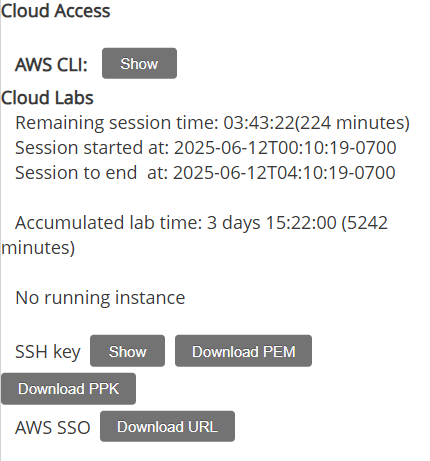
image.png

  • AWS CLI右横にあるShowボタンをクリックする。
  • 以下の文字列が3種類記載されている
    • aws_access_key_id
    • aws_secret_access_key
    • aws_session_token
  • ③認証情報を以下のコマンドで設定する
    user/.aws/credintialsに登録されている
aws configure
aws configure set aws_session_token 発行されたセッショントークン
  • ④認証が正しく通ったか確認する
aws sts get-caller-identity

ユーザーID等が含まれたJSONが返ってきたら正しく認証出来ている

0
0
0

Register as a new user and use Qiita more conveniently

  1. You get articles that match your needs
  2. You can efficiently read back useful information
  3. You can use dark theme
What you can do with signing up
0
0

Delete article

Deleted articles cannot be recovered.

Draft of this article would be also deleted.

Are you sure you want to delete this article?