0
0

Delete article

Deleted articles cannot be recovered.

Draft of this article would be also deleted.

Are you sure you want to delete this article?

More than 3 years have passed since last update.

Windows10でリモートデスクトップ接続先の音が鳴らないように

0
Last updated at Posted at 2023-03-27

要件

  1. パソコンA ⇒ パソコンB へリモートデスクトップして使っている。
  2. パソコンBの音(キー操作とかのピロンピロン音)がパソコンA側で鳴ってうるさいので、パソコンBのリモートオーディオの音量を0%にしてる。
    (パソコンBの音は一切鳴らなくてよい)
  3. リモートデスクトップ終了 ⇒ 再度リモートデスクトップ をするとパソコンBのリモートオーディオの音量が100%にリセットされる。
  4. リモートデスクトップするたび、 毎回 パソコンBのリモートオーディオの音量調整するの面倒くさい。

対応

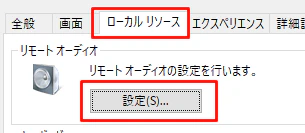
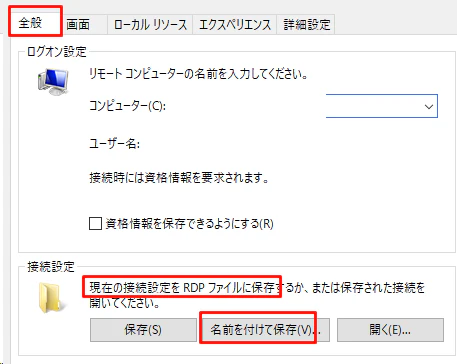
『リモートデスクトップショートカット(rdpファイル)』作ればいい。
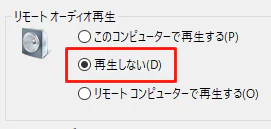
そこに『接続先の音が鳴らないように』という設定を仕込んでおく。
リモートデスクトップする時はrdpファイルを開く。
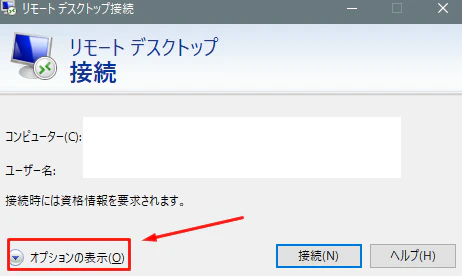
image.png
image.png
image.png
image.png

参考サイトさん

バージョン

Windows 10 Pro 22H2 OSビルド 19045.2788

0
0
0

Register as a new user and use Qiita more conveniently

  1. You get articles that match your needs
  2. You can efficiently read back useful information
  3. You can use dark theme
What you can do with signing up
0
0

Delete article

Deleted articles cannot be recovered.

Draft of this article would be also deleted.

Are you sure you want to delete this article?