1
2

Delete article

Deleted articles cannot be recovered.

Draft of this article would be also deleted.

Are you sure you want to delete this article?

More than 5 years have passed since last update.

初めのWPFアプリケーション

1
Last updated at Posted at 2018-04-18

Sales(売上管理)プロジェクトを作成する手順:

  • スタートメニューからVisual Studio 2012 を開いて、「新しプロジェクト…」ボタンをクリックします。
    スケッチ.png
  • 下記の画像の通り選択します。名前のボックスにSalesを入力します。最後にOKボタンをクリックすると、Salesプロジェクトの作成が完了となります。

*参照: WPFアプリケーションとは: WPSのアプリケーションのウィンドウのことを「WPSウィンドウ」と呼びます。ここで説明したように、Visual Studio 2012 ではツールボックスからコントロールをWPSウィンドウのデザイン編集画面に配置して、WPSウィンドウの画面デザインを視覚的に行うことができます。
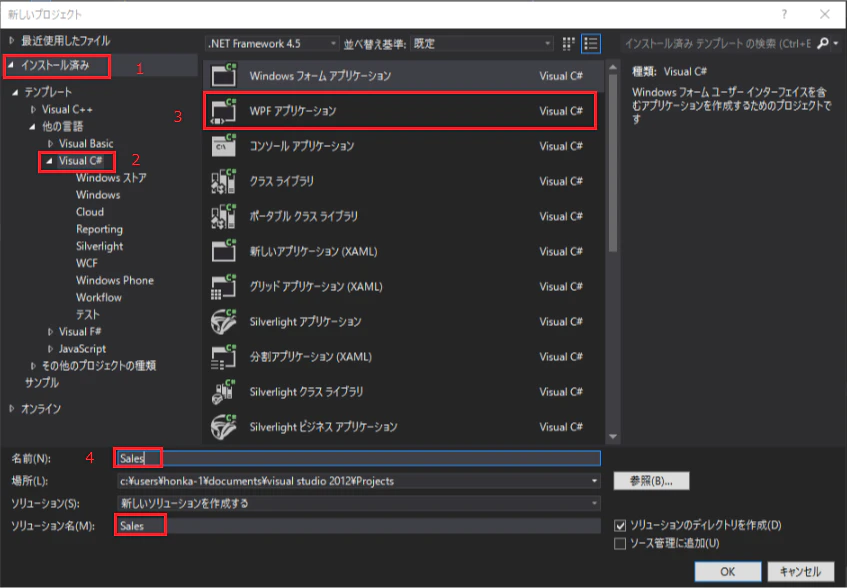
スケッチ (1).png

1
2
0

Register as a new user and use Qiita more conveniently

  1. You get articles that match your needs
  2. You can efficiently read back useful information
  3. You can use dark theme
What you can do with signing up
1
2

Delete article

Deleted articles cannot be recovered.

Draft of this article would be also deleted.

Are you sure you want to delete this article?