
前の記事: CSSファイルってどうやって作るの?style.css をつないでトップページ風にするまで
前回は、CSSを自分で書いてトップページのような見た目を作りました。
今回は、自分でCSSを細かく書かずに、Bootstrapが用意しているclassで見た目を整えます。
Bootstrapとは
Bootstrapは、あらかじめ用意されたデザイン(CSS)を使って、見た目を整えられる仕組みです。
- ボタン
- カード
- レイアウト
などが、classを付けるだけで使えます。
Bootstrapを使う前と後
同じHTMLでも、Bootstrapを読み込んでclassを付けると見た目が変わります。
左はBootstrapなし、右はBootstrapありです。
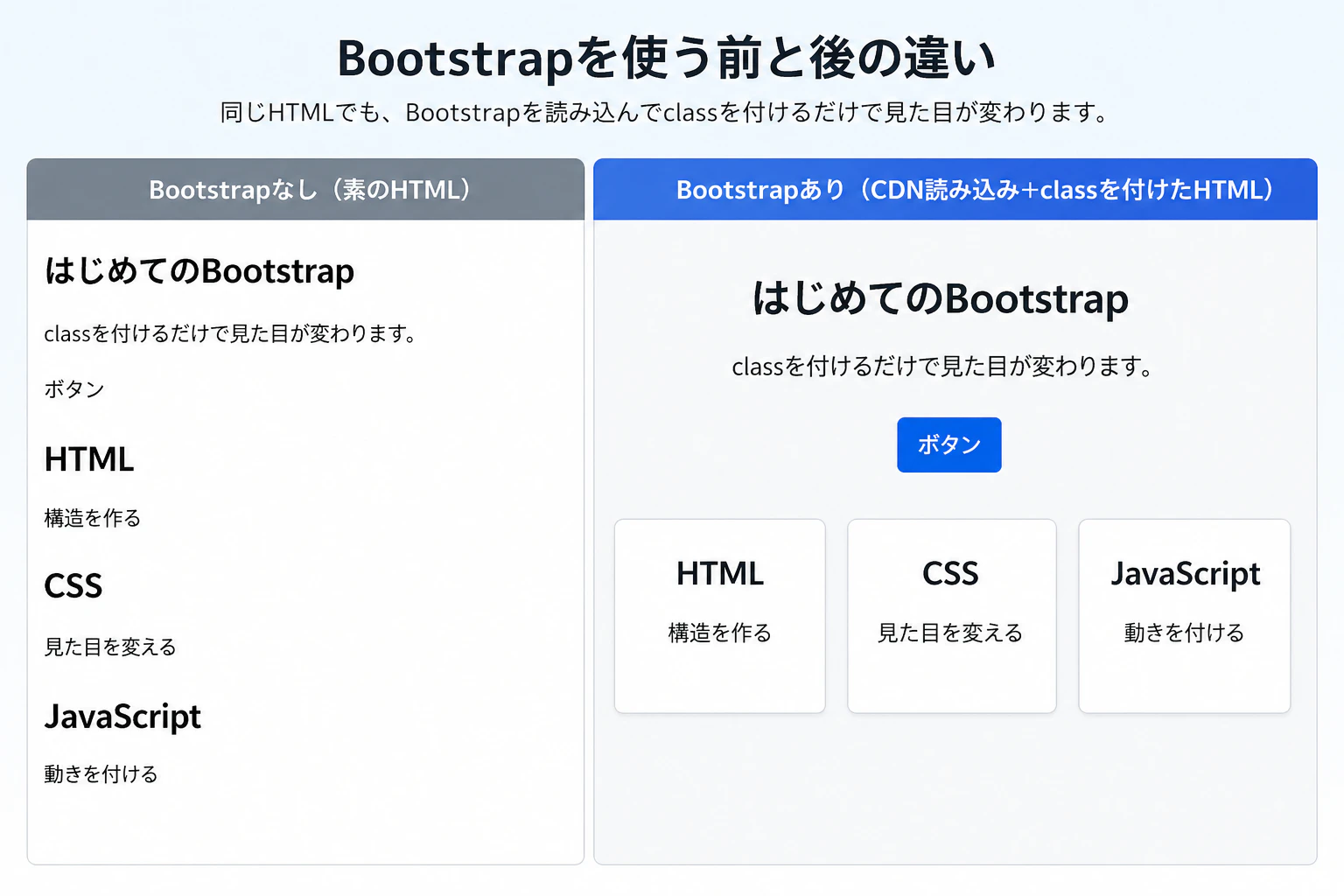
自分でCSSを書いていなくても、Bootstrapが用意しているCSSによって、余白・中央寄せ・ボタン・カードの見た目が整います。
一番簡単な使い方(CDN)
まずはHTMLに1行追加します。
<link href="https://cdn.jsdelivr.net/npm/bootstrap@5.3.3/dist/css/bootstrap.min.css" rel="stylesheet">
これでBootstrapが使える状態になります。
HTMLを書き換える
前回のHTMLを、次のように書き換えます。
<!DOCTYPE html>
<html lang="ja">
<head>
    <meta charset="UTF-8">
    <title>Bootstrapテスト</title>
    <link href="https://cdn.jsdelivr.net/npm/bootstrap@5.3.3/dist/css/bootstrap.min.css" rel="stylesheet">
</head>
<body class="bg-light">

<div class="container text-center mt-5">

    <h1 class="mb-3">はじめてのBootstrap</h1>
    <p class="mb-4">classを付けるだけで見た目が変わります。</p>

    <a class="btn btn-primary">ボタン</a>

    <div class="row mt-5">
        <div class="col-md-4">
            <div class="card p-3">
                <h2>HTML</h2>
                <p>構造を作る</p>
            </div>
        </div>

        <div class="col-md-4">
            <div class="card p-3">
                <h2>CSS</h2>
                <p>見た目を変える</p>
            </div>
        </div>

        <div class="col-md-4">
            <div class="card p-3">
                <h2>JavaScript</h2>
                <p>動きを付ける</p>
            </div>
        </div>
    </div>

</div>

</body>
</html>
ブラウザで確認する
index.html を開いて、次のように見えればOKです。
- ボタンが青く表示される
- 全体が中央に寄る
- カードが横に並ぶ
- 余白が整っている
ここまでできれば、Bootstrapが効いています。
何が起きているか
| class | 役割 |
|---|---|
container |
横幅と中央寄せ |
text-center |
中央揃え |
mt-5 |
上に余白 |
btn btn-primary |
ボタンの見た目 |
row |
横並びの土台 |
col-md-4 |
3分割 |
card |
カードの見た目 |
CSSとの違い
前回は style.css に色や余白を書いて見た目を作りました。
今回は、
- CSSを書かずに
- classを付けるだけで
- 同じような見た目に近づける
という違いがあります。
その分、細かく自由に作るのはCSSの方が向いています。
ダウンロードして使う方法
インターネットに接続できない環境では、ファイルをダウンロードして使うこともできます。
公式サイト
https://getbootstrap.com/
ダウンロードページ
https://getbootstrap.com/docs/5.3/getting-started/download/
ダウンロードした中の bootstrap.min.css を使います。
<link rel="stylesheet" href="bootstrap.min.css">
まとめ
- Bootstrapはclassを付けるだけで見た目が変わる
- CSSを書かなくてもページを整えられる
- 細かく調整する場合はCSSと組み合わせる
まずはCDNで動かして、どこまでclassでできるかを試してみると分かりやすいです。