
Introduction
Fellow developers, have you ever found yourself thinking "I keep sending the same prompts to AI over and over again" during your daily coding work? I was in the same boat. Especially when using Claude Code, I frequently encountered situations where I wanted to execute multiple prompts sequentially, but manually executing them one by one was incredibly inefficient. That's how "Prompt Scheduler" was born.
This tool is a modern TypeScript-based prompt automation scheduler for AI agents with intelligent usage limit detection. Currently supporting Claude Code with plans for additional AI agent integrations in the future, it offers easy one-liner installation and provides a powerful automation environment through tmux integration.
In this article, as the actual developer of this tool, I'll share in detail how this tool has revolutionized my coding workflow. From the development background to real-world usage examples and the benefits achieved, I'll provide a comprehensive overview.
Disclaimer
The Prompt Scheduler introduced in this article is an open-source tool that I personally developed. I want to clearly state that this is an independent personal development project with no connection whatsoever to Anthropic's Claude or Claude Code. Additionally, I cannot take responsibility for any issues that may arise from using this tool, so please use it at your own risk.
Background Leading to Development
I started using Claude Code because I was attracted to its excellent code generation capabilities. However, as I used it daily, I faced one major challenge. There were frequent situations where I wanted to execute multiple related prompts sequentially, but I could only execute them manually one by one.
For example, when implementing a feature, I would follow the same workflow every time: "first create the basic structure, then add error handling, write tests, and finally update documentation." Each of these steps was optimally executed with intervals of 15 to 30 minutes between them, as I needed to consider Claude Code's usage limits.
Managing these manually was, frankly, extremely cumbersome. Setting timers, executing the next prompt when time was up, waiting again - this repetitive cycle. This disrupted my concentration and prevented me from focusing on the actual coding work.
Prompt Scheduler as the Solution
That's when I developed Prompt Scheduler. This tool automatically executes pre-configured prompts at specified intervals and features automatic detection of Claude Code usage limits with appropriate waiting functionality.
I chose TypeScript as the development language. I wanted to prioritize type safety and design for future feature expansions. For the runtime environment, I adopted Node.js and tsx, allowing developers to directly execute TypeScript files. This enables quick tool usage by skipping the compilation process.
The core functionality of the tool lies in its integration with tmux sessions. Since Claude Code operates in a terminal environment, I automated prompt sending programmatically using tmux commands like send-keys and load-buffer. This design allows users to use Claude Code normally while the scheduler operates in the background.
Technical Implementation Details
The technical core of Prompt Scheduler consists of several important components.
First, the configuration management system. Prompt configurations are managed in JSONL (JSON Lines) format. Each line represents one prompt configuration, containing information such as prompt text, target tmux session, execution status, execution timestamp, and wait time. I chose this format because it's easy to edit line by line and maintains good visibility when managing large numbers of prompts.
Next, the usage limit detection system. This is one of the features I put particular effort into developing. It detects messages like "Approaching usage limit · resets at 10pm" or "Claude usage limit reached. Your limit will reset at 1pm" displayed by Claude Code using regular expressions, parses the reset time, and calculates appropriate wait times using the dayjs library. This functionality automatically waits when usage limits are reached and resumes execution the moment limits are reset.

For the command-line interface, I implemented a colorful and highly visible UI using the chalk library. Execution status, errors, success messages, etc., are displayed in different colors, making it easy to understand the tool's state at a glance. The progress display feature also clearly shows which prompt is currently executing and what's scheduled next.
Time control functionality is also an important element. I implemented features to stop execution at specific times and to continue execution for only a specified duration. This enables usage patterns like starting execution before bedtime and automatically stopping at wake-up time.
Real-World Usage Examples and Workflow
Let me introduce how Prompt Scheduler is utilized using my actual workflow as an example.
One day, I was working on a project to create over 70 TradingView PineScript indicators. Creating each indicator required a series of processes: implementing the basic structure, adjusting parameters, adding error handling, and creating documentation. Managing these processes manually was not realistic.
This is where Prompt Scheduler came in. First, I configured 70 prompts in the prompts.jsonl file. Each prompt was specified with a title in the format "title: [Indicator Name]" and set with a 15-minute wait time. This was the optimal interval considering Claude Code's usage limits.
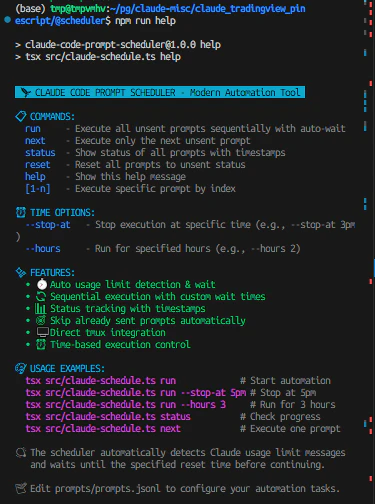
Execution is extremely simple. Just typing "npm run run" in the terminal starts the scheduler. The first prompt executes, waits 15 minutes, then the next prompt executes - this flow continues automatically. When usage limits are reached, it automatically detects them, waits until the reset time, and then resumes execution.
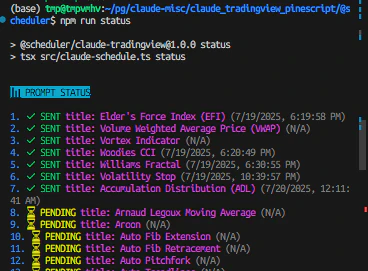
This automation allowed me to focus on other work. I no longer needed to worry about prompt execution timing, and productivity improved dramatically. Creating 70 indicators, which would have taken several weeks with manual management, was completed in just a few days.
Achieved Effects and Productivity Improvements
Since introducing Prompt Scheduler, my coding workflow has changed dramatically. This tool currently supports Claude Code but is planned to support other AI agents in the future. The biggest change has been the continuity of concentration. Previously, I frequently interrupted work to manage prompt execution timing, but now I can work continuously for long periods with just one-time setup.
Quantitative effects are also remarkable. Previously, I could process about 5-8 prompts per day, but now I can handle 20-30 prompts. This isn't just an increase in numbers; the quality of each prompt has also improved. With time constraints removed, I can now create prompts more carefully.
Additionally, automated error handling is a major benefit. With usage limit detection and automatic waiting, I can safely run the tool during nights and weekends. The experience of waking up to find all prompts set the previous night completed is extremely satisfying.
Time control features are also practical. I can flexibly respond to requirements like "I want to run for only 3 hours today" or "I want to complete by 5 PM." This allows me to properly manage the boundary between work and personal life.
Community and Future Prospects
Prompt Scheduler is published on GitHub as an MIT-licensed open-source project. The repository has issue templates and pull request templates in place, welcoming contributions from the community.
While development initially aimed at solving personal challenges, I've realized that many developers face similar problems. GitHub Discussions feature active discussions about various usage examples and customization methods.
Future prospects include support for other AI platforms. Currently supporting Claude Code, I aim to generalize the architecture to make it usable with a wider range of AI agents.
I'm also planning to add prompt template functionality. I want to template commonly used prompt patterns so new users can start using it immediately.
Performance and Optimization
In actual operation, performance optimization was also an important factor. The initial version had slight delays in tmux command execution, but through proper use of execSync and improved error handling, I significantly enhanced responsiveness.
Memory usage is also considered. Even when processing large numbers of prompts, I optimized object creation and destruction to ensure garbage collection works properly after each prompt execution.
For file I/O optimization, I streamlined JSONL file reading and writing. I adjusted the frequency of status updates to manage state with minimal necessary file access.
Security and Configuration Management
In development, I paid sufficient attention to security as well. Since prompt configuration files may contain personal information, I added the prompts.jsonl file to .gitignore and instead provide a prompts.jsonl.sample file. This allows users to keep their configurations private while referencing sample configurations to create their own.
Tmux session path information is also treated as confidential. In configuration file samples, I use "/path/to/your/claude/session" as a placeholder to prevent actual path information from being unintentionally disclosed.
Troubleshooting and Learning
During the development process, I faced many technical challenges. Particularly in tmux integration, handling special characters in session names and adjusting key transmission timing required trial and error.
Improving the accuracy of usage limit detection was also an important challenge. The initial version had problems with false detection of past messages. To solve this problem, I implemented functionality to skip usage limit detection during initial execution. This prevents malfunctions due to existing messages.
I also spent considerable time improving error handling. I needed to handle various error cases such as non-existent tmux sessions, permission issues, and network problems. Currently, detailed error messages and recovery method suggestions make it easier for users to identify and resolve problems.
Comparison with Other Tools
Compared to existing automation tools, Prompt Scheduler's uniqueness lies in being Claude Code-specific. While many general-purpose task schedulers exist, no other tool understood and appropriately handled Claude Code's usage limits.
I also considered shell script automation, but chose to develop a dedicated tool considering TypeScript's type safety, comprehensive error handling, and flexible configuration management. As a result, I was able to create a tool with high maintainability and extensibility.
Integration with cron or systemd timers is possible, but I designed Prompt Scheduler to be self-contained. This enables advanced control while maintaining simple configuration.
Contribution to the Developer Community
Through developing this tool, I learned much about contributing to the open-source community. I accumulated know-how for sustainable project management, including proper documentation creation, issue template setup, and contribution guideline establishment.
Particularly important was introducing a Contributor License Agreement (CLA). While being a personal development project, I organized appropriate rights relationships considering potential future commercial use. This protects the rights of both contributors and developers.
I'm also actively promoting multilingual support. I'm designing with consideration for the global developer community, including creating Japanese versions of READMEs and multilingual GitHub templates.
Learning Effects and Technical Skill Improvement
Through this project, my own technical skills have also improved significantly. I was able to delve deeply into various technical areas including TypeScript's advanced type system, Node.js stream processing, regular expression optimization, and time calculation library utilization.
Particularly in processing usage limit analysis using dayjs.js time manipulation features, I accumulated practical time processing know-how including timezone handling, relative time calculation, and format conversion. This knowledge has become versatile skills applicable to other projects.
I also learned much about CLI design. I was able to understand characteristics that excellent CLI tools should have through implementation, including user-friendly command systems, appropriate help messages, and clear error handling.
Conclusion
Through the development and operation of Prompt Scheduler, my coding workflow has fundamentally changed. I've been freed from inefficiencies due to manual management and can now focus on truly creative work. This tool started from solving my personal challenges, but it has been confirmed to be useful for many developers facing similar problems.
By publishing it as an open-source project, I continue to make improvements while receiving feedback from the community. Moving forward, I want to continue providing better tools from the perspective of optimizing development workflows that utilize AI.
I hope this article serves as a reference for developers interested in development efficiency improvements using AI tools. Prompt Scheduler's source code is published on GitHub, so please try it out and provide feedback. I hope it will help your creative workflows.
Project Information
- GitHub: https://github.com/prompt-scheduler/cli
- License: MIT License
- Language: TypeScript
- Supported Platforms: Linux, macOS, Windows (WSL)
Tags
#CLI #CommandLineTool #AgenticAI #AIAgents #ClaudeCode #OpenSource #FreeTools #TypeScript #NodeJS #Automation #DevEfficiency