
この記事の構成
基準となるコードを示します。この基準コードの当該関数の引数を変更することで、どのような動作をしているかを特定します。
基準コード
シェーダー(変更しない)
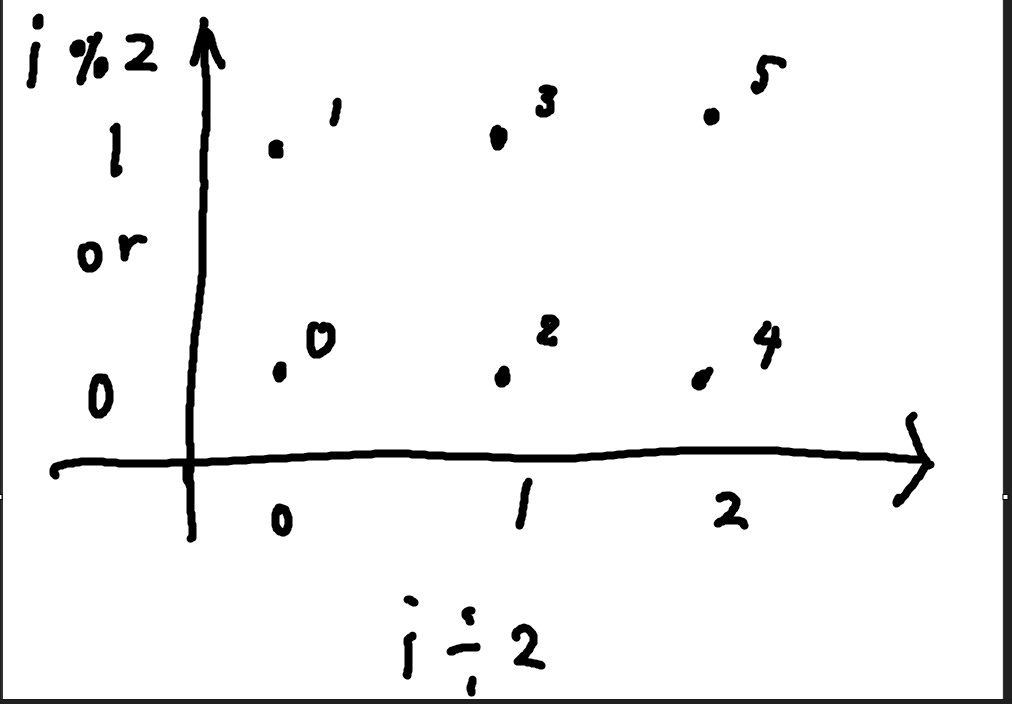
下の図のように、SV_VertexIDによってx座標とy座標を計算してフラグメントshaderに渡すだけのコードです。
インスタンスIDによって別インスタンスの描写は別の行にするようにもしています。インスタンス数を増やすことで上にコピーができるような感じになります。
こっちは変更しません。
Shader "Unlit/Test_PrimitiveQuad"
{
    Properties
    {
    }
    SubShader
    {
        Tags { "RenderType"="Opaque" }
        LOD 100

        Pass
        {
            CGPROGRAM
            #pragma vertex vert
            #pragma fragment frag
            #include "UnityCG.cginc"
            struct appdata
            {
                uint index : SV_VertexID;
                uint instanceIndex: SV_InstanceID;
            };

            struct v2f
            {
                float2 uv : TEXCOORD0;
                float4 pos : SV_POSITION;
            };

            v2f vert (appdata v)
            {
                v2f o;
                float x = v.index / 2 *0.7;
                float y = v.index % 2 *0.7;
                y = y + v.instanceIndex;// インスタンスIDで行をずらす
                o.pos = float4(x,y,0,1);
                o.pos = UnityObjectToClipPos(o.pos);
                o.uv = float2(x,y);
                return o;
            }

            fixed4 frag (v2f i) : SV_Target
            {
                // sample the texture
                fixed4 col = float4(1, 0, 0, 1);
                return col;
            }
            ENDCG
        }
    }
}
MonoBehaviour
using Unity.Collections;
using UnityEngine;

public class Test_PrimitiveQuad : MonoBehaviour
{
    public Material mat;
    RenderParams param;
    GraphicsBuffer indexBuffer;
    public static GraphicsBuffer MakeIndexBuffer()
    {
        GraphicsBuffer result = new GraphicsBuffer(GraphicsBuffer.Target.Index, 6, 2);
        NativeArray<ushort> cpuBuffer = new NativeArray<ushort>(6, Allocator.Temp);
        cpuBuffer[0] = 0;
        cpuBuffer[1] = 1;
        cpuBuffer[2] = 2;
        cpuBuffer[3] = 2;
        cpuBuffer[4] = 3;
        cpuBuffer[5] = 4;
        result.SetData(cpuBuffer);
        return result;
    }
    void Start()
    {
        param = new RenderParams(mat);
        indexBuffer = MakeIndexBuffer();
        param.worldBounds = new Bounds(Vector3.zero, 10000 * Vector3.one); // use tighter bounds
    }

    void Update()
    {
        Graphics.RenderPrimitivesIndexed(param, MeshTopology.Triangles, indexBuffer, 6, startIndex:0, instanceCount: 4);
    }
}
基準コードの結果

わかったこと
・インデックスバッファから三つずつ使用する。
・インデックスバッファの値がそのまま渡される
実験
範囲外のインデックスは0として実行する
基準コードでは[0][1][2] [3][4][5]の値のインデックスを使用していました。
startIndexが1だと[1][2][3] [4][5][6] としたいところですが、vertexCount = 6なので[6]は範囲外になり、[4][5]0というふうになります。
変更した部分
public static GraphicsBuffer MakeIndexBuffer()
    {
        GraphicsBuffer result = new GraphicsBuffer(GraphicsBuffer.Target.Index, 6, 2);
        NativeArray<ushort> cpuBuffer = new NativeArray<ushort>(6, Allocator.Temp);
        cpuBuffer[0] = 4;
        cpuBuffer[1] = 6;
        cpuBuffer[2] = 7;
        cpuBuffer[3] = 8;
        cpuBuffer[4] = 5;
        cpuBuffer[5] = 4;
        result.SetData(cpuBuffer);
        return result;
    }

    void Update()
    {
        Graphics.RenderPrimitivesIndexed(param, MeshTopology.Triangles, indexBuffer, 6, startIndex:1, instanceCount: 4);
    }
結果
右の三角形が([1] = 6,[2] = 7, [3] = 8)で、左が([4] = 5,[5] = 4,[6] = 0)の三角形です。

わからないこと
トロポジーをQuadにしても、三角形と変わりませんでした。四角形用のインデックスの指定方法もわかりません。これを特定する実験が増えたら追記するかもしれません。