
概要
HUDクラスをデバッグで使う記事を参考に作った際のメモ書きです。
更新履歴
| 日付 | 内容 |
|---|---|
| 2026/01/23 | 初版 |
| 2026/01/26 | シングルプロセス実行を外す方法を追記 |
参考
以下を参考にさせて頂きました、ありがとうございます。
[UE4] HUDでデバッグ表示をカスタマイズする
猫でも分かるUMG
環境
Windows11
Visual Studio 2022
UnrealEngine 5.6, 5.7
関連ソース
"Engine\Source\Runtime\Engine\Classes\GameFramework\HUD.h"
"Engine\Source\Runtime\Engine\Private\Debug\DebugDrawService.cpp"
デバッグHUDの作成
[UE4] HUDでデバッグ表示をカスタマイズするを参考にデバッグ用のHUDを作ってみます。
クラス作成
参考記事をほとんどそのままでUE5でも動きます。
あと Build.cs にGameplayDebuggerの追加も必要です。
#pragma once

#include "GameFramework/HUD.h"
#include "Debug/DebugDrawService.h"

#if WITH_GAMEPLAY_DEBUGGER
#include "GameplayDebuggerTypes.h"
#endif

#include "DebugHUD.generated.h"

// デバッグ用HUDクラス
UCLASS()
class ADebugHUD : public AHUD
{
	GENERATED_BODY()

public:
	static void ToggleDebugHUD(UWorld* _InWorld, UClass* _DebugHUDClass, FDelegateHandle& DrawDebugDelegateHandle);

public:
	// デバッグ情報表示
	void DrawDebugHUD( UCanvas* Canvas, APlayerController* Cont);

#if WITH_GAMEPLAY_DEBUGGER
	// 下地付きのテキスト表示
	void DrawTextBg(float _DispPosX, float _DispPosY, FString _Text);
#endif
};
cppのほうも参考記事を元に作成しています。
ただし UGameplayStatics::ProjectWorldToScreen だと位置がずれてしまったため位置計算は変えています。あとマルチプレイを考慮してワールドの比較を行うコードを追加しています。
#include "./DebugHUD.h"
#include "Kismet/GameplayStatics.h"
#include "UObject/UObjectIterator.h"
#include "Engine/Engine.h"
#include "Engine/GameViewportClient.h"
#include "EngineUtils.h"
#include "Engine/OverlapResult.h"
#include "Engine/Canvas.h"
#include "CanvasItem.h"
#include "Engine/NetConnection.h"
#include "Engine/NetDriver.h"
#include "Engine/PackageMapClient.h"

// デバッグ情報表示
void ADebugHUD::DrawDebugHUD(UCanvas* InCanvas, APlayerController* Cont)
{
	if (IsValid(Cont) ){
		if (Cont->GetWorld() != GetWorld()){
			return;		// 別ワールドの描画は行わない
		}
	}

	Canvas = InCanvas;
	if ( !Canvas ){
		return;
	}

	if ( APlayerController* _PC = GetWorld()->GetFirstPlayerController() )
	{
		auto _Pawn = _PC->GetPawn();

		TArray<AActor*> _Actors;
		UGameplayStatics::GetAllActorsOfClass( this, AAppCharacterBase::StaticClass(), _Actors );

		for(AActor* _It : _Actors){

#if WITH_GAMEPLAY_DEBUGGER
			// Actor.WorldLocationからスクリーン座標に変換
			FVector2D _ScreenPosition;
			{
				FGameplayDebuggerCanvasContext _CanvasContext( Canvas, GEngine->GetSmallFont() );
				_CanvasContext.FontRenderInfo.bEnableShadow = true;
				_ScreenPosition = _CanvasContext.ProjectLocation(_It->GetActorLocation());

				_CanvasContext.CursorX = _CanvasContext.DefaultX = _ScreenPosition.X;
				_CanvasContext.CursorY = _CanvasContext.DefaultY = _ScreenPosition.Y;

                // 表示する情報を記述する
				UWorld* _World = _Pawn->GetWorld();
				FString _EnumStr1 = StaticEnum<ENetRole>()->GetValueAsString(_Pawn->GetLocalRole());
				FString _EnumStr2 = StaticEnum<ENetRole>()->GetValueAsString(_Pawn->GetRemoteRole());

				if( _World->GetNetMode() != NM_Client){
					_CanvasContext.Printf( FColor::White, TEXT( "{cyan}Local:%s\nRemote:%s" ), *_EnumStr1, *_EnumStr2 );
				}
				else{
					_CanvasContext.CursorY += 20.0f;
					_CanvasContext.Printf( FColor::White, TEXT( "{white}Local:%s\nRemote:%s" ), *_EnumStr1, *_EnumStr2 );
				}
			}
#endif
		}

	}
}

#if !UE_BUILD_SHIPPING
// HUDの生成/破棄
void ADebugHUD::ToggleDebugHUD(UWorld* _InWorld, UClass* _DebugHUDClass, FDelegateHandle& DrawDebugDelegateHandle)
{
	if ( !_InWorld ){
		return;
	}

	ADebugHUD* _HUD = nullptr;
	// World内単一のDebugHUDクラスを探す
	for ( TActorIterator<ADebugHUD> _It(_InWorld); _It; ++_It )
	{
		if ( *_It && _It->IsA(_DebugHUDClass) )
		{
			_HUD = *_It;
			break;
		}
	}

	// HUD アクターの生成/削除 & デリゲートのバインド
	if ( !_HUD )
	{
		_HUD = _InWorld->SpawnActor<ADebugHUD>( _DebugHUDClass );
		DrawDebugDelegateHandle = UDebugDrawService::Register(TEXT("Game"), FDebugDrawDelegate::CreateUObject( _HUD, &ThisClass::DrawDebugHUD ) );
	}
	else
	{
		UDebugDrawService::Unregister( DrawDebugDelegateHandle );
		_HUD->Destroy();
	}
}

// コンソールコマンド
static void ToggleDebugHUD(const TArray<FString>& _Args, UWorld* _InWorld)
{
	static FDelegateHandle DrawDebugDelegateHandle;
	ADebugHUD::ToggleDebugHUD( _InWorld, ADebugHUD::StaticClass(), DrawDebugDelegateHandle );
}

// コンソールコマンドに登録する
FAutoConsoleCommandWithWorldAndArgs DebugHUDToggleCommand( TEXT( "Debug.ToggleHUD" ),
	TEXT( "toggle debug HUD drawing." ), FConsoleCommandWithWorldAndArgsDelegate::CreateStatic( ToggleDebugHUD ) );

#endif	// !UE_BUILD_SHIPPING
実行テスト(UE5.6)
マルチプレイでの実行をし、コンソールコマンド Debug.ToggleHUDを実行します。

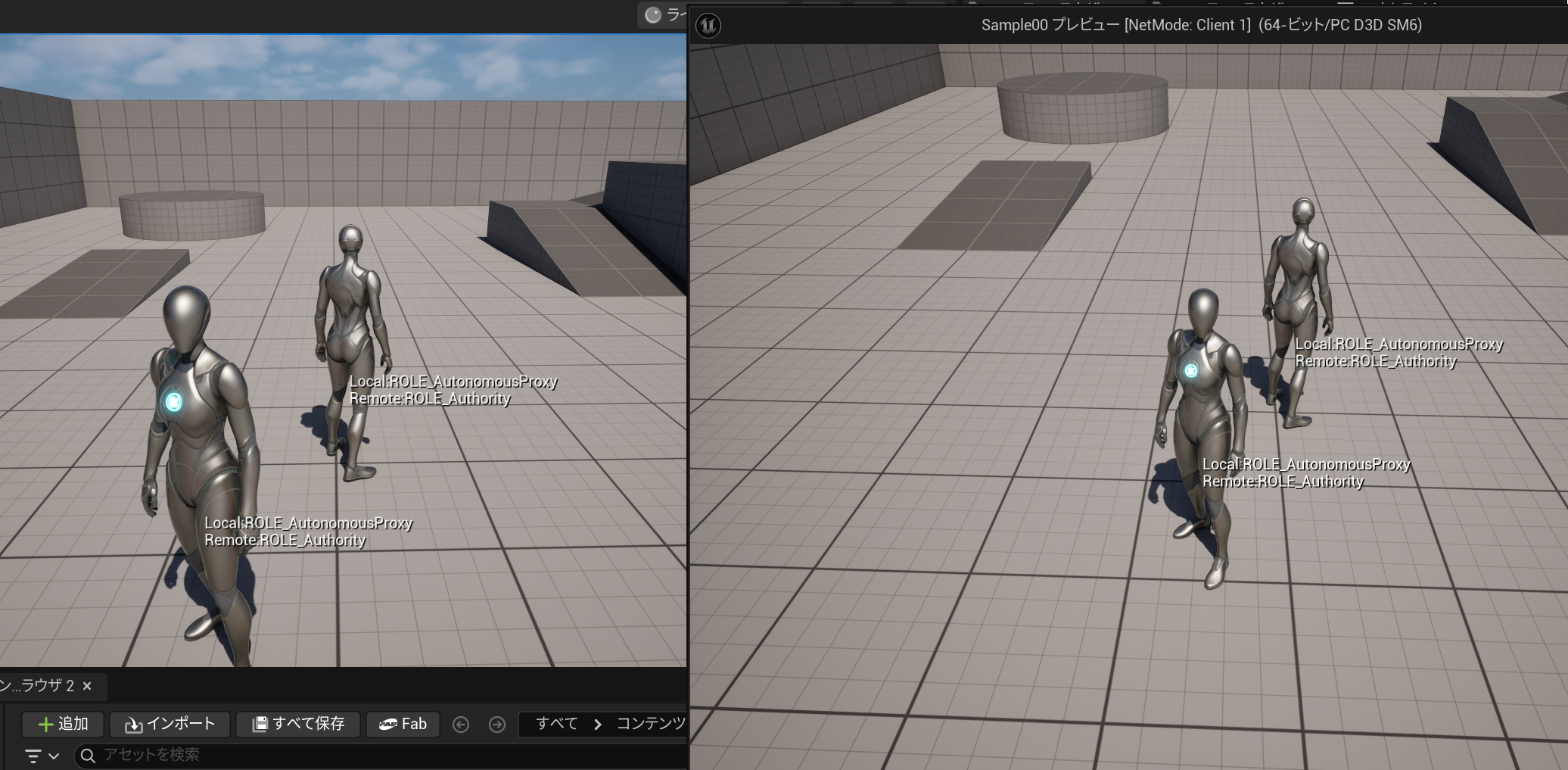
結果、サーバー側でHUDを実行したにもかかわらず、クライアント側の画面にも表示されてしまいました。(クライアント側の画面でサーバー側の情報が表示されているためネットワークロールが違っている)

クライアント側でHUDを実行するとサーバー側の画面にもでてしまいます。
実行テスト(UE5.7)
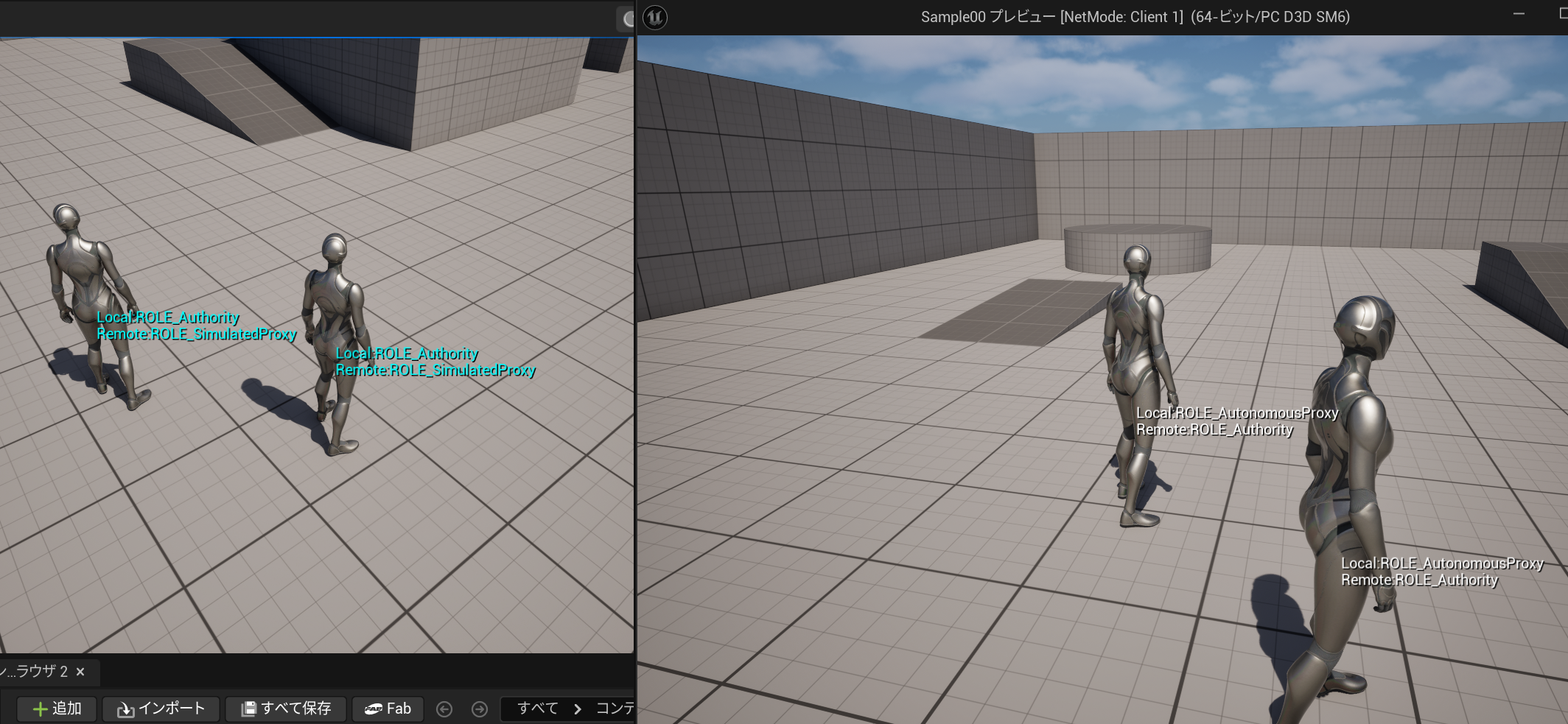
UE5.7で同じようにHUDを実行するとそれぞれの画面にのみ表示されます。
表示違いの原因について
元記事にもありますが、描画時の引き数 APlayerControllerがUE5.6までだとnullptrが必ず入ってきます。呼び出し元の UDebugDrawService::Draw() にてそのような呼び出しになっているためワールドの判定ができませんでした。
ただ、UE5.7だと呼び出し方が変わったようで APlayerControllerにちゃんとコントローラーが入っているためワールドの比較ができます。
回避方法について
UE5.6でこの表示違いを回避するにはHUDをスポーンする際にワールドコンテキストからビューポートを保持してそのビューポートから表示すべきワールドを判定すれば可能だと思われます。
// 生成時のワールドからビューポートを保持しておく
const FWorldContext* _WorldContext = GEngine->GetWorldContextFromWorld(_InWorld);
UGameViewportClient* _GameViewport = _WorldContext->GameViewport;
_HUD->Viewport = _GameViewport->Viewport;
あるいは[エディタの環境設定]から[レベルエディタ]->[プレイ]->[マルチプレイヤーオプション]の設定の[1つのプロセス下で実行]のチェックを外すとそれぞれのワールドごとのプロセスになるためこの表示問題はでません。
まとめ
シングルプレイだと問題ないのですが、エディタでのマルチプレイ時の表示され方の違いがあり、そこからUE5.7からHUDの描画呼び出し方法が変わっていた事に気づいたので記事にしました。
リリースノートはそんなに細かく見ていない…