
はじめに
こんにちは!unecchiです。
Google Cloudを今年から勉強し始めたのですが、座学だけじゃイメージ湧かない。。
でもまだお仕事でも触ったことないし、そもそも今のプロジェクトはBEとして入っているし、、
仕事で使えないなら自分で何か作ればいいじゃない ということで、まずはシンプルに定時実行の画像生成システムを作ってみました。
なお、ただ画像を作るだけではなく、指定したキャラクターについてシチュエーション違いの画像を生成してもらうようにしました。
フロー自体はざっくりこんな感じです。
事前準備
NotionでDBの用意
①インテグレーションの用意
https://www.notion.so/profile/integrations
にアクセスして、新しいインテグレーションを作成します。
コンテンツ機能の3つにチェックをつけ、シークレットは控えておきます。
②Notionでデータベース(テーブル)を作る
カラムは以下の4つが必要
- Title
- Status(未生成・生成済み)
- URL
- 作成日時
作成したデータベース右上「…」→ Add Connections → さっき作った Penguin Automation を追加(これを忘れるとAPIで書き込めません)
③データベースIDを取得
データベースを開いた時のURLに含まれる 32文字くらいのID を控えます
(例)https://www.notion.so/xxxxx?v=...&pvs=4 の xxxxx 部分
Slackでの通知の設定
Slack Appで「Incoming Webhooks」を有効にしてWebhook URL取得(Slackのワークスペース権限が必要)
Google Cloudプロジェクトの作成
①Google Cloud Console にログインし、プロジェクトを新規作成(例:create-images-automation)
②以下のAPIを有効化
* Vertex AI API
* Gemini API (Generative Language API)
* Cloud Functions API
* Cloud Storage API
* Cloud Scheduler API
③課金アカウントをリンク(無料枠内で収まるが、APIキー発行にはBillingアカウントが必須)
Gemini APIキーの取得
①Google AI Studio にアクセス
②「新しいAPIキーを作成」→ コピーしておく
③このキーを Cloud Functions の環境変数 に設定する(後述)
Cloud Storage バケットの作成
Cloud Storage > 「バケットを作成」(名前例:create-images)
権限:Private(後で署名付きURLで共有可能)
ローカルMacに gcloud を入れる
※すでに入っている場合はスキップ
Cloud SDKからダウンロードする。
手順通りダウンロードできたら、セットアップを開始する。
gcloud init
必要なAPIを有効化する
gcloud services enable \
  cloudfunctions.googleapis.com \
  storage.googleapis.com \
  aiplatform.googleapis.com \
  cloudscheduler.googleapis.com
もしくはGUIから有効化して下さい
自動画像生成システムを作ってみる
ベースとなるキャラクター画像の設定
作成しておいたバケットにフォルダを作成し、ベースとなるキャラクターの画像をアップロードします。
今回は以下のようなディレクトリとしました。
assets/character.png ←ベースとなる画像
generated/<日付>/生成した画像.png
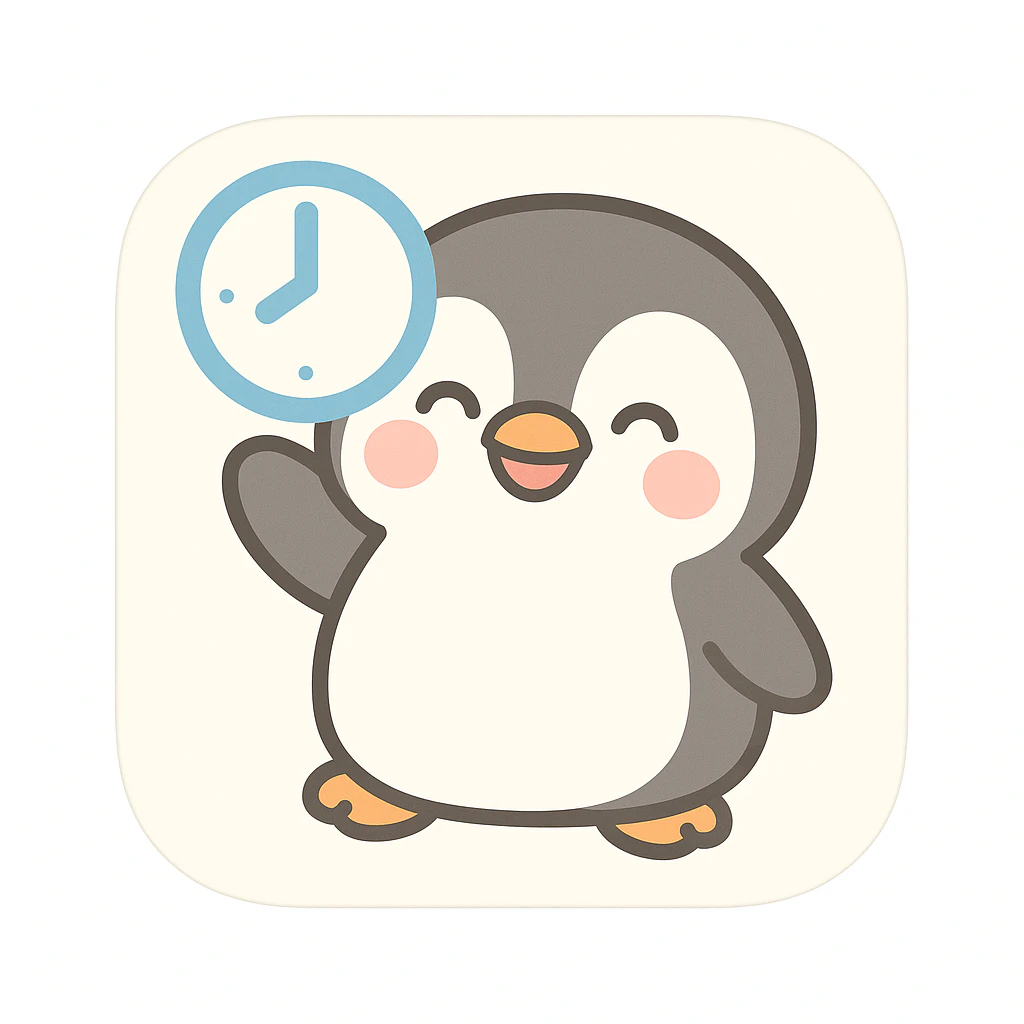
※ちなみに今回指定したキャラクターはこんな感じ
フォルダを作成し、移動する
mkdir -p ~/[プロジェクト名] && cd ~/[プロジェクト名]
各種ファイルを作成する
package.json
cat > package.json <<'EOF'
{
  "name": "プロジェクト名",
  "version": "1.0.0",
  "type": "module",
  "dependencies": {
    "@google-cloud/storage": "^7.10.0",
    "node-fetch": "^3.3.2"
  }
}
EOF
.env.yaml(←ここにあなたの鍵を入れる)
cat > .env.yaml <<'EOF'
GEMINI_KEY: "AI Studioで発行したAPIキーを入れる"
PROJECT_ID: "今回使用するGoogleCloudのプロジェクトID"
LOCATION: "us-central1"
MODEL_ID: "gemini-2.5-flash-image"

NOTION_TOKEN: "NotionのInternal Integration Secret"
NOTION_DB_ID: "NotionのデータベースID"

GCS_BUCKET: "バケット名"
PENGUIN_IMAGE_PATH: "指定するキャラクターの格納パス"

WEBHOOK_URL: "通知用SlackのWebhook URL"
EOF
ハブとなるindex.js
export { createPrompt } from "./functionA_createPrompt.js";
export { generateImageForOldestPending } from "./functionB_generateImage.js";
プロンプト作成用のfunctionA_createPrompt.js
import fetch from "node-fetch";
import { Storage } from "@google-cloud/storage";
const storage = new Storage();

const GEMINI_TEXT = (key) =>
  `https://generativelanguage.googleapis.com/v1beta/models/gemini-2.0-flash:generateContent?key=${key}`;

const NOTION_CREATE_PAGE = "https://api.notion.com/v1/pages";

const notionHeaders = () => ({
  "Authorization": `Bearer ${process.env.NOTION_TOKEN}`,
  "Notion-Version": "2022-06-28",
  "Content-Type": "application/json",
});

// 必須環境変数チェック(あると原因切り分けが速い)
function assertEnv(...keys) {
  const missing = keys.filter((k) => !process.env[k]);
  if (missing.length) {
    throw new Error(`Missing env vars: ${missing.join(", ")}`);
  }
}

async function loadPenguinAsBase64() {
  const file = storage.bucket(process.env.GCS_BUCKET).file(process.env.PENGUIN_IMAGE_PATH);
  const [buf] = await file.download();
  return buf.toString("base64");
}

export const createPrompt = async (req, res) => {
  try {
    assertEnv("GEMINI_KEY", "NOTION_TOKEN", "NOTION_DB_ID", "GCS_BUCKET", "PENGUIN_IMAGE_PATH");

    const penguinB64 = await loadPenguinAsBase64();

    // 固定の指示文(あなた指定)
    const fixedInstruction =
      "この可愛らしいペンギンのキャラクターを、現実世界に溶け込ませたような画像を生成するためのプロンプトを作成してください。例えば、このペンギンがどこかの場所にいて、まるでそこに実在するかのような写真風のイメージです。出力は、写真向けプロンプトとして必要な要素(ロケーション/時間帯/レンズ/画角/被写界深度/ライティング/質感/背景/色味/構図/禁止事項)を短い箇条書きで。出力はプロンプトのみでOKです。";

    // 画像+テキストを同じリクエストに添付(Bと同じ表記に統一)
    const body = {
      contents: [
        {
          role: "user",
          parts: [
            { text: fixedInstruction },
            {
              inline_data: {
                mime_type: "image/png",
                data: penguinB64,
              },
            },
          ],
        },
      ],
      generationConfig: { response_mime_type: "text/plain" },
    };

    const gRes = await fetch(GEMINI_TEXT(process.env.GEMINI_KEY), {
      method: "POST",
      headers: { "Content-Type": "application/json" },
      body: JSON.stringify(body),
    });

    if (!gRes.ok) {
      const errText = await gRes.text();
      throw new Error(`Gemini API error: ${gRes.status} ${gRes.statusText} - ${errText}`);
    }

    const gJson = await gRes.json();
    const prompt =
      gJson?.candidates?.[0]?.content?.parts?.[0]?.text?.trim() ||
      "(プロンプト生成に失敗しました)";

    // Notionに保存(Status=未生成)
    const nowIso = new Date().toISOString();
    const nRes = await fetch(NOTION_CREATE_PAGE, {
      method: "POST",
      headers: notionHeaders(),
      body: JSON.stringify({
        parent: { database_id: process.env.NOTION_DB_ID },
        properties: {
          Name: { title: [{ text: { content: `現実世界化プロンプト ${nowIso}` } }] },
          Status: { select: { name: "未生成" } }, // セレクト名はDB側と一致させる
        },
        children: [
          {
            object: "block",
            type: "paragraph",
            paragraph: { rich_text: [{ text: { content: prompt } }] },
          },
        ],
      }),
    });

    if (!nRes.ok) {
      const t = await nRes.text();
      throw new Error(`Notion作成に失敗: ${nRes.status} ${nRes.statusText} - ${t}`);
    }

    const nJson = await nRes.json();

    res.status(200).send({ ok: true, notionPageUrl: nJson?.url, prompt });
  } catch (e) {
    console.error(e);
    res.status(500).send({ ok: false, error: e.message });
  }
};
画像生成用のfunctionB_generateImage.js
// functionB_generateImage.js
import fetch from "node-fetch";
import { Storage } from "@google-cloud/storage";
import { GoogleAuth } from "google-auth-library";

const storage = new Storage();

/** Vertex AI(Gemini 2.5 Flash Image)エンドポイント */
const VERTEX_GEMINI_URL =
  `https://${process.env.LOCATION}-aiplatform.googleapis.com/v1/projects/${process.env.PROJECT_ID}/locations/${process.env.LOCATION}/publishers/google/models/${process.env.MODEL_ID}:generateContent`;

/** Notion API endpoints */
const NOTION_DB_QUERY    = (dbId)   => `https://api.notion.com/v1/databases/${dbId}/query`;
const NOTION_PAGE_BLOCKS = (pageId) => `https://api.notion.com/v1/blocks/${pageId}/children`;
const NOTION_UPDATE_PAGE = (pageId) => `https://api.notion.com/v1/pages/${pageId}`;

const notionHeaders = () => ({
  "Authorization": `Bearer ${process.env.NOTION_TOKEN}`,
  "Notion-Version": "2022-06-28",
  "Content-Type": "application/json",
});

/** Vertex AI呼び出し用の認証トークン取得 */
async function getAccessToken() {
  const auth = new GoogleAuth({ scopes: "https://www.googleapis.com/auth/cloud-platform" });
  const client = await auth.getClient();
  const accessToken = await client.getAccessToken();
  return accessToken.token ?? accessToken;
}

/** 固定ペンギン画像をGCSからbase64で読み込む */
async function loadPenguinAsBase64() {
  const file = storage.bucket(process.env.GCS_BUCKET).file(process.env.PENGUIN_IMAGE_PATH);
  const [buf] = await file.download();
  return buf.toString("base64");
}

/** Notionブロックからテキストを抽出 */
function extractTextFromBlocks(blocks) {
  const getText = (rich) => (rich || []).map((t) => t.plain_text || "").join("");
  const para = blocks.find((b) => b.type === "paragraph");
  if (para) return getText(para.paragraph?.rich_text);
  const bullet = blocks.find((b) => b.type === "bulleted_list_item");
  if (bullet) return getText(bullet.bulleted_list_item?.rich_text);
  const numbered = blocks.find((b) => b.type === "numbered_list_item");
  if (numbered) return getText(numbered.numbered_list_item?.rich_text);
  return "";
}

/** 生成画像を日付フォルダに保存し、署名付きURLを返す */
async function saveImageAndGetUrl(buffer) {
  const now = new Date();
  const yyyy = now.getFullYear();
  const mm = String(now.getMonth() + 1).padStart(2, "0");
  const dd = String(now.getDate()).padStart(2, "0");

  const objectName = `generated/${yyyy}/${mm}/${dd}/penguin_${Date.now()}.png`;
  const file = storage.bucket(process.env.GCS_BUCKET).file(objectName);
  await file.save(buffer, { contentType: "image/png" });

  const [signedUrl] = await file.getSignedUrl({
    action: "read",
    expires: Date.now() + 1000 * 60 * 60 * 24, // 24h
  });

  return { objectName, signedUrl };
}

export const generateImageForOldestPending = async (req, res) => {
  try {
    // 1) Notionから「未生成」を1件取得
    const qRes = await fetch(NOTION_DB_QUERY(process.env.NOTION_DB_ID), {
      method: "POST",
      headers: notionHeaders(),
      body: JSON.stringify({
        filter: { property: "Status", select: { equals: "未生成" } },
        sorts: [{ timestamp: "created_time", direction: "ascending" }],
        page_size: 1,
      }),
    });
    if (!qRes.ok) throw new Error(`Notion検索失敗: ${qRes.status}`);
    const qJson = await qRes.json();
    const page = qJson?.results?.[0];
    if (!page) return res.status(200).send({ ok: true, message: "未生成はありません" });

    const pageId = page.id;

    // 2) ページ本文からプロンプト抽出
    const bRes = await fetch(NOTION_PAGE_BLOCKS(pageId), { method: "GET", headers: notionHeaders() });
    if (!bRes.ok) throw new Error(`Notion本文取得失敗: ${bRes.status}`);
    const bJson = await bRes.json();
    const prompt = extractTextFromBlocks(bJson?.results || []);
    if (!prompt) throw new Error("プロンプト本文を取得できませんでした");

    // 3) Gemini 2.5 Flash Image で、参照画像つき生成
const penguinB64 = await loadPenguinAsBase64();
const accessToken = await getAccessToken();

const body = {
  contents: [
    {
      role: "user",
      parts: [
        {
          text:
            "以下の参照画像のペンギンキャラクターを必ず主役として使用し、" +
            "このキャラクターが現実世界に溶け込んでいるような写真風の画像を生成してください。\n\n" +
            "テーマの詳細:\n" + prompt,
        },
        {
          inline_data: {
            mime_type: "image/png",
            data: penguinB64, // ← 固定のペンギン画像を添付
          },
        },
      ],
    },
  ],
};

const iRes = await fetch(VERTEX_GEMINI_URL, {
  method: "POST",
  headers: {
    Authorization: `Bearer ${accessToken}`,
    "Content-Type": "application/json",
  },
  body: JSON.stringify(body),
});
if (!iRes.ok) {
  const errTxt = await iRes.text();
  throw new Error(`Vertex AI画像生成失敗: ${iRes.status} - ${errTxt}`);
}

const iJson = await iRes.json();
const base64 =
  iJson?.candidates?.[0]?.content?.parts?.find(p => p.inline_data?.data)?.inline_data?.data ||
  iJson?.candidates?.[0]?.content?.parts?.find(p => p.inlineData?.data)?.inlineData?.data;
if (!base64) throw new Error("画像データの抽出に失敗しました");


    // 4) GCSに保存
    const buf = Buffer.from(base64, "base64");
    const { objectName, signedUrl } = await saveImageAndGetUrl(buf);

    // 5) Notionを更新
    const nUpd = await fetch(NOTION_UPDATE_PAGE(pageId), {
      method: "PATCH",
      headers: notionHeaders(),
      body: JSON.stringify({
        properties: {
          Status: { select: { name: "生成済み" } },
          "Image URL": { url: signedUrl },
        },
      }),
    });
    if (!nUpd.ok) throw new Error(`Notion更新失敗: ${nUpd.status}`);

    // 6) 通知
if (process.env.WEBHOOK_URL) {
  await fetch(process.env.WEBHOOK_URL, {
    method: "POST",
    headers: { "Content-Type": "application/json" },
    body: JSON.stringify({
      text:
        `✅ *画像生成完了*\n` +
        `*Notion:* https://www.notion.so/${pageId.replace(/-/g, "")}\n` +
        `*画像:* ${signedUrl}\n` +
        `*保存先:* gs://${process.env.GCS_BUCKET}/${objectName}`,
    }),
  });
}

    res.status(200).send({ ok: true, pageId, imageUrl: signedUrl });
  } catch (e) {
    console.error(e);
    try {
      if (process.env.WEBHOOK_URL) {
        await fetch(process.env.WEBHOOK_URL, {
          method: "POST",
          headers: { "Content-Type": "application/json" },
          body: JSON.stringify({ content: `❌ 生成失敗: ${e.message}` }),
        });
      }
    } catch {}
    res.status(500).send({ ok: false, error: e.message });
  }
};
挙動を確認してみる
以下のコマンドを実施してそれぞれをデプロイする
※コードの修正を行うたびにデプロイを行う必要あり
gcloud functions deploy createPrompt \
  --entry-point=createPrompt \
  --source=. \
  --runtime=nodejs22 \
  --trigger-http \
  --region=asia-northeast1 \
  --env-vars-file=.env.yaml \
  --allow-unauthenticated
gcloud functions deploy generateImageForOldestPending \
  --entry-point=generateImageForOldestPending \
  --source=. \
  --runtime=nodejs22 \
  --trigger-http \
  --region=asia-northeast1 \
  --env-vars-file=.env.yaml \
  --allow-unauthenticated
実行コマンド
curl -X POST "https://asia-northeast1-[PROJECT_ID].cloudfunctions.net/createPrompt" \
  -H "Content-Type: application/json" \
  -d '{}'
curl -X POST "https://asia-northeast1-[PROJECT_ID].cloudfunctions.net/generateImageForOldestPending" \
  -H "Content-Type: application/json" \
  -d '{}'
定時実行できるようにする
Cloud Scheduler を開き、左メニューから「Cloud Scheduler」→「ジョブを作成」
基本情報を設定
| 項目 | 入力例 |
|---|---|
| ジョブ名 | create-prompt-1 |
| 頻度(cron形式) |
0 6 * * *(毎日6時) |
| タイムゾーン | Asia/Tokyo |
| ターゲットタイプ | HTTP |
HTTP ターゲット設定
| 項目 | 入力例 |
|---|---|
| URL | Function A の URL(例:https://asia-northeast1-...cloudfunctions.net/createPrompt) |
| HTTP メソッド | POST |
| ボディ | {} |
「OIDCトークンを追加」を選択
→自動候補に出てくるサービスアカウントを選択
「トークンを含める」にチェック✅
「作成」ボタンをクリック!
同じ要領で画像生成についても設定します。
実際ちゃんと動いているのか
問題なく毎日定時実行できています
Notion


Slack

生成された画像


まとめ
やっぱり座学だけでなく、実際に手を動かしてみるとサービスに対する理解が深まりますね。
ニュースの収集や問題集の作成など、まだまだできることが多そうで可能性を感じます。
まずは自分の好きなものを題材に手を動かしてみると、意外とすんなり理解が進むかもしれませんね。