
元ネタ:
現在のVivliostyle(Vivliostyle.js v2.40.0)では、入力HTMLに含まれるJavaScriptは入力HTMLのコンテキストではなく、プレビュー画面のコンテキストで実行されます。このためJavaScriptを含むHTMLとして期待する動作とは異なる挙動になる場合があります1。
vivliostyle/vivliostyle.js#975 (comment)To understand this issue, we have to know that Vivliostyle.js manages two DOM trees, the source tree and the view tree. The source tree is loaded via XMLHttpRequest. The CSS cascading processing is done on the source tree and CSS properties on each element are determined. Then, the view tree is constructed by the layout processing using the source tree and the cascaded CSS properties on each element in the source tree. The view tree is displayed in browser.
In the current JavaScript support, the script can modify only the layout result, by manipulating the DOM nodes in the view tree, and cannot modify the source tree and CSS cascading results.
つまり以下のHTMLはブラウザでは表示できますが、Vivliostyleでは正しく表示できません。Vivliostyleの処理によって、テキストを挿入したいspanはJavaScriptの実行時にはbodyの直下ではなくなっているからです(spanをIDで参照すれば一応動作するのでこれは意地悪な例です)。
<!doctype html>
<html lang="ja">
  <head>
    <meta charset="UTF-8" />
    <meta name="viewport" content="width=device-width, initial-scale=1.0" />
    <title>Hello World あたたたた</title>
    <style>
      span {
        white-space: pre-wrap;
      }
    </style>
    <script type="module">
      const span = document.querySelector("body > span");
      if (span) {
        span.textContent = ((
          iter = (function* () {
            while (true) yield Math.random() < 0.5 ? "あ" : "た";
            return; // Generator<"あ" | "た", void> と推論させるために必要
          })(),
        ) =>
          iter.reduce(
            (hako, char) =>
              (hako += char).slice(-5) === "あたたたた"
                ? (iter.return(), hako + "\nお前はもう死んでいる")
                : hako,
            "",
          ))();
      }
    </script>
  </head>
  <body>
    <span></span>
  </body>
</html>
代わりに、Vivliostyle CLI(v10.3.1)ではunifiedによる原稿処理のカスタマイズが可能です。PDF出力を前提に考えてみれば、私たちはある時点のDOMのスナップショットを得たいのですから、表示時に実行されるスクリプトではなく文書の変形として定義するのは自然ともいえます。現在はHTML以外の形式について対応していますが、HTML/XHTMLについても対応するためPRを作成しています。
次のようにプロジェクトを作成してください。現時点ではVFMが使用しているunifiedのバージョンが遅れているので、unist/hastのツールは互換性のあるバージョンを明示する必要があります。hast-util-selectはv52、unist-builderはv33を使用します。
$ npx --yes @vivliostyle/cli@10.3.1 create
║
◇─ Where should we create your project?
║  atatatata
║
◇─ What's the title of your publication?
║  Atatatata
║
◇─ What's the author name?
║  Kenshiro
║
◇─ What's the language?
║  Japanese
║
◇─ What's the project template?
║  Minimal
║
◇─ What's the project theme?
║  Not use Vivliostyle theme
║
◇─ Should we install dependencies? (You can install them later.)
║  Yes
║
╙─ All configurations are set! Creating your project...

INFO Downloading a template
INFO Installing dependencies with npm

...

SUCCESS Successfully created a project at atatatata

Next steps:
1. Navigate to atatatata
2. Create and edit Markdown files
3. Modify the entry field in vivliostyle.config.js
4. npm run preview to open a preview browser window
5. npm run build to generate the output file

For more information, visit https://docs.vivliostyle.org.

🖋 Happy writing!
$ cd atatatata
$ npm install --save hast-util-select@5 unist-builder@3
--- vivliostyle.config.js.orig  2026-02-25 21:12:19.934766435 +0900
+++ vivliostyle.config.js       2026-02-25 22:18:16.202351047 +0900
@@ -1,5 +1,34 @@
 // @ts-check
-import { defineConfig } from '@vivliostyle/cli';
+/// <reference lib="esnext.iterator" />
+import { defineConfig, VFM } from "@vivliostyle/cli";
+import { select } from "hast-util-select"; // @5
+import { u } from "unist-builder"; // @3
+
+/** @type {import("unified").Plugin} */
+const atatatata = () => (node) => {
+  const span = select("#atatatata", /** @type {import("hast").Root} */ (node));
+  if (!span) {
+    return;
+  }
+  span.children = [
+    u(
+      "text",
+      ((
+        iter = (function* () {
+          while (true) yield Math.random() < 0.5 ? "あ" : "た";
+          return;
+        })(),
+      ) =>
+        iter.reduce(
+          (hako, char) =>
+            (hako += char).slice(-5) === "あたたたた"
+              ? (iter.return(), hako + "\nお前はもう死んでいる")
+              : hako,
+          "",
+        ))(),
+    ),
+  ];
+};

 export default defineConfig({
   title: "Atatatata",
@@ -8,4 +37,6 @@
   browser: "chrome@145.0.7632.26",
   image: "ghcr.io/vivliostyle/cli:10.3.1",
   entry: ["manuscript.md"],
+  theme: "style.css",
+  documentProcessor: (opts, meta) => VFM(opts, meta).use(atatatata),
 });
span {
  white-space: pre-wrap;
}
<span id="atatatata"></span>
原稿を保存するたびに組版結果が変化します。
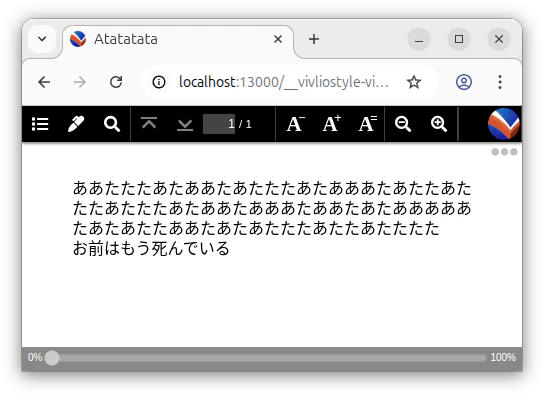
あたたたたポイントとしては比較的新しいIterator Helpersで書いてみました。
-
仮に入力HTMLのコンテキストでJavaScriptを実行するよう変更されたとしても、Webページで動作させるJavaScriptは基本的に非同期処理であり(でなければページがフリーズします)、その終了を検出する確実な方法は存在しない問題があります。あらゆるケースでJavaScriptの実行を待って組版処理を開始するのは想像以上に難しいことです。 ↩
-
v6はhast v3を使用 https://github.com/syntax-tree/hast-util-select/blob/6.0.0/package.json#L40 ↩
-
v4はunist v3を使用 https://github.com/syntax-tree/unist-builder/blob/4.0.0/package.json#L42 ↩