
背景
2025年7月中旬頃に「AWS 基礎セキュリティのベストプラクティス v1.0.0(FSBP)」において、Security Hub コントロール [SSM.6]、[SSM.7] が検知されるようになりました。
これは、SSM Document や Automation を使用していない場合も検知されるものになりますので、スコアを上げるためには対処を行う必要があります。
対処としては、以下が挙げられます。
- 検出結果の抑制
- 当該項目の有効化
今回は項目を有効化する方針で対処を行います。
SSM.6
SSM Automation should have CloudWatch logging enabled
[SSM.6] This control checks whether Amazon CloudWatch logging is enabled for AWS Systems Manager (SSM) Automation. The control fails if CloudWatch logging isn't enabled for SSM Automation.
SSM.7
SSM documents should have the block public sharing setting enabled
[SSM.7] This control checks whether the block public sharing setting is enabled for AWS Systems Manager documents. The control fails if the block public sharing setting is disabled for Systems Manager documents.
設定
マネジメントコンソールからでも設定できますが、この設定はリージョン単位で行う必要があります。
設定して、リージョンを移動して、というのは骨が折れるので、AWS CLIを用いて一括で設定します。
以下のコマンドをコマンドラインに貼り付けて実行してください。
account_id="[アカウントID]"

for region in $(aws ec2 describe-regions --query "sort(Regions[].RegionName)" --output text); do
    output1=$(aws ssm update-service-setting --setting-id arn:aws:ssm:${region}:${account_id}:servicesetting/ssm/documents/console/public-sharing-permission --setting-value Disable --region $region --output text 2>&1)
    echo -e "$region \t public-sharing-permission \t $output1"

    output2=$(aws ssm update-service-setting --setting-id arn:aws:ssm:${region}:${account_id}:servicesetting/ssm/automation/customer-script-log-destination --setting-value CloudWatch --region $region --output text 2>&1)
    echo -e "$region \t customer-script-log-destination \t $output2"
done
AWSの認証情報をProfileで管理している方は、aws コマンドの末尾に --profile [プロファイル名] を付けてください。
また、SCPや権限によって一部リージョンでエラーが出る場合は、for文の部分を静的にリージョン指定するよう修正してから実行してください。
※一応エラーでも全リージョン試行します。
結果確認
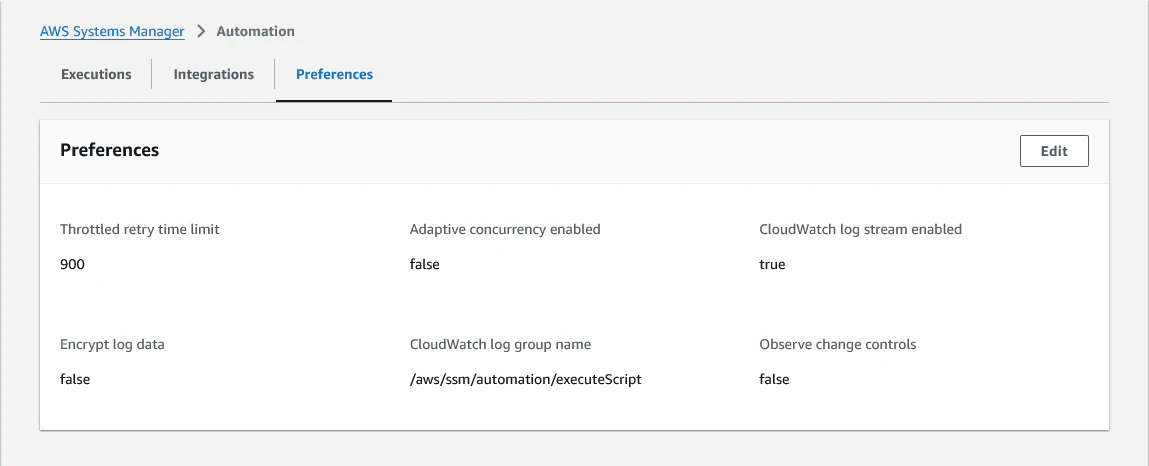
SSM.6
CloudWatch log stream enabled が trueになっていたらOKです。
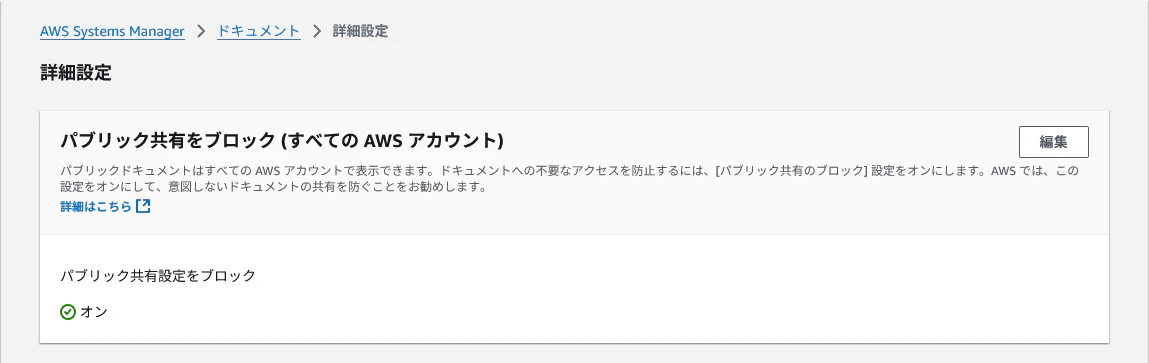
SSM.7
パブリック共有設定をブロック が オンになっていたらOKです。
おわりに
Security Hub のセキュリティコントロールはいつの間にか追加されがちですよね。
忘れずに対応して、スコアを上げていきましょう!