2
0

Delete article

Deleted articles cannot be recovered.

Draft of this article would be also deleted.

Are you sure you want to delete this article?

【VS Code】GitHub Copilotを非表示・無効化する方法

2
Last updated at Posted at 2026-01-31

はじめに

VS CodeでAmazon Q Developerを利用していると、GitHub Copilotと競合したり、単純に不要になることがあります。
本記事では、VS CodeでGitHub Copilotを非表示にする手順を紹介します。

対象読者

  • 業務でAmazon Q Developerなど他のAIツールを使っており、Copilotは不要な方

前提条件

  • OS: Windows 11
  • Visual Studio Code

設定手順

VS Codeの標準設定から変更可能です。

  1. VS Codeの右下にある 管理(歯車マーク) をクリックし、「設定」 を選択します。

image.png

  1. 検索欄に 「Copilot」 と入力して検索します。
  2. 表示される 「Chat: Disable AI Features」 にチェックを入れます。
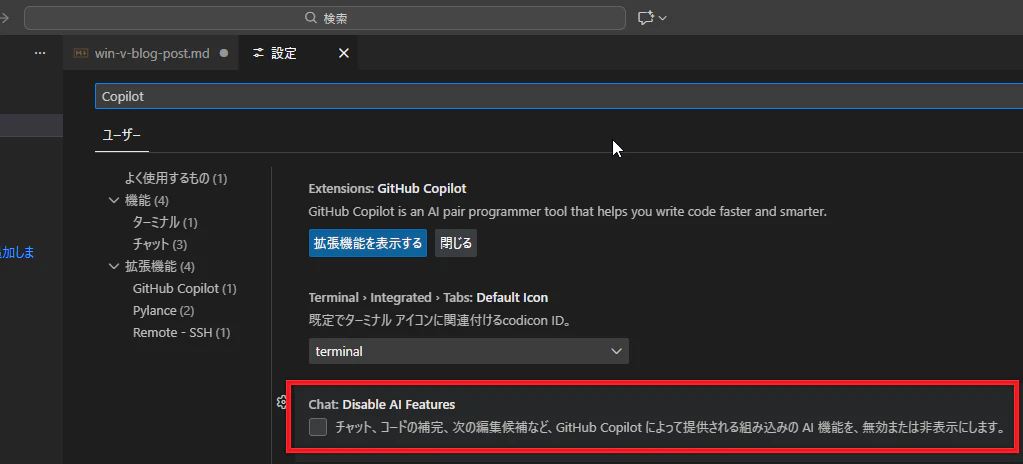
image.png

これでCopilotのAI機能が無効化(非表示)されます。


まとめ

Amazon Q Developerなどをメインで利用している場合、Copilotの表示が不要になることがあります。
設定から簡単にオフにできるので、ぜひ試してみてください。

2
0
0

Register as a new user and use Qiita more conveniently

  1. You get articles that match your needs
  2. You can efficiently read back useful information
  3. You can use dark theme
What you can do with signing up
2
0

Delete article

Deleted articles cannot be recovered.

Draft of this article would be also deleted.

Are you sure you want to delete this article?