
とても抽象的でふわっとされたイメージでしゃべっています。正確性は保証いたしかねます。もし致命的な間違いがある場合、そっとお知らせくださるととても助かります
環境
UE5.6
VS2022
Enhanced Inputをc++で追加する
この目標を達成する工程はいくつかに分けられます
1.Input Mapping ContextはBP派生を作ってBPから指定できるようにする
2.PlayerControllerにInputMappingContextを追加する
3.PawnでInputActionを受け取る
なんかC++からアセットを参照すると地獄って聞いた。絶対に嫌だ(固い意志)
IMC型の変数を作成する
PlayerController型のクラスを作成して、テンプレートを参考にIncludeとか変数作成を行う
これUObjectだから絶対ポインタらしいですね。へー
//PC_Mainplayer.h
// Fill out your copyright notice in the Description page of Project Settings.

#pragma once

#include "CoreMinimal.h"
#include "GameFramework/PlayerController.h"
#include "InputMappingContext.h"
#include "PC_Mainplayer.generated.h"

/**
 *
 */
UCLASS()
class PETITCON25TH_API APC_Mainplayer : public APlayerController
{
	GENERATED_BODY()

protected:
	UPROPERTY(EditAnywhere, BlueprintReadOnly, Category = "Input") //使用するEnhancedInputをBP側で指定
	UInputMappingContext* UseMappingContext;
};
一回ソリューションビルドかけたら、知らん間にBuild.csにも追記されてました。
//Build.cs
// Copyright Epic Games, Inc. All Rights Reserved.

using UnrealBuildTool;

public class PetitCon25th : ModuleRules
{
	public PetitCon25th(ReadOnlyTargetRules Target) : base(Target)
	{
		PCHUsage = PCHUsageMode.UseExplicitOrSharedPCHs;

		PublicDependencyModuleNames.AddRange(new string[] { "Core", "CoreUObject", "Engine", "InputCore", "EnhancedInput" });

		PrivateDependencyModuleNames.AddRange(new string[] {  });

		// Uncomment if you are using Slate UI
		// PrivateDependencyModuleNames.AddRange(new string[] { "Slate", "SlateCore" });

		// Uncomment if you are using online features
		// PrivateDependencyModuleNames.Add("OnlineSubsystem");

		// To include OnlineSubsystemSteam, add it to the plugins section in your uproject file with the Enabled attribute set to true
	}
}
PublicDependencyModuleNames.のところに自分でEnhancedInputを追記する必要があったらしい?
最近悟りつつあるんですけど、ビルドでエラーが出たらとりあえずもう一回ソリューションビルドしてダメだったらいったんVS閉じて再起動してもう一回ソリューションビルドすると結構な頻度でなおりますよね。何なんだあれ
作ったクラスを親にしてBPの作成
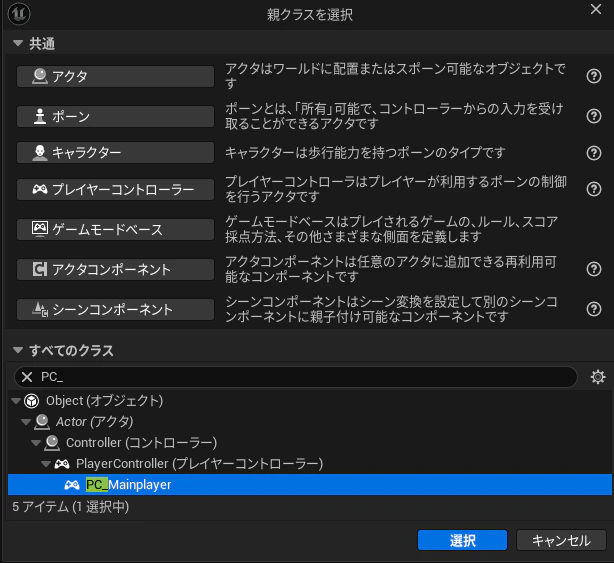
おおーいるいる
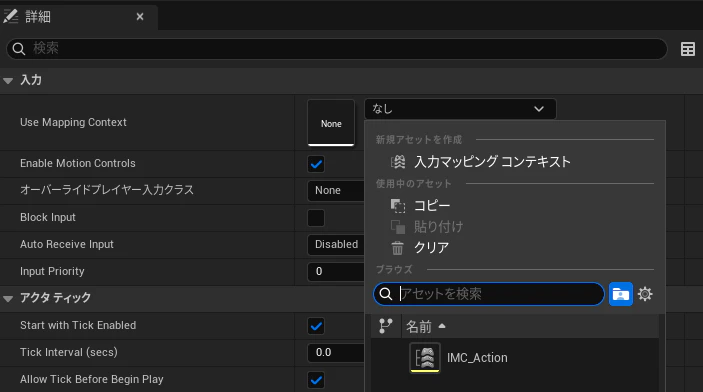
PlayerControllerにIMCを追加する
EnhancedInputへの追加は、BPと同じようにcppでBeginPlayで書くのがおススメらしいです。
というわけでBeginPlayを追加。
//h
protected:
virtual void BeginPlay() override;
//cpp
void APC_Mainplayer::BeginPlay()
{
}
さて、BPならPlayerControllerからEnhanced Input Local Player Subsystemを呼び出してAddしてあげるだけの簡単な処理です。
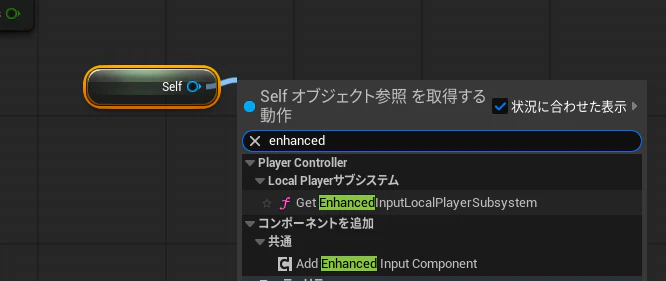
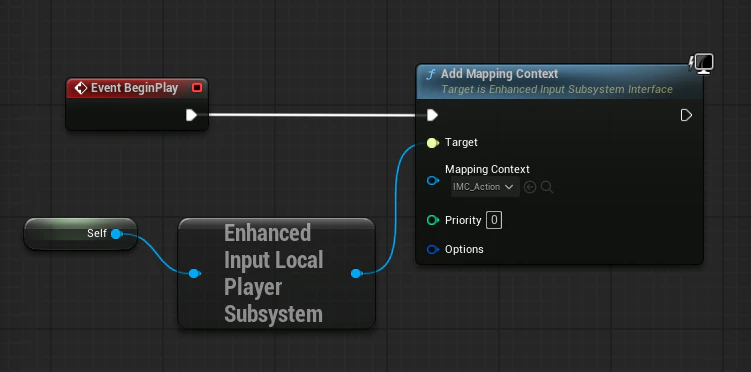
Add Mapping Context to local player
しかし、納得がとてもいかないことに、C++ではPlayerControllerに対してGet EngancedInputLocalPlayerSubsytemを書けることができません。LocalPlayerというものに変換してあげる必要があります。
BPで言うと、LocalPlayerという単語が出てくるシーンは1個に限られます。
ローカルマルチプレイで2機目のPlayerControllerを追加するときです
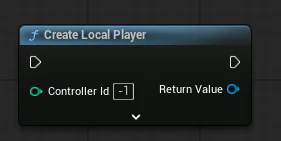
しかしこいつから出されるのはPlayerController型です。
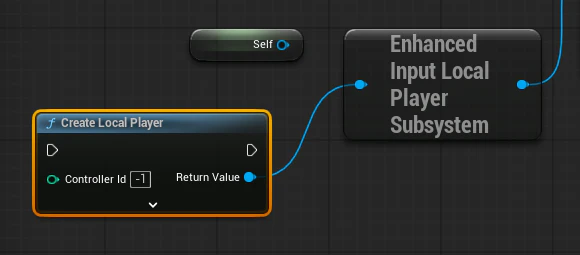
????
LocalPlayerって誰だよ
localPlayerはどうやらPlayerControllerとは別概念のようです。
しかし調べても調べても出てくるのはLocal Multiの話ばかり。そうだよねそこでしかお目にかからないよねわかる。
DeveloperAssistant君
LocalPlayer
ローカルのプレイヤー(ゲームクライアント内の一人のユーザー)を表すオブジェクトです。主にクライアント固有の情報や入力マッピング、プラットフォームユーザーIDなどを管理します。ゲームクライアント上で複数のローカルプレイヤーが存在する(分割画面やマルチユーザー環境など)場合、それぞれにLocalPlayerが対応します。
PlayerController
プレイヤーの操作をゲーム内のPawnやキャラクターに伝えるインターフェースであり、「プレイヤーの意志」を表す役割を持ちます。PlayerControllerは入力処理、プレイヤー操作のロジック、HUD管理などの中心的役割を担い、Pawnの操作やゲーム内アクションのコマンドを発行します。Pawnが置き換わってもPlayerControllerは同じままであることが多く、プレイヤーの一貫した状態を管理します。
で、このLocalPlayerはPlayerControllerと紐づいてる意識していない別クラス扱いっぽいです。しかもBPからは一切操作不可。まれに目に入るのがEnhancedInput。
つまりPlayerControllerの説明をするときに上げがちだった入力は実はLocalPlayerの担当だったと。
へー(感嘆)
BPでは自動でPlayerControllerからLocalPlayerを取得しといてくれるけどC++ではやってくれないと。
なるほどな!!!!!!!!!!!!
LocalPlayerを取得する
LocalPlayerを取得するだけならこうなります
ULocalPlayer* LocalPlayer = GetLocalPlayer()
しかし、こういうのはnullにあることがあるらしく、Nullチェックが推奨されます。
Nullチェックをしたいときはifが使えるます
if(//なんかしらのポインタ)
{
//書きたい処理
}
なのでこんな感じになります
//cppのBeginPaly

if (ULocalPlayer* LocalPlayer = GetLocalPlayer())
{

}
EnhancedInputLocalPlayerSubsystemを取得する
次にLocalPlayerからEnhancedInputLocalPlayerSubsystemを取得する必要があります。
まず、必要なヘッダをIncludeします
//cpp
#include "Engine/LocalPlayer.h"
#include "EnhancedInputSubsystems.h"
EnhancedInputLocalPlayerSubsystemはUobjectなのでこいつもifでNullチェックする必要が出てきます。
つまりこうです
if (ULocalPlayer* LocalPlayerPtr = GetLocalPlayer())
{
	if (UEnhancedInputLocalPlayerSubsystem* EISubsystem = LocalPlayerPtr->GetSubsystem<UEnhancedInputLocalPlayerSubsystem>())

	{

	}

}
だいぶ長くなってきたな…
さて、最後に取得したEnhn(ry にInputMappingContextを追加します
//cpp Beginplay

if (ULocalPlayer* LocalPlayerPtr = GetLocalPlayer()) //LocalPlayerを取得してNullチェック
{
	if (UEnhancedInputLocalPlayerSubsystem* EISubsystem = LocalPlayerPtr->GetSubsystem<UEnhancedInputLocalPlayerSubsystem>()) //LocalPlayerからEnhancedInputLocalPlayerSubsystemを取得s知恵Nullチェック

	{
		EISubsystem->AddMappingContext(UseMappingContext,0); //InputMappingContextとPriority
	}

}
PlayerControllerをこねこねするのはここまでなので、全文を貼っておきます。
// Fill out your copyright notice in the Description page of Project Settings.

#pragma once

#include "CoreMinimal.h"
#include "GameFramework/PlayerController.h"
#include "InputMappingContext.h"
#include "PC_Mainplayer.generated.h"

/**
 *
 */
UCLASS()
class PETITCON25TH_API APC_Mainplayer : public APlayerController
{
	GENERATED_BODY()

protected:
	UPROPERTY(EditAnywhere, BlueprintReadOnly, Category = "Input") //使用するEnhancedInputをBP側で指定
	UInputMappingContext* UseMappingContext;

	virtual void BeginPlay() override;
};
//cpp

// Fill out your copyright notice in the Descriptiだけなのにge of Project Settings.


#include "Player/PC_Mainplayer.h"
#include "Engine/LocalPlayer.h"
#include "EnhancedInputSubsystems.h"

void APC_Mainplayer::BeginPlay()
{
	Super::BeginPlay();

	if (ULocalPlayer* LocalPlayerPtr = GetLocalPlayer()) //LocalPlayerを取得してNullチェック
	{
		if (UEnhancedInputLocalPlayerSubsystem* EISubsystem = LocalPlayerPtr->GetSubsystem<UEnhancedInputLocalPlayerSubsystem>()) //LocalPlayerからEnhancedInputLocalPlayerSubsystemを取得s知恵Nullチェック

		{
			EISubsystem->AddMappingContext(UseMappingContext,0); //InputMappingContextとPriority
		}

	}
}
Pawnに実動作を書く
新しくPawnを作ってきました
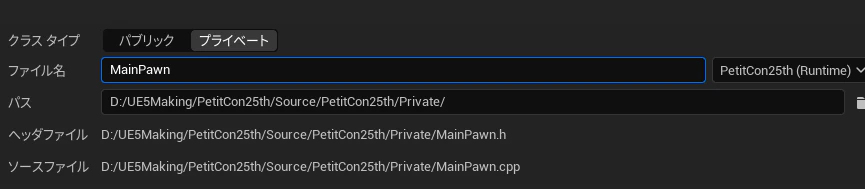
BPでは特に意識しなくても
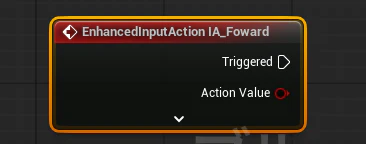
こいつで入力を受け取れますが、c++ではそうもいかないらしい。
実際に受け取るには
.h
・受け取りたいInputActionの変数を受け取りたい数だけ作成
・InputActionを受け取るためのハンドル?になる関数を用意する。
cpp
・PlayerInputComponentをEnhancedInputComponentにCast
・EnhancedInputComponentを使って、InputActionのアセットから関数にイベントをバインド
・(関数に実際の処理を書く)
という大変複雑な処理を書く必要があります。BPの簡単さどこにいったん…。
取り合えずやっていきましょう…
受け取りたいInputActionの変数を作成・InputActionを受け取るためのハンドルを追加
必須ファイルのInclude
//.h
#include "EnhancedInputComponent.h" //EnhancedInputのイベントを関数にバインドするための奴
#include "EnhancedInputSubsystems.h"
#include "InputActionValue.h" //EnhancedInputの入力で使うVector2Dだったり様々な入力値のリスト
変数と関数を作成
protected:
	// Called when the game starts or when spawned
	virtual void BeginPlay() override;

	//~~~~~~~~~Enhanced Input関係を書くよ~~~~~~~~~
	UPROPERTY(EditAnywhere, BlueprintReadOnly, Category = "Input") //InputActionの型の変数
	UInputAction* IA_Forward;

	virtual void Input_Forward(const FInputActionValue& Value);  //ハンドル用の関数
FInputActionValue& Valueとかいうやつ初めて見ましたけどうまくいくんでしょうか。ちなみにテンプレートをC++とかにした奴だと普通にfloatとかで出してました。ほんまか?DeveloperAssistant先生。
PlayerInputComponentをEnhancedInputComponentにCast
まずよくわからんPlayerInputComponentとやらを取得していきます。
この処理はPawnに最初からいるSetupPlayerInputComponentという関数に書く必要があります。
SetupPlayerInputComponentって何?
SetupPlayerInputComponentは、Unreal Engine 5におけるプレイヤーの入力(キーボード、マウス、コントローラーなど)をキャラクターやポーンの関数に結び付けるために使われる重要な関数です。
簡単に説明すると:
・役割:UInputComponentを使って、プレイヤーの操作(移動やジャンプなど)をキャラクターの関数に「バインド(結び付け)」します。
・場所:通常、キャラクター(ACharacter)やポーン(APawn)のクラス内でオーバーライド(上書き)します。
・仕組み:引数として渡されるUInputComponent*に対して、「入力の名前(Action/Axis)」と「呼ぶべき関数」を指定して紐付ける形です。
とりあえず入力を結びつけるための特殊な関数のようです。
ほんでEnhancedInputComponentはバインド用のあれだけどPlayerInputComponentってなによ。
PlayerInputComponentとは
PlayerInputComponentは?
PlayerInputComponentは、Pawn(通常はCharacter)に関連付けられた入力バインディング用コンポーネントのことです。
これはUInputComponentの派生で、プレイヤーからの入力(キー、ボタン、軸など)を受け取って、それに対応する関数を呼び出す役割を持ちます。
SetupPlayerInputComponent(UInputComponent* PlayerInputComponent)の引数として渡されるのがまさにこれです。
このコンポーネントに対してBindActionやBindAxisで入力イベントと関数が結び付けられます。
なるほど
EnhancedInputComponentは?
UEnhancedInputComponentはUInputComponent(PlayerInputComponentとして扱われることが多い)の派生クラスです。
UInputComponentは基本の入力コンポーネントクラスです。
UEnhancedInputComponentはその派生であり、Enhanced Inputシステム用に拡張された入力機能(例:BindActionの拡張版)を提供します。
そのためUEnhancedInputComponentはUInputComponentとしても扱えますし、Cast(PlayerInputComponent)で安全にダウンキャスト可能です。
Unreal Engine 5(特に5.1以降)では、Pawnでの入力バインドにUEnhancedInputComponentが基本かつ推奨されるコンポーネントとして使われています。
なるほどね?
はいじゃあ書いていきましょう(虚ろな目)
//cpp
void AMainPawn::SetupPlayerInputComponent(UInputComponent* PlayerInputComponent)
{
	Super::SetupPlayerInputComponent(PlayerInputComponent);

	if (UEnhancedInputComponent* EnhancedInputComp = Cast<UEnhancedInputComponent>(PlayerInputComponent)) //もしPlayerInputComponentがUEnhancedInputComponentだったらEnhancedInputComp変数にSet

	{

	}

}
バインド処理を書いていきます
//.cpp
if (IA_Forward)
{
	EnhancedInputComp->BindAction(
		IA_Forward, //↑のInputActionの変数
		ETriggerEvent::Triggered, //呼び出すとき(TriggeredとかStartedとかCompletedとか)
		this, //どのオブジェクトの関数を呼ぶか指定(※thisは実質Self)
		&AMainPawn::Input_Forward //バインド先の関数
	);

}
※参考

BPみたいに複数バインドするにはこのバインド関数を何回もやるらしい。
打ってると選択肢出てきます
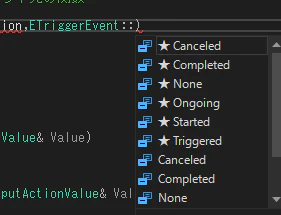
if (IA_Forward)
{
	EnhancedInputComp->BindAction(
		IA_Forward, //↑のInputActionの変数
		ETriggerEvent::Triggered, //呼び出すとき(TriggeredとかStartedとかCompletedとか)
		this, //どのオブジェクトの関数を呼ぶか指定(※thisは実質Self)
		&AMainPawn::Input_Forward //バインド先の関数
	);
	EnhancedInputComp->BindAction(IA_Forward, ETriggerEvent::Completed, this, &AMainPawn::Input_Forward_Compleat);//二個目

}
はい。
これでバインドは完了したはずです。たぶん。
受け取った先のイベントを書く
今回、InputActionはAxis1D(float)で作成しました
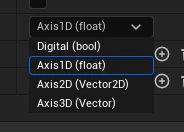
さて、処理を書いてみましょう。
//cpp

void AMainPawn::Input_Forward(const FInputActionValue& Value)
{
	float InputSpeed = Value.Get<float>(); //.Get<float>()はテンプレート呼び出しらしい。InputActionから来る値をローカル変数に

	FVector ForwardDir = GetActorForwardVector(); //Pawnの前方方向を取得。GetActorForwardVectorってC++にもあるんや。

	FVector MoveOffset = ForwardDir * DeltaTimeSave * BaseSpeed; //適当に作ったBaseSpeedのFloatとDeltatimeを保存してるやつを掛ける

	AddActorWorldOffset(MoveOffset); //AddActorLocationのc++版

}
はい。
試してみる
いざ実践の時。
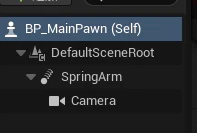
PawnとPlayerControllerのBPを作成してそれぞれセットしてることを確認。
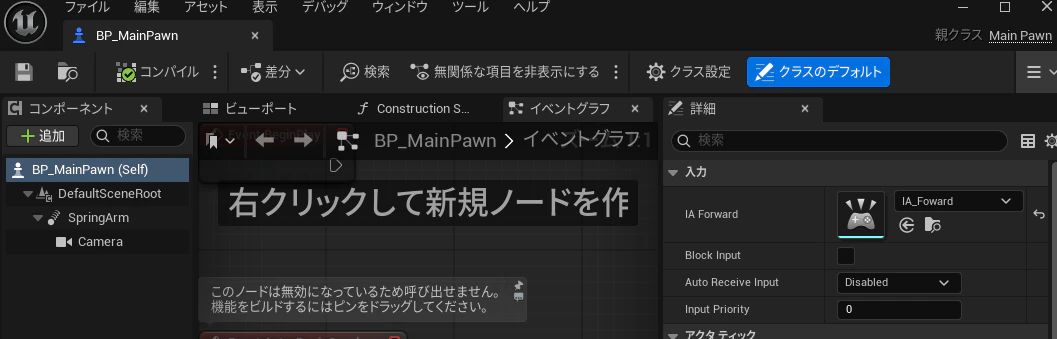
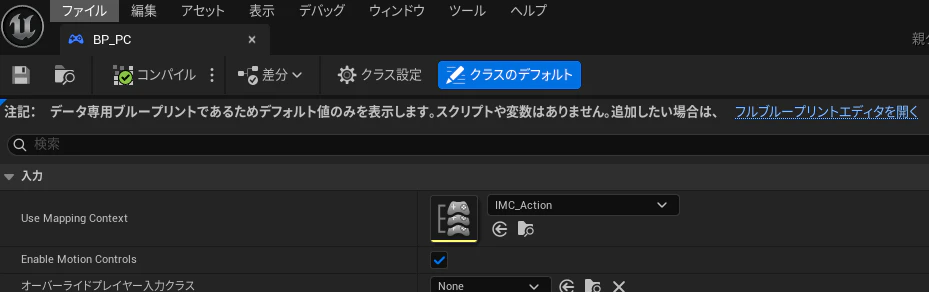
Pawnには適当にカメラを生やしました
実行!
![PetitCon25th プレビュー [NetMode_ Standalone 0] (64-ビット_PC D3D SM6) 2026-02-21 21-59-18.gif](https://qiita-user-contents.imgix.net/https%3A%2F%2Fqiita-image-store.s3.ap-northeast-1.amazonaws.com%2F0%2F2257391%2F300d3b34-a5ae-40a5-ac73-ad83875b72ce.gif?ixlib=rb-4.0.0&auto=format&gif-q=60&q=75&s=8a5f615635b885240ff82ccb83a40781)
キャー動いたーーーーー!!!!
BPユーザーからしたら何こんなことではしゃいでんのみたいな内容なんですが、こんなことになるなんて思ってなかったんです。ほんとに(記事と合わせて12時間越え)
ほんとにゲーム完成するのかな
ほな……
おまけ Pawn全文
//.h
// Fill out your copyright notice in the Description page of Project Settings.

#pragma once

#include "CoreMinimal.h"
#include "GameFramework/Pawn.h"
#include "EnhancedInputComponent.h" //EnhancedInputのイベントを関数にバインドするための奴
#include "EnhancedInputSubsystems.h"
#include "InputActionValue.h" //EnhancedInputの入力で使うVector2Dだったり様々な入力値のリスト
#include "MainPawn.generated.h"

UCLASS()
class AMainPawn : public APawn
{
	GENERATED_BODY()

public:
	// Sets default values for this pawn's properties
	AMainPawn();

	float BaseSpeed = 100.0f;

protected:
	// Called when the game starts or when spawned
	virtual void BeginPlay() override;
	float DeltaTimeSave;

	//~~~~~~~~~Enhanced Input関係を書くよ~~~~~~~~~
	UPROPERTY(EditAnywhere, BlueprintReadOnly, Category = "Input") //InputActionの型の変数
	UInputAction* IA_Forward;

	virtual void Input_Forward(const FInputActionValue& Value);  //ハンドル用の関数
	virtual void Input_Forward_Compleat(const FInputActionValue& Value);

public:
	// Called every frame
	virtual void Tick(float DeltaTime) override;

	// Called to bind functionality to input
	virtual void SetupPlayerInputComponent(class UInputComponent* PlayerInputComponent) override;

};
//.cpp
// Fill out your copyright notice in the Description page of Project Settings.


#include "MainPawn.h"

// Sets default values
AMainPawn::AMainPawn()
{
 	// Set this pawn to call Tick() every frame.  You can turn this off to improve performance if you don't need it.
	PrimaryActorTick.bCanEverTick = true;

}

// Called when the game starts or when spawned
void AMainPawn::BeginPlay()
{
	Super::BeginPlay();

}
// Called every frame
void AMainPawn::Tick(float DeltaTime)
{
	Super::Tick(DeltaTime);
	DeltaTimeSave = DeltaTime;

}

// Called to bind functionality to input
void AMainPawn::SetupPlayerInputComponent(UInputComponent* PlayerInputComponent)
{
	Super::SetupPlayerInputComponent(PlayerInputComponent);

	if (UEnhancedInputComponent* EnhancedInputComp = Cast<UEnhancedInputComponent>(PlayerInputComponent)) //もしPlayerInputComponentがUEnhancedInputComponentだったらEnhancedInputComp変数にSet

	{
		if (IA_Forward)
		{
			EnhancedInputComp->BindAction(
				IA_Forward, //↑のInputActionの変数
				ETriggerEvent::Triggered, //呼び出すとき(TriggeredとかStartedとかCompletedとか)
				this, //どのオブジェクトの関数を呼ぶか指定(※thisは実質Self)
				&AMainPawn::Input_Forward //バインド先の関数
			);
			EnhancedInputComp->BindAction(IA_Forward, ETriggerEvent::Completed, this, &AMainPawn::Input_Forward_Compleat);//二個目

		}
	}

}

//InputAction関係の関数↓↓
void AMainPawn::Input_Forward(const FInputActionValue& Value)
{
	float InputSpeed = Value.Get<float>(); //.Get<float>()はテンプレート呼び出しらしい。InputActionから来る値をローカル変数に

	FVector ForwardDir = GetActorForwardVector(); //Pawnの前方方向を取得。GetActorForwardVectorってC++にもあるんや。

	FVector MoveOffset = ForwardDir * DeltaTimeSave * BaseSpeed; //適当に作ったBaseSpeedのFloatとDeltatimeを保存してるやつを掛ける

	AddActorWorldOffset(MoveOffset); //AddActorLocationのc++版

}

void AMainPawn::Input_Forward_Compleat(const FInputActionValue& Value)
{
}