0
0

Delete article

Deleted articles cannot be recovered.

Draft of this article would be also deleted.

Are you sure you want to delete this article?

【Tableau】ソート機能を切る

0
Posted at

検索向けキーワード

・ソートしない
・ソートアイコンを表示しない
・並び替えしない
・並び替えを無効にする

やりたいこと

ヘッダーにカーソルを合わせると、ソートアイコンが表示されます。
image.png

・現在の表示順に意味があるのでソートをしたくないのに、誤ってソートしてしまう可能性がある
・行の幅によってはヘッダータイトルと被ってしまう
など、ソート機能を切ったほうが安全な場合があります。
image.png

やり方

①「ワークシート」タブをクリック
②「ソート コントロールの表示」をクリックしてチェックを外す。
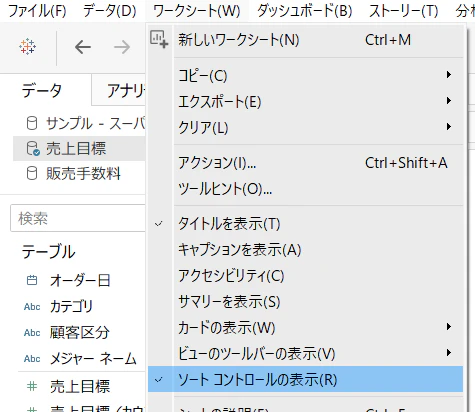
image.png

以上!

雑談

Tableauを使って数年、この機能はまったく使わずに来ましたが、レビューで「ソートしないようにできないか?」とご意見をいただき初めて調べて対処しました。
ユーザは常に新しい視点をくれますね。

0
0
0

Register as a new user and use Qiita more conveniently

  1. You get articles that match your needs
  2. You can efficiently read back useful information
  3. You can use dark theme
What you can do with signing up
0
0

Delete article

Deleted articles cannot be recovered.

Draft of this article would be also deleted.

Are you sure you want to delete this article?