

はじめに
@tsuzuki817です🐸
Xcode 27.1 から Device Hub で iPhone Duo が触れるようになりました。
仕事で作っているアプリを動かしたところ、畳んだ状態で開閉すると日付の横スクロールがズレる現象が出ました。
日付ストリップは左端に「今日」が来るのが正しい表示です。
開いて閉じると、この位置がズレて「今日」が画面外に出ます。
| 正しい表示(起動直後) | 開いて閉じた後 |
|---|---|
 |
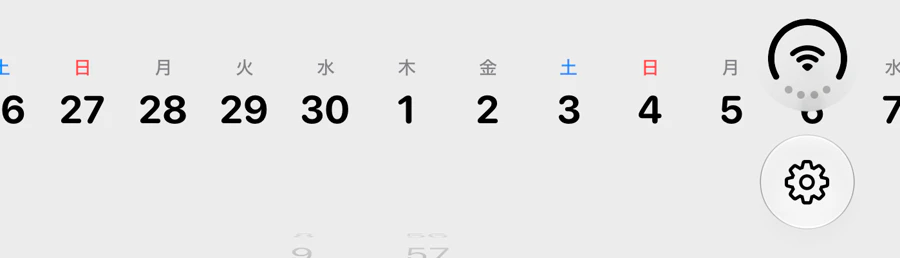 |
右端の日付もシステムの縦バーに潜っています。
原因にたどり着くまで遠回りしたので、試した手と結果を残しておきます。
Xcode 27.1 beta / iOS 27.1 の情報です。今後変わる可能性があります
Duo の safe area
safe area を画面に出すだけのアプリを作って測りました。

size 382x644
trail 84          ← 右に84ptのシステム縦バー
occlusion 2
  x399 w37 y29 h37    ← カメラ
  x382 w84 y0 h170    ← 縦バー領域
通常のiPhoneと並べるとこうなります。
| iPhone 18 Pro | iPhone Duo(畳んだ状態) | |
|---|---|---|
| 画面 | 402 × 778 | 382 × 644 |
| safe top | 62.0 | 0.0 |
| safe trailing | 0.0 | 84.0 |
| size class | compact × regular | compact × regular |
Duoはステータスバーが上ではなく右側に縦に並ぶため、top が 0 になって trailing に 84pt 入ります。
size class は変わらないので、size class で分岐しても検知できません。
効かなかった方法
1. safeAreaPadding(.trailing)
ScrollView(.horizontal, showsIndicators: false) {
    HStack(spacing: 0) { ... }
}
.safeAreaPadding(.trailing)
表示は変わりません。この位置での safeAreaInsets.trailing は 0 で、0pt の padding が足されるだけです。
2. contentMargins
.contentMargins(.trailing, systemBarInset, for: .scrollContent)
これも変わりません。contentMargins はスクロールできる範囲を変えるもので、初期表示の描画位置には影響しません。
3. clipped()
.clipped()
起動直後は日付が枠内で止まりますが、開閉すると元に戻ります。
開閉後は行の幅そのものが 382pt から 951pt(画面全幅)に膨らんでいるため、切り落とす枠ごと広がります。
枠の幅が正しくなる前にこれを入れても効きません。原因を取り除いた後であれば有効です(後述)。
4. Xcode 27.1 の App Resizability
Xcode 27.1 には App Resizability(旧 app modernization)が入っています。ここに答えが書いてありました。
An inset derived from a width or a size class is worse. It is wrong whenever the inset changes and the size does not. A vertical bar does exactly that.
幅や size class から inset を導くのは誤りで、サイズが変わらないのに inset だけ変わるときに壊れる。縦バーがまさにそれ、と明記されています。
The insets a GeometryProxy reports describe the space the view was offered, not the region it ended up with. Let the framework place the content.
GeometryProxy の inset を padding として使うと二重に数えることになるため、配置はフレームワークに任せる。
1〜3で試した手は、いずれもこの処方に含まれていません。
原因は AdMob のバナー
広告を無効にして開閉すると、崩れません。
広告あり・開閉後: row 951  trail 42
広告なし・開閉後: row 382  trail 84
AdBannerView はこうなっていました。
var body: some View {
    BannerViewContainer(adUnitID: adUnitID, width: viewWidth)
        .frame(maxWidth: .infinity)
        .frame(height: bannerHeight)
        .onGeometryChange(for: CGFloat.self) { proxy in
            proxy.size.width
        } action: { newWidth in
            viewWidth = newWidth
        }
}
UIViewRepresentable に縦横のサイズを与えていません。
この状態だと UIKit 側の内在サイズが親のレイアウトに影響します。Duoを開閉するとバナーのサイズが変わるため、同じ画面にある横スクロールの位置まで巻き込まれます。
解決方法
幅の測定は SwiftUI 側の空ビューで行い、バナーには確定した縦横を渡します。
var body: some View {
    Color.clear
        .frame(maxWidth: .infinity)
        .frame(height: bannerHeight)
        .overlay {
            if viewWidth > 0 {
                BannerViewContainer(adUnitID: adUnitID, width: viewWidth)
                    .frame(width: viewWidth, height: bannerHeight)
            }
        }
        .background(Color(uiColor: .secondarySystemBackground))
        .onGeometryChange(for: CGFloat.self) { proxy in
            proxy.size.width
        } action: { newWidth in
            viewWidth = newWidth
        }
}
開閉で幅が変わったときは updateUIView で追従させます。ここが空だとバナーが古い幅のまま残ります。
func updateUIView(_ uiView: BannerView, context: Context) {
    let adSize = currentOrientationAnchoredAdaptiveBanner(width: width)
    guard uiView.adSize.size.width != adSize.size.width else { return }
    uiView.adSize = adSize
}
開閉しても「今日」が左端のまま保たれます。

開閉が実際に起きたかは、内側ディスプレイのスクリーンショットで判定できます。
xcrun simctl io <UDID> enumerate で Duo は2つの display が取れるので、
--display で内側を撮って全ピクセルが黒なら畳んだ状態です
日付が縦バーにぶつかる
原因を直した後も、右端の日付はシステムの縦バーの下に入ったままです。
safeAreaPadding と contentMargins はこの位置で inset が 0 になるため効きません。
iOS 27.1 の reservedRegions でバーの実寸を読み、その分だけ行を内側に寄せます。
@State private var barInsets = EdgeInsets()

// ...

.onGeometryChange(for: EdgeInsets.self) {{ proxy in
    guard #available(iOS 27.1, *) else {{ return EdgeInsets() }}
    let bars = proxy.reservedRegions(kind: .occlusion, options: .includeInactive)
        .map(\.frame)
        .filter {{ $0.width > 50 }}      // カメラの丸は幅が小さいので除外
    var insets = EdgeInsets()
    for bar in bars {{
        if bar.minX <= 0 {{
            insets.leading = max(insets.leading, bar.maxX)
        }} else {{
            insets.trailing = max(insets.trailing, proxy.size.width - bar.minX)
        }}
    }}
    return insets
}} action: {{ barInsets = $0 }}
.padding(.leading, barInsets.leading)
.padding(.trailing, barInsets.trailing)
バーは Split View では左端に出ることもあるため、EdgeInsets で左右どちらにも対応させています。
スクロールの中身が枠を超えて描かれる分は .clipped() で止めます。
| Before | After |
|---|---|
 |
 |
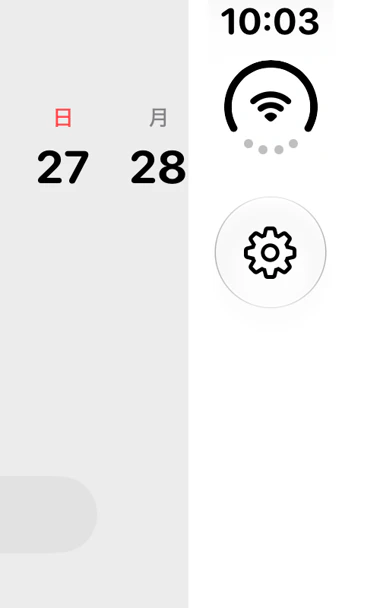
右端が白くなる
右の縦バー部分に SwiftUI 既定の白が残ります。背景が safe area の内側だけに敷かれているためです。
| Before | After |
|---|---|
 |
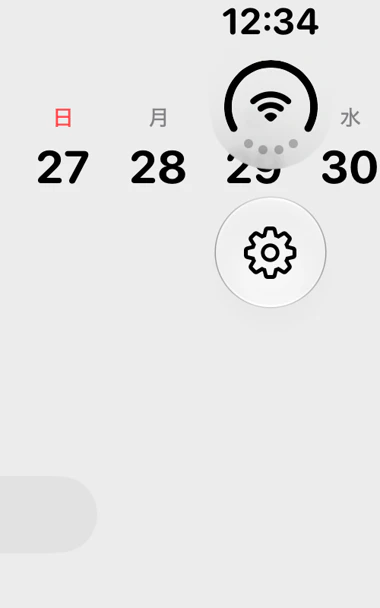 |
- .background { Color(.primaryBackground) }
+ .background { Color(.primaryBackground).ignoresSafeArea() }
引数なしの ignoresSafeArea() は App Resizability の検出対象ですが、背景塗りは例外として明記されています。
It is correct on a layer meant to reach every edge: a background fill, an artwork backdrop, a gradient, or a scrim. Leave those alone.
読む・触るコンテンツに付けるのは対象外です。
おわりに
UIViewRepresentable にサイズを渡していないと、UIKit の内在サイズが親まで伝播して、画面の別の場所が崩れます。
iPhoneでは画面幅が変わらないため表面化しませんが、折りたたみでは開閉のたびにサイズが変わるので出てきます。UIKitラッパーを持っているアプリは同じ踏み方をする可能性があります。
参考