やりたいこと
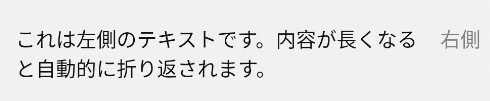
以下の用件のUIを作成したい
・左右に Text が横並び(横並び=flexDirection: 'row')
・それぞれの Text は画面の左右いっぱいに寄っている
・左側の Text は 複数行 に折り返して表示される(右側にかぶらない)
・右側の Text は固定幅 or 自動幅で右端に配置される
実装
import React from 'react';
import { View, Text, StyleSheet } from 'react-native';

const TwoTextRow = () => {
  return (
    <View style={styles.container}>
      <Text style={styles.leftText}>
        これは左側のテキストです。内容が長くなると自動的に折り返されます。
      </Text>
      <Text style={styles.rightText}>
        右側
      </Text>
    </View>
  );
};

export default TwoTextRow;


const styles = StyleSheet.create({
  container: {
    flexDirection: 'row',
    padding: 16,
    alignItems: 'flex-start',
  },
  leftText: {
    flex: 1, // 残りのスペースをすべて使う
    marginRight: 8,
    fontSize: 16,
    flexWrap: 'wrap',
  },
  rightText: {
    fontSize: 16,
    color: 'gray',
    // 幅を自動で計算する
    flexShrink: 0, // 右側は縮まない(固定幅)
  },
});
表示されるUIは以下。