

クロスアカウントでAthena経由のCURデータをQuickに接続する方法
PayerアカウントでCURデータエクスポートできる方はもっと簡単にできるので参考程度にしてください。
リセラー契約をされていてPayerアカウントにCUR作れないよって方向けです。
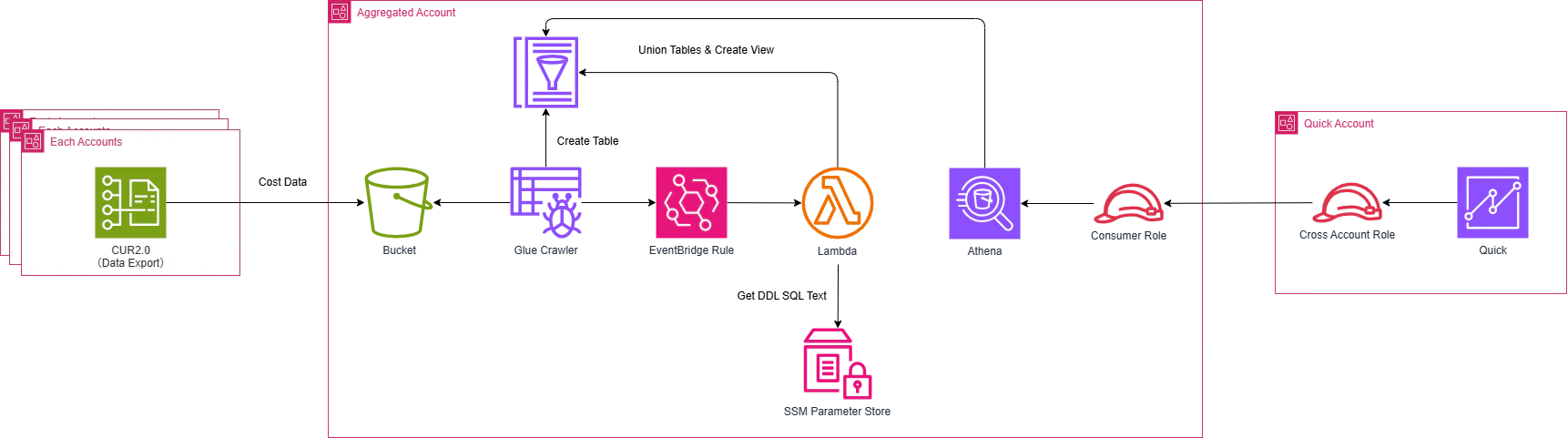
以下のような構成を作成します。
データエクスポートの作成(CUR)
1.データ保存用のS3バケットを作成
| 設定項目 | 設定値 | 備考 |
|---|---|---|
| バケット名 | 任意のバケット名 | 例:cur-data-bucket |
バケットポリシーは以下のように設定します。
{
    "Version": "2012-10-17",
    "Statement": [
        {
            "Sid": "EnableAWSDataExportsToWriteToS3AndCheckPolicy",
            "Effect": "Allow",
            "Principal": {
                "Service": [
                    "bcm-data-exports.amazonaws.com",
                    "billingreports.amazonaws.com"
                ]
            },
            "Action": [
                "s3:PutObject",
                "s3:GetBucketPolicy"
            ],
            "Resource": [
                "arn:aws:s3:::${BucketName}",
                "arn:aws:s3:::${BucketName}/*"
            ],
            "Condition": {
                "StringEquals": {
                    "aws:SourceOrgID": "o-xxxxxxx"
                }
            }
        },
        {
            "Effect": "Allow",
            "Principal": {
                "AWS": "arn:aws:iam::${QuickAccountId}:root"
            },
            "Action": [
                "s3:GetObject",
                "s3:GetObjectVersion",
                "s3:ListBucket"
            ],
            "Resource": [
                "arn:aws:s3:::${BucketName}",
                "arn:aws:s3:::${BucketName}/*"
            ]
        }
    ]
}
2.データエクスポートを作成
| 設定項目 | 設定値 | 備考 |
|---|---|---|
| タイプ | 標準データエクスポート | |
| エクスポート名 | 任意の名前 | 例:cur-export |
| データテーブル | CUR2.0 | |
| データテーブルの設定 |
Include caller identity (IAM principal) allocation dataをオンにする |
Bedrockのモデル呼び出し元分析のため |
| レポートデータ統合 | Amazon Athena | |
| Storage account | Another account | |
| S3 bucket name | 1で作成したバケット名 | |
| AWS Region | 1を作成したリージョン | |
| S3 bucket owner | 1を作成したAWSアカウントID | |
| S3 bucket prefix | こちらのアカウントID |
上記のような設定でエクスポートを各アカウントに作成します。
以下のCloudFormationテンプレートを利用してスタックセットを作成することをお勧めします。
(設定はお好みで変更してください)
us-east-1で作成が必要です
AWSTemplateFormatVersion: '2010-09-09'
Description: CUR report definition for each member account (deployed via StackSets)

Parameters:
  ExportName:
    Type: String
    Description: Name of the export
    Default: cur-export
  AggregatedBucketName:
    Type: String
    Description: S3 bucket name in the aggregation account
  AggregatedBucketOwner:
    Type: String
    Description: S3 bucket owner account ID of the aggregation S3 bucket
    Default: 123456789123
  AggregatedBucketRegion:
    Type: String
    Default: ap-northeast-1
    Description: Region of the aggregation S3 bucket

Resources:
  DataExport:
    Type: AWS::BCMDataExports::Export
    Properties:
      Export:
        DataQuery:
          QueryStatement: 'SELECT bill_bill_type, bill_billing_entity, bill_billing_period_end_date, bill_billing_period_start_date, bill_invoice_id, bill_invoicing_entity, bill_payer_account_id, bill_payer_account_name, cost_category, discount, discount_bundled_discount, discount_total_discount, identity_line_item_id, identity_time_interval, line_item_availability_zone, line_item_blended_cost, line_item_blended_rate, line_item_currency_code, line_item_iam_principal, line_item_legal_entity, line_item_line_item_description, line_item_line_item_type, line_item_net_unblended_cost, line_item_net_unblended_rate, line_item_normalization_factor, line_item_normalized_usage_amount, line_item_operation, line_item_product_code, line_item_resource_id, line_item_tax_type, line_item_unblended_cost, line_item_unblended_rate, line_item_usage_account_id, line_item_usage_account_name, line_item_usage_amount, line_item_usage_end_date, line_item_usage_start_date, line_item_usage_type, line_item_user_identifier, pricing_currency, pricing_lease_contract_length, pricing_offering_class, pricing_public_on_demand_cost, pricing_public_on_demand_rate, pricing_purchase_option, pricing_rate_code, pricing_rate_id, pricing_term, pricing_unit, product, product_comment, product_fee_code, product_fee_description, product_from_location, product_from_location_type, product_from_region_code, product_instance_family, product_instance_type, product_instancesku, product_location, product_location_type, product_operation, product_pricing_unit, product_product_family, product_region_code, product_servicecode, product_sku, product_to_location, product_to_location_type, product_to_region_code, product_usagetype, reservation_amortized_upfront_cost_for_usage, reservation_amortized_upfront_fee_for_billing_period, reservation_availability_zone, reservation_effective_cost, reservation_end_time, reservation_modification_status, reservation_net_amortized_upfront_cost_for_usage, reservation_net_amortized_upfront_fee_for_billing_period, reservation_net_effective_cost, reservation_net_recurring_fee_for_usage, reservation_net_unused_amortized_upfront_fee_for_billing_period, reservation_net_unused_recurring_fee, reservation_net_upfront_value, reservation_normalized_units_per_reservation, reservation_number_of_reservations, reservation_recurring_fee_for_usage, reservation_reservation_a_r_n, reservation_start_time, reservation_subscription_id, reservation_total_reserved_normalized_units, reservation_total_reserved_units, reservation_units_per_reservation, reservation_unused_amortized_upfront_fee_for_billing_period, reservation_unused_normalized_unit_quantity, reservation_unused_quantity, reservation_unused_recurring_fee, reservation_upfront_value, resource_tags, savings_plan_amortized_upfront_commitment_for_billing_period, savings_plan_end_time, savings_plan_instance_type_family, savings_plan_net_amortized_upfront_commitment_for_billing_period, savings_plan_net_recurring_commitment_for_billing_period, savings_plan_net_savings_plan_effective_cost, savings_plan_offering_type, savings_plan_payment_option, savings_plan_purchase_term, savings_plan_recurring_commitment_for_billing_period, savings_plan_region, savings_plan_savings_plan_a_r_n, savings_plan_savings_plan_effective_cost, savings_plan_savings_plan_rate, savings_plan_start_time, savings_plan_total_commitment_to_date, savings_plan_used_commitment, split_line_item_actual_usage, split_line_item_net_split_cost, split_line_item_net_unused_cost, split_line_item_parent_resource_id, split_line_item_public_on_demand_split_cost, split_line_item_public_on_demand_unused_cost, split_line_item_reserved_usage, split_line_item_split_cost, split_line_item_split_usage, split_line_item_split_usage_ratio, split_line_item_unused_cost, tags FROM COST_AND_USAGE_REPORT'
          TableConfigurations:
            COST_AND_USAGE_REPORT:
              BILLING_VIEW_ARN: !Sub arn:aws:billing::${AWS::AccountId}:billingview/primary
              INCLUDE_CAPACITY_RESERVATION_DATA: "FALSE"
              INCLUDE_IAM_PRINCIPAL_DATA: "TRUE"
              INCLUDE_MANUAL_DISCOUNT_COMPATIBILITY: "FALSE"
              INCLUDE_RESOURCES: "TRUE"
              INCLUDE_SPLIT_COST_ALLOCATION_DATA: "TRUE"
              TIME_GRANULARITY: "HOURLY"
        Description: CUR report definition for each member account
        DestinationConfigurations:
          S3Destination:
            S3Bucket: !Ref AggregatedBucketName
            S3BucketOwner: !Ref AggregatedBucketOwner
            S3OutputConfigurations:
              Compression: PARQUET
              Format: PARQUET
              OutputType: ATHENA
              Overwrite: OVERWRITE_REPORT
            S3Prefix: !Sub ${AWS::AccountId}
            S3Region: !Ref AggregatedBucketRegion
        Name: !Ref ExportName
        RefreshCadence:
          Frequency: SYNCHRONOUS
集約アカウントでの作業
以下の三つの作業をします。
- 1.ワークグループの作成
- 2.Glueとテーブルの作成
- 3.スイッチ用のIAMロール作成
- 4.ビューの作成
以下で簡単に説明をしていますが、CFnテンプレートを用意しましたので、よかったら参考にしてください。
aggregated-account-resource.yaml
AWSTemplateFormatVersion: 2010-09-09
Parameters:
AggregatedBucketName:
Type: String
Description: S3 bucket name in the aggregation account
QuickAccountId:
Type: String
Description: Account ID of the quick account
Resources:
AWSDataExportsDatabase:
Type: 'AWS::Glue::Database'
Properties:
DatabaseInput:
Name: 'athenadataexports_cur_2'
CatalogId: !Ref AWS::AccountId
AWSDataExportsCrawlerComponentFunction:
Type: 'AWS::IAM::Role'
Properties:
AssumeRolePolicyDocument:
Version: 2012-10-17
Statement:
- Effect: Allow
Principal:
Service:
- glue.amazonaws.com
Action:
- 'sts:AssumeRole'
Path: /
ManagedPolicyArns:
- !Sub 'arn:${AWS::Partition}:iam::aws:policy/service-role/AWSGlueServiceRole'
Policies:
- PolicyName: AWSDataExportsCrawlerComponentFunction
PolicyDocument:
Version: 2012-10-17
Statement:
- Effect: Allow
Action:
- 'logs:CreateLogGroup'
- 'logs:CreateLogStream'
- 'logs:PutLogEvents'
Resource: !Sub 'arn:${AWS::Partition}:logs:*:*:*'
- Effect: Allow
Action:
- 'glue:UpdateDatabase'
- 'glue:UpdatePartition'
- 'glue:CreateTable'
- 'glue:UpdateTable'
- 'glue:ImportCatalogToGlue'
Resource: '*'
- Effect: Allow
Action:
- 's3:GetObject'
- 's3:PutObject'
Resource: !Sub 'arn:${AWS::Partition}:s3:::${AggregatedBucketName}/*'
- PolicyName: AWSDataExportsKMSDecryption
PolicyDocument:
Version: 2012-10-17
Statement:
- Effect: Allow
Action:
- 'kms:Decrypt'
Resource: '*'
AWSDataExportsCrawlerLambdaExecutor:
Type: 'AWS::IAM::Role'
Properties:
AssumeRolePolicyDocument:
Version: 2012-10-17
Statement:
- Effect: Allow
Principal:
Service:
- lambda.amazonaws.com
Action:
- 'sts:AssumeRole'
Path: /
Policies:
- PolicyName: AWSDataExportsCrawlerLambdaExecutor
PolicyDocument:
Version: 2012-10-17
Statement:
- Effect: Allow
Action:
- 'logs:CreateLogGroup'
- 'logs:CreateLogStream'
- 'logs:PutLogEvents'
Resource: !Sub 'arn:${AWS::Partition}:logs:*:*:*'
- Effect: Allow
Action:
- 'glue:StartCrawler'
Resource: '*'
AWSDataExportsCrawler:
Type: 'AWS::Glue::Crawler'
DependsOn:
- AWSDataExportsDatabase
- AWSDataExportsCrawlerComponentFunction
Properties:
Name: AWSDataExportsCrawler-cur-2
Description: A recurring crawler that keeps your table in Athena up-to-date.
Role: !GetAtt AWSDataExportsCrawlerComponentFunction.Arn
DatabaseName: !Ref AWSDataExportsDatabase
# 9:00 JST (= 0:00 UTC) に毎日起動
Schedule:
ScheduleExpression: 'cron(0 0 * * ? *)'
Configuration: |
{
"Version": 1.0,
"Grouping": { "TableGroupingPolicy": "CombineCompatibleSchemas" },
"CrawlerOutput": {
"Partitions": { "AddOrUpdateBehavior": "InheritFromTable" }
}
}
Targets:
S3Targets:
- Path: !Sub 's3://${AggregatedBucketName}/'
Exclusions:
- '**.json'
- '**.yml'
- '**.sql'
- '**.csv'
- '**.gz'
- '**.zip'
SchemaChangePolicy:
UpdateBehavior: UPDATE_IN_DATABASE
DeleteBehavior: DELETE_FROM_DATABASE
AWSDataExportsInitializer:
Type: 'AWS::Lambda::Function'
DependsOn: AWSDataExportsCrawler
Properties:
Code:
ZipFile: >
const { GlueClient, StartCrawlerCommand } = require('@aws-sdk/client-glue');
const response = require('./cfn-response');
exports.handler = function (event, context, callback) {
if (event.RequestType === 'Delete') {
response.send(event, context, response.SUCCESS);
} else {
const glue = new GlueClient();
const input = { Name: 'AWSDataExportsCrawler-cur-2' };
const command = new StartCrawlerCommand(input);
glue.send(command, function (err, data) {
if (err) {
const responseData = JSON.parse(this.httpResponse.body);
if (responseData['__type'] == 'CrawlerRunningException') {
callback(null, responseData.Message);
} else {
const responseString = JSON.stringify(responseData);
if (event.ResponseURL) {
response.send(event, context, response.FAILED, { msg: responseString });
} else {
callback(responseString);
}
}
} else {
if (event.ResponseURL) {
response.send(event, context, response.SUCCESS);
} else {
callback(null, response.SUCCESS);
}
}
});
}
};
Handler: 'index.handler'
Timeout: 30
Runtime: nodejs22.x
ReservedConcurrentExecutions: 1
Role: !GetAtt AWSDataExportsCrawlerLambdaExecutor.Arn
AWSDataExportsStartCrawler:
Type: 'Custom::AWSDataExportsStartCrawler'
Properties:
ServiceToken: !GetAtt AWSDataExportsInitializer.Arn
AWSDataExportsS3EventLambdaPermission:
Type: AWS::Lambda::Permission
Properties:
Action: 'lambda:InvokeFunction'
FunctionName: !GetAtt AWSDataExportsInitializer.Arn
Principal: 's3.amazonaws.com'
SourceAccount: !Ref AWS::AccountId
SourceArn: !Sub 'arn:${AWS::Partition}:s3:::${AggregatedBucketName}'
AWSDataExportsS3LambdaExecutor:
Type: 'AWS::IAM::Role'
Properties:
AssumeRolePolicyDocument:
Version: 2012-10-17
Statement:
- Effect: Allow
Principal:
Service:
- lambda.amazonaws.com
Action:
- 'sts:AssumeRole'
Path: /
Policies:
- PolicyName: AWSDataExportsS3LambdaExecutor
PolicyDocument:
Version: 2012-10-17
Statement:
- Effect: Allow
Action:
- 'logs:CreateLogGroup'
- 'logs:CreateLogStream'
- 'logs:PutLogEvents'
Resource: !Sub 'arn:${AWS::Partition}:logs:*:*:*'
- Effect: Allow
Action:
- 's3:PutBucketNotification'
Resource: !Sub 'arn:${AWS::Partition}:s3:::${AggregatedBucketName}'
AWSDataExportsS3Notification:
Type: 'AWS::Lambda::Function'
DependsOn:
- AWSDataExportsInitializer
- AWSDataExportsS3EventLambdaPermission
- AWSDataExportsS3LambdaExecutor
Properties:
Code:
ZipFile: >
const { S3Client, PutBucketNotificationConfigurationCommand } = require('@aws-sdk/client-s3');
const response = require('./cfn-response');
exports.handler = function (event, context, callback) {
const s3 = new S3Client();
const putConfigRequest = function (notificationConfiguration) {
const input = {
Bucket: event.ResourceProperties.BucketName,
NotificationConfiguration: notificationConfiguration,
};
const command = new PutBucketNotificationConfigurationCommand(input);
return s3.send(command);
};
const newNotificationConfig = {};
if (event.RequestType !== 'Delete') {
newNotificationConfig.LambdaFunctionConfigurations = [{
Events: ['s3:ObjectCreated:*'],
LambdaFunctionArn: event.ResourceProperties.TargetLambdaArn || 'missing arn',
Filter: { Key: { FilterRules: [{ Name: 'suffix', Value: '.parquet' }] } },
}];
}
putConfigRequest(newNotificationConfig)
.then(function (result) {
response.send(event, context, response.SUCCESS, result);
callback(null, result);
})
.catch(function (error) {
console.log(error);
response.send(event, context, response.FAILED, { error: error.message });
callback(error);
});
};
Handler: 'index.handler'
Timeout: 30
Runtime: nodejs22.x
ReservedConcurrentExecutions: 1
Role: !GetAtt AWSDataExportsS3LambdaExecutor.Arn
AWSDataExportsPutS3Notification:
DeletionPolicy: Retain
Type: 'Custom::AWSDataExportsPutS3Notification'
Properties:
ServiceToken: !GetAtt AWSDataExportsS3Notification.Arn
TargetLambdaArn: !GetAtt AWSDataExportsInitializer.Arn
BucketName: !Ref AggregatedBucketName
AWSDataExportsReportStatusTable:
Type: 'AWS::Glue::Table'
DependsOn: AWSDataExportsDatabase
Properties:
DatabaseName: athenadataexports_cur_2
CatalogId: !Ref AWS::AccountId
TableInput:
Name: 'execution_status'
TableType: 'EXTERNAL_TABLE'
StorageDescriptor:
Columns:
- Name: status_code
Type: 'string'
InputFormat: 'org.apache.hadoop.hive.ql.io.parquet.MapredParquetInputFormat'
OutputFormat: 'org.apache.hadoop.hive.ql.io.parquet.MapredParquetOutputFormat'
SerdeInfo:
SerializationLibrary: 'org.apache.hadoop.hive.ql.io.parquet.serde.ParquetHiveSerDe'
Location: !Sub 's3://${AggregatedBucketName}/execution_status/'
# Athena results bucket
AthenaResultsBucket:
Type: 'AWS::S3::Bucket'
Properties:
BucketName: !Sub
- 'athena-results-${UUID}'
- UUID: !Select [2, !Split ['/', !Ref 'AWS::StackId']]
AccessControl: Private
BucketEncryption:
ServerSideEncryptionConfiguration:
- ServerSideEncryptionByDefault:
SSEAlgorithm: AES256
Workgroup:
Type: 'AWS::Athena::WorkGroup'
Properties:
Name: AWSDataExportsAthenaWorkGroup
Description: WorkGroup for AWS Data Exports
State: ENABLED
WorkGroupConfiguration:
ResultConfiguration:
OutputLocation: !Sub 's3://${AthenaResultsBucket}/'
BytesScannedCutoffPerQuery: 10000000000
# cur_view の DDL を保持する SSM パラメータ (5876 文字 -> Advanced tier)
CurViewDdlParameter:
Type: 'AWS::SSM::Parameter'
Properties:
Name: '/athenadataexports/cur_view_ddl'
Type: String
Tier: Advanced
Description: 'DDL for cur_view (executed by the view refresher Lambda)'
Value: |
CREATE OR REPLACE VIEW "athenadataexports_cur_2"."cur_view" AS
SELECT
-- ■ 請求情報
billing_period,
bill_bill_type,
bill_billing_entity,
bill_billing_period_start_date,
bill_billing_period_end_date,
bill_invoice_id,
bill_invoicing_entity,
bill_payer_account_id,
bill_payer_account_name,
-- ■ 明細識別
identity_line_item_id,
identity_time_interval,
-- ■ 使用明細
line_item_usage_account_id,
line_item_usage_account_name,
line_item_product_code,
line_item_line_item_type,
line_item_line_item_description,
line_item_usage_start_date,
line_item_usage_end_date,
line_item_usage_type,
line_item_operation,
line_item_availability_zone,
line_item_usage_amount,
line_item_normalization_factor,
line_item_normalized_usage_amount,
line_item_currency_code,
line_item_unblended_rate,
line_item_unblended_cost,
line_item_blended_rate,
line_item_blended_cost,
line_item_net_unblended_rate,
line_item_net_unblended_cost,
line_item_iam_principal,
line_item_legal_entity,
line_item_tax_type,
line_item_user_identifier,
line_item_resource_id,
-- ■ 製品情報(MAP<varchar,varchar> → JSON文字列に変換)
json_format(cast(product AS JSON)) AS product,
product_comment,
product_fee_code,
product_fee_description,
product_from_location,
product_from_location_type,
product_from_region_code,
product_instance_family,
product_instance_type,
product_instancesku,
product_location,
product_location_type,
product_operation,
product_pricing_unit,
product_product_family,
product_region_code,
product_servicecode,
product_sku,
product_to_location,
product_to_location_type,
product_to_region_code,
product_usagetype,
-- ■ 料金情報
pricing_currency,
pricing_lease_contract_length,
pricing_offering_class,
pricing_public_on_demand_cost,
pricing_public_on_demand_rate,
pricing_purchase_option,
pricing_rate_code,
pricing_rate_id,
pricing_term,
pricing_unit,
-- ■ 割引情報(MAP<varchar,double> → JSON文字列に変換)
json_format(cast(discount AS JSON)) AS discount,
discount_bundled_discount,
discount_total_discount,
-- ■ コストカテゴリ・タグ(MAP<varchar,varchar> → JSON文字列に変換)
json_format(cast(cost_category AS JSON)) AS cost_category,
json_format(cast(resource_tags AS JSON)) AS resource_tags,
json_format(cast(tags AS JSON)) AS tags,
-- ■ リザーベーション(RI)
reservation_amortized_upfront_cost_for_usage
AS rsv_amortized_upfront_cost_for_usage,
reservation_amortized_upfront_fee_for_billing_period
AS rsv_amortized_upfront_fee_for_billing_period,
reservation_availability_zone
AS rsv_availability_zone,
reservation_effective_cost
AS rsv_effective_cost,
reservation_end_time
AS rsv_end_time,
reservation_modification_status
AS rsv_modification_status,
reservation_number_of_reservations
AS rsv_number_of_reservations,
reservation_recurring_fee_for_usage
AS rsv_recurring_fee_for_usage,
reservation_reservation_a_r_n
AS rsv_reservation_a_r_n,
reservation_start_time
AS rsv_start_time,
reservation_subscription_id
AS rsv_subscription_id,
reservation_total_reserved_normalized_units
AS rsv_total_reserved_normalized_units,
reservation_total_reserved_units
AS rsv_total_reserved_units,
reservation_units_per_reservation
AS rsv_units_per_reservation,
reservation_normalized_units_per_reservation
AS rsv_normalized_units_per_reservation,
reservation_unused_quantity
AS rsv_unused_quantity,
reservation_unused_normalized_unit_quantity
AS rsv_unused_normalized_unit_quantity,
reservation_unused_recurring_fee
AS rsv_unused_recurring_fee,
reservation_unused_amortized_upfront_fee_for_billing_period
AS rsv_unused_amortized_upfront_fee_for_billing_period,
reservation_upfront_value
AS rsv_upfront_value,
reservation_net_amortized_upfront_cost_for_usage
AS rsv_net_amort_upfront_cost_usage,
reservation_net_amortized_upfront_fee_for_billing_period
AS rsv_net_amort_upfront_fee_billing,
reservation_net_effective_cost
AS rsv_net_effective_cost,
reservation_net_recurring_fee_for_usage
AS rsv_net_recurring_fee_usage,
reservation_net_unused_recurring_fee
AS rsv_net_unused_recurring_fee,
reservation_net_unused_amortized_upfront_fee_for_billing_period
AS rsv_net_unused_amort_upfront_fee,
reservation_net_upfront_value
AS rsv_net_upfront_value,
-- ■ Savings Plans(SP)
savings_plan_savings_plan_a_r_n
AS sp_savings_plan_a_r_n,
savings_plan_savings_plan_rate
AS sp_savings_plan_rate,
savings_plan_savings_plan_effective_cost
AS sp_savings_plan_effective_cost,
savings_plan_end_time
AS sp_end_time,
savings_plan_instance_type_family
AS sp_instance_type_family,
savings_plan_offering_type
AS sp_offering_type,
savings_plan_payment_option
AS sp_payment_option,
savings_plan_purchase_term
AS sp_purchase_term,
savings_plan_region
AS sp_region,
savings_plan_start_time
AS sp_start_time,
savings_plan_total_commitment_to_date
AS sp_total_commitment_to_date,
savings_plan_used_commitment
AS sp_used_commitment,
savings_plan_recurring_commitment_for_billing_period
AS sp_recurring_commitment_for_billing_period,
savings_plan_amortized_upfront_commitment_for_billing_period
AS sp_amortized_upfront_commitment_for_billing_period,
savings_plan_net_savings_plan_effective_cost
AS sp_net_effective_cost,
savings_plan_net_amortized_upfront_commitment_for_billing_period
AS sp_net_amort_upfront_commit_billing,
savings_plan_net_recurring_commitment_for_billing_period
AS sp_net_recurring_commit_billing
FROM "athenadataexports_cur_2"."union_data"
# ビュー再生成 Lambda の実行ロール
ViewRefresherRole:
Type: 'AWS::IAM::Role'
Properties:
AssumeRolePolicyDocument:
Version: 2012-10-17
Statement:
- Effect: Allow
Principal:
Service:
- lambda.amazonaws.com
Action:
- 'sts:AssumeRole'
Path: /
Policies:
- PolicyName: ViewRefresherPolicy
PolicyDocument:
Version: 2012-10-17
Statement:
- Effect: Allow
Action:
- 'logs:CreateLogGroup'
- 'logs:CreateLogStream'
- 'logs:PutLogEvents'
Resource: !Sub 'arn:${AWS::Partition}:logs:*:*:*'
- Effect: Allow
Action:
- 'glue:GetDatabase'
- 'glue:GetTables'
- 'glue:GetTable'
- 'glue:CreateTable'
- 'glue:UpdateTable'
- 'glue:DeleteTable'
Resource:
- !Sub 'arn:${AWS::Partition}:glue:${AWS::Region}:${AWS::AccountId}:catalog'
- !Sub 'arn:${AWS::Partition}:glue:${AWS::Region}:${AWS::AccountId}:database/athenadataexports_cur_2'
- !Sub 'arn:${AWS::Partition}:glue:${AWS::Region}:${AWS::AccountId}:table/athenadataexports_cur_2/*'
- Effect: Allow
Action:
- 'athena:StartQueryExecution'
- 'athena:GetQueryExecution'
- 'athena:StopQueryExecution'
Resource: !Sub 'arn:${AWS::Partition}:athena:${AWS::Region}:${AWS::AccountId}:workgroup/AWSDataExportsAthenaWorkGroup'
- Effect: Allow
Action:
- 's3:GetBucketLocation'
- 's3:GetObject'
- 's3:PutObject'
- 's3:ListBucket'
- 's3:AbortMultipartUpload'
Resource:
- !Sub 'arn:${AWS::Partition}:s3:::${AthenaResultsBucket}'
- !Sub 'arn:${AWS::Partition}:s3:::${AthenaResultsBucket}/*'
- Effect: Allow
Action:
- 'ssm:GetParameter'
Resource: !Sub 'arn:${AWS::Partition}:ssm:${AWS::Region}:${AWS::AccountId}:parameter/athenadataexports/cur_view_ddl'
# data を動的 UNION で再生成し、続けて cur_view を作り直す Lambda
ViewRefresher:
Type: 'AWS::Lambda::Function'
Properties:
Handler: 'index.handler'
Runtime: python3.12
Timeout: 180
MemorySize: 128
ReservedConcurrentExecutions: 1
Role: !GetAtt ViewRefresherRole.Arn
Environment:
Variables:
DB: 'athenadataexports_cur_2'
WG: 'AWSDataExportsAthenaWorkGroup'
PFX: 'data_'
VIEW: 'union_data'
DDL_PARAM: '/athenadataexports/cur_view_ddl'
Code:
ZipFile: |
import os, time, boto3
DB = os.environ["DB"]; WG = os.environ["WG"]
PFX = os.environ["PFX"]; VIEW = os.environ["VIEW"]
DDL_PARAM = os.environ["DDL_PARAM"]
glue = boto3.client("glue"); ath = boto3.client("athena"); ssm = boto3.client("ssm")
def run(q, timeout=150):
qid = ath.start_query_execution(
QueryString=q.strip().rstrip(";"),
QueryExecutionContext={"Database": DB},
WorkGroup=WG,
)["QueryExecutionId"]
deadline = time.time() + timeout
while time.time() < deadline:
st = ath.get_query_execution(QueryExecutionId=qid)["QueryExecution"]["Status"]
s = st["State"]
if s in ("SUCCEEDED", "FAILED", "CANCELLED"):
if s != "SUCCEEDED":
raise RuntimeError(f"Athena {s}: {st.get('StateChangeReason','')}")
return
time.sleep(1)
raise TimeoutError(f"query {qid} timed out")
def handler(event, context):
tables = []
for pg in glue.get_paginator("get_tables").paginate(
DatabaseName=DB, Expression=PFX + ".*"):
for t in pg["TableList"]:
n = t["Name"]
if n.startswith(PFX) and t.get("TableType") != "VIRTUAL_VIEW":
tables.append(n)
if not tables:
raise RuntimeError(f"no tables match {PFX}* in {DB}")
tables.sort()
union = " UNION ALL ".join(f'SELECT * FROM "{DB}"."{t}"' for t in tables)
run(f'CREATE OR REPLACE VIEW "{DB}"."{VIEW}" AS {union}')
ddl = ssm.get_parameter(Name=DDL_PARAM)["Parameter"]["Value"]
run(ddl)
print(f"rebuilt '{VIEW}' over {len(tables)} tables + cur_view")
return {"tableCount": len(tables)}
# クローラーが Succeeded したら ViewRefresher を起動
CrawlerSucceededRule:
Type: 'AWS::Events::Rule'
Properties:
Description: 'Rebuild data / cur_view after the crawler succeeds'
EventPattern:
source:
- aws.glue
detail-type:
- 'Glue Crawler State Change'
detail:
crawlerName:
- 'AWSDataExportsCrawler-cur-2'
state:
- 'Succeeded'
State: ENABLED
Targets:
- Id: ViewRefresherTarget
Arn: !GetAtt ViewRefresher.Arn
ViewRefresherInvokePermission:
Type: 'AWS::Lambda::Permission'
Properties:
Action: 'lambda:InvokeFunction'
FunctionName: !GetAtt ViewRefresher.Arn
Principal: 'events.amazonaws.com'
SourceArn: !GetAtt CrawlerSucceededRule.Arn
# IAM Role for Quick Switching
QsAthenaConsumerRole:
Type: 'AWS::IAM::Role'
Properties:
RoleName: qs-athena-consumer-role
AssumeRolePolicyDocument:
Version: 2012-10-17
Statement:
- Effect: Allow
Principal:
AWS: !Sub 'arn:${AWS::Partition}:iam::${QuickAccountId}:root'
Action:
- 'sts:AssumeRole'
Condition:
StringLike:
'sts:ExternalId': !Sub 'arn:aws:quicksight:*:${QuickAccountId}:datasource/*'
QsAthenaConsumerPolicy:
Type: 'AWS::IAM::Policy'
Properties:
PolicyName: QsAthenaConsumerPolicy
Roles:
- !Ref QsAthenaConsumerRole
PolicyDocument:
Version: 2012-10-17
Statement:
- Effect: Allow
Action:
- 'athena:Get*'
- 'athena:List*'
Resource: '*'
- Effect: Allow
Action:
- 'athena:RunQuery'
- 'athena:StartQueryExecution'
- 'athena:StopQueryExecution'
- 'athena:BatchGetQueryExecution'
- 'athena:CancelQueryExecution'
Resource:
- !Sub 'arn:${AWS::Partition}:athena:*:${AWS::AccountId}:workgroup/AWSDataExportsAthenaWorkGroup'
- !Sub 'arn:${AWS::Partition}:athena:*:${AWS::AccountId}:datacatalog/*'
- Effect: Allow
Action:
- 'glue:GetCatalog'
- 'glue:GetCatalogs'
- 'glue:GetDatabase'
- 'glue:GetDatabases'
- 'glue:GetTable'
- 'glue:GetTables'
- 'glue:GetPartition'
- 'glue:GetPartitions'
- 'glue:BatchGetPartition'
Resource:
- !Sub 'arn:${AWS::Partition}:glue:*:${AWS::AccountId}:catalog'
- !Sub 'arn:${AWS::Partition}:glue:*:${AWS::AccountId}:database/*'
- !Sub 'arn:${AWS::Partition}:glue:*:${AWS::AccountId}:table/*'
- Effect: Allow
Action:
- 's3:GetBucketLocation'
- 's3:GetObject'
- 's3:PutObject'
- 's3:AbortMultipartUpload'
- 's3:ListBucket'
- 's3:ListBucketMultipartUploads'
- 's3:ListMultipartUploadParts'
Resource:
- !Sub 'arn:${AWS::Partition}:s3:::${AggregatedBucketName}'
- !Sub 'arn:${AWS::Partition}:s3:::${AggregatedBucketName}/*'
- !Sub 'arn:${AWS::Partition}:s3:::${AthenaResultsBucket}'
- !Sub 'arn:${AWS::Partition}:s3:::${AthenaResultsBucket}/*'
ワークグループの作成
集約用アカウントにAthenaのワークグループを作成します。
その際、出力先設定をマネージド設定にすると後の手順で失敗しますので、必ずカスタムで設定してください。
また、意図せずものすごい量のスキャンをかけないようにワークグループのデータの上限は設定しておきます。
Glueとテーブルの作成
データエクスポートの設定でAthena統合をしておくと、出力先バケットの以下のパスにCFnテンプレートが置かれます。
s3://バケット名/プレフィックス/.../crawler-cfn.yml
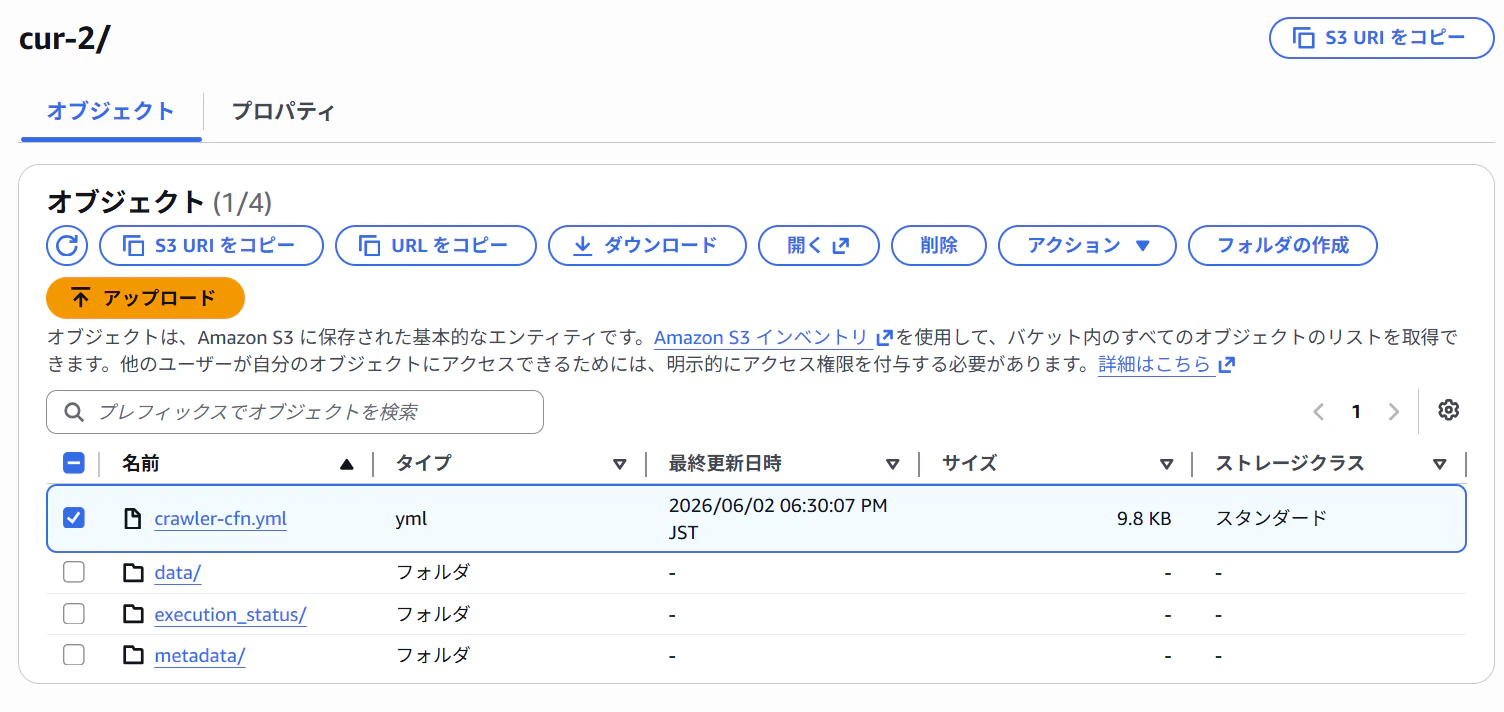
中身は以下です。(一部マスクしてます)
crawler-cfn.yml
AWSTemplateFormatVersion: 2010-09-09
Resources:

  AWSDataExportsDatabase:
    Type: 'AWS::Glue::Database'
    Properties:
      DatabaseInput:
        Name: 'athenadataexports_cur_2'
      CatalogId: !Ref AWS::AccountId


  AWSDataExportsCrawlerComponentFunction:
    Type: 'AWS::IAM::Role'
    Properties:
      AssumeRolePolicyDocument:
        Version: 2012-10-17
        Statement:
          - Effect: Allow
            Principal:
              Service:
                - glue.amazonaws.com
            Action:
              - 'sts:AssumeRole'
      Path: /
      ManagedPolicyArns:
        - !Sub 'arn:${AWS::Partition}:iam::aws:policy/service-role/AWSGlueServiceRole'
      Policies:
        - PolicyName: AWSDataExportsCrawlerComponentFunction
          PolicyDocument:
            Version: 2012-10-17
            Statement:
              - Effect: Allow
                Action:
                  - 'logs:CreateLogGroup'
                  - 'logs:CreateLogStream'
                  - 'logs:PutLogEvents'
                Resource: !Sub 'arn:${AWS::Partition}:logs:*:*:*'
              - Effect: Allow
                Action:
                  - 'glue:UpdateDatabase'
                  - 'glue:UpdatePartition'
                  - 'glue:CreateTable'
                  - 'glue:UpdateTable'
                  - 'glue:ImportCatalogToGlue'
                Resource: '*'
              - Effect: Allow
                Action:
                  - 's3:GetObject'
                  - 's3:PutObject'
                Resource: !Sub 'arn:${AWS::Partition}:s3:::${バケット名}/${プレフィックス}/cur-2/data*'
        - PolicyName: AWSDataExportsKMSDecryption
          PolicyDocument:
            Version: 2012-10-17
            Statement:
              - Effect: Allow
                Action:
                  - 'kms:Decrypt'
                Resource: '*'


  AWSDataExportsCrawlerLambdaExecutor:
    Type: 'AWS::IAM::Role'
    Properties:
      AssumeRolePolicyDocument:
        Version: 2012-10-17
        Statement:
          - Effect: Allow
            Principal:
              Service:
                - lambda.amazonaws.com
            Action:
              - 'sts:AssumeRole'
      Path: /
      Policies:
        - PolicyName: AWSDataExportsCrawlerLambdaExecutor
          PolicyDocument:
            Version: 2012-10-17
            Statement:
              - Effect: Allow
                Action:
                  - 'logs:CreateLogGroup'
                  - 'logs:CreateLogStream'
                  - 'logs:PutLogEvents'
                Resource: !Sub 'arn:${AWS::Partition}:logs:*:*:*'
              - Effect: Allow
                Action:
                  - 'glue:StartCrawler'
                Resource: '*'


  AWSDataExportsCrawler:
    Type: 'AWS::Glue::Crawler'
    DependsOn:
      - AWSDataExportsDatabase
      - AWSDataExportsCrawlerComponentFunction
    Properties:
      Name: AWSDataExportsCrawler-cur-2
      Description: A recurring crawler that keeps your table in Athena up-to-date.
      Role: !GetAtt AWSDataExportsCrawlerComponentFunction.Arn
      DatabaseName: !Ref AWSDataExportsDatabase
      Targets:
        S3Targets:
          - Path: 's3://${バケット名}/プレフィックス/cur-2/data'
            Exclusions:
              - '**.json'
              - '**.yml'
              - '**.sql'
              - '**.csv'
              - '**.gz'
              - '**.zip'
      SchemaChangePolicy:
        UpdateBehavior: UPDATE_IN_DATABASE
        DeleteBehavior: DELETE_FROM_DATABASE


  AWSDataExportsInitializer:
    Type: 'AWS::Lambda::Function'
    DependsOn: AWSDataExportsCrawler
    Properties:
      Code:
        ZipFile: >
          const { GlueClient, StartCrawlerCommand } = require('@aws-sdk/client-glue');
          const response = require('./cfn-response');
          exports.handler = function (event, context, callback) {
            if (event.RequestType === 'Delete') {
              response.send(event, context, response.SUCCESS);
            } else {
              const glue = new GlueClient();
              const input = { Name: 'AWSDataExportsCrawler-cur-2' };
              const command = new StartCrawlerCommand(input);
              glue.send(command, function (err, data) {
                if (err) {
                  const responseData = JSON.parse(this.httpResponse.body);
                  if (responseData['__type'] == 'CrawlerRunningException') {
                    callback(null, responseData.Message);
                  } else {
                    const responseString = JSON.stringify(responseData);
                    if (event.ResponseURL) {
                      response.send(event, context, response.FAILED, { msg: responseString });
                    } else {
                      callback(responseString);
                    }
                  }
                } else {
                  if (event.ResponseURL) {
                    response.send(event, context, response.SUCCESS);
                  } else {
                    callback(null, response.SUCCESS);
                  }
                }
              });
            }
          };
      Handler: 'index.handler'
      Timeout: 30
      Runtime: nodejs22.x
      ReservedConcurrentExecutions: 1
      Role: !GetAtt AWSDataExportsCrawlerLambdaExecutor.Arn


  AWSDataExportsStartCrawler:
    Type: 'Custom::AWSDataExportsStartCrawler'
    Properties:
      ServiceToken: !GetAtt AWSDataExportsInitializer.Arn


  AWSDataExportsS3EventLambdaPermission:
    Type: AWS::Lambda::Permission
    Properties:
      Action: 'lambda:InvokeFunction'
      FunctionName: !GetAtt AWSDataExportsInitializer.Arn
      Principal: 's3.amazonaws.com'
      SourceAccount: !Ref AWS::AccountId
      SourceArn: !Sub 'arn:${AWS::Partition}:s3:::${バケット名}'


  AWSDataExportsS3LambdaExecutor:
    Type: 'AWS::IAM::Role'
    Properties:
      AssumeRolePolicyDocument:
        Version: 2012-10-17
        Statement:
          - Effect: Allow
            Principal:
              Service:
                - lambda.amazonaws.com
            Action:
              - 'sts:AssumeRole'
      Path: /
      Policies:
        - PolicyName: AWSDataExportsS3LambdaExecutor
          PolicyDocument:
            Version: 2012-10-17
            Statement:
              - Effect: Allow
                Action:
                  - 'logs:CreateLogGroup'
                  - 'logs:CreateLogStream'
                  - 'logs:PutLogEvents'
                Resource: !Sub 'arn:${AWS::Partition}:logs:*:*:*'
              - Effect: Allow
                Action:
                  - 's3:PutBucketNotification'
                Resource: !Sub 'arn:${AWS::Partition}:s3:::${バケット名}'


  AWSDataExportsS3Notification:
    Type: 'AWS::Lambda::Function'
    DependsOn:
      - AWSDataExportsInitializer
      - AWSDataExportsS3EventLambdaPermission
      - AWSDataExportsS3LambdaExecutor
    Properties:
      Code:
        ZipFile: >
          const { S3Client, PutBucketNotificationConfigurationCommand } = require('@aws-sdk/client-s3');
          const response = require('./cfn-response');
          exports.handler = function (event, context, callback) {
            const s3 = new S3Client();
            const putConfigRequest = function (notificationConfiguration) {
              return new Promise(function (resolve, reject) {
                const input = {
                  Bucket: event.ResourceProperties.BucketName,
                  NotificationConfiguration: notificationConfiguration,
                };
                const command = new PutBucketNotificationConfigurationCommand(input);
                s3.send(command, function (err, data) {
                  if (err) reject({ msg: this.httpResponse.body.toString(), error: err, data: data });
                  else resolve(data);
                });
              });
            };
            const newNotificationConfig = {};
            if (event.RequestType !== 'Delete') {
              newNotificationConfig.LambdaFunctionConfigurations = [{
                Events: ['s3:ObjectCreated:*'],
                LambdaFunctionArn: event.ResourceProperties.TargetLambdaArn || 'missing arn',
                Filter: { Key: { FilterRules: [{ Name: 'prefix', Value: event.ResourceProperties.ReportKey }] } },
              }];
            }
            putConfigRequest(newNotificationConfig)
              .then(function (result) {
                response.send(event, context, response.SUCCESS, result);
                callback(null, result);
              })
              .catch(function (error) {
                response.send(event, context, response.FAILED, error);
                console.log(error);
                callback(error);
              });
          };
      Handler: 'index.handler'
      Timeout: 30
      Runtime: nodejs22.x
      ReservedConcurrentExecutions: 1
      Role: !GetAtt AWSDataExportsS3LambdaExecutor.Arn


  AWSDataExportsPutS3Notification:
    Type: 'Custom::AWSDataExportsPutS3Notification'
    Properties:
      ServiceToken: !GetAtt AWSDataExportsS3Notification.Arn
      TargetLambdaArn: !GetAtt AWSDataExportsInitializer.Arn
      BucketName: '${バケット名}'
      ReportKey: '${プレフィックス}/cur-2/data'


  AWSDataExportsReportStatusTable:
    Type: 'AWS::Glue::Table'
    DependsOn: AWSDataExportsDatabase
    Properties:
      DatabaseName: athenadataexports_cur_2
      CatalogId: !Ref AWS::AccountId
      TableInput:
        Name: 'execution_status'
        TableType: 'EXTERNAL_TABLE'
        StorageDescriptor:
          Columns:
            - Name: status_code
              Type: 'string'
          InputFormat: 'org.apache.hadoop.hive.ql.io.parquet.MapredParquetInputFormat'
          OutputFormat: 'org.apache.hadoop.hive.ql.io.parquet.MapredParquetOutputFormat'
          SerdeInfo:
            SerializationLibrary: 'org.apache.hadoop.hive.ql.io.parquet.serde.ParquetHiveSerDe'
          Location: 's3://${バケット名}/${プレフィックス}/cur-2/execution_status/'
このテンプレートを利用してスタックを作成すると、Glueのテーブルとクローラーが作成されます。
ただし、今回は複数アカウントから出力したデータを確認するため、プレフィックス部分をアカウントIDにしているのでその部分を少し変更してあげる必要があります。
Quickのアカウントからスイッチロールする用のIAMロール作成
QuickのアカウントからAthenaにアクセスするためのIAMロールを作成します。
信頼ポリシーは以下のように書きます。
{
    "Version": "2012-10-17",
    "Statement": [
        {
            "Effect": "Allow",
            "Principal": {
                "AWS": "arn:aws:iam::${QuickAccountId}:root"
            },
            "Action": "sts:AssumeRole",
            "Condition": {
                "StringLike": {
                    "sts:ExternalId": "arn:aws:quicksight:*:${QuickAccountId}:datasource/*"
                }
            }
        }
    ]
}
ロールにアタッチするポリシーは以下のようにします。
{
    "Version": "2012-10-17",
    "Statement": [
        {
            "Effect": "Allow",
            "Action": [
                "athena:BatchGetQueryExecution",
                "athena:CancelQueryExecution",
                "athena:GetCatalogs",
                "athena:GetExecutionEngine",
                "athena:GetExecutionEngines",
                "athena:GetNamespace",
                "athena:GetNamespaces",
                "athena:GetQueryExecution",
                "athena:GetQueryExecutions",
                "athena:GetQueryResults",
                "athena:GetQueryResultsStream",
                "athena:GetTable",
                "athena:GetTables",
                "athena:ListQueryExecutions",
                "athena:RunQuery",
                "athena:StartQueryExecution",
                "athena:StopQueryExecution",
                "athena:ListWorkGroups",
                "athena:ListEngineVersions",
                "athena:GetWorkGroup",
                "athena:GetDataCatalog",
                "athena:GetDatabase",
                "athena:GetTableMetadata",
                "athena:ListDataCatalogs",
                "athena:ListDatabases",
                "athena:ListTableMetadata"
            ],
            "Resource": [
                "arn:aws:athena:ap-northeast-1:${AggregatedAccountId}:workgroup/${WorkGroupName}",
                "arn:aws:athena:ap-northeast-1:${AggregatedAccountId}:datacatalog/*"
            ]
        },
        {
            "Effect": "Allow",
            "Action": [
                "glue:GetCatalog",
                "glue:GetCatalogs",
                "glue:GetDatabase",
                "glue:GetDatabases",
                "glue:GetTable",
                "glue:GetTables",
                "glue:GetPartition",
                "glue:GetPartitions",
                "glue:BatchGetPartition"
            ],
            "Resource": [
                "arn:aws:glue:ap-northeast-1:${AggregatedAccountId}:catalog",
                "arn:aws:glue:ap-northeast-1:${AggregatedAccountId}:database/*",
                "arn:aws:glue:ap-northeast-1:${AggregatedAccountId}:table/*"
            ]
        },
        {
            "Effect": "Allow",
            "Action": [
                "s3:GetBucketLocation",
                "s3:GetObject",
                "s3:PutObject",
                "s3:AbortMultipartUpload",
                "s3:ListBucket",
                "s3:ListBucketMultipartUploads",
                "s3:ListMultipartUploadParts"
            ],
            "Resource": [
                "arn:aws:s3:::${AggregatedBucketName}",
                "arn:aws:s3:::${AggregatedBucketName}/*",
                "arn:aws:s3:::${AthenaQueryOutputBucket}",
                "arn:aws:s3:::${AthenaQueryOutputBucket}/*"
            ]
        }
    ]
}
権限が足りない場合は適宜調整してください。
ビューの作成
data_というプレフィックスのついたテーブルがアカウント数で来てしまうので、UNIONします。
また、デフォルトのテーブルの列名だと、Quick側の64文字以内の制限とdouble型制限にかかってしまいデータソースの作成に失敗するため、ビューを作成します。
以下のクエリは文字数と型変換を実行します。
CREATE OR REPLACE VIEW "athenadataexports_cur_2"."cur_view" AS
SELECT
  -- ■ 請求情報
  billing_period,
  bill_bill_type,
  bill_billing_entity,
  bill_billing_period_start_date,
  bill_billing_period_end_date,
  bill_invoice_id,
  bill_invoicing_entity,
  bill_payer_account_id,
  bill_payer_account_name,

  -- ■ 明細識別
  identity_line_item_id,
  identity_time_interval,

  -- ■ 使用明細
  line_item_usage_account_id,
  line_item_usage_account_name,
  line_item_product_code,
  line_item_line_item_type,
  line_item_line_item_description,
  line_item_usage_start_date,
  line_item_usage_end_date,
  line_item_usage_type,
  line_item_operation,
  line_item_availability_zone,
  line_item_usage_amount,
  line_item_normalization_factor,
  line_item_normalized_usage_amount,
  line_item_currency_code,
  line_item_unblended_rate,
  line_item_unblended_cost,
  line_item_blended_rate,
  line_item_blended_cost,
  line_item_net_unblended_rate,
  line_item_net_unblended_cost,
  line_item_iam_principal,
  line_item_legal_entity,
  line_item_tax_type,
  line_item_user_identifier,
  line_item_resource_id,

  -- ■ 製品情報(MAP<varchar,varchar> → JSON文字列に変換)
  json_format(cast(product AS JSON))         AS product,
  product_comment,
  product_fee_code,
  product_fee_description,
  product_from_location,
  product_from_location_type,
  product_from_region_code,
  product_instance_family,
  product_instance_type,
  product_instancesku,
  product_location,
  product_location_type,
  product_operation,
  product_pricing_unit,
  product_product_family,
  product_region_code,
  product_servicecode,
  product_sku,
  product_to_location,
  product_to_location_type,
  product_to_region_code,
  product_usagetype,

  -- ■ 料金情報
  pricing_currency,
  pricing_lease_contract_length,
  pricing_offering_class,
  pricing_public_on_demand_cost,
  pricing_public_on_demand_rate,
  pricing_purchase_option,
  pricing_rate_code,
  pricing_rate_id,
  pricing_term,
  pricing_unit,

  -- ■ 割引情報(MAP<varchar,double> → JSON文字列に変換)
  json_format(cast(discount AS JSON))              AS discount,
  discount_bundled_discount,
  discount_total_discount,

  -- ■ コストカテゴリ・タグ(MAP<varchar,varchar> → JSON文字列に変換)
  json_format(cast(cost_category AS JSON))   AS cost_category,
  json_format(cast(resource_tags AS JSON))   AS resource_tags,
  json_format(cast(tags AS JSON))            AS tags,

  -- ■ リザーベーション(RI)
  reservation_amortized_upfront_cost_for_usage
    AS rsv_amortized_upfront_cost_for_usage,
  reservation_amortized_upfront_fee_for_billing_period
    AS rsv_amortized_upfront_fee_for_billing_period,
  reservation_availability_zone
     AS rsv_availability_zone,
  reservation_effective_cost
     AS rsv_effective_cost,
  reservation_end_time
     AS rsv_end_time,
  reservation_modification_status
     AS rsv_modification_status,
  reservation_number_of_reservations
     AS rsv_number_of_reservations,
  reservation_recurring_fee_for_usage
     AS rsv_recurring_fee_for_usage,
  reservation_reservation_a_r_n
     AS rsv_reservation_a_r_n,
  reservation_start_time
     AS rsv_start_time,
  reservation_subscription_id
     AS rsv_subscription_id,
  reservation_total_reserved_normalized_units
     AS rsv_total_reserved_normalized_units,
  reservation_total_reserved_units
     AS rsv_total_reserved_units,
  reservation_units_per_reservation
     AS rsv_units_per_reservation,
  reservation_normalized_units_per_reservation
     AS rsv_normalized_units_per_reservation,
  reservation_unused_quantity
     AS rsv_unused_quantity,
  reservation_unused_normalized_unit_quantity
     AS rsv_unused_normalized_unit_quantity,
  reservation_unused_recurring_fee
     AS rsv_unused_recurring_fee,
  reservation_unused_amortized_upfront_fee_for_billing_period
     AS rsv_unused_amortized_upfront_fee_for_billing_period,
  reservation_upfront_value
     AS rsv_upfront_value,
  reservation_net_amortized_upfront_cost_for_usage
    AS rsv_net_amort_upfront_cost_usage,
  reservation_net_amortized_upfront_fee_for_billing_period
    AS rsv_net_amort_upfront_fee_billing,
  reservation_net_effective_cost
    AS rsv_net_effective_cost,
  reservation_net_recurring_fee_for_usage
    AS rsv_net_recurring_fee_usage,
  reservation_net_unused_recurring_fee
    AS rsv_net_unused_recurring_fee,
  reservation_net_unused_amortized_upfront_fee_for_billing_period
    AS rsv_net_unused_amort_upfront_fee,
  reservation_net_upfront_value
    AS rsv_net_upfront_value,

  -- ■ Savings Plans(SP)
  savings_plan_savings_plan_a_r_n
    AS sp_savings_plan_a_r_n,
  savings_plan_savings_plan_rate
    AS sp_savings_plan_rate,
  savings_plan_savings_plan_effective_cost
    AS sp_savings_plan_effective_cost,
  savings_plan_end_time
    AS sp_end_time,
  savings_plan_instance_type_family
    AS sp_instance_type_family,
  savings_plan_offering_type
    AS sp_offering_type,
  savings_plan_payment_option
    AS sp_payment_option,
  savings_plan_purchase_term
    AS sp_purchase_term,
  savings_plan_region
    AS sp_region,
  savings_plan_start_time
    AS sp_start_time,
  savings_plan_total_commitment_to_date
    AS sp_total_commitment_to_date,
  savings_plan_used_commitment
    AS sp_used_commitment,
  savings_plan_recurring_commitment_for_billing_period
    AS sp_recurring_commitment_for_billing_period,
  savings_plan_amortized_upfront_commitment_for_billing_period
    AS sp_amortized_upfront_commitment_for_billing_period,  savings_plan_net_savings_plan_effective_cost
    AS sp_net_effective_cost,
  savings_plan_net_amortized_upfront_commitment_for_billing_period
    AS sp_net_amort_upfront_commit_billing,
  savings_plan_net_recurring_commitment_for_billing_period
    AS sp_net_recurring_commit_billing

FROM "athenadataexports_cur_2"."data";
Crawler -> UNIONで結合 -> カラム名の変更と型変換をスケジューリングします。
(テンプレートを参照)
Quickアカウントでの作業
Quickのアカウントでは以下の作業をします。
- 集約アカウントのIAMロールにスイッチするIAMロールを作成
- QuickSightでデータソースを作成
こちらもCFnテンプレートを用意したので、参考にしてください。
quick-account-resource.yaml
AWSTemplateFormatVersion: 2010-09-09

Parameters:
  AggregatedAccountId:
    Type: String
    Description: Account ID of the aggregated account
  WorkGroupName:
    Type: String
    Description: Athena workgroup name to be used in QuickSight data source
    Default: AWSDataExportsAthenaWorkGroup
  QuickUserArn:
    Type: String
    Description: ARN of the QuickSight user to be granted permissions on the data source

Resources:
  QsAthenaCrossAccountRole:
    Type: 'AWS::IAM::Role'
    Properties:
      RoleName: qs-athena-cross-account-role
      AssumeRolePolicyDocument:
        Version: 2012-10-17
        Statement:
          - Effect: Allow
            Principal:
              Service: quicksight.amazonaws.com
            Action:
              - 'sts:AssumeRole'
            Condition:
              StringLike:
                'aws:SourceArn': !Sub 'arn:aws:quicksight:*:${AWS::AccountId}:datasource/*'
                'aws:SourceAccount': !Ref AWS::AccountId

  QsAthenaCrossAccountPolicy:
    Type: 'AWS::IAM::Policy'
    Properties:
      PolicyName: QsAthenaCrossAccountPolicy
      Roles:
        - !Ref QsAthenaCrossAccountRole
      PolicyDocument:
        Version: 2012-10-17
        Statement:
          - Effect: Allow
            Action:
              - 'sts:AssumeRole'
            Resource: !Sub 'arn:aws:iam::${AggregatedAccountId}:role/qs-athena-consumer-role'
            Condition:
              StringLike:
                'sts:ExternalId': !Sub 'arn:aws:quicksight:*:${AWS::AccountId}:datasource/*'

  QsDataSource:
    DependsOn:
      - QsAthenaCrossAccountRole
    Type: AWS::QuickSight::DataSource
    Properties:
      AwsAccountId: !Ref AWS::AccountId
      DataSourceId: !Sub
        - 'qs-ds-${UUID}'
        - UUID: !Select [2, !Split ['/', !Ref 'AWS::StackId']]
      DataSourceParameters:
        AthenaParameters:
          WorkGroup: !Ref WorkGroupName
          RoleArn: !GetAtt QsAthenaCrossAccountRole.Arn
          ConsumerAccountRoleArn: !Sub 'arn:aws:iam::${AggregatedAccountId}:role/qs-athena-consumer-role'
      Name: 'CUR Data Source'
      Type: 'ATHENA'
      Permissions:
        - Principal: !Ref QuickUserArn
          Actions:
            - 'quicksight:DescribeDataSource'
            - 'quicksight:DescribeDataSourcePermissions'
            - 'quicksight:PassDataSource'
            - 'quicksight:UpdateDataSource'
            - 'quicksight:DeleteDataSource'
            - 'quicksight:UpdateDataSourcePermissions'
集約アカウントのIAMロールにスイッチするIAMロールを作成
Quickのアカウントにスイッチ用のIAMロールを作成します。
信頼ポリシーは以下のようにします。
{
    "Version": "2012-10-17",
    "Statement": [
        {
            "Effect": "Allow",
            "Principal": {
                "Service": "quicksight.amazonaws.com"
            },
            "Action": "sts:AssumeRole",
            "Condition": {
                "StringLike": {
                    "aws:SourceArn": "arn:aws:quicksight:*:${QuickAccountId}:datasource/*",
                    "aws:SourceAccount": "${QuickAccountId}"
                }
            }
        }
    ]
}
ロールにアタッチするポリシーは以下のようにします。
{
    "Version": "2012-10-17",
    "Statement": [
        {
            "Effect": "Allow",
            "Action": "sts:AssumeRole",
            "Resource": "arn:aws:iam::${AggregatedAccountId}:role/qs-athena-consumer-role",
            "Condition": {
                "StringLike": {
                    "sts:ExternalId": "arn:aws:quicksight:*:${QuickAccountId}:datasource/*"
                }
            }
        }
    ]
}
Quickでデータソースを作成
クロスアカウントの場合Quickのコンソールからではデータソースが作成できないため、CLIなどを使って作成します。
私はBoto3を使用したので、参考として載せておきます。
import boto3

client = boto3.client('quicksight', region_name='ap-northeast-1')

response = client.create_data_source(
AwsAccountId='${QuickAccountId}',
DataSourceId='cur-data-source',
Name='Athena Cross Account - Consumer Data',
Type='ATHENA',
DataSourceParameters={
"AthenaParameters": {
"WorkGroup": "${WorkGroupName}",
"RoleArn": "arn:aws:iam::${QuickAccountId}:role/qs-athena-cross-account-role",
"ConsumerAccountRoleArn": "arn:aws:iam::${AggregatedAccountId}:role/qs-athena-consumer-role"
}
}
)

response = client.update_data_source_permissions(
    AwsAccountId='${QuickAccountId}',
    DataSourceId='cur-data-source',
    GrantPermissions=[
        {
            'Principal': '${QuickUserARN}',
            'Actions': ["quicksight:DescribeDataSource","quicksight:DescribeDataSourcePermissions","quicksight:PassDataSource","quicksight:UpdateDataSource","quicksight:DeleteDataSource","quicksight:UpdateDataSourcePermissions"]
        },
    ]
)
Quickでの作業
Quickのアカウントでデータソースを作成したら、あとはQuick側で分析を作成するだけです。
データセットの作成
Quickのコンソールからデータセットを作成します。
データソースは先ほど作成したものを選択し、テーブルはビューを選択します。
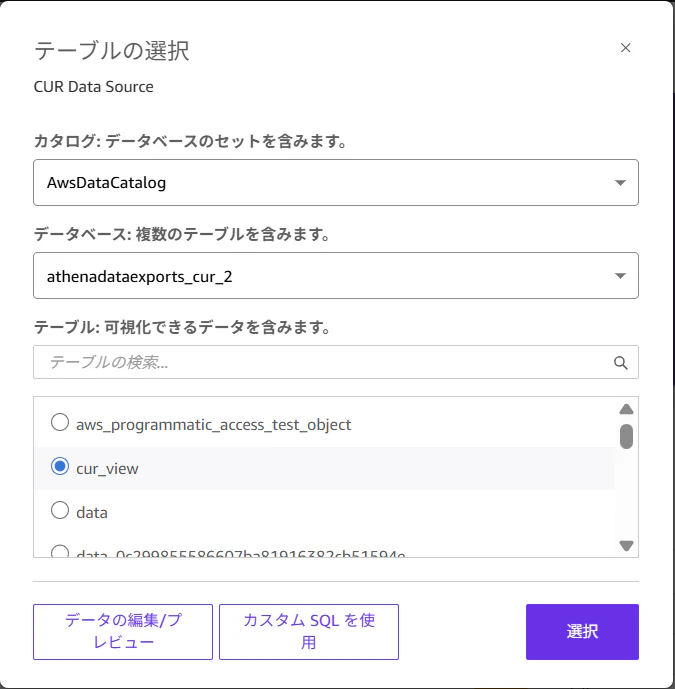
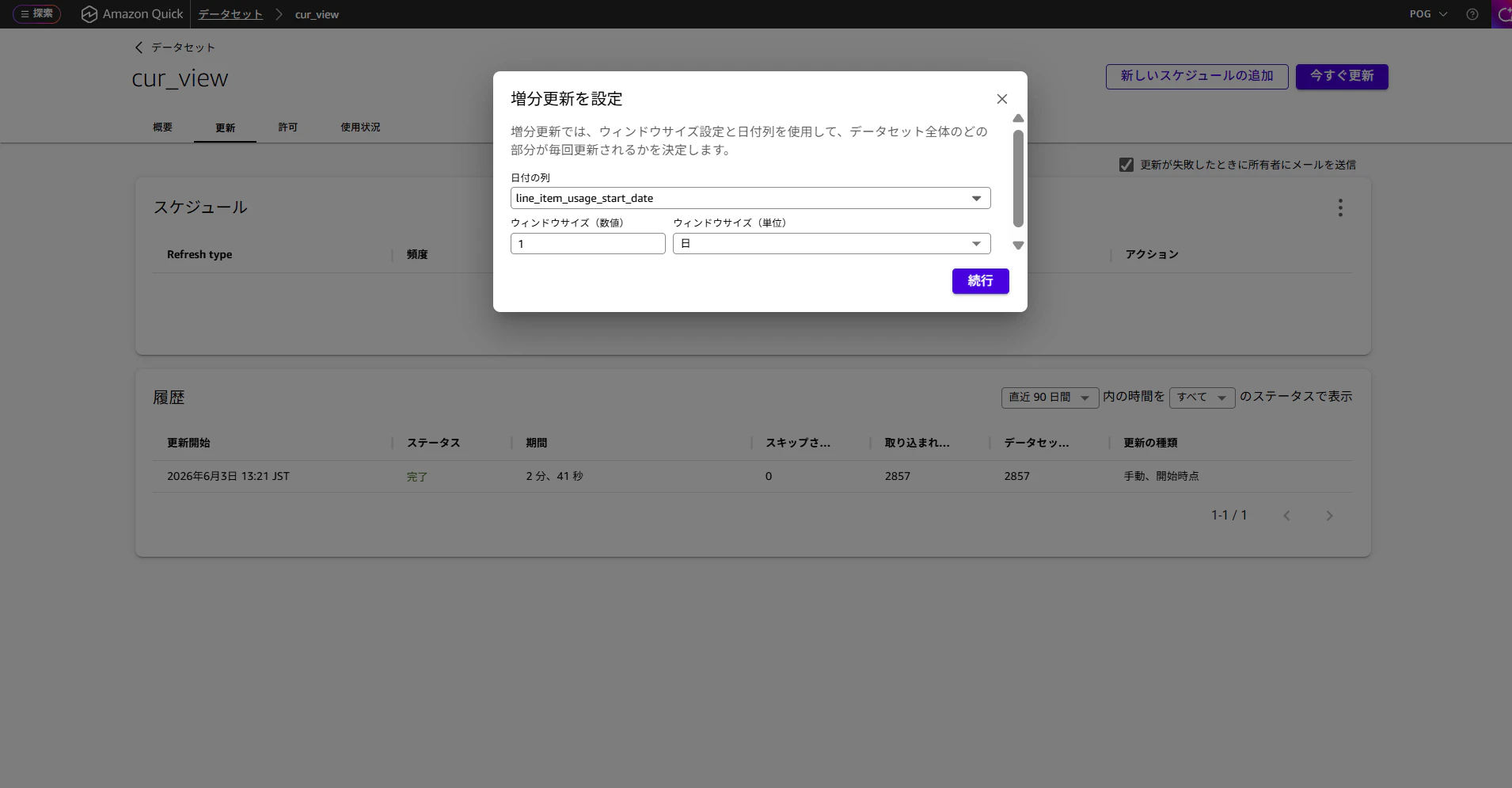
更新のスケジュールも追加します。
毎日10:00に増分更新にしてみます。
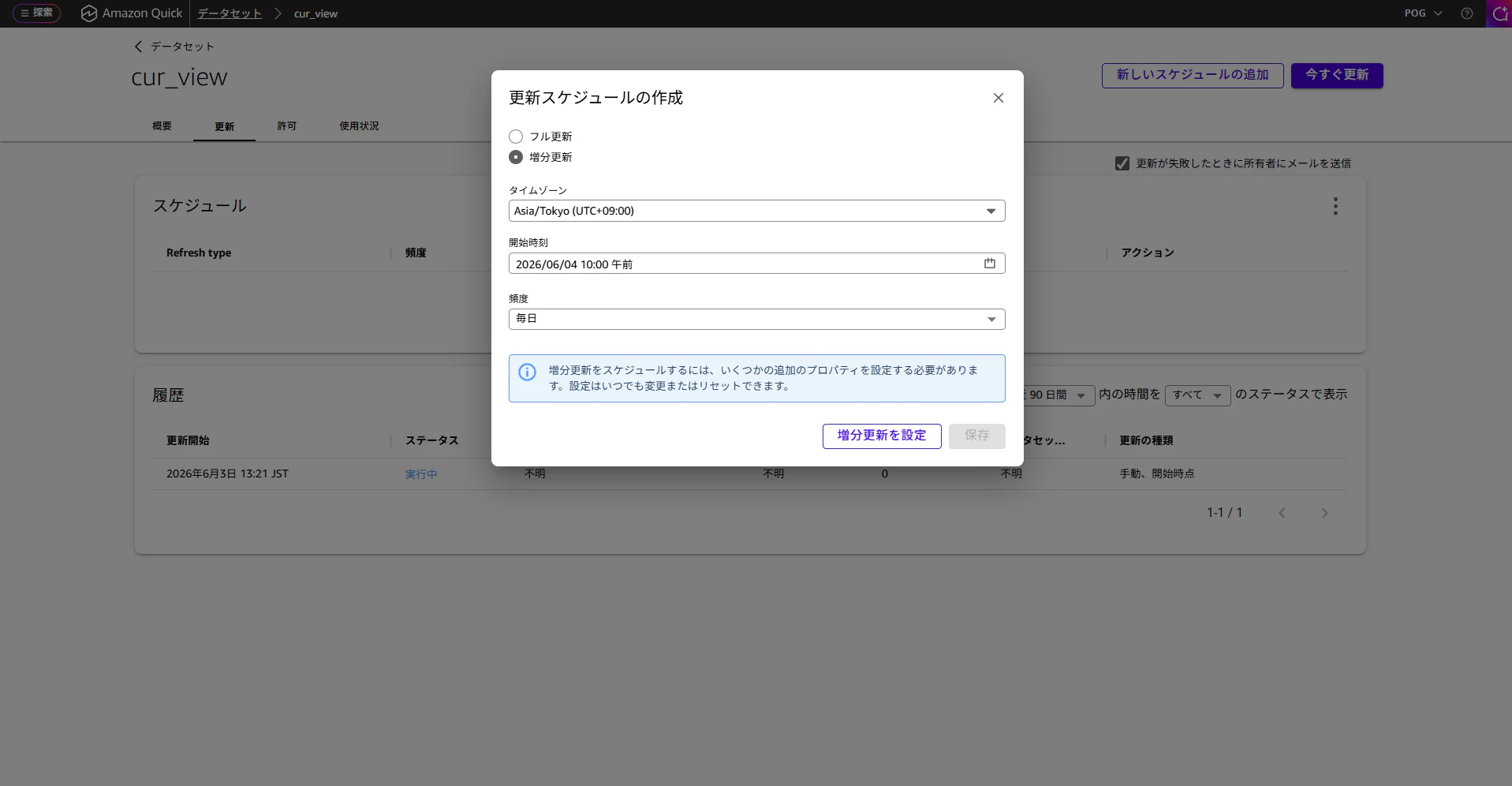
日付の列はline_item_usage_start_dateにしてみます。
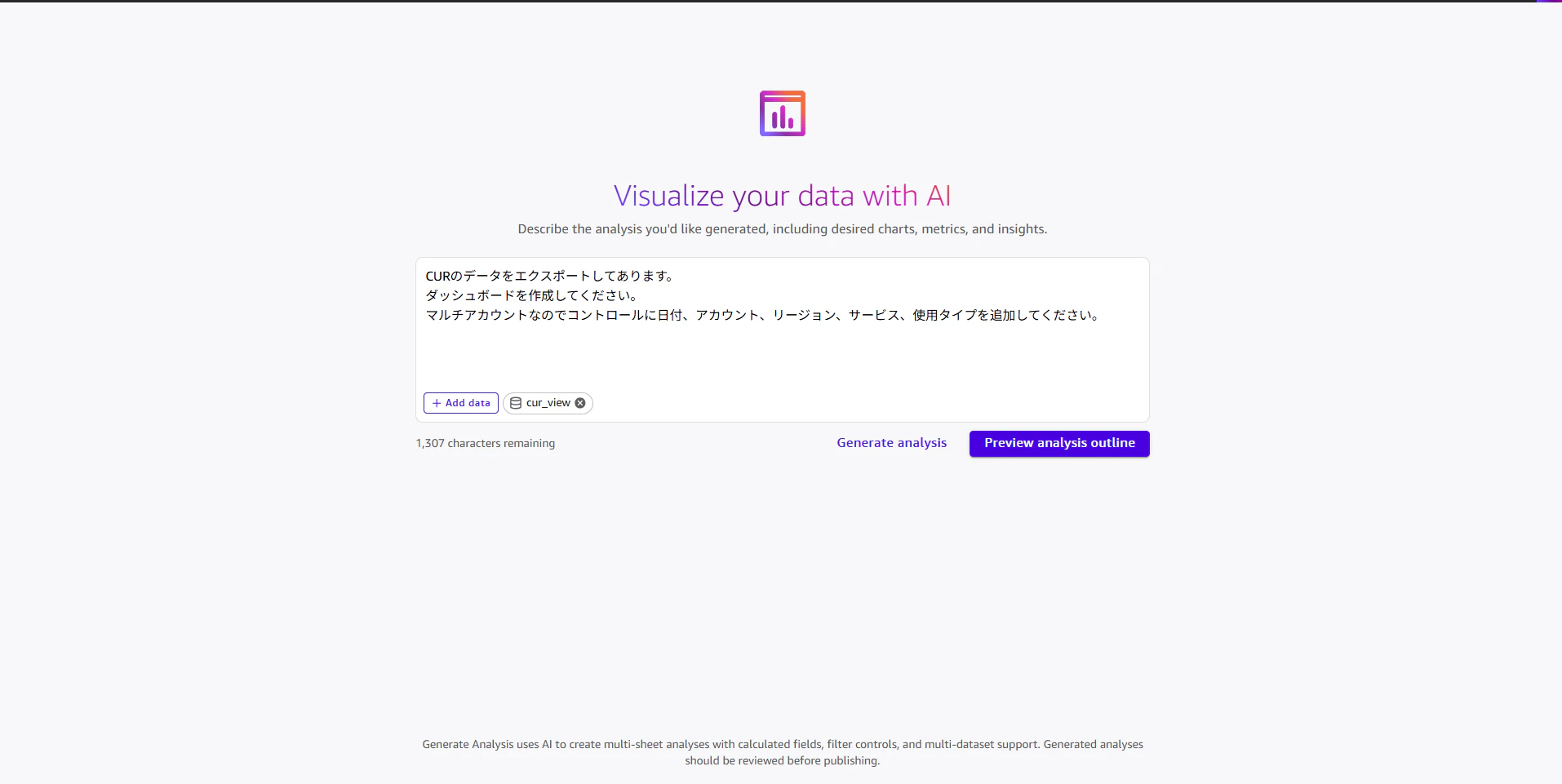
分析の作成
せっかくQuickを使っているので、AIで生成してみましょう。
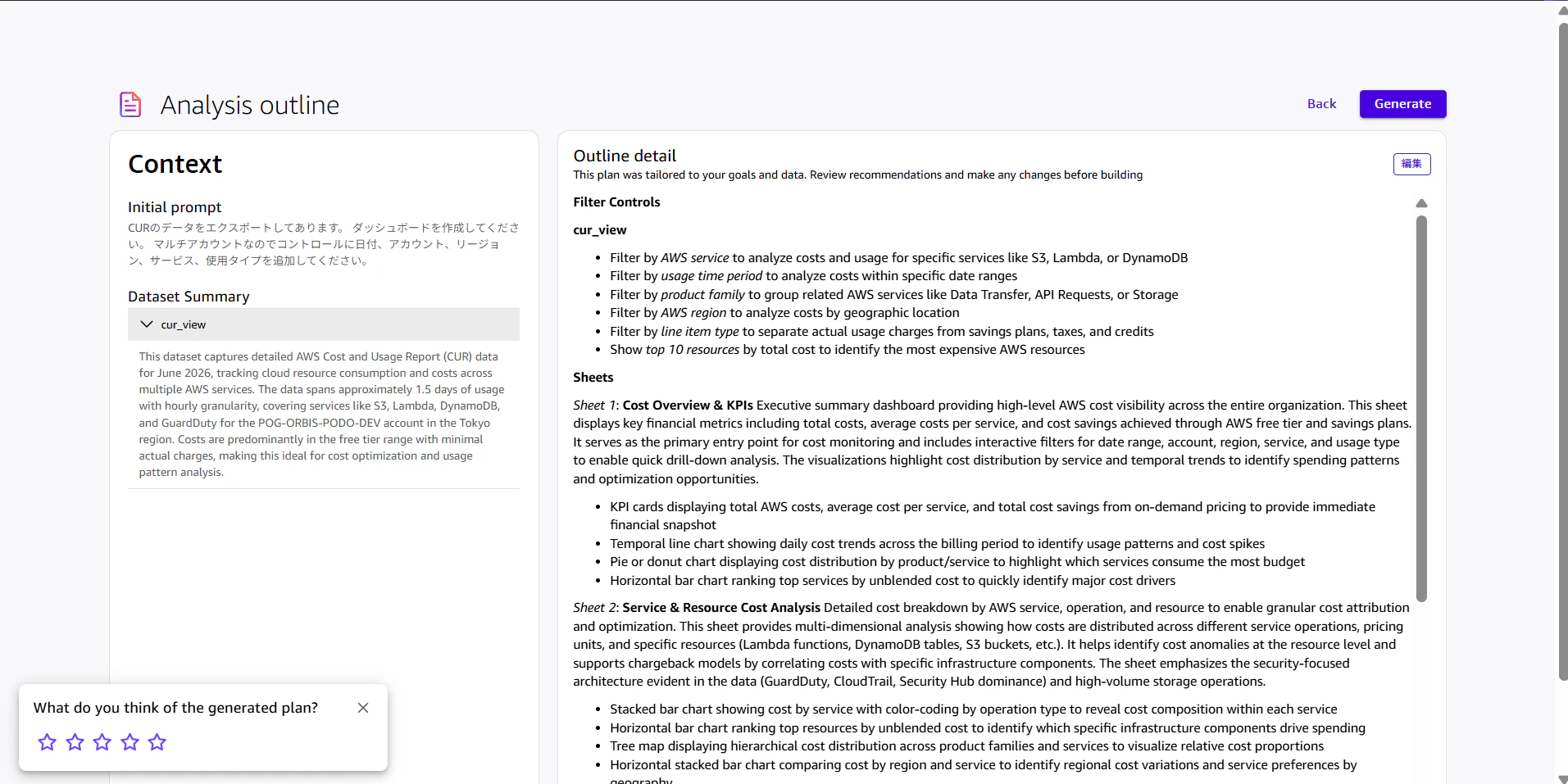
アウトラインはこんな感じで生成されます。
作成されたのはこんな感じです!
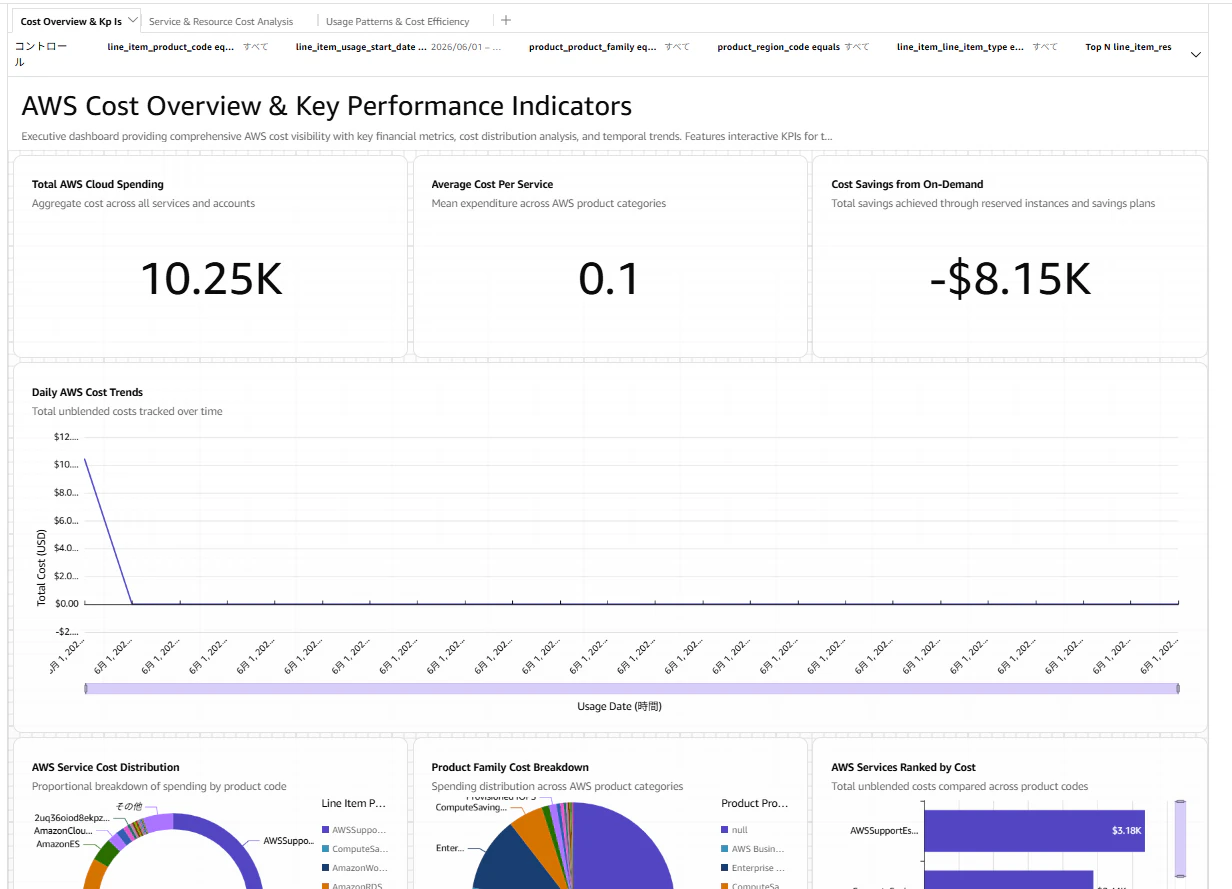
アカウントIDをコントロールに入れるようにリクエスト出したのにやってくれてない。。。
Claudeの分析
今回これを作成する背景に、Claude(Bedrock)の利用者ごとの費用を知りたいという目的がありました。
詳細は以下のブログで紹介されているので確認してみてください。
弊社ではIAM Identity Centerを利用しているので、計算フィールドを使って、メールアドレスを抽出します。
split({line_item_iam_principal}, '/', -1)
これでユーザーごとの費用がわかるようになりました!
終わりに
今回は、CURを複数アカウントから集約してQuickで分析するための仕組みを構築してみました。
つまりポイントがてんこ盛りだったのでどなたかの参考になれば幸いです。
弊社では一緒に働く仲間を募集中です!
現在、様々な職種を募集しております。
カジュアル面談も可能ですので、ご連絡お待ちしております!
募集内容等詳細は、是非採用サイトをご確認ください。