
この記事は Emacs 精進 Advent Calendar 2025 3 日目の投稿です。
背景
oantolin/embark は Emacs でのワークフローを大きく変えるパッケージです。 Fifteen ways to use Embark のように、あらゆる場面で使い倒している人もいるとか。
かくいう僕は全く Embark を乗りこなせていないため、改めて向き合ってみます。
Embark 入門
Embark とは
Embark の主な API は embark-act です。
embark-act は、事前に用意した action を、任意のコンテキストに差し込んで使えるコマンドという印象です。個々のパッケージに対して設定しなくても、外部から action を追加できる点が優れた点なのかと思います。
embark-act のキーバインド
embark-act のバインドには C-. が推奨されていますが、ターミナル上の Emacs では Ctrl + 記号類を正しく入力できません。ひとまず minibuffer 上では C-s としました:
(leaf embark
  :init
  (keymap-set minibuffer-mode-map "C-s" #'embark-act))

(leaf embark-consult
  :hook
  (embark-collect-mode-hook . consult-preview-at-point-mode))
なぜ
:initにする必要があるか (なぜ:bindでは動作しないのか) は未確認です。
Embark action を見やすくする
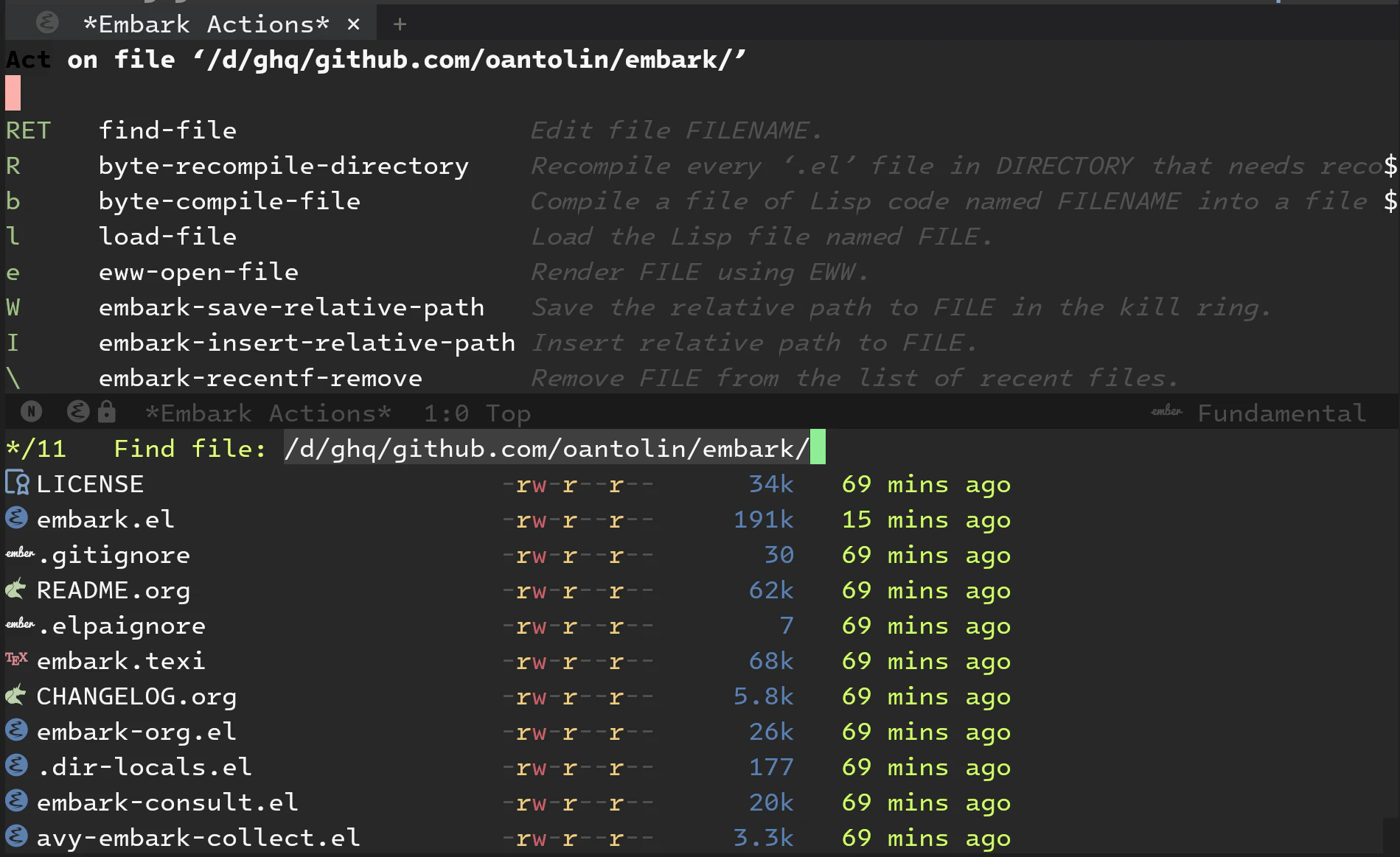
find-file 中に embark-act を呼び出しすると、以下のように *Embark Actions* が表示します。非常に見づらい上に、一部のキーバインディングしか表示しませんでした:
which-key で見る
Wiki にある通り which-key を使うと、動作が軽量な上に、より多くのキーバインドを表示できました:
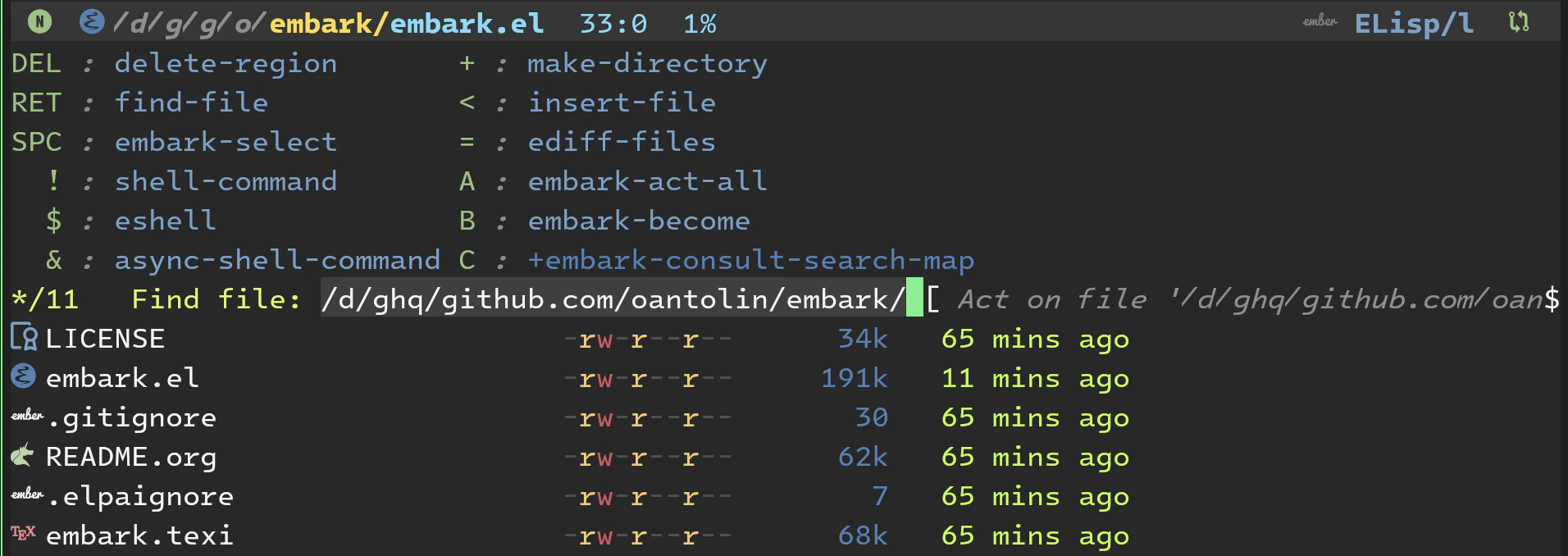
とはいえ全てのキーバインドを表示してくれるわけでもなさそうです。しかも厄介なことに、 which-key-show-next-page-cycle のバインド (C-h C-n) が embark-act 上では潰れています。
embark-bindings で見る
embark-act 中に embark-bindings を呼ぶと、 embark aciton を completing-read から選択できます:

これを見て Embark のキーバインドを理解して行きたいと思います。
Minibuffer 関連のナビゲーション
大まかに以下の操作性を希望します:
-
Minibuffer を開いたまま他のバッファに移動したい (
other-window) -
Minibuffer を起動するコマンド間を移動したい
-
find-fileとswitch-to-bufferを相互に移動したい (embark-become) -
find-fileでフルパスを表示したい: -
find-fileとconsult-ripgrepを相互に移動したい (embark-become)
-
find-file を使いたい
find-file はプロンプト中のテキストがフルパスであり、 CWD 相当のファイルを絞り込みできます:

一方、 consult-find-file はサブディレクトリを含めた再帰的な検索を行い、 CWD の変更に相当する操作がありません。
find-file において consult-preview-key を有効化する
Consult Wiki にある consult-find-file-with-preview 関数を read-file-name-function にすると、プレビュー機能付きの find-file になります:
https://github.com/minad/consult/wiki#previewing-files-in-find-file
(leaf consult
  :custom
  (consult-preview-key  . "C-l")
  ;; (consult-preview-key  . "any") ;; always show preview
  :init
  (progn ;; `find-file' with Consult preview
    (setq read-file-name-function #'consult-find-file-with-preview)
    (defun consult-find-file-with-preview (prompt &optional dir default mustmatch initial pred)
      (interactive)
      (require 'consult)
      (let* ((default-directory (or dir default-directory))
             (minibuffer-completing-file-name t)
             ;; Use the current directory as initial input if none provided
             (initial (or initial (abbreviate-file-name default-directory))))
        (consult--read #'read-file-name-internal
                       :state (consult--file-state)
                       :prompt prompt
                       :initial initial
                       :require-match mustmatch
                       :predicate pred)))))
Wiki 版と異なり Enter キーでファイルを開ける他、従来の
find-fileと同様に入力欄にフルパスを表示しています。
Preview: バッファを表示できています:

以前はこの設定無しでも preview を表示できていましたが、 Emacs か consult のバージョンが上がると、上記の設定が必要になりそうです。
Consult preview で行番号を表示する
以下の設定で、プレビューにおいても行番号を表示しています:
(global-display-line-numbers-mode)
(add-to-list 'consult-preview-allowed-hooks 'global-display-line-numbers-mode)
embark-become 経由の find-file
embark-become を使うと、 minibuffer を起動するコマンド同士を移動できます。たとえば find-file と switch-to-buffer を移動することもできます。
しかし embark-become から起動した find-file は、 CWD を基準とした検索になっており、やや考え方が異なるように見えました:

以下の設定により、いつものフルパスの find-file にできました:
(progn ;; Show full path in `find-file' after `embark-become'
  (defun my-embark-become-prepend-default-dir (orig-fun command input)
    "Prepend default-directory to INPUT when COMMAND is file-related."
    (if (and (memq command '(find-file find-file-other-window
                                       find-file-other-frame find-file-literally))
             (not (string-prefix-p (expand-file-name default-directory)
                                   (expand-file-name input))))
        (let ((dir-with-slash (file-name-as-directory default-directory)))
          (if (equal input "")
              (funcall orig-fun command dir-with-slash)
            (funcall orig-fun command (expand-file-name input dir-with-slash))))
      (funcall orig-fun command input)))

  (advice-add 'embark--become-command :around
              #'my-embark-become-prepend-default-dir)))
[未] find-file と grep を行き来する
理想的には find-file で CWD を変更し、他の minibuffer コマンドに移行できれば良いのですが、そこそこ大変そうです。
find-file を閉じずに RET
embark-act 中の RET を minibuffer を閉じずに confirm する機能にします:
;; leaf ブロックに追加
:custom
(embark-quit-after-action . nil)
other-window で開いたウィンドウに移動できます。副作用があったらすみません。
VSCode のサイドバーは検索結果を保持できて良さそうですが、 Emacs の minibuffer も開きっぱなしで作業できるようになりました。もちろん embark-export で退避させても良く、 VSCode とは違った方法で快適な環境を構築できたのではないかと思います。

this-command について
embark は minibuffer 突入時の this-command の値を embark--command に記録しています。 embark-become ではこの値を見て、何のコマンドから移動しようとしているか判定します。
lambda 関数が交じると this-command がぐちゃぐちゃになり、 embark-become の選択肢が表示されなくなります。最終手段としては、以下のように this-command を偽れば良さそうです:
" gr"
(lambda ()
  (interactive)
  (let ((this-command 'consult-ripgrep))
    (consult-ripgrep "." " . ")))
まとめ
再び Embark に入門しました。 embark-act のキーバインドを which-key で表示するのが軽快で良いかと思います。
find-file を積極的に使ったり、 embark-become で minibuffer コマンドを切り替えらえるようになりました。理想としては、任意の minibuffer コマンドの CWD を find-file で変更できると良さそうですが、まだまだ設定を積み重ねる必要がありそうです。
それでは 3 日遅れの投稿となってしまいましたが、次の記事でお会いしましょう。