
AutoScreenShot
Windows 向けの自動スクリーンショットアプリ(Go 製)です。
指定範囲をキャプチャし、キー操作ごとに JPG を保存し、終了後に PDF にまとめます。
電子アプリで買った本や連続した画像データなどを個人的に利用するためにPDF化したいけど操作が大変
スクショ→キー信号→スクショ→キー信号 → … → pdf化みたいなのないかな…
(RPAあるけどなんかうまく作れなかった…)
そのような不便を解決するために作成しました。
ダウンロード
Releases にからexeファイルをダウンロードできます(windowsのみ):
-
AutoScreenShot-windows-amd64.exe(64bit Intel/AMD) -
AutoScreenShot-windows-arm64.exe(64bit ARM)
使い方
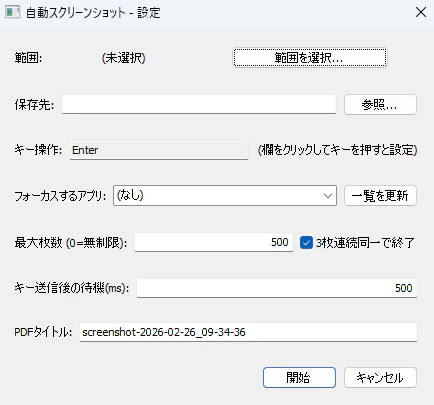
- 起動すると設定ダイアログが開きます。
- 「範囲を選択...」 をクリックし、画面に表示される半透明オーバーレイ上で マウスドラッグ してキャプチャしたい範囲を指定します(Esc でキャンセル)。
- 保存先 に JPG/PDF を保存するフォルダを入力するか「参照...」で選択します。
-
キー操作 に、1枚キャプチャするたびに送信するキーを指定します(例:
Enter,Tab,Ctrl+C,PageDown)。 - 最大枚数(0 で無制限)と 「3枚連続同一で終了」 で終了条件を設定します。
- 「開始」 を押すと、対象アプリをアクティブにした状態でキャプチャが始まります。
- 終了後、指定フォルダに
screenshot_00001.jpg… とscreenshots.pdfが出力されます。
実動作
