
前置き
- 2025/07/15にnuxt4が正式リリースされた (https://nuxt.com/blog/v4)
- 後方互換ありとのことなので、フォルダ構成のみ気をつければvuetify3も動作可能。
- とりあえず、既存のvuetify3アプリケーション構築手順でうまく、nuxt4/vuetify3環境が構築できるか検証してみた。
nuxt4インストール
-
npm create nuxt@latest nuxt4_vuetify3
- npm installはcreate nuxt内部で実行されるため明示的実行は不要。
node ➜ /workspaces/nodejs_typescript $ npm create nuxt@latest nuxt4_vuetify3 Need to install the following packages: create-nuxt@3.26.3 Ok to proceed? (y) ・・・snip・・・ ✨ Nuxt project has been created with the v4 template. Next steps: › cd nuxt4_vuetify3 nuxi 5:41:44 AM › Start development server with npm run dev -
npm run dev
- nuxt 4が起動していることを確認
node ➜ /workspaces/nodejs_typescript $ cd nuxt4_vuetify3/
node ➜ /workspaces/nodejs_typescript/nuxt4_vuetify3 (master) $ ls
app  node_modules  nuxt.config.ts  package.json  package-lock.json  public  README.md  tsconfig.json
node ➜ /workspaces/nodejs_typescript/nuxt4_vuetify3 (master) $ npm run dev

> dev
> nuxt dev
Nuxt 4.0.0 with Nitro 2.12.0

・・・snip・・・

✔ Vite client built in 21ms
vuetifyインストール
-
vuetify, vite-plugin-vuetifyをインストール
-
注意:vuetify公式サイトでは、vuetify-nuxt-module を利用したインストール方法がオプションで紹介されているが、現状、以下のように脆弱性が検出される。vuetify-nuxt-module自体が依存するライブラリ(esbuild)からの検出で、本件バグ報告済み#303だが、対応にはまだ時間がかかりそう。
node ➜ /workspaces/nodejs_typescript/nuxt_vuetify (master) $ npm audit # npm audit report esbuild <=0.24.2 Severity: moderate esbuild enables any website to send any requests to the development server and read the response - https://github.com/advisories/GHSA-67mh-4wv8-2f99 fix available via npm audit fix --force Will install vuetify-nuxt-module@0.16.1, which is a breaking change node_modules/importx/node_modules/esbuild importx 0.0.2 - 0.3.11 || 0.4.2 - 0.5.1 Depends on vulnerable versions of esbuild node_modules/importx unconfig 0.4.0 - 0.4.5 || 0.5.2 - 0.5.5 Depends on vulnerable versions of importx node_modules/unconfig vuetify-nuxt-module >=0.17.0 Depends on vulnerable versions of unconfig node_modules/vuetify-nuxt-module 4 moderate severity vulnerabilities -
vite-plugin-vuetifyはviteビルド時にしか参照されないためDオプション(devDependencies)とする。
-
vuetifyもSSR環境が前提の場合、同様にDオプション(devDependencies)を指定してインストールする。
node ➜ /workspaces/nodejs_typescript/nuxt4_vuetify3 (master) $ npm i -D vuetify vite-plugin-vuetify

added 9 packages, and audited 772 packages in 15s

175 packages are looking for funding
run `npm fund` for details

found 0 vulnerabilities
-
-
mdi@fontをインストール
- fontだけでなく、mdiアイコンなどもインストールされる。
node ➜ /workspaces/nodejs_typescript/nuxt4_vuetify3 (master) $ npm i @mdi/font added 1 package, and audited 773 packages in 1s 175 packages are looking for funding run `npm fund` for details found 0 vulnerabilities -
vuetifyサイトに従い、nuxt.config.ts, app/plugins/vuetify.ts, app/app.vueを編集する。
- plugins, app.vueのフォルダ配置がnuxt4で変更されていることに注意。
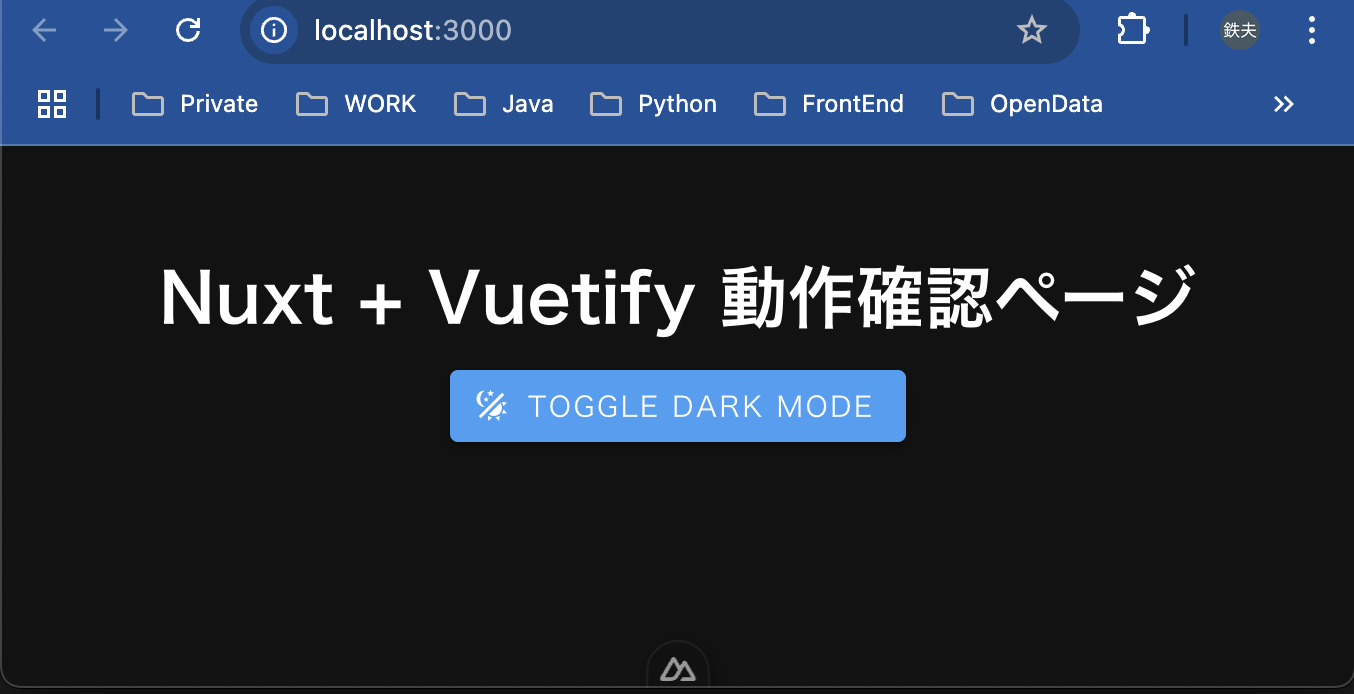
vuetify、mdiアイコンの正常インストールを確認するトップページを作成
-
トップページ(app/app.vue)を編集し、mdiアイコン、vuetifyの基本動作が確認できるページとする。
-
構成要素
要素 内容 <v-app>Vuetify を使う際のルートコンテナ。必須 <v-main>レイアウト内でのメインコンテンツを指定 <v-container>レスポンシブな余白付きのコンテナ <v-btn>Vuetify のボタン。色・アイコンなどで装飾 <v-icon>mdi アイコンを使って、Vuetify で表示確認 useTheme()Vuetify 3 のダーク/ライト切り替え用 Composition API -
app.vue
<template> <v-app> <v-main> <v-container class="text-center mt-10"> <h1 class="text-h4 font-weight-bold mb-4">Nuxt + Vuetify 動作確認ページ</h1> <v-btn color="primary" @click="toggleDark"> <v-icon start>mdi-theme-light-dark</v-icon> Toggle Dark Mode </v-btn> </v-container> </v-main> </v-app> </template> <script setup> import { useTheme } from 'vuetify' const theme = useTheme() const toggleDark = () => { const current = theme.global.name.value const next = current === 'light' ? 'dark' : 'light' theme.change(next) } </script> -
ボタン押下でテーマの切り替え

考察
- nuxt4/vuetify3環境を構築すること自体は特に問題なさそう。
- appフォルダ構成の変更だけ意識すれば特に問題はなかったが、以下注意点があった。
- 「npm create nuxt」にて、latestタグを明示的に付けないとver3がインストールされてしまう。
- nuxt3/vuetify3からの従来の注意点として以下二点
- vuetify公式の案内にあるvuetify-nuxt-moduleによるインストールは脆弱性が混入されるため避けるべし。
- SSR/Vite環境においては、vuetify, vite-plugin-vuetifyのインストールはdevDependenciesにすべき。
- コンポーネント動作など、これから色々問題点が露わになってくると思います。安定するのはいつになるか?