
AWSの無料枠で出来る範囲のチュートリアルを ChatGPT に示して頂いたので、試してみた経過を簡単にまとめてみました。
AWS等の実際の画面や操作はどんな感じか知りたい方を読者対象としているつもりです。
著者はAWS クラウドプラクティショナー、ソリューションアーキテクト アソシエイト という資格を取得済みで「AWSってなんぞや?」という概要を知識としてある程度理解しているが、実際にAWSの画面を触ったことが無いという状態でAWSのチュートリアルをこなしていくという状況です。
今回の内容としては、Terraform で コードをモジュール化(役割ごとに分割) を目標にしたいと思います。
Terraform をモジュール化
🧠 目的
VPC / Subnet / SG / ALB / EC2 を全部モジュール化
→ main.tf は“呼び出しだけ”
🌱 モジュール化のメリット
・再利用できる
・構造が理解しやすい
・実務そのもの
📁 ディレクトリ構成(完成形)
terraform-project/
├── main.tf
├── variables.tf
├── outputs.tf
├── modules/
│   ├── vpc/
│   │   ├── main.tf
│   │   ├── variables.tf
│   │   └── outputs.tf
│   ├── sg/
│   ├── ec2/
│   └── alb/
💡 イメージ
VPC = 土地
SG  = セキュリティ
EC2 = サーバー
ALB = 入口
main.tf (ルート)
provider "aws" {
  region = "ap-northeast-1"
}

############################################
# VPC
############################################
module "vpc" {
  source = "./modules/vpc"
}

############################################
# セキュリティグループ
############################################
module "sg" {
  source = "./modules/sg"

  vpc_id = module.vpc.vpc_id
}

############################################
# EC2(nginx)
############################################
module "ec2" {
  source = "./modules/ec2"

  ami           = "ami-0c3fd0f5d33134a76"
  instance_type = "t3.micro"

  subnet_id = module.vpc.public_subnets[0]
  sg_ids    = [module.sg.web_sg_id]
}

############################################
# ALB(HTTPS)
############################################
module "alb" {
  source = "./modules/alb"

  vpc_id             = module.vpc.vpc_id
  subnets            = module.vpc.public_subnets
  alb_sg_id          = module.sg.alb_sg_id
  target_instance_id = module.ec2.instance_id

  certificate_arn = "あなたのARN"
}
💡 ポイント
module.xxx.xxx = 他モジュールの出力
VPCモジュール
🎯 役割
ネットワークを作る
📦 作ってるもの
・VPC
・サブネット(2つ)
・IGW(インターネットゲートウェイ)
・ルートテーブル
# 全体のネットワーク
resource "aws_vpc" "main" {
  cidr_block = "10.0.0.0/16"

  tags = {
    Name = "terraform-vpc"
  }
}

# パブリックサブネット(2つ)
resource "aws_subnet" "public_1" {
  vpc_id                  = aws_vpc.main.id
  cidr_block              = "10.0.1.0/24"
  availability_zone       = "ap-northeast-1a"
  # EC2にパブリックIP付与
  map_public_ip_on_launch = true
}

resource "aws_subnet" "public_2" {
  vpc_id                  = aws_vpc.main.id
  cidr_block              = "10.0.2.0/24"
  availability_zone       = "ap-northeast-1c"
  map_public_ip_on_launch = true
}

# IGW: インターネット接続
resource "aws_internet_gateway" "igw" {
  vpc_id = aws_vpc.main.id
}

# ルートテーブル
resource "aws_route_table" "rt" {
  vpc_id = aws_vpc.main.id
}

resource "aws_route" "internet_access" {
  route_table_id         = aws_route_table.rt.id
  destination_cidr_block = "0.0.0.0/0"
  gateway_id             = aws_internet_gateway.igw.id
}

# サブネット関連付け
resource "aws_route_table_association" "a1" {
  subnet_id      = aws_subnet.public_1.id
  route_table_id = aws_route_table.rt.id
}

resource "aws_route_table_association" "a2" {
  subnet_id      = aws_subnet.public_2.id
  route_table_id = aws_route_table.rt.id
}
output "vpc_id" {
  value = aws_vpc.main.id
}

output "public_subnets" {
  value = [
    aws_subnet.public_1.id,
    aws_subnet.public_2.id
  ]
}
セキュリティグループモジュール
🎯 役割
通信制御(ファイアウォール)
📦 作ってるもの
🔹 ALB用SG
80 / 443 → 全世界OK
🔹 EC2用SG
80 → ALBからのみ
22 → 自分のIPのみ
variable "vpc_id" {}

# ALB用
resource "aws_security_group" "alb_sg" {
  vpc_id = var.vpc_id

  ingress {
    from_port   = 80
    to_port     = 80
    protocol    = "tcp"
    cidr_blocks = ["0.0.0.0/0"]
  }

  ingress {
    from_port   = 443
    to_port     = 443
    protocol    = "tcp"
    cidr_blocks = ["0.0.0.0/0"]
  }

  egress {
    from_port = 0
    to_port   = 0
    protocol  = "-1"
    cidr_blocks = ["0.0.0.0/0"]
  }
}

# EC2用(ALBからのみ)
resource "aws_security_group" "web_sg" {
  vpc_id = var.vpc_id

  ingress {
    from_port       = 80
    to_port         = 80
    protocol        = "tcp"
    # ALB経由しか通さない
    security_groups = [aws_security_group.alb_sg.id]
  }

  egress {
    from_port = 0
    to_port   = 0
    protocol  = "-1"
    cidr_blocks = ["0.0.0.0/0"]
  }
}
output "alb_sg_id" {
  value = aws_security_group.alb_sg.id
}

output "web_sg_id" {
  value = aws_security_group.web_sg.id
}
EC2 モジュール
🎯 役割
サーバー(nginx)を作る
resource "aws_instance" "web" {
  ami           = var.ami
  instance_type = var.instance_type

  subnet_id                   = var.subnet_id
  vpc_security_group_ids      = var.sg_ids
  associate_public_ip_address = true

  # 起動時に自動構築
  user_data = <<-EOF
    #!/bin/bash
    amazon-linux-extras install -y nginx1
    systemctl start nginx
    systemctl enable nginx
  EOF

  tags = {
    Name = "terraform-nginx"
  }
}
output "instance_id" {
  value = aws_instance.web.id
}
variable "ami" {}
variable "instance_type" {}
variable "subnet_id" {}
variable "sg_ids" {
  type = list(string)
}
ALB モジュール
🎯 役割
アクセスの入口(ロードバランサー)
variable "vpc_id" {}
variable "subnets" {
  type = list(string)
}
variable "alb_sg_id" {}
variable "target_instance_id" {}
variable "certificate_arn" {}

# ALB: 入口
# ALBというリソースを作る宣言
resource "aws_lb" "alb" {
  # 名前(AWS上の識別用)
  name               = "terraform-alb"
  # インターネット公開(false) or 非公開(true)
  internal           = false
  # ALBの種類: application: HTTP/HTTPS, network: TCP高速, gateway: 特殊
  load_balancer_type = "application"
  # 配置場所: 複数AZに配置 → 高可用性
  subnets            = var.subnets
  # ALBに適用するSG
  security_groups    = [var.alb_sg_id]
}

# ターゲットグループ: 転送先(EC2)
resource "aws_lb_target_group" "tg" {
  # 名前
  name     = "terraform-tg"
  # EC2への通信
  port     = 80
  protocol = "HTTP"
  # 所属VPC
  vpc_id   = var.vpc_id

  # ヘルスチェック: / にアクセスして正常ならOK
  health_check {
    path = "/"
  }
}

# EC2をターゲット登録
resource "aws_lb_target_group_attachment" "tg_attach" {
  # どのグループに?
  target_group_arn = aws_lb_target_group.tg.arn
  # どのEC2?
  target_id        = var.target_instance_id
  # 接続ポート
  port             = 80
}

# HTTP(80) → HTTPS(443) リダイレクト
# ポート80の入口
resource "aws_lb_listener" "http" {
  # このALBに紐付け
  load_balancer_arn = aws_lb.alb.arn
  # HTTP通信
  port              = 80
  protocol          = "HTTP"

  # 転送ではなくリダイレクト
  default_action {
    type = "redirect"

    # http → https に強制変換
    redirect {
      port        = "443"
      protocol    = "HTTPS"
      status_code = "HTTP_301"
    }
  }
}

# HTTPSリスナー: 443 → EC2へ転送
# 443の入口
resource "aws_lb_listener" "https" {
  load_balancer_arn = aws_lb.alb.arn
  port              = 443
  protocol          = "HTTPS"
  # TLS設定
  ssl_policy        = "ELBSecurityPolicy-2016-08"
  # ACMの証明書
  certificate_arn   = var.certificate_arn

  # EC2へ送る
  default_action {
    type             = "forward"
    # 流れ: HTTPS → ALB → EC2
    target_group_arn = aws_lb_target_group.tg.arn
  }
}
output "alb_dns" {
  value = aws_lb.alb.dns_name
}
データの流れ
ユーザー
↓
HTTP(80)
↓
HTTPS(443)へリダイレクト
↓
ALB
↓
Target Group
↓
EC2
👉 Listenerの役割
入口のルール
👉 Target Groupの役割
行き先リスト
👉 Attachment
EC2を登録
💡 よくあるミス
❌ certificate_arn 未設定
→ HTTPSエラー
❌ subnets 1つ
→ ALB作れない
❌ SGミス
→ タイムアウト
ACM発行の手順
注意点
❗ リージョン
ALBと同じリージョンにする
👉 例えば
ap-northeast-1(東京)
ACM (Certificate Manager) → 証明書をリクエスト
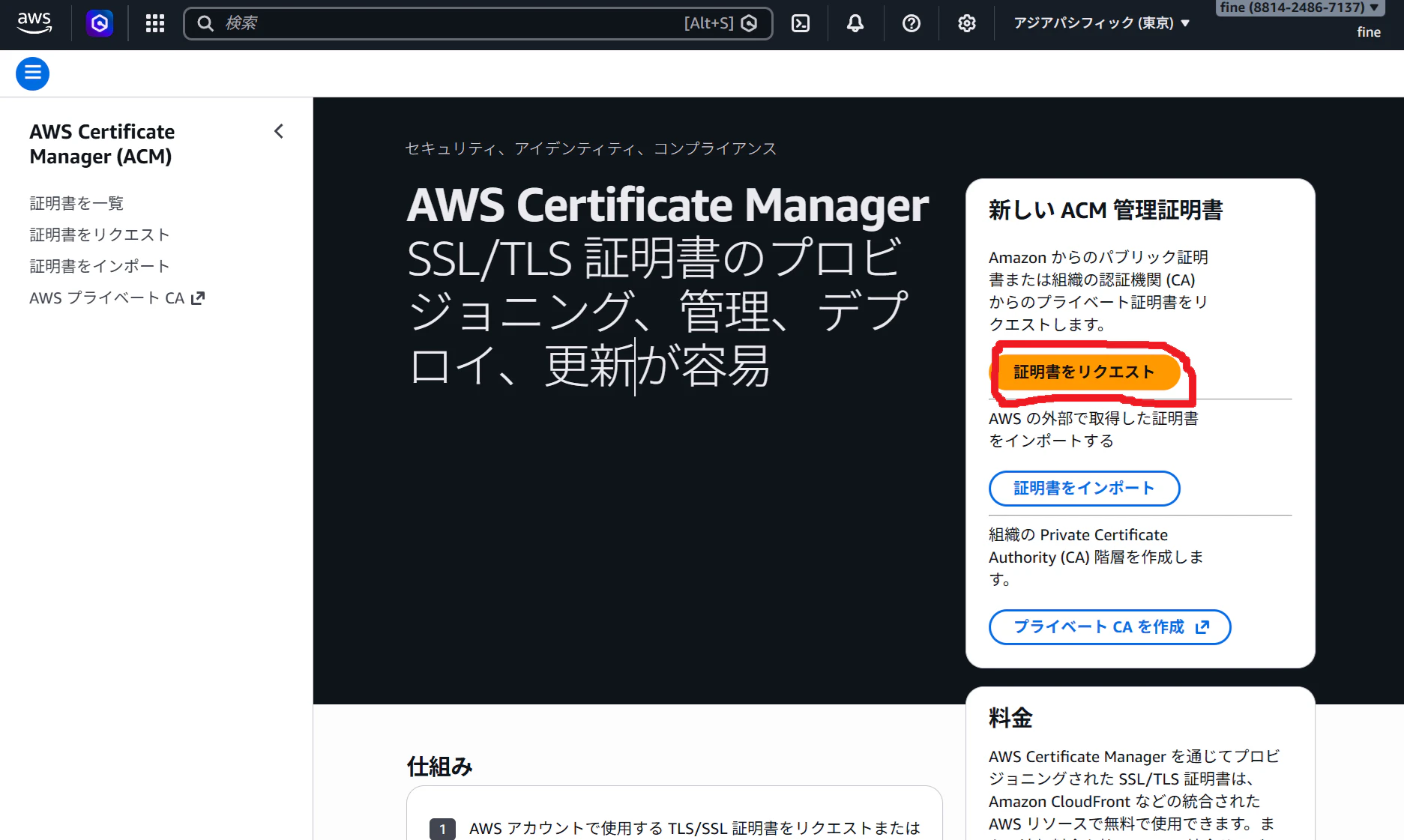
→ パブリック証明書

ドメイン入力 → 検証方法(DNS検証) → リクエスト

Route 53 でレコードを作成
Route 53 → ホストゾーン → net-4.net → レコードを作成
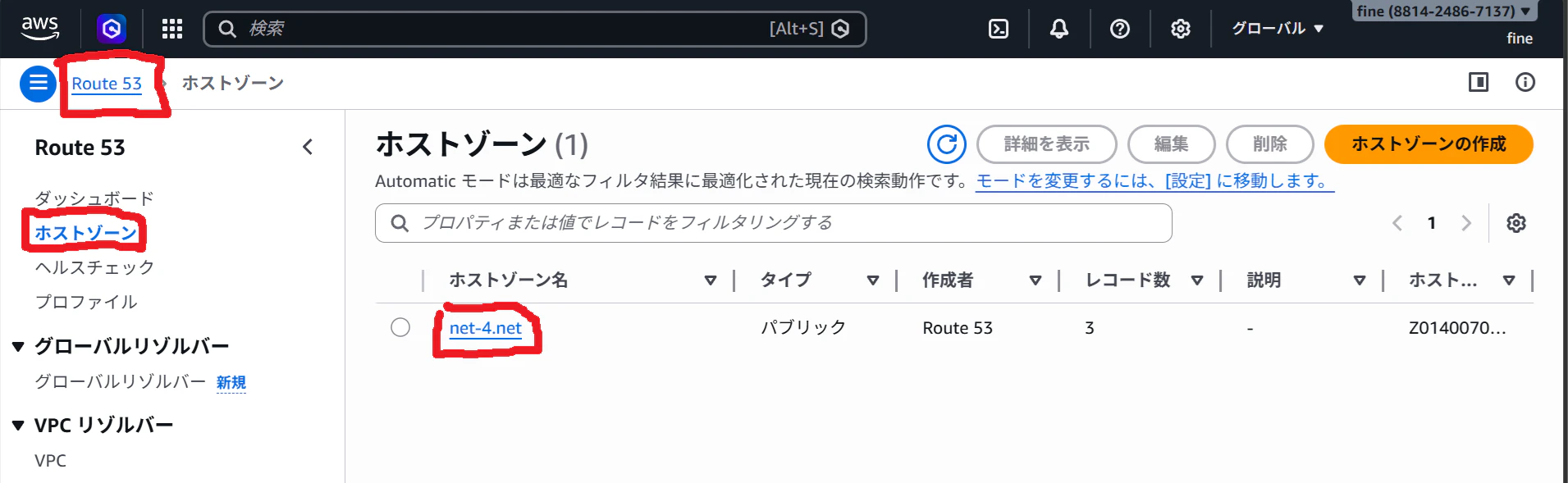
📝 入力
レコードタイプ:CNAME
レコード名:ACMの名前(_xxxx)
値:ACMの値(_yyyy.acm-validations.aws)
👉 例(イメージ)
名前:_abc123.net-4.net
値:_xyz456.acm-validations.aws
👉 追加後
数分〜10分で Issued になる
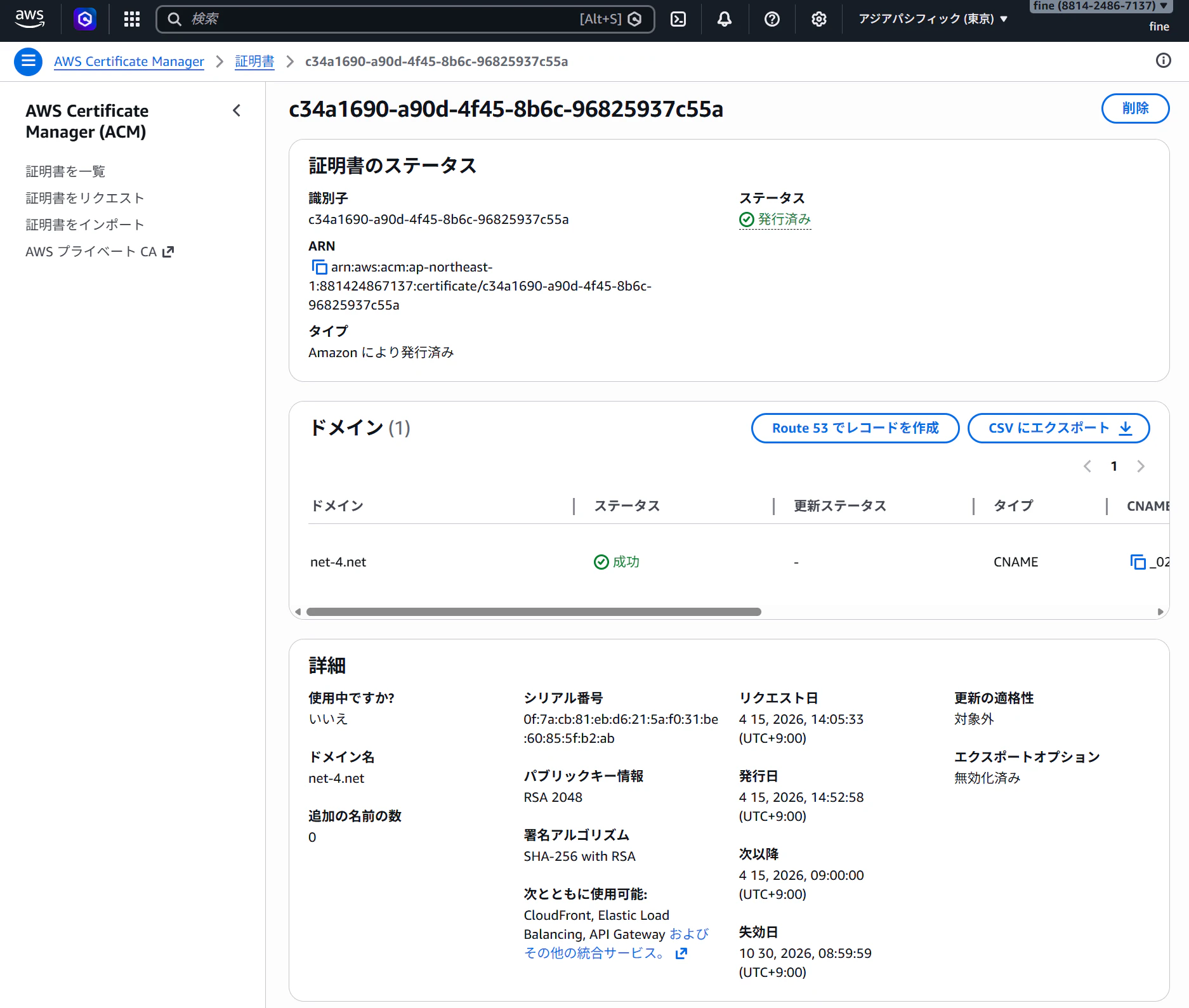
✅ Issuedなのにエラーの場合
👉 次を確認
✔ ドメイン
(あなたのドメイン名) で作ったか?
✔ リージョン
ap-northeast-1 (東京リージョン) か?
👍 ワンポイント
ACMは「Issuedになるまで絶対使えない」
ARN を取得
arn:aws:acm:ap-northeast-1:xxxxxxxx:certificate/xxxx
これをコピー
🎯 これで何が起きるか
https://ALB → 有効になる
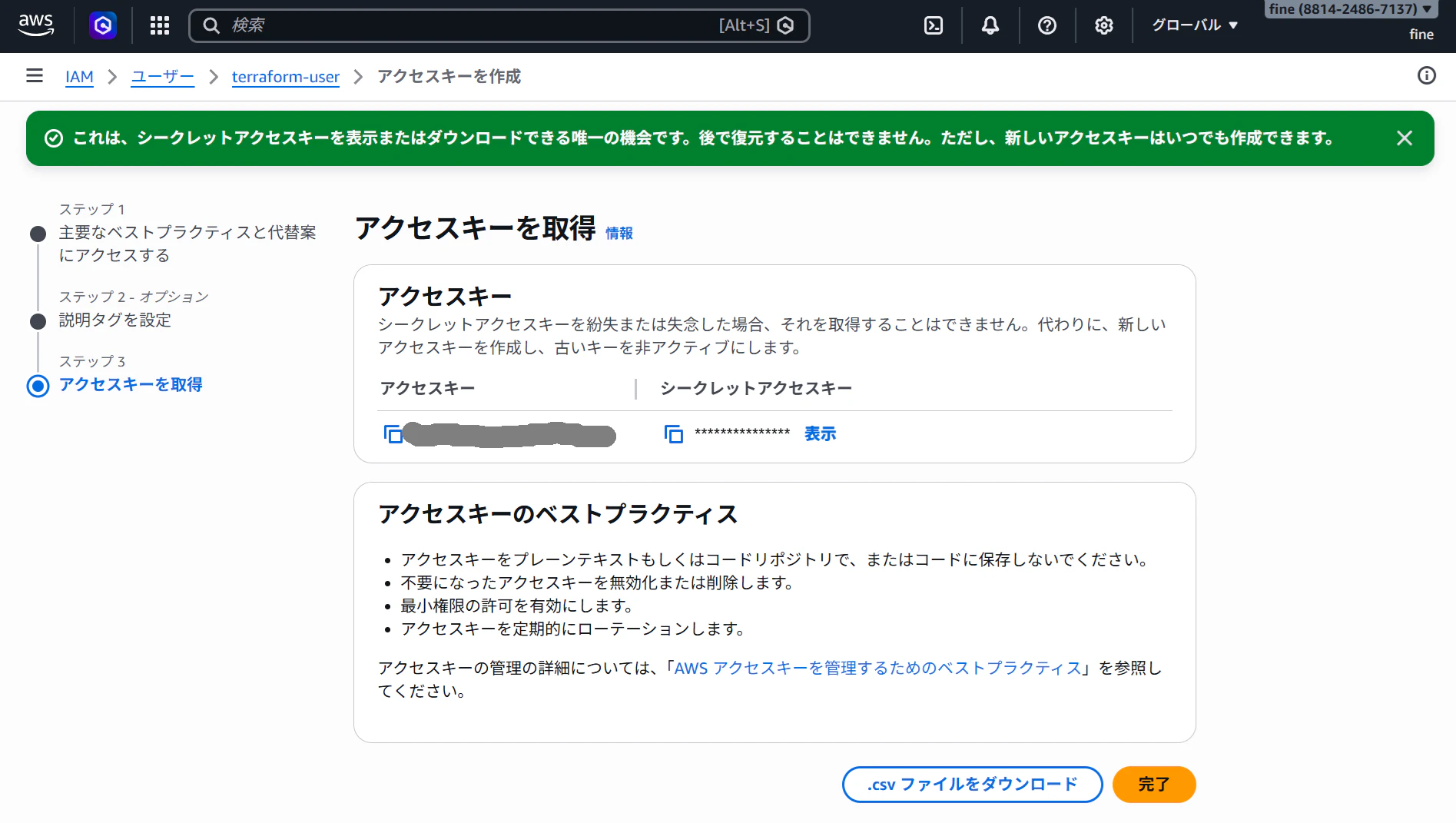
AWS のアクセスキーが無効 or 古い
→ 新しい Access key を作る
AWS コンソール
IAM → Users → terraform-user → セキュリティ認証情報 → アクセスキーを作成

CLI → 次へ
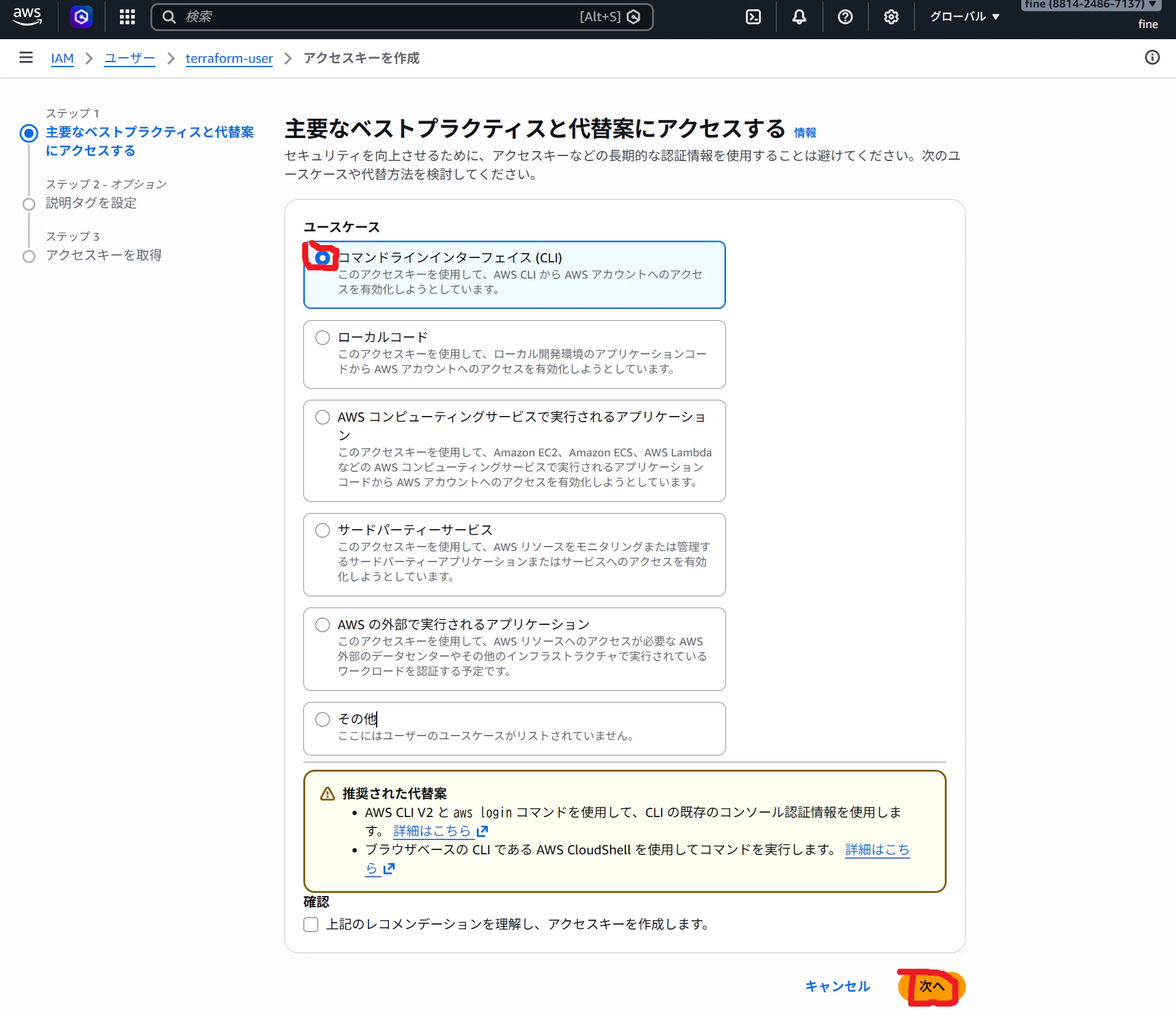
重要
Access Key ID
Secret Access Key
→ 必ず保存(この機会を逃すともう見られない)
aws configure 再設定
aws configure
入力👇
AWS Access Key ID: 新しいやつ
AWS Secret Access Key: 新しいやつ
Default region name: ap-northeast-1
Default output format: json
確認
aws sts get-caller-identity
👉 成功例
{
  "UserId": "...",
  "Account": "...",
  "Arn": "..."
}
エラー
https://net-4.net と入れたが、「申し訳ございません。このページに到達できません」と出る
🎯 可能性高い順
① ALBの443ポートが閉じている(最有力)
② Route53 → ALB の紐付けミス
③ ALB自体は動いてるがドメインだけダメ
🧠 状況整理(現状)
✔ Terraformは成功
✔ HTTPSリスナー作成済み
✔ 証明書も通った
✔ ALBは動いている
👉 なのに
https://net-4.net → タイムアウト
お名前.com のネームサーバー設定がなされていなかった

→ DNS伝播まで待って、
nslookup net-4.net
→ IP アドレスが出れば OK
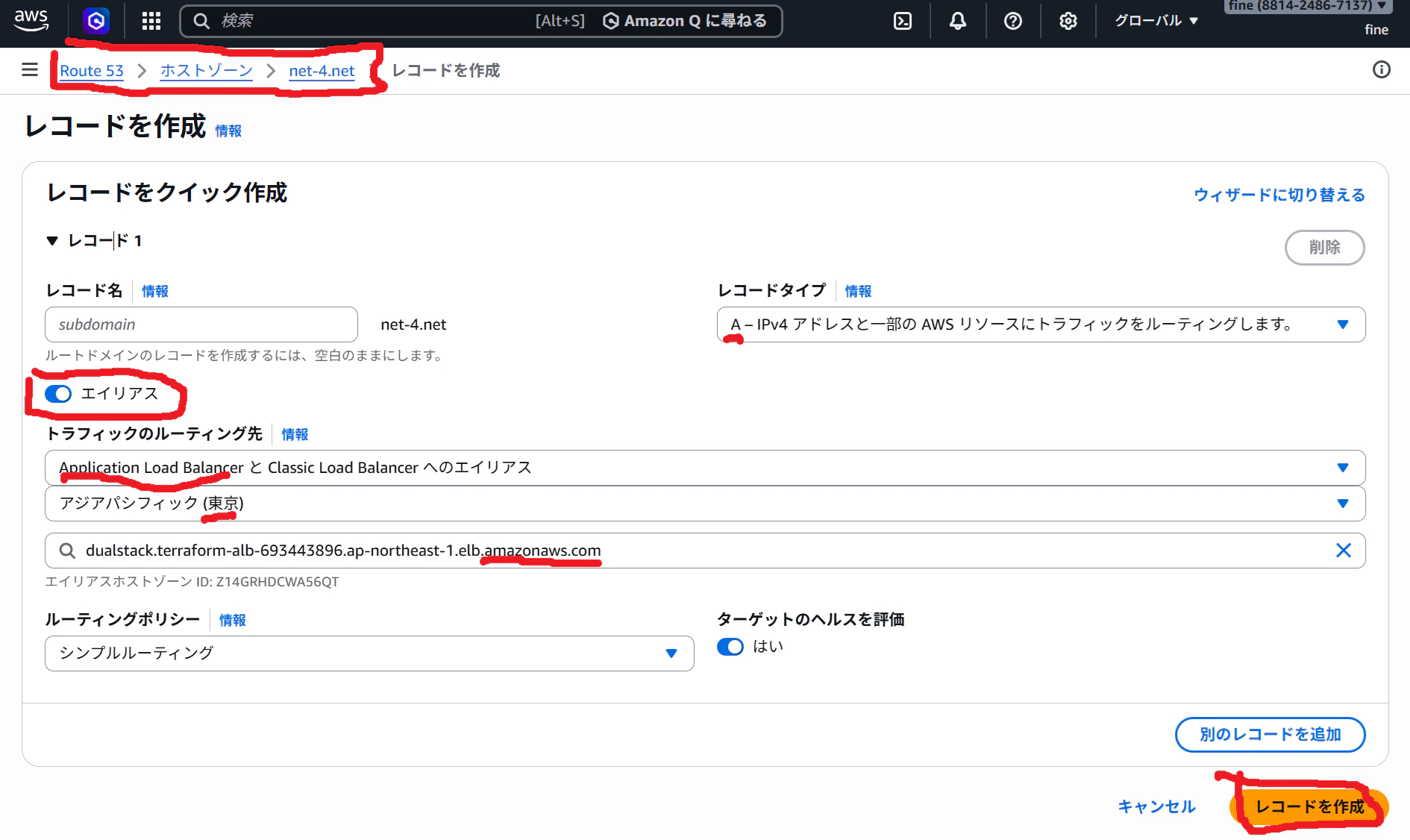
A レコードがあるか
Route53 → ホストゾーン → net-4.net
👇 この3つがある?
① NS(あるはず)
② SOA(あるはず)
③ A(これが重要)
👉 「レコードを作成」
入力
レコード名:空(または net-4.net)
タイプ:A
エイリアス:ON
ターゲット:ALBを選択
🎯 ここまでで何が変わるか
Before
全部 main.tf に書く
After
main.tf = 設計図
modules = 部品
🧠 実務での意味
・再利用できる
・チームで分担できる
・変更が楽
🌐 通信の流れ
ブラウザ
↓
ALB(80 → 443リダイレクト)
↓
ALB(HTTPS)
↓
EC2(nginx)
実行手順
terraform init
terraform apply