

はじめに
この記事は、TIS アドベントカレンダー2025 の4日目の記事です。
全3回にわたって以下のAIチャットで見るようなリアルタイムレスポンスの実装方法の解説をします。
- Go言語でAmazon BedrockのInvokeMoelWithResponseStreamを使ったサーバーサイドの実装
- Go言語で、Ginフレームワークを使ったServer-Sent-Eventsの応答の実装
- Reactで、Server-Sent-Eventsを使ったリアルタイムレスポンスの表示の実装
本記事は、最後の3回目のReactを使ったServer-Sent-Events(SSE)のクライアント側の実装です。
どんなことをしたいか?(再掲)
以下の画像のような、AIを使ったチャットアプリケーションで、リアルタイムにレスポンスを表示する実装をしたい場面がありました。
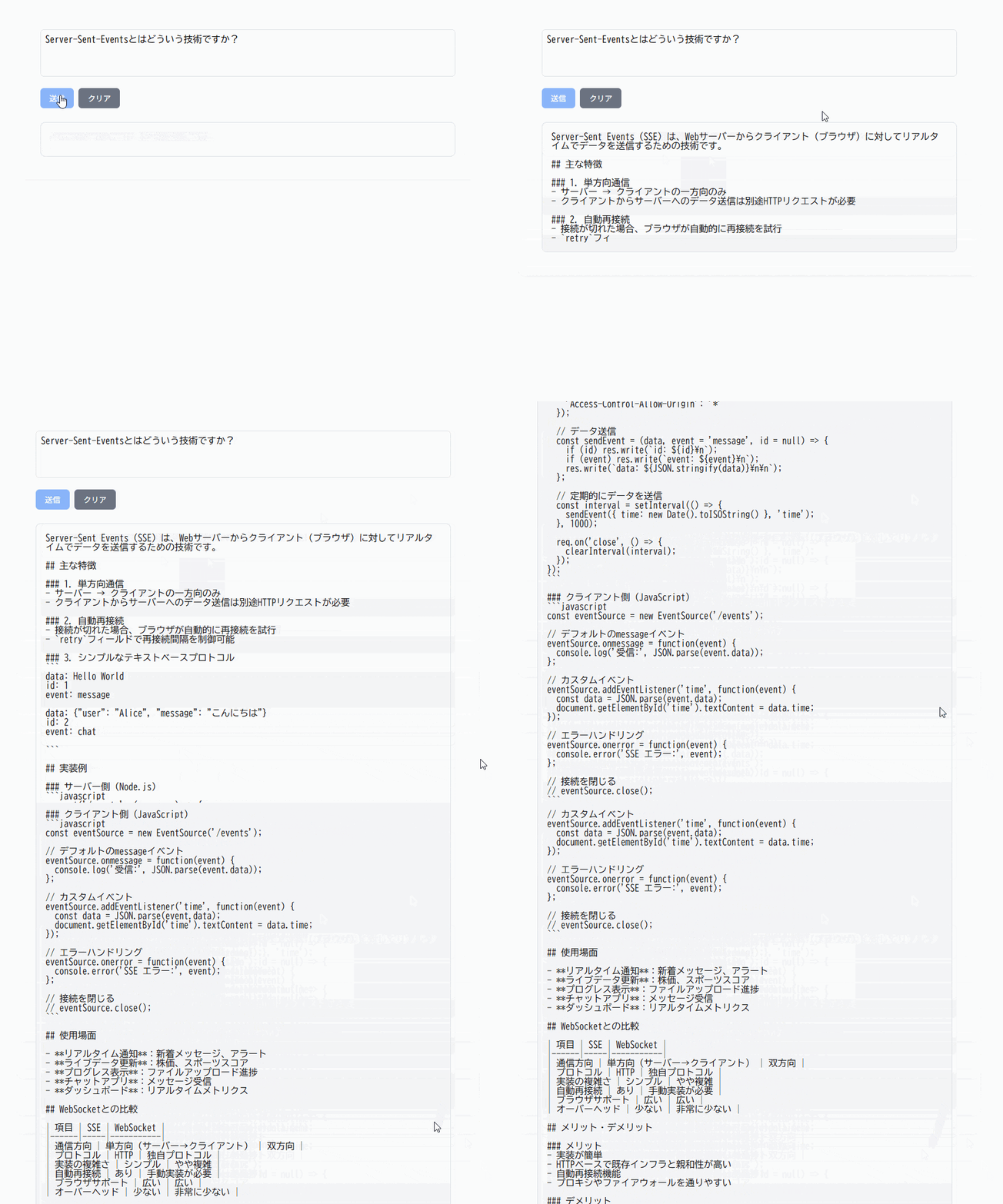
要素技術的には、
- リアルタイムレスポンスを返すAPIとしては、Amazon BedrockのInvokeModelWithResponseStreamを使い、
- Server-Sent-Eventsという技術を利用すればできそうでしたのでサンプルを作りました
今回はクライアント側の紹介です
Reactとは?
Meta社(旧Facebook社)が開発したWebフロントエンドのライブラリです。
- GitHub Star数 241k
- コンポーネント指向のライブラリ
- JavaScript/TypeScriptを拡張したjsx, tsxという記法で宣言的実装が可能
などの特徴を持ちます。
Server-Sent-Eventsとは?
Webサーバーからリアルタイムにデータを送信するための技術です。
- サーバーからのPUSH通知に利用できる
- 接続を張り続け、切断されても自動接続される
- 標準ではHTTPリクエストのGETのみサポート
という特徴があります。
しかし、実際にはGET以外のPOSTでもServer-Sent-Eventsを使いたいことは多いため、
本記事では、Microsoftが開発しているライブラリ @microsoft/fetch-event-source を利用してPOSTでSSEするようにしています。
クライアント側の実装
create-next-appした後に、page.tsxとutil/fetchEventSource.service.tsを作るだけで上記の画像の画面はできあがります。
page.tsxとfetchEventSource.service.tsの2ファイルで完結するので両方を貼り付けます。
画面
(1) output変数をuseStateで定義し、
(2) FetchEventSourceServiceのコールバックで逐次データをメッセージと受け取ってoutput変数をリアルタイムに更新する
"use client";
import { FetchEventSourceService } from "../util/fetchEventSource.service";
import { useState } from "react";

export default function Home() {
  // プロンプト
  const [input, setInput] = useState("");
  // レスポンス
  const [output, setOutput] = useState("");
  // 実行中の状態
  const [executing, setExecuting] = useState(false);
  const handleSubmit = async () => {
    setExecuting(true);
    FetchEventSourceService.fetchChat(
      input,
      (data) => {
        if (data.metadata === "end") {
          setExecuting(false);
          return;
        }
        setOutput((prev) => prev + data.message);
      },
      (err) => {
        console.error("Error:", err);
        setExecuting(false);
      }
    );
  };

  return (
    <div style={containerStyle}>
      <div style={formStyle}>
        <textarea
          placeholder="プロンプトを入力してください..."
          rows={4}
          style={textareaStyle}
          onChange={(e) => {
            setInput(e.target.value);
          }}
          value={input}
        />
        <div style={{ marginTop: "16px", display: "flex" }}>
          <button
            onClick={handleSubmit}
            disabled={input === "" || executing}
            style={{
              ...sendButtonStyle,
              opacity: input === "" || executing ? 0.6 : 1,
            }}
          >
            送信
          </button>
          <button
            onClick={() => {
              setOutput("");
              setExecuting(false);
            }}
            style={clearButtonStyle}
          >
            クリア
          </button>
        </div>
        <div style={responseStyle}>
          <pre style={preStyle}>{output}</pre>
        </div>
      </div>
    </div>
  );
}

//CSSスタイルの変数は割愛
SSEのクライアント
(1) 基本、microsoft/fetch-event-sourceを使っている。onMessageとonErrorのコールバックを受け取れるようにしている。
(2) つなぎっぱなしだと画面が切り替わるたびに再実行されるため、AbortControllerでエラー発生時と、レスポンス取得完了時に切断している
import {
  EventSourceMessage,
  fetchEventSource,
} from "@microsoft/fetch-event-source";

const baseUrl = "http://localhost:4000";

export class FetchEventSourceService {
  static async fetchChat(
    prompt: string,
    onMessage: (event: { message: string; metadata?: string }) => void,
    // eslint-disable-next-line @typescript-eslint/no-explicit-any
    onError: (err: any) => void
  ) {
    const controller = new AbortController();
    await fetchEventSource(`${baseUrl}/chat/stream`, {
      method: "POST",
      headers: {
        "Content-Type": "application/json",
      },
      body: JSON.stringify({
        prompt: prompt,
      }),
      signal: controller.signal,
      onmessage(event: EventSourceMessage) {
        const data = JSON.parse(event.data) as {
          message: string;
          metadata?: string;
        };
        onMessage(data);
        if (data.metadata === "end") {
          controller.abort();
        }
      },
      onerror(err) {
        onError(err);
        controller.abort();
        if (err instanceof TypeError) {
          console.log('Stopping retry due to "Failed to fetch" error.');
          // エラーを再スローすることで、ライブラリの再接続ロジックを停止させる
          throw err;
        }
      },
    });
  }
}
さいごに
POSTでもSSEしたいときは、microsoft/fetch-event-sourceを使うとよいです。
なお、controller.abort()を呼び出さないと、タブ切り替えたときなどに、SSEがつなぎっぱなしにしようとしていて、再実行される問題がありましたのでご注意ください。
以上、3回にわたってAmazon Bedrock + SSE + Gin/React での実装の解説でした。