
はじめに
自宅にLaravelのアプリケーションがあり、一旦、運用できる状態になったので、フレームワーク、ライブラリのバージョンアップをしていくうえで、リグレッション観点で自動テストをしたいな。と。
Laravelには「Laravel Dusk」もあるが、個人的に「Playwright」を使ってみたいな。と。
インストール手順
Laravelでtailwindを使っていたので、既にpackage.jsonはある。
なので、npmでplaywrightを追加。
npm init playwright@latest

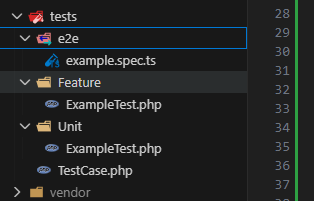
フォルダだけ「tests/e2e」にする。
元々Laravelで「tests」フォルダがあるため
サンプルシナリオを実行してみる
中身を見てみる。
インストール時にパスを「tests/e2e」にしたので以下にある。
tests/e2e/example.spec.ts
見てみると、playwright のサイトをテストする感じになっている。

動かしてみる
npx playwright test
結果を確認
npx playwright show-report
GitHubActionsの動きも見てみる
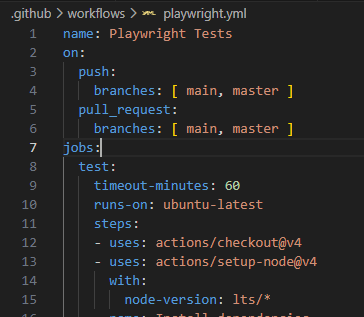
インストール時にGitHubActionsへも追加としたので、「playwright.yml」も追加済
.github/workflows/playwright.yml
mainブランチにプッシュしてみる
「playwright.yml」を見ると、main,master ブランチに対して、プッシュ OR プルリクエストの場合にのみ、「test」ジョブが動く感じ


結果の「playwright-report」を見てみる

をクリックして、「playwright-report.zip」を落としてみる。
中身の「index.html」を表示

感想
インストールは簡単、サンプル実行も簡単。GitHubActionsのymlも自動生成してくれるので至れり尽くせり。
とはいえ、サンプルは「playwright」のサイトを検証しているので、Laravelのアプリケーションをテストしたい場合は、GitHubActions上で、「Laravelのアプリケーション」を起動も必要と思うので。
次回以降
1.Laravelのアプリケーションのシナリオを作成
2.GitHubActions上で、「Laravelのアプリケーション」を起動
をやってみる。
GitHubActions上でのDBはローカルで動かす際に使っている「sqlite」と 環境別(GitHubActions用)に「seeder」(テストデータ投入)を実行するイメージで良いかな。と妄想しています。