背景
偶然にAppGWのアクセスログをみたら、backendpool,backendsetting,listenerの部分は空白の行はありました。
これは何でしょうかを確認してみました。意外の発見がありました。

調査と検証
シナリオ1.まずMulti-site listenerに対して、別のドメインでcurlで接続してみました。
本当のドメインはtanappgw.jpninjateams.comですが、わざとtanappgw2.jpninjateams.comにしました。
解決されたIPは正しいです。
curlの結果は以下です。
C:\Users\hirtan>curl --resolve tanappgw2.jpninjateams.com:443:135.149.43.56 https://tanappgw2.jpninjateams.com
<html>
<head><title>404 Not Found</title></head>
<body>
<center><h1>404 Not Found</h1></center>
<hr><center>Microsoft-Azure-Application-Gateway/v2</center>
</body>
</html>
アクセスログをみると、やはり空白の行になります。

直接IPの場合も同じく空白の行になります。
C:\Users\hirtan>curl 135.149.43.56:443
<html>
<head><title>400 The plain HTTP request was sent to HTTPS port</title></head>
<body>
<center><h1>400 Bad Request</h1></center>
<center>The plain HTTP request was sent to HTTPS port</center>
<hr><center>Microsoft-Azure-Application-Gateway/v2</center>
</body>
</html>

シナリオ2.次はbasic type listenerで検証しました。以下の結果です。
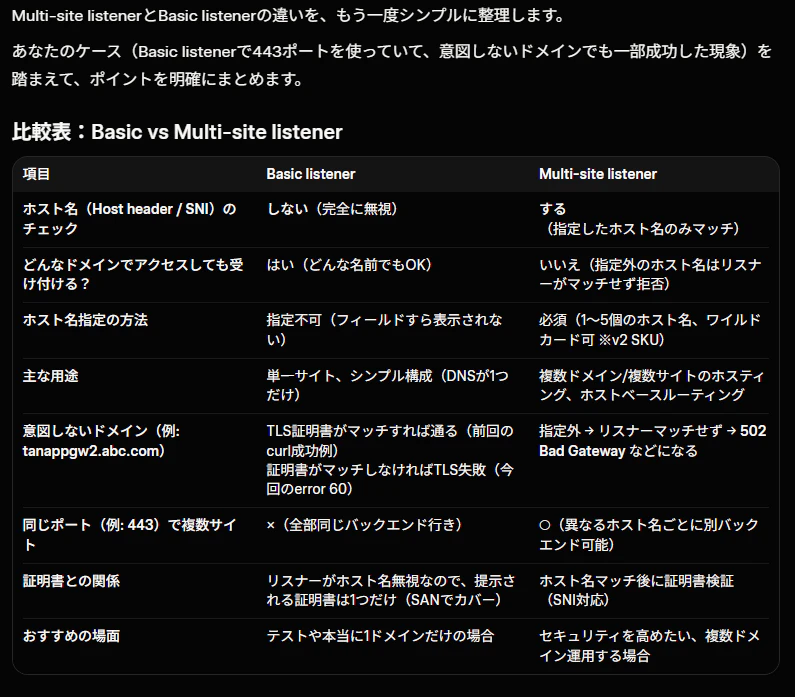
なんとドメインが間違っても成功です。アクセスログもちゃんと全部出ています。
C:\Users\hirtan>curl --resolve tanappgw2.jpninjateams.com:443:135.149.43.56 https://tanappgw2.jpninjateams.com
<!DOCTYPE html>
<html lang="ja">
<head>
    <meta charset="UTF-8">
    <title>テキストファイルアップロード</title>
</head>
<body>
    <h2>テキストファイルアップロード</h2>
    <form action="" method="post" enctype="multipart/form-data">
        <input type="file" name="textfile" accept=".txt">
        <input type="submit" value="アップロード">
    </form>

    </body>
</html>

理由としては以下です。
Basic listener(基本リスナー)は、ホスト名(Host header / SNI)を一切チェックしません。
ポート(ここでは443)とプロトコル(HTTPS)が一致すれば、どんなドメイン名でアクセスされても受け付けてしまいます。証明書のhandshakeが設立できれば成功となります。
シナリオ3.でも完全に別のドメイン tanappgw2.abc.comにしたら、失敗します。
なぜなら、TLSハンドシェイク自体ではサーバー証明書が提示されます。
登録された証明書はwildcardの*.jpninjateams.comですので、
tanappgw2.jpninjateams.comはまだtls handshakeができます。tanappgw2.abc.comならできません。
C:\Users\hirtan>curl --resolve tanappgw2.abc.com:443:135.149.43.56 https://tanappgw2.abc.com
curl: (60) schannel: SNI or certificate check failed: SEC_E_WRONG_PRINCIPAL (0x80090322) - 対象のプリンシパル名が間違っています。
More details here: https://curl.se/docs/sslcerts.html

curl failed to verify the legitimacy of the server and therefore could not
establish a secure connection to it. To learn more about this situation and
how to fix it, please visit the webpage mentioned above.
それにより、もちろんアクセスログにも記録されません。
ちなみにBasic listenerの場合では、直接IPの場合は依然空白の行になります。

C:\Users\hirtan>curl 135.149.43.56:443
<html>
<head><title>400 The plain HTTP request was sent to HTTPS port</title></head>
<body>
<center><h1>400 Bad Request</h1></center>
<center>The plain HTTP request was sent to HTTPS port</center>
<hr><center>Microsoft-Azure-Application-Gateway/v2</center>
</body>
</html>
結論
やはりAppGWは深いですね。Multi-site listenerとBasic listenerの違いを把握しておきましょう。