
はじめに
突然ですが、レクリエーションで使えるアプリを作りたくなったので作りました。今回はカードゲームのitoをWebアプリケーションとしてデプロイしました。
1.概要
まず「ito」というゲームについて、簡単に説明しておくと、
・プレイヤー全員が1から100までの数字が書かれたカードを1枚づつ引く
・その数字を、出されたお題に沿って、物や事で表現する(例えば「生き物の大きさ」の場合、1が極めて小さい生き物、100が極めて大きい生き物として考える)
・全員が表現したら、そこからはお題に沿って自由に会話できる
・数字が小さいと思う人から、順番に場へカードを出していく
という感じです。
今回必要な要件としては、
・数字をランダムで選出する機能
・数字のブラインド機能
・表現を書き込める機能
辺りなので、これを元に実装を進めていきます。
2.実装
今回の実装では、主にhtmlを利用して制作します。意図としては、オフラインでも動作するようにする為、githubpagesで公開する為、軽量にする為です。もっとも、私以外はダウンロードしなければオフラインで動作しないので、本末転倒ではありますが、今回は動作するアプリの制作が目的なので、意識しないものとします。
ディレクトリ内にindex.html、style.css、main.jsを作りまして、コードをつくっていきます。実際のスクリプトはこのようになりました。
<!DOCTYPE html>
<html lang="ja">
<head>
    <meta charset="UTF-8">
    <meta name="viewport" content="width=device-width, initial-scale=1.0">
    <title>itoアプリ</title>
    <link rel="stylesheet" href="style.css">
</head>
<body>
    <div class="app">
        <header class="app-header">
            <h1 class="app-title">itoアプリ</h1>
        </header>

        <main class="app-main">
            <div class="card-scene">
                <div class="card" id="card">
                    <div class="card-face card-front">
                        <span class="number" id="number">?</span>
                    </div>
                    <div class="card-face card-back">
                        <div class="card-back-pattern"></div>
                    </div>
                </div>
            </div>

            <div class="controls">
                <button type="button" class="btn btn-draw" id="draw-btn">抽選</button>
                <button type="button" class="btn btn-blind" id="blind-btn" disabled>ブラインド</button>
            </div>
        </main>

        <footer class="app-footer">
            <div class="memo-area" id="memo-area">
                <div class="memo-display is-placeholder" id="memo-display">タップして入力...</div>
                <textarea class="memo-input" id="memo-input" placeholder="メモを入力..."></textarea>
            </div>
        </footer>
    </div>

    <script src="main.js"></script>
</body>
</html>
*, *::before, *::after {
    box-sizing: border-box;
    margin: 0;
    padding: 0;
}

:root {
    --bg: #100d28;
    --surface: rgba(255, 255, 255, 0.05);
    --border: rgba(255, 255, 255, 0.12);
    --text: #ddd9f5;
    --text-muted: rgba(221, 217, 245, 0.35);
    --accent-blue: #5b73d4;
    --accent-purple: #8b4ec5;
    --blue-glow: rgba(91, 115, 212, 0.45);
    --purple-glow: rgba(139, 78, 197, 0.4);
}

body {
    background-color: var(--bg);
    background-image:
        radial-gradient(ellipse at 30% 20%, rgba(60, 40, 120, 0.45) 0%, transparent 55%),
        radial-gradient(ellipse at 75% 80%, rgba(25, 15, 75, 0.45) 0%, transparent 55%);
    color: var(--text);
    font-family: 'Hiragino Kaku Gothic ProN', 'Noto Sans JP', 'Yu Gothic', sans-serif;
    min-height: 100svh;
}

/* ===== App Layout ===== */
.app {
    display: flex;
    flex-direction: column;
    min-height: 100svh;
    max-width: 480px;
    margin: 0 auto;
    padding: 0 20px;
}

/* ===== Header ===== */
.app-header {
    padding: 24px 0 18px;
    text-align: center;
}

.app-title {
    font-size: 1.3rem;
    font-weight: 300;
    letter-spacing: 0.35em;
    opacity: 0.9;
}

/* ===== Main ===== */
.app-main {
    flex: 1;
    display: flex;
    flex-direction: column;
    align-items: center;
    justify-content: center;
    gap: 40px;
    padding: 20px 0;
}

/* ===== Card ===== */
.card-scene {
    perspective: 800px;
    width: 200px;
    height: 200px;
}

.card {
    width: 100%;
    height: 100%;
    position: relative;
    transform-style: preserve-3d;
    transition: transform 0.55s cubic-bezier(0.45, 0.05, 0.55, 0.95);
}

.card.is-blind {
    transform: rotateY(180deg);
}

.card-face {
    position: absolute;
    inset: 0;
    border-radius: 20px;
    display: flex;
    align-items: center;
    justify-content: center;
    -webkit-backface-visibility: hidden;
    backface-visibility: hidden;
}

.card-front {
    background: var(--surface);
    border: 1px solid var(--border);
    box-shadow:
        0 4px 24px rgba(0, 0, 0, 0.5),
        inset 0 1px 0 rgba(255, 255, 255, 0.07);
}

.card-back {
    background: linear-gradient(135deg, rgba(28, 14, 68, 0.9) 0%, rgba(50, 20, 100, 0.9) 100%);
    border: 1px solid rgba(139, 78, 197, 0.35);
    transform: rotateY(180deg);
    overflow: hidden;
    box-shadow: 0 4px 24px rgba(0, 0, 0, 0.5);
}

.card-back-pattern {
    position: absolute;
    inset: 0;
    background-image:
        repeating-linear-gradient(
            45deg,
            rgba(139, 78, 197, 0.12) 0px,
            rgba(139, 78, 197, 0.12) 1px,
            transparent 1px,
            transparent 14px
        ),
        repeating-linear-gradient(
            -45deg,
            rgba(91, 115, 212, 0.12) 0px,
            rgba(91, 115, 212, 0.12) 1px,
            transparent 1px,
            transparent 14px
        );
}

/* ===== Number ===== */
.number {
    font-size: clamp(3.5rem, 18vw, 5rem);
    font-weight: 700;
    letter-spacing: -0.02em;
    font-variant-numeric: tabular-nums;
    text-shadow: 0 0 28px var(--blue-glow);
    color: var(--text);
}

.number.pop {
    animation: numPop 0.38s cubic-bezier(0.34, 1.56, 0.64, 1);
}

@keyframes numPop {
    from { transform: scale(0.55); opacity: 0; }
    to   { transform: scale(1);    opacity: 1; }
}

/* ===== Controls ===== */
.controls {
    display: flex;
    gap: 16px;
    align-items: center;
}

.btn {
    padding: 13px 26px;
    min-width: 115px;
    border-radius: 50px;
    border: 1px solid transparent;
    font-size: 0.95rem;
    font-family: inherit;
    font-weight: 500;
    letter-spacing: 0.05em;
    color: var(--text);
    cursor: pointer;
    transition: background-color 0.2s, box-shadow 0.2s, transform 0.1s, opacity 0.2s;
    -webkit-tap-highlight-color: transparent;
}

.btn:active:not(:disabled) {
    transform: scale(0.94);
}

.btn:disabled {
    opacity: 0.3;
    cursor: not-allowed;
}

.btn-draw {
    background: rgba(91, 115, 212, 0.18);
    border-color: rgba(91, 115, 212, 0.5);
}

.btn-draw:hover:not(:disabled) {
    background: rgba(91, 115, 212, 0.32);
    box-shadow: 0 0 18px rgba(91, 115, 212, 0.35);
}

.btn-blind {
    background: rgba(139, 78, 197, 0.18);
    border-color: rgba(139, 78, 197, 0.5);
}

.btn-blind:hover:not(:disabled) {
    background: rgba(139, 78, 197, 0.32);
    box-shadow: 0 0 18px rgba(139, 78, 197, 0.35);
}

/* ===== Footer / Memo ===== */
.app-footer {
    padding: 16px 0 28px;
}

.memo-area {
    border-radius: 14px;
    background: rgba(0, 0, 0, 0.22);
    border: 1px solid var(--border);
    overflow: hidden;
    transition: border-color 0.2s, box-shadow 0.2s;
    min-height: 88px;
}

.memo-area:hover {
    border-color: rgba(255, 255, 255, 0.22);
}

.memo-area.is-editing {
    border-color: var(--accent-blue);
    box-shadow: 0 0 0 3px rgba(91, 115, 212, 0.2);
}

.memo-display {
    padding: 16px;
    min-height: 88px;
    cursor: pointer;
    font-size: 0.9rem;
    line-height: 1.75;
    white-space: pre-wrap;
    word-break: break-word;
    color: var(--text);
}

.memo-display.is-placeholder {
    color: var(--text-muted);
}

.memo-area.is-editing .memo-display {
    display: none;
}

.memo-input {
    display: none;
    width: 100%;
    min-height: 88px;
    padding: 16px;
    background: transparent;
    border: none;
    outline: none;
    color: var(--text);
    font-size: 0.9rem;
    font-family: inherit;
    line-height: 1.75;
    resize: none;
}

.memo-area.is-editing .memo-input {
    display: block;
}

/* ===== Responsive ===== */
@media (max-height: 580px) {
    .app-main { gap: 24px; }
    .card-scene { width: 160px; height: 160px; }
    .app-header { padding: 14px 0 10px; }
}
'use strict';

const card      = document.getElementById('card');
const numberEl  = document.getElementById('number');
const drawBtn   = document.getElementById('draw-btn');
const blindBtn  = document.getElementById('blind-btn');
const memoArea  = document.getElementById('memo-area');
const memoDisp  = document.getElementById('memo-display');
const memoInput = document.getElementById('memo-input');

// ===== State =====
let currentNumber = null;
let isBlind       = false;
let canRedraw     = false;
// Rules:
//   - 初回抽選は常に可能
//   - 抽選後はブラインド→解除のサイクルを経ないと再抽選不可
//   - ブラインド中は再抽選不可

// ===== UI Update =====
function updateUI() {
    numberEl.textContent = currentNumber !== null ? currentNumber : '?';
    card.classList.toggle('is-blind', isBlind);

    const drawEnabled = currentNumber === null || (!isBlind && canRedraw);
    drawBtn.disabled  = !drawEnabled;

    blindBtn.disabled   = currentNumber === null;
    blindBtn.textContent = isBlind ? '解除' : 'ブラインド';
}

// ===== Actions =====
function draw() {
    currentNumber = Math.floor(Math.random() * 100) + 1;
    isBlind   = false;
    canRedraw = false;

    numberEl.classList.remove('pop');
    void numberEl.offsetWidth; // reflow to restart animation
    numberEl.classList.add('pop');

    updateUI();
}

function toggleBlind() {
    if (isBlind) {
        isBlind   = false;
        canRedraw = true;
    } else {
        isBlind = true;
    }
    updateUI();
}

drawBtn.addEventListener('click', draw);
blindBtn.addEventListener('click', toggleBlind);

// ===== Memo area =====
memoDisp.addEventListener('click', () => {
    memoArea.classList.add('is-editing');
    memoInput.focus();
    memoInput.setSelectionRange(memoInput.value.length, memoInput.value.length);
});

function closeMemo() {
    memoArea.classList.remove('is-editing');
    const val = memoInput.value;
    if (val.trim()) {
        memoDisp.textContent = val;
        memoDisp.classList.remove('is-placeholder');
    } else {
        memoDisp.textContent = 'タップして入力...';
        memoDisp.classList.add('is-placeholder');
    }
}

memoInput.addEventListener('blur', closeMemo);

memoInput.addEventListener('keydown', (e) => {
    if (e.key === 'Escape') memoInput.blur();
});

memoInput.addEventListener('input', () => {
    memoInput.style.height = 'auto';
    memoInput.style.height = Math.max(88, memoInput.scrollHeight) + 'px';
});

// ===== Init =====
updateUI();
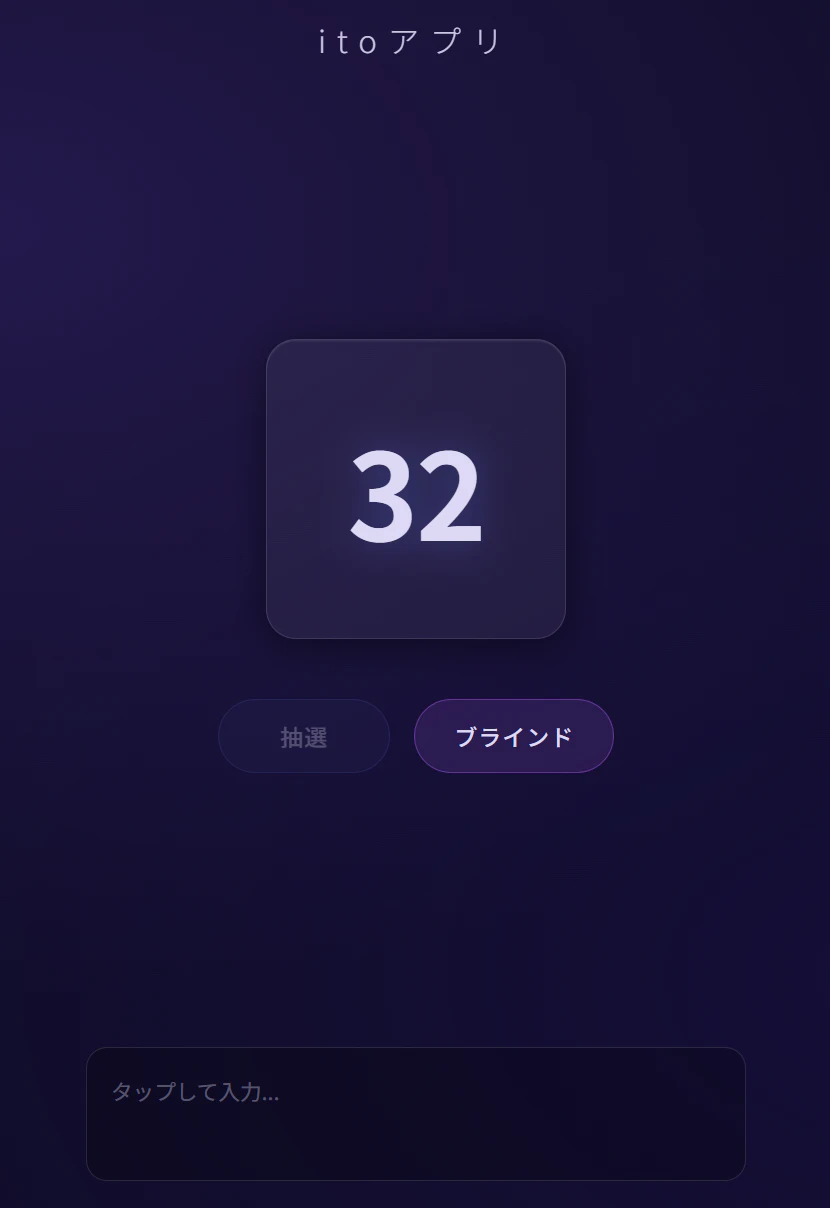
これでもうアプリ自体はできました。
3.デプロイ
さて、これをgithubに上げていくわけですが、今回高々3ファイルしかないので、webに直接ぶん投げます。そして、プロジェクトのSettingからPagesを選択し、ブランチを選べば、もう公開できます。1回更新すれば、もうリンクが表示されていると思います。
おわりに
こんな感じで、自分の作りたいアプリを公開してみました、今回はgithubのPagesを使いましたが、例えばReactとかで作った場合は、他のプラットフォーム(Vercelなど)でないと不可能なので気を付けましょう。このようなWebアプリ制作において、この記事を、少しでも参考にしていただけたら幸いです。
今回制作したWebアプリ↓
https://tangentkoh.github.io/application_ito/