
はじめに
ゲームを制作する以上、Spriteを表示する機会は多い
今一度メモリから解放されるタイミングを調査してみた
試す
SpriteRendererによって参照される3000*3000の画像を用意した

MemoryProfilerで確認すると、当然Allocateされていることがわかる

そこで以下のコードを用意する
using System;
using System.Collections.Generic;
using UnityEngine;
using UnityEngine.InputSystem;

[Serializable]
public class DestroyContext
{
    public Key Key;
    public GameObject GameObject;
}

public class ObjectDestroyer : MonoBehaviour
{
    public List<DestroyContext> destroyContexts;

    void Update()
    {
        var keyboard = Keyboard.current;
        if (keyboard == null) return;

        foreach (var context in destroyContexts)
        {
            if (keyboard[context.Key].wasPressedThisFrame && context.GameObject != null)
            {
                Destroy(context.GameObject);
            }
        }
    }
}
そしてこのスクリプトをシーンに配置する
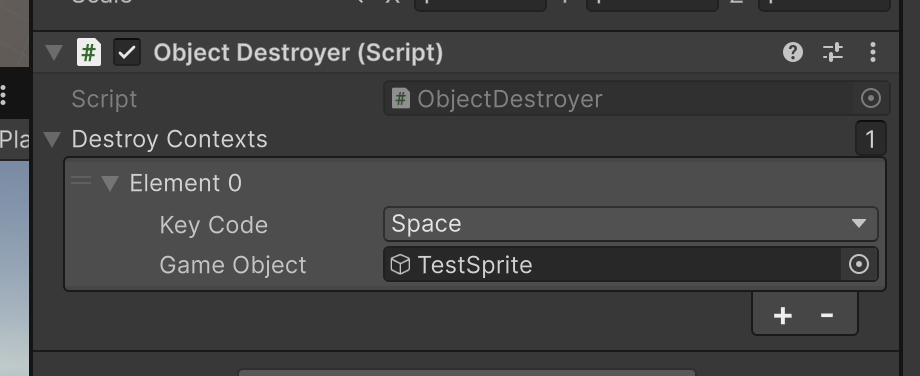
Spaceを押してシーン上のオブジェクトがDestroyされたことを確認してから、MemoryProfilerを再度確認する

Allocateされたままであることを確認できる
シーンを遷移できる以下のスクリプトを作成する
using System;
using System.Collections.Generic;
using UnityEngine;
using UnityEngine.InputSystem;
using UnityEngine.SceneManagement;

[Serializable]
public class SceneLoadContext
{
    public Key Key;
    public string SceneName;
}

public class SceneLoader : MonoBehaviour
{
    [SerializeField] private List<SceneLoadContext> sceneLoadContexts = new();

    private void Update()
    {
        foreach (var context in sceneLoadContexts)
        {
            if (Keyboard.current[context.Key].wasPressedThisFrame)
            {
                SceneManager.LoadScene(context.SceneName);
                break;
            }
        }
    }
}
同様に設定して、シーンを遷移させる

すると画像はアンロードされていることが確認できる

つまり、シーンに最初から配置されているSpriteは、シーンのアンロード時に同時にアンロードされる
これは、Unity側でシーンの依存アセットとしてSpriteが自動的にパックされているためである
https://docs.unity3d.com/6000.3/Documentation/Manual/build-content-output.html
また、以下のようなスクリプトを用意してみる
using UnityEngine;
using UnityEngine.InputSystem;

public class ResourceUnloader : MonoBehaviour
{
    void Update()
    {
        if (Keyboard.current[Key.T].wasPressedThisFrame)
        {
            Resources.UnloadUnusedAssets();
            Debug.Log("UnloadUnusedAssets");
        }
    }
}
これをシーン上に配置してTを押すと、メモリから解放されていることを確認できる

Resources.UnloadUnusedAssets();を使うと、シーンに紐づいてロードされたアセットについても、参照されていないアセットを解放できる
まとめ
SpriteRendererで参照しているSpriteは、オブジェクトをDestroyしただけではメモリからは解放されない
シーンを遷移してアンロードすると、そのシーンに最初から配置されていたSpriteはシーン依存アセットとしてまとめてアンロードされる
それ以外にも、Resources.UnloadUnusedAssets();を呼び出すと、シーン由来でロードされたアセットで会っても、参照が切れていればメモリから解放できる