

これは ZOZO Advent Calendar 2025 カレンダー Vol.3 の 25日目の記事です
はじめに
「外部システムからの通知をトリガーにバッチ処理を起動したい」
本記事では、Argo Events を使って Webhook を受信し、Argo Workflows でワークフローを自動実行する構成をローカル環境で検証してみたので、その検証内容をご紹介します。
Argo Events とは?
Argo Events は、Kubernetes ネイティブなイベント駆動型ワークフロー自動化フレームワークです。
主な特徴
- 20種類以上のイベントソース: Webhook、AWS S3、GitHub、Slack、Kafka など
- 宣言的な設定: YAML でイベントトリガーを定義
- Kubernetes ネイティブ: CRD として動作し、kubectl で管理可能
アーキテクチャ概要
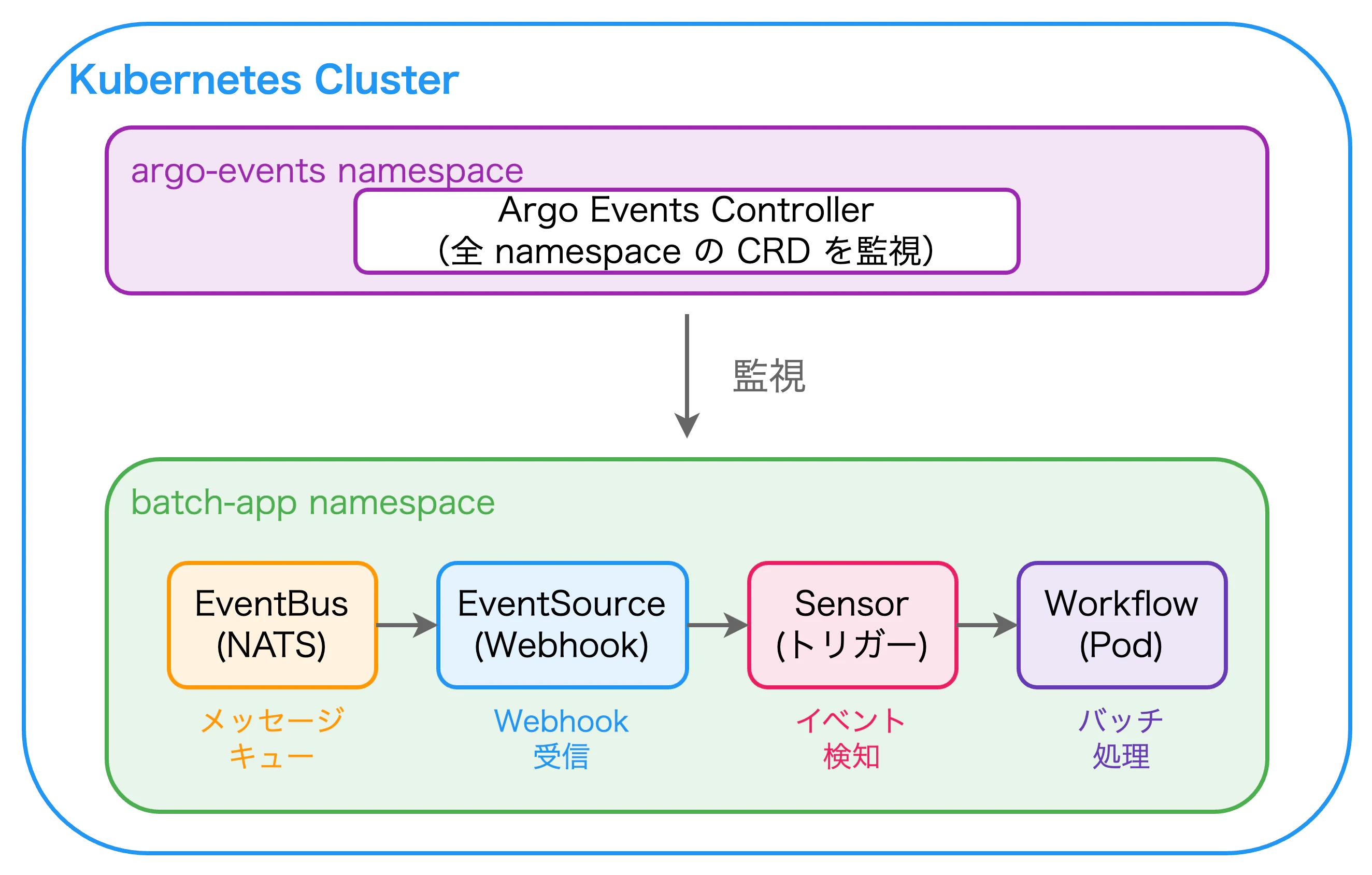
今回作るもの
全体の流れ

コンポーネント一覧
| コンポーネント | 役割 |
|---|---|
| EventBus | イベントの中継(NATS JetStream) |
| EventSource | Webhook を受信する HTTP サーバー |
| Sensor | イベントを受けて Workflow を起動 |
| Workflow | 実際のバッチ処理 |
環境構築
前提条件
- Docker Desktop で Kubernetes が有効化済み
- kubectl が使用可能
# Kubernetes バージョン確認
kubectl version --short
Step 1: Namespace 作成
今回は以下の 4 つの Namespace を使用します。
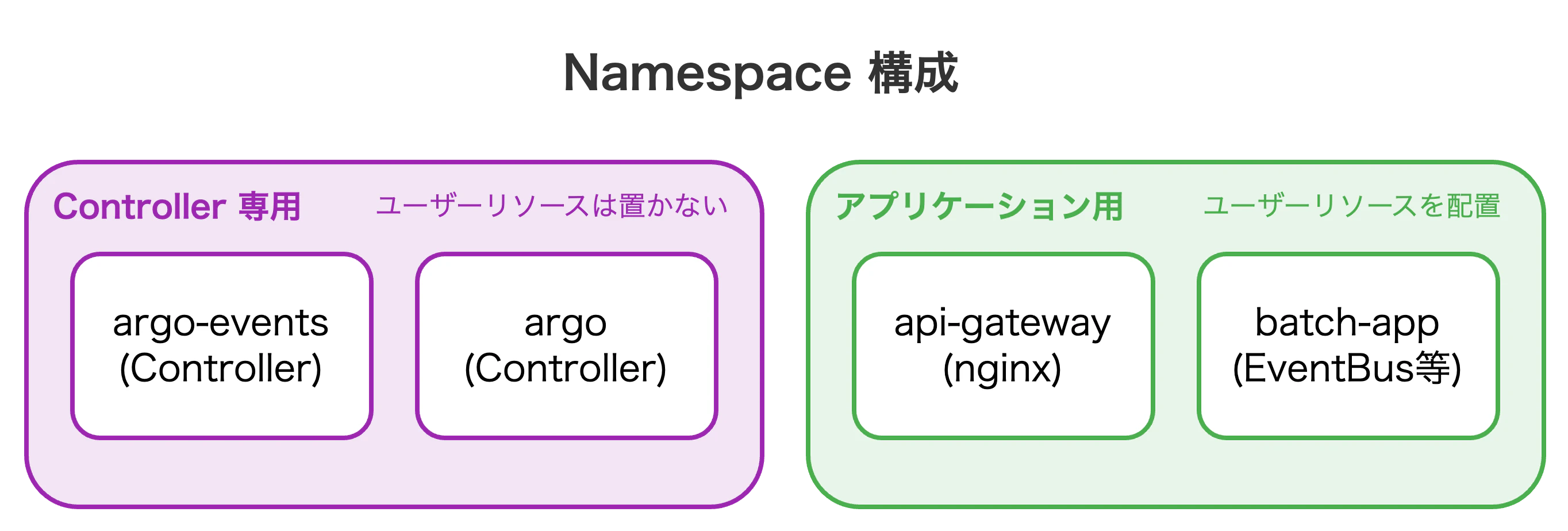
# namespaces.yaml
apiVersion: v1
kind: Namespace
metadata:
  name: api-gateway
  labels:
    purpose: api-gateway
---
apiVersion: v1
kind: Namespace
metadata:
  name: batch-app
  labels:
    purpose: application
---
apiVersion: v1
kind: Namespace
metadata:
  name: argo-events
  labels:
    purpose: argo-events-controller
---
apiVersion: v1
kind: Namespace
metadata:
  name: argo
  labels:
    purpose: argo-workflows-controller
kubectl apply -f namespaces.yaml
Step 2: Argo Events のインストール
# Argo Events インストール(v1.9.6)
kubectl apply -n argo-events \
  -f https://raw.githubusercontent.com/argoproj/argo-events/v1.9.6/manifests/install.yaml

# 起動確認
kubectl wait --for=condition=Ready pod \
  -l app=controller-manager \
  -n argo-events \
  --timeout=120s
Step 3: Argo Workflows のインストール
# Argo Workflows インストール(v3.5.15)
kubectl apply -n argo \
  -f https://raw.githubusercontent.com/argoproj/argo-workflows/v3.5.15/manifests/quick-start-minimal.yaml

# 起動確認
kubectl wait --for=condition=Ready pod \
  -l app=workflow-controller \
  -n argo \
  --timeout=120s
Step 4: EventBus の作成
EventBus とは?
EventSource と Sensor 間でイベントを受け渡すための メッセージキュー です。内部で NATS JetStream を使用しています。
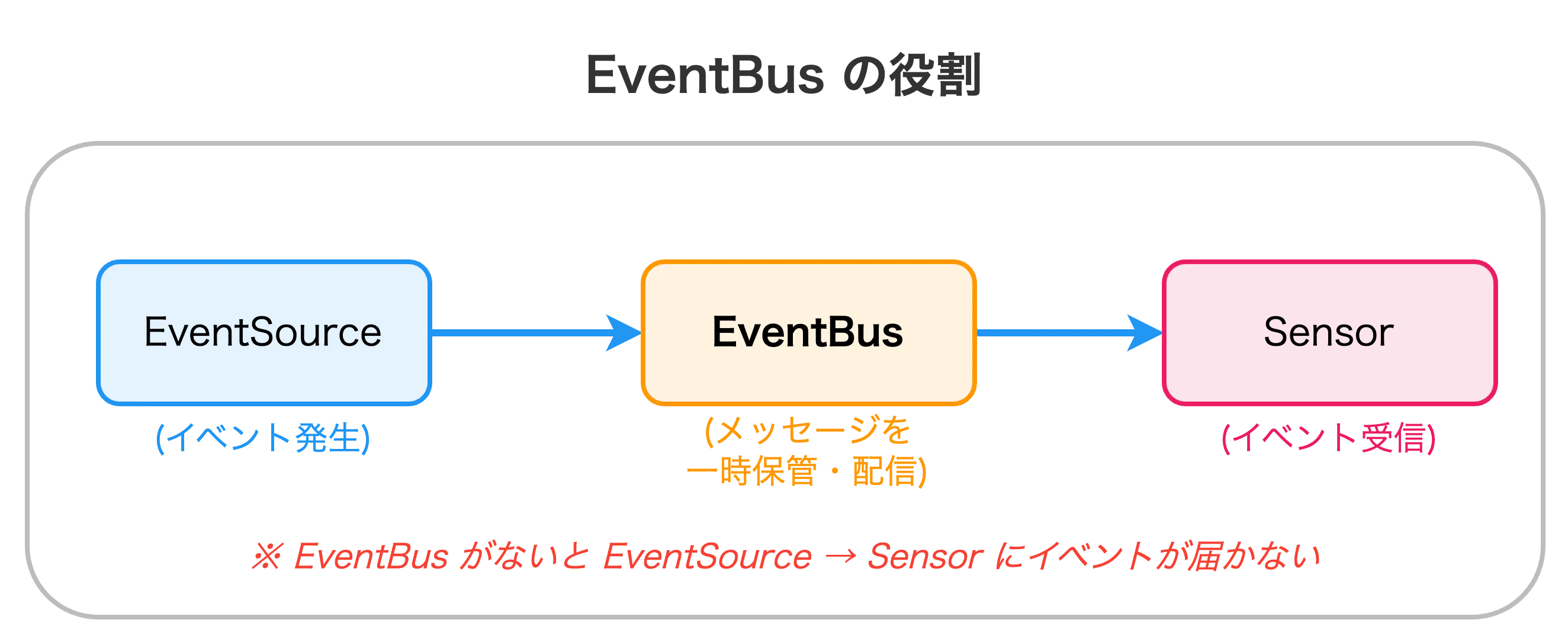
EventBus 適用で何が起きる?
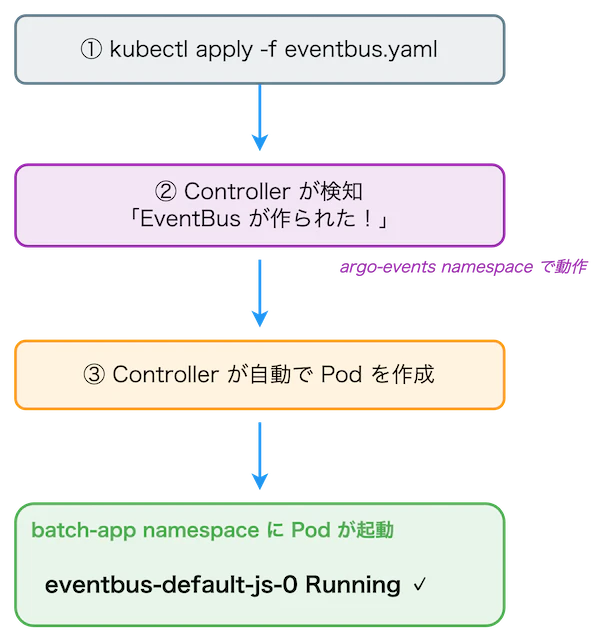
# eventbus.yaml
apiVersion: argoproj.io/v1alpha1
kind: EventBus
metadata:
  name: default
  namespace: batch-app
spec:
  jetstream:
    version: "2.10.10"
    replicas: 1
    streamConfig: |
      maxMsgs: 50000
      maxAge: 168h
      maxBytes: -1
      replicas: 1
      duplicates: 300s
kubectl apply -f eventbus.yaml

# 起動確認(JetStream Pod)
kubectl wait --for=condition=Ready pod \
  -l eventbus-name=default \
  -n batch-app \
  --timeout=120s
replicas: 1 の場合、streamConfig.replicas も 1 に設定する必要があります。
設定しないと nats: replicas > 1 not supported in non-clustered mode エラーが発生します。
Step 5: EventSource(Webhook)の作成
EventSource とは?
外部からのイベントを 受信する入り口 です。今回は HTTP Webhook を受け付けます。
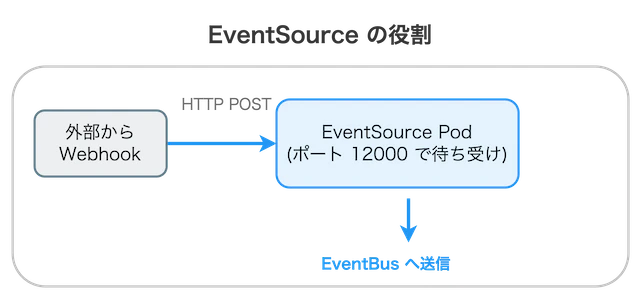
EventSource 適用で何が起きる?
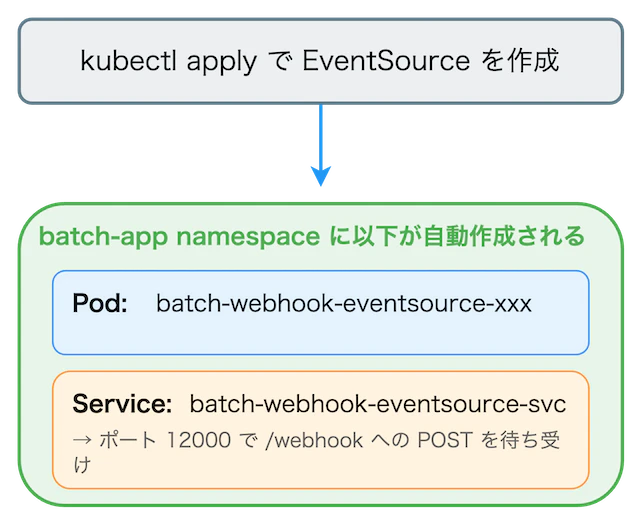
# eventsource-webhook.yaml
apiVersion: argoproj.io/v1alpha1
kind: EventSource
metadata:
  name: batch-webhook
  namespace: batch-app
spec:
  service:
    ports:
      - port: 12000
        targetPort: 12000
  webhook:
    batch-webhook:
      port: "12000"
      endpoint: /webhook
      method: POST
kubectl apply -f eventsource-webhook.yaml

# 起動確認
kubectl wait --for=condition=Ready pod \
  -l eventsource-name=batch-webhook \
  -n batch-app \
  --timeout=120s
Step 6: RBAC 設定
なぜ RBAC が必要?
Kubernetes の default ServiceAccount は標準リソース(Pod, Job など)の操作権限を持っていますが、CRD(Argo Workflow)への操作権限は持っていません。
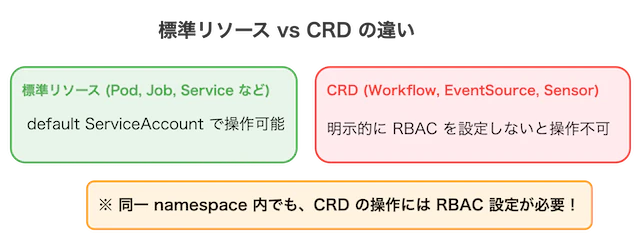
RBAC の構成要素
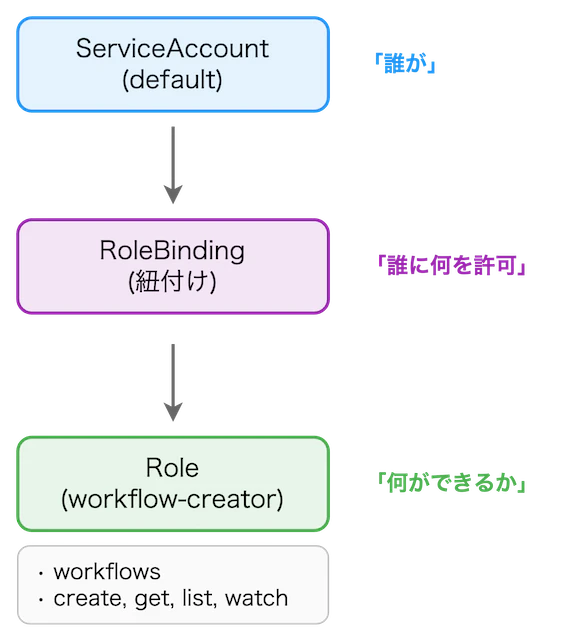
# rbac.yaml
apiVersion: rbac.authorization.k8s.io/v1
kind: Role
metadata:
  name: workflow-creator
  namespace: batch-app
rules:
  - apiGroups: ["argoproj.io"]
    resources: ["workflows"]
    verbs: ["create", "get", "list", "watch"]
---
apiVersion: rbac.authorization.k8s.io/v1
kind: RoleBinding
metadata:
  name: default-workflow-creator
  namespace: batch-app
subjects:
  - kind: ServiceAccount
    name: default
    namespace: batch-app
roleRef:
  kind: Role
  name: workflow-creator
  apiGroup: rbac.authorization.k8s.io
kubectl apply -f rbac.yaml

# 権限確認
kubectl auth can-i create workflows -n batch-app \
  --as=system:serviceaccount:batch-app:default
# → yes
RBAC が設定されていない場合、以下のエラーが発生します:
workflows.argoproj.io is forbidden:
User "system:serviceaccount:batch-app:default"
cannot create resource "workflows" in API group "argoproj.io"
Step 7: Sensor の作成
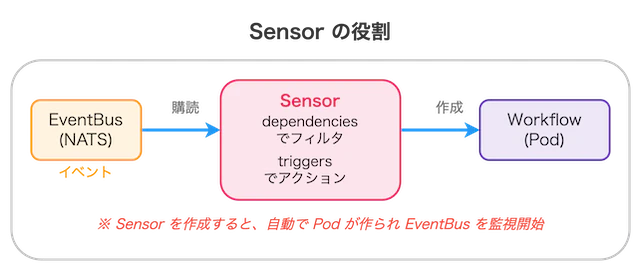
Sensor とは?
EventBus からイベントを受け取り、トリガー(アクション)を実行 するコンポーネントです。
# sensor-workflow.yaml
apiVersion: argoproj.io/v1alpha1
kind: Sensor
metadata:
  name: batch-webhook-sensor
  namespace: batch-app
spec:
  dependencies:
    - name: batch-webhook-dep
      eventSourceName: batch-webhook
      eventName: batch-webhook
  triggers:
    - template:
        name: batch-workflow-trigger
        k8s:
          operation: create
          source:
            resource:
              apiVersion: argoproj.io/v1alpha1
              kind: Workflow
              metadata:
                generateName: batch-job-
                namespace: batch-app
              spec:
                entrypoint: main
                templates:
                  - name: main
                    container:
                      image: alpine:3.20
                      command: [sh, -c]
                      args:
                        - |
                          echo "============================================"
                          echo "Batch Job Started"
                          echo "Triggered by Webhook!"
                          echo "Timestamp: $(date)"
                          echo "============================================"
                          sleep 5
                          echo "Job completed successfully!"
kubectl apply -f sensor-workflow.yaml

# 起動確認
kubectl get pod -n batch-app
Step 8: API Gateway(nginx)の作成
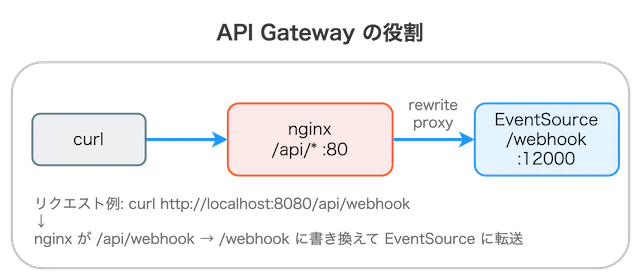
本番環境に近い構成で検証するため、nginx を API Gateway として配置します。
# nginx-gateway.yaml
apiVersion: v1
kind: ConfigMap
metadata:
  name: nginx-config
  namespace: api-gateway
data:
  default.conf: |
    server {
        listen 80;

        location /api/ {
            rewrite ^/api/(.*)$ /$1 break;
            proxy_pass http://batch-webhook-eventsource-svc.batch-app.svc.cluster.local:12000;
        }
    }
---
apiVersion: apps/v1
kind: Deployment
metadata:
  name: nginx-gateway
  namespace: api-gateway
spec:
  replicas: 1
  selector:
    matchLabels:
      app: nginx-gateway
  template:
    metadata:
      labels:
        app: nginx-gateway
    spec:
      containers:
        - name: nginx
          image: nginx:alpine
          ports:
            - containerPort: 80
          volumeMounts:
            - name: config
              mountPath: /etc/nginx/conf.d/default.conf
              subPath: default.conf
      volumes:
        - name: config
          configMap:
            name: nginx-config
---
apiVersion: v1
kind: Service
metadata:
  name: nginx-gateway
  namespace: api-gateway
spec:
  selector:
    app: nginx-gateway
  ports:
    - port: 80
      targetPort: 80
kubectl apply -f nginx-gateway.yaml
動作確認
1. 全体の状態確認
kubectl get pods -A | grep -E "api-gateway|batch-app|argo"
期待される出力:
api-gateway   nginx-gateway-xxx                        1/1     Running
argo-events   controller-manager-xxx                   1/1     Running
argo          workflow-controller-xxx                  1/1     Running
batch-app     batch-webhook-eventsource-xxx            1/1     Running
batch-app     batch-webhook-sensor-xxx                 1/1     Running
batch-app     eventbus-default-js-0                    3/3     Running
2. ポートフォワード設定
Service は ClusterIP(クラスタ内部専用)なので、ローカルからアクセスするにはポートフォワードが必要です。
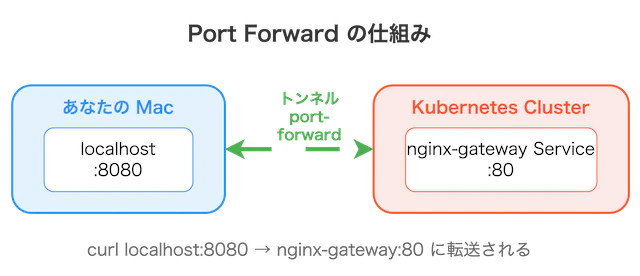
kubectl port-forward -n api-gateway svc/nginx-gateway 8080:80 &
3. Webhook 送信
curl -X POST \
    -H "Content-Type: application/json" \
    -d '{"message": "Hello from Webhook!"}' \
    http://localhost:8080/api/webhook
期待される出力: success
4. Workflow 実行確認
# Workflow 一覧
kubectl get workflows -n batch-app

# 最新の Workflow ログ確認
kubectl logs -n batch-app -l workflows.argoproj.io/workflow --tail=20 -c main
期待される出力:
============================================
Batch Job Started
Triggered by Webhook!
Timestamp: Wed Dec 25 12:00:00 UTC 2025
============================================
Job completed successfully!
トラブルシューティング
よくあるエラーと対処法
| エラー | 原因 | 対処法 |
|---|---|---|
workflows.argoproj.io is forbidden |
RBAC 未設定 |
rbac.yaml を適用 |
replicas > 1 not supported |
EventBus 設定不備 |
streamConfig.replicas: 1 を追加 |
| EventSource Pod が起動しない | EventBus 未作成 | EventBus を先に作成 |
デバッグコマンド
# EventSource のログ
kubectl logs -n batch-app -l eventsource-name=batch-webhook --tail=50

# Sensor のログ
kubectl logs -n batch-app -l sensor-name=batch-webhook-sensor --tail=50

# Argo Events Controller のログ
kubectl logs -n argo-events -l app=controller-manager --tail=50
まとめ
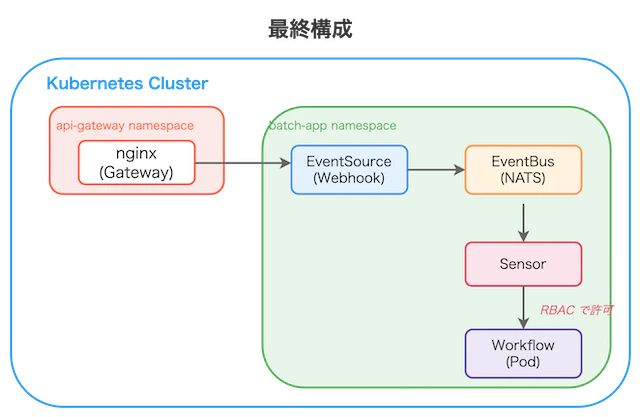
本記事では、Argo Events を使って Webhook から Kubernetes ワークフローを自動実行する構成を構築しました。
完成した構成図
学んだこと
| 項目 | 内容 |
|---|---|
| RBAC | CRD(Workflow)の操作には明示的な権限設定が必要 |
| EventBus | EventSource と Sensor を繋ぐメッセージキュー |
| Namespace 設計 | Controller は専用 namespace、リソースはアプリ namespace に配置 |
Argo Events は Webhook 以外にも、AWS S3、GitHub、Slack など 20 種類以上のイベントソースに対応しています。ぜひ様々なユースケースで活用してみてください!