以下の記事を翻訳して理解した内容をまとめています。
構造体の定義には、structキーワードを使用する。
その次に構造体の名前を記入する。
次に中括弧の内側でフィールドを定義する。
struct User {
    username: String,
    email: String,
    sign_in_count: u64,
    active: bool,
}
インスタンスを作成する場合は中括弧の中にkey : Valueの形で記載する。
順序は関係ない。
let user1 = User {
        email: String::from("someone@example.com"),
        username: String::from("someusername123"),
        active: true,
        sign_in_count: 1,
    };
値を参照する場合はドット表記で記載する。
    let mut user1 = User {
        email: String::from("someone@example.com"),
        username: String::from("someusername123"),
        active: true,
        sign_in_count: 1,
    };

    user1.email = String::from("anotheremail@example.com");
構造体は全体が変更可能でなければならない。
関数の戻り値を構造体にすることもできる。
fn build_user(email: String, username: String) -> User {
    User {
        email: email,
        username: username,
        active: true,
        sign_in_count: 1,
    }
}
全部のフィールドを記載しなくちゃいけないのはめんどくさい。
Using the Field Init Shorthand when Variables and Fields Have the Same Name
パラメータとフィールド名が同じならばフィールド名を省略できる。
fn build_user(email: String, username: String) -> User {
    User {
        email,
        username,
        active: true,
        sign_in_count: 1,
    }
}
Creating Instances From Other Instances With Struct Update Syntax
通常は古いインスタンスから一部を変更して新しいインスタンスを作成することが多い。
以下はemailとusernameに新しい値を設定するが、それ以外は、上で作成したuser1からの同じ値を使用する。
    let user2 = User {
        email: String::from("another@example.com"),
        username: String::from("anotherusername567"),
        active: user1.active,
        sign_in_count: user1.sign_in_count,
    };
以下の様に..構文を使用すると、少ないコードで上と同じ事ができる。
    let user2 = User {
        email: String::from("another@example.com"),
        username: String::from("anotherusername567"),
        ..user1
    };
emailとusernameの値が異なるuser2のインスタンスを作成するが、user1のactiveフィールドとsign_in_countフィールドの値は同じとなる。
Using Tuple Structs without Named Fields to Create Different Types
タプル構文に似たタプル構造体が定義できる。
タプル構造体にはフィールド名を除いて記載する。
タプル構造体を定義するには、構造体キーワードと構造体名で始まり、その後にタプル内の型が続く。
たとえば、以下はColorとPointという名前の2つのタプル構造体の定義と使用法を示す。
    struct Color(i32, i32, i32);
    struct Point(i32, i32, i32);

    let black = Color(0, 0, 0);
    let origin = Point(0, 0, 0);
blackとoriginはタイプが異なるタプル構造体である。
Colorをパラメータとして受け取る関数は、Pointを受け取る事はできない。
Unit-Like Structs Without Any Fields
フィールドのない構造体を定義することができる。
これらはユニット構造体と呼ばれている。
Ownership of Struct Data
上の文字列は&str文字列のスライスタイプではない。
この構造体のインスタンスが全てのデータを所有し、構造体全体が有効である限りそのデータが有効であるため、そのようにしている。
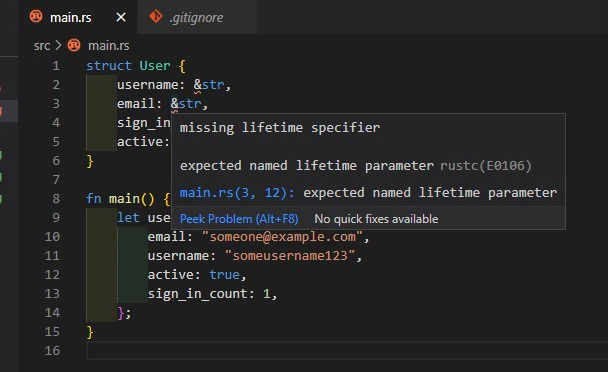
構造体に参照を格納することはできるが、これを行うためには、Rustの機能であるライフタイムを使用する必要がある。
以下はエラーになる。
struct User {
    username: &str,
    email: &str,
    sign_in_count: u64,
    active: bool,
}

fn main() {
    let user1 = User {
        email: "someone@example.com",
        username: "someusername123",
        active: true,
        sign_in_count: 1,
    };
}