

はじめに
React x Vite の環境立ち上げて、環境変数の.env.local使おうとしたらちょっとだけハマったので残します。
問題
以下のようにsupabaseクライアントを作成して、各キーを.env.localに隠してprocess.env.を使用してそれぞれ読み込もうとしました。
lib/clients/supabase.js
import { createClient } from '@supabase/supabase-js'

const supabase = createClient(
  process.env.SUPABASE_URL,
  process.env.SUPABASE_PUBLISHABLE_KEY
)
すると、processあたりに以下のエラー警告が。
'process' is not defined.
processまわりって何かしないといけなかったっけ?
解決方法
eslint.config.jsに以下★の行を追加すればOK。
eslint.config.js
import js from '@eslint/js'
import globals from 'globals'
import reactHooks from 'eslint-plugin-react-hooks'
import reactRefresh from 'eslint-plugin-react-refresh'
import { defineConfig, globalIgnores } from 'eslint/config'

export default defineConfig([
  globalIgnores(['dist']),
  {
    files: ['**/*.{js,jsx}'],
    extends: [
      js.configs.recommended,
      reactHooks.configs.flat.recommended,
      reactRefresh.configs.vite,
    ],
    languageOptions: {
      globals: globals.browser,
      parserOptions: { ecmaFeatures: { jsx: true } },
    },
  },
  // ★以下を追加
  {
    "env": {
      "node": true
    }
  }
])
これで解決。
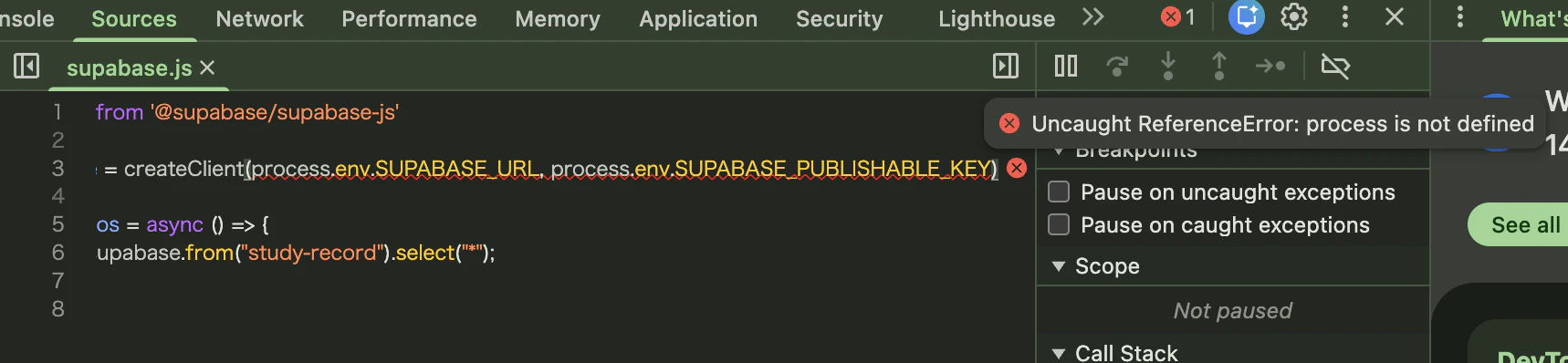
、、と思ったら、Chrome devtoolのコンソール上で「processなんてないよ!」みたいなエラーが。。。
ほんとの解決方法
Viteで環境構築したら、以下2つのルールを守らなくちゃいけないらしい。
-
.envファイルに設定する環境変数は、頭にVITE_とつけなきゃいけいない - コードで
.envファイルの環境変数を呼び出す場合は、process.env.XXXじゃなくてimport.meta.env.XXXで呼び出す
なので、環境変数を参照する側のコード以下のようにする。
lib/clients/supabase.js
import { createClient } from "@supabase/supabase-js"

export const supabase = createClient(
  import.meta.env.VITE_SUPABASE_URL,
  import.meta.env.VITE_SUPABASE_PUBLISHABLE_KEY,
)
おわりに
仕事で扱うソースコードは特に何も考えずにprocess.env.使えてたからこういう下ごしらえが必要だったのは知らなかった。
参考
こちらの記事が最初にヒットしましたが、こちらでは.eslintrc.jsonというファイルをいじってるんですね。
こちらはVite環境変数のルールに気づかせてくれた記事。