
液晶ディスプレイに文字を表示する導通を行った
環境
| HW/SW | バージョン他 |
|---|---|
| 筐体 | Arduino Uno R4 Minima |
| IDE | Arduino IDE 2.3.7 |
| 部品 | I2C液晶ディスプレイ(I2C 1602 LCD Display Module – Blue Backlight) 部品詳細 |
| その他部品 | ジャンパーワイアー |
前準備
Arduino IDEで、「Sketch」→「Include Library」→「Manage Libraries」
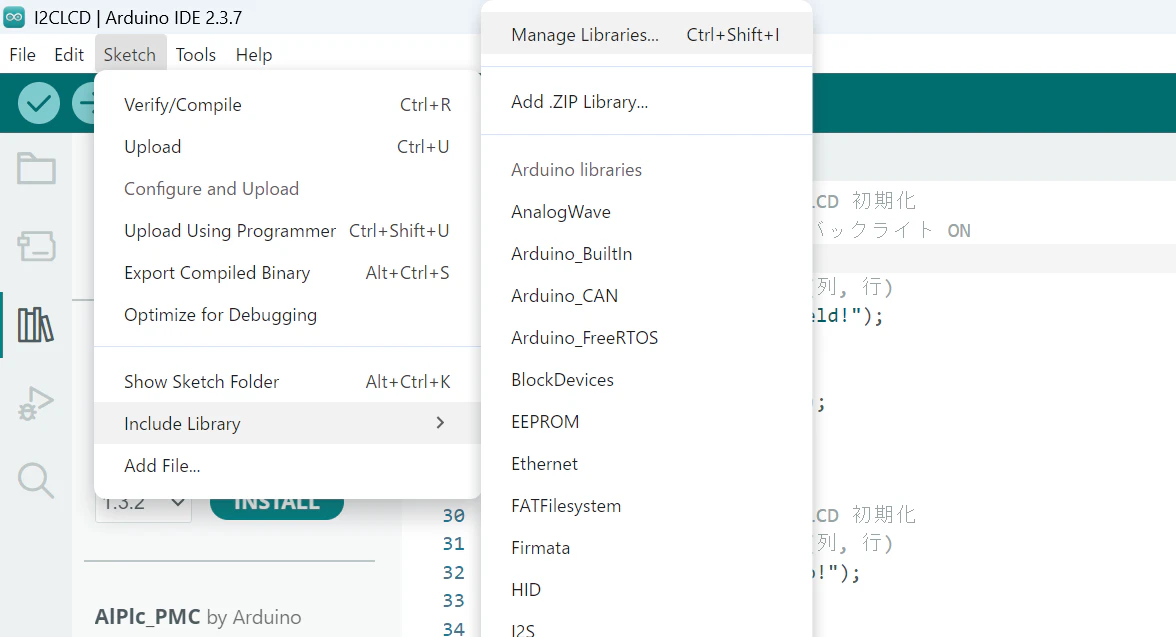
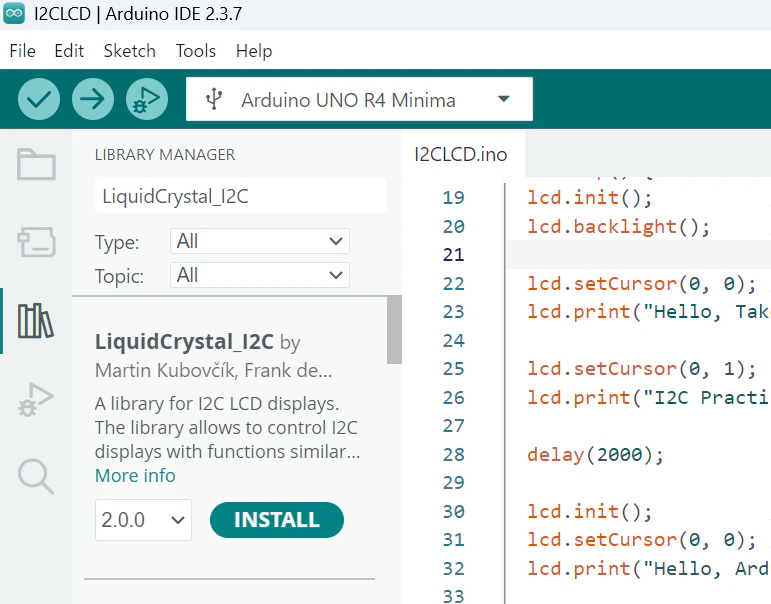
→検索窓で、「LiquidCrystal_I2C」で検索し、INSTALLを行う
回路
テキスト回路図(I2C液晶ディスプレイ→Arduino)
I2C LCD モジュール          Arduino UNO
-------------------        -----------------
VCC -----------------------> 5V
GND -----------------------> GND
SDA -----------------------> A4
SCL -----------------------> A5
プログラム仕様
・実行すると、液晶ディスプレイに文字が表示される(2秒ごとに表示が変更)
プログラムソース
I2CLCD.ico
#include <Wire.h>
#include <LiquidCrystal_I2C.h>

// アドレス 0x27、16桁×2行 の LCD
LiquidCrystal_I2C lcd(0x27, 16, 2);

void setup() {
}

void loop() {
  lcd.init();          // LCD 初期化
  lcd.backlight();     // バックライト ON

  lcd.setCursor(0, 0); // (列, 行)
  lcd.print("Hello, Takefield!");

  lcd.setCursor(0, 1);
  lcd.print("I2C Practice");

  delay(2000);

  lcd.init();          // LCD 初期化
  lcd.setCursor(0, 0); // (列, 行)
  lcd.print("Hello, Arduino!");

  lcd.setCursor(0, 1);
  lcd.print("I2C LCD Ready");
}
実行結果

ディスプレイがうまく表示されない場合は、以下のつまみを+ドライバで回して調整してください
