
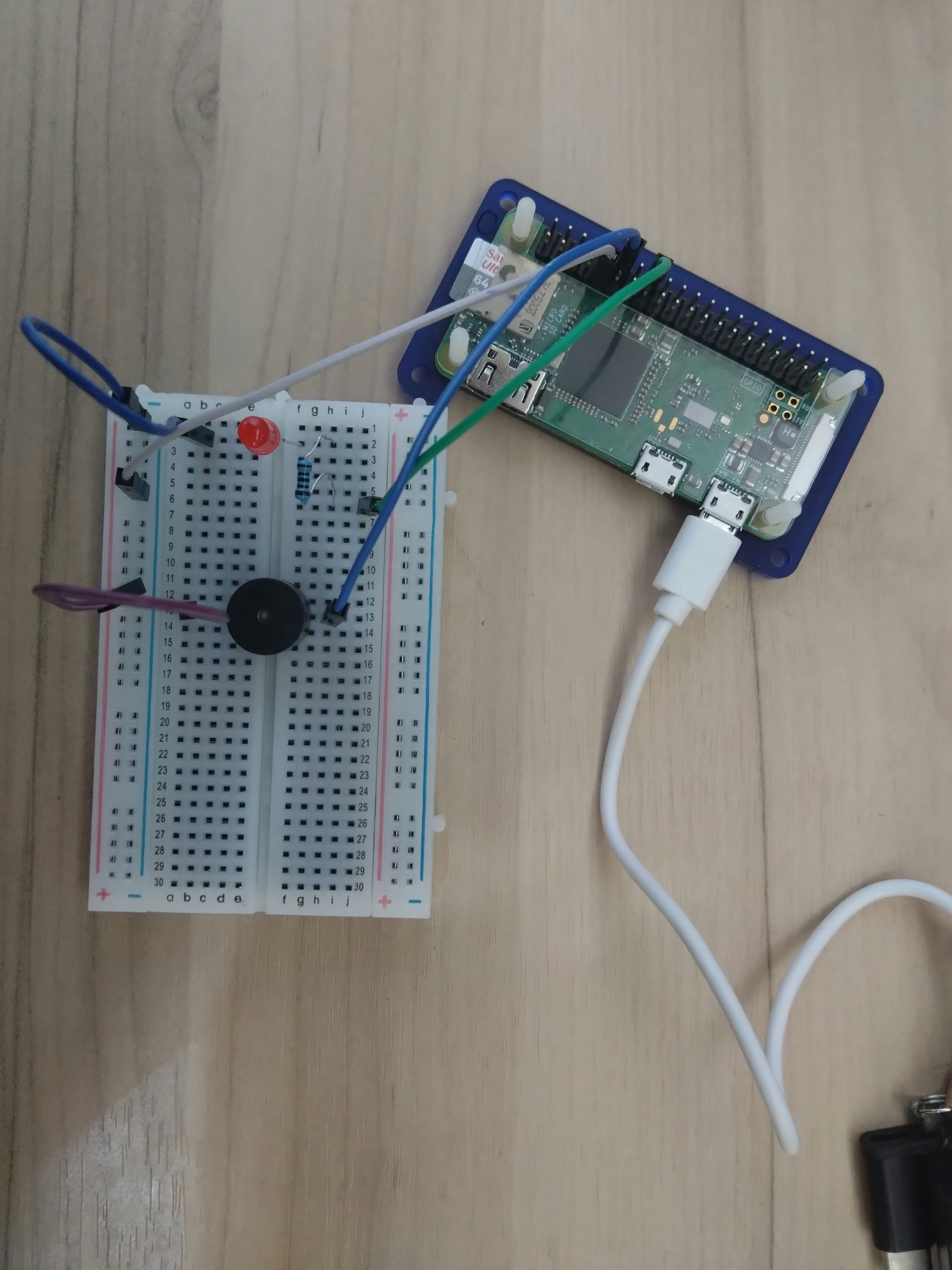
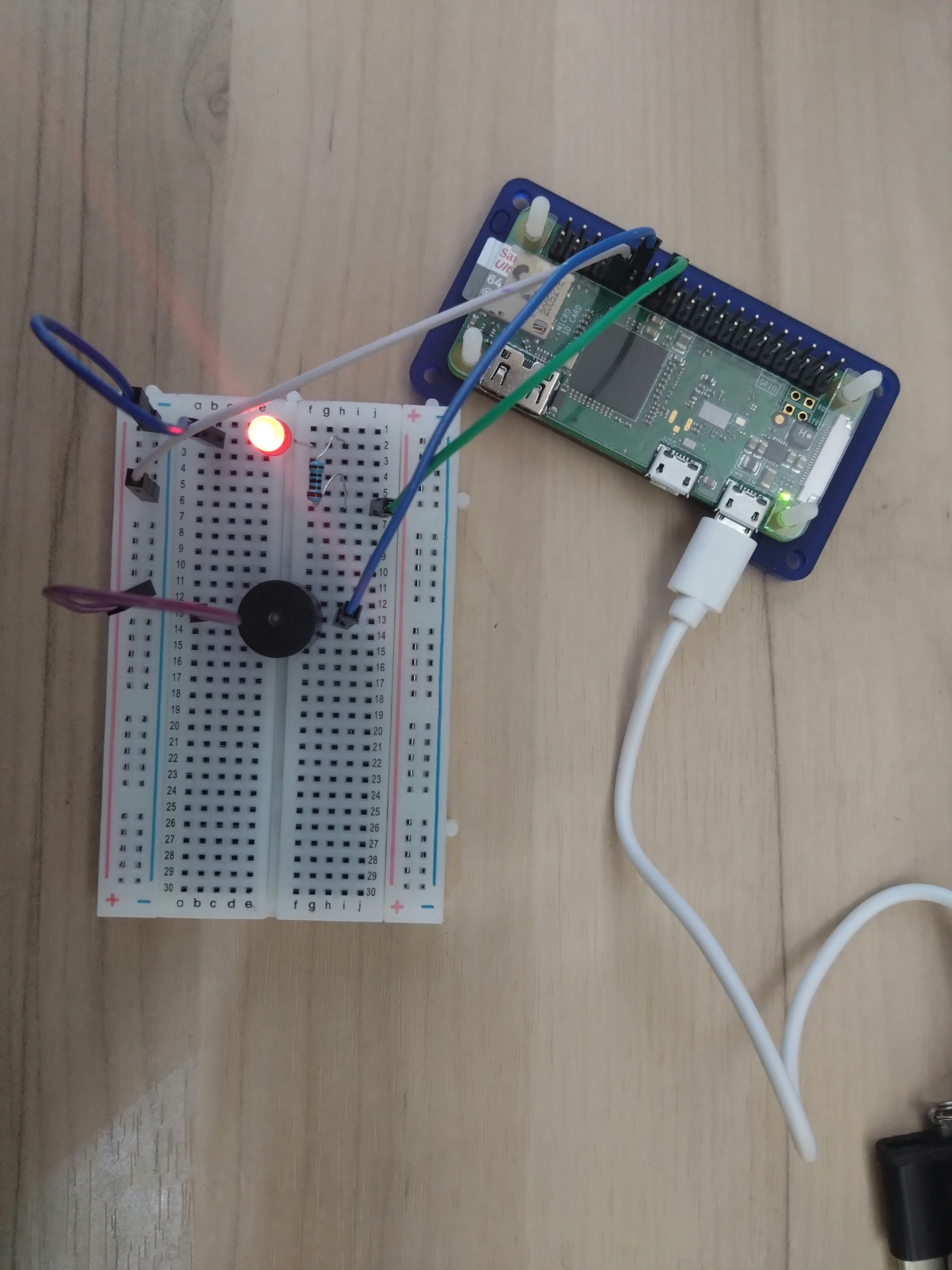
ラズパイゼロで、ブザーが鳴っているときに、赤LEDを点灯させる導通を行った
環境
| HW/SW | バージョン他 |
|---|---|
| 筐体 | Rasberry zero |
| OS | RasberryPi OS (32-bit) |
| python | 3.13.5 |
| 部品① | LED |
| 部品② | BUZZER 5V |
| その他部品 | ブレッドボード、ジャンパーワイアー、抵抗(1kΩ) |
テキスト回路図
■部品① LED
Rasberry ZERO(GPIO18:物理ピン12) → 抵抗1KΩ → (+)LED(-) → ※
※ → Rasberry ZERO(GND:物理ピン9)

■部品② ブザー
Rasberry ZERO(GPIO23:物理ピン16) → (+)ブザー(-) → Rasberry ZERO(GND:物理ピン9)
インフォメーション
上記の回路の、LEDとブザーの終端で物理ピン[9]を併用しているのは、ブレッドボード上で並列に回路を組んでます
※ブレッドボードがないなどで並列に回路が組めない場合は、ラズパイ側の物理ピン[9]以外に、[6]、[14]、[20]、[25]、[30]、[34]、[39]がGNDになります
プログラム仕様
・実行すると、コンソール出力し、0.3秒ごとに、ブザーとLEDの[ON][OFF]を繰り返す
・やめるときは、[Ctl] + [c]
プログラムソース
buzzer_led.py
#!/usr/bin/python

import RPi.GPIO as GPIO
import time

LedPin = 23    #LEDのピン GPIO23 物理ピン:16
BuzzerPin = 18 #ブザーのピン GPIO18 物理ピン:12

def print_message():
    print ("|**************************************|")
    print ("|                 Beep                 |")
    print ("|**************************************|\n")
    print ("実行中...")
    print ("")
    print ("Ctrl+C で実行終了")

def setup():
    GPIO.setmode(GPIO.BCM) #GPIOのモードを"GPIO.BCM"に設定
    GPIO.setup(BuzzerPin, GPIO.OUT, initial=GPIO.HIGH)
    GPIO.setup(LedPin, GPIO.OUT, initial=GPIO.HIGH)

def main():
    print_message()
    while True:
        GPIO.output(BuzzerPin, GPIO.LOW) #ブザー OFF
        GPIO.output(LedPin, GPIO.LOW)    #LED OFF
        time.sleep(0.3) #0,3秒待つ
        GPIO.output(BuzzerPin, GPIO.HIGH) #ブザー ON
        GPIO.output(LedPin, GPIO.HIGH)    #LED ON
        time.sleep(0.3) #0.3秒待つ


def destroy():
    # Turn off buzzer
    GPIO.output(BuzzerPin, GPIO.HIGH)
    GPIO.output(LedPin, GPIO.HIGH)
    # Release resource
    GPIO.cleanup()

if __name__ == '__main__':
    setup()
    try:
        main()
    except KeyboardInterrupt:
        destroy()
5Vブザーの音に注意してください。
実行
pi@pi32lite:~/gpio $ python buzzer_led.py
|**************************************|
|                 Beep                 |
|**************************************|

実行中...

Ctrl+C で実行終了
| ブザー、LED OFF | ブザー、LED ON |
|---|---|
 |
 |