
Claude Code などの AI Agent と連携し、AWS 環境へアプリケーションをデプロイするためのアーキテクチャの提案や IaC の生成をしてくれる Agent Plugins for AWS が先日リリースされました。
Today’s launch includes an initial deploy-on-aws agent plugin, which lets developers enter deploy to AWS and have their coding agent generate AWS architecture recommendations, AWS service cost estimates, and AWS infrastructure-as-code to deploy the application to AWS.
私は最近 Claude Code を使い始めたばかりなので、早速 Agent Plugins for AWS を試してみたいと思っていたところに、AWS AI Hero のみのるんさんによる「Amazon Bedrock AgentCore を使ってモダンな UI の AI エージェントを IaC 付きで構築しよう」という記事が AWS の builders.flush に掲載されているのを見つけました。
このハンズオンでは、AI エージェントの Runtime が Amazon Bedrock AgentCore で、フロントエンドは AWS Amplify でホスティングになっており、これらのインフラを AWS CDK でデプロイできるようになっています。
このハンズオンの IaC を作成する部分から先を Claude Code と Agent Plugins for AWS に作らせたら面白いのではと思い、早速試してみました。
Bedrock AgentCore を使った AI エージェントの作成(ハンズオンより)
Amazon Bedrock AgentCore を使ってモダンな UI の AI エージェントを IaC 付きで構築しよう のハンズオンに沿って、「CDK によるインフラ定義」の手前まで進めます。
ハンズオンのここから先の手順を Claude Code と Agant Plugins for AWS に行わせる想定ですが、npm の関連パッケージのインストールだけは先に行なっておきます。
$ npm install aws-cdk@latest aws-cdk-lib@latest
$ npm install @aws-cdk/aws-bedrock-agentcore-alpha@latest
$ npm install deploy-time-build
$ npm install -D @types/node
$ npm pkg set "overrides.@aws-sdk/client-cloudformation"="3.936.0"
$ npm install
CDK Bootstrap が未実施であればこれも行ないます。
$ ACCOUNT_ID=$(aws sts get-caller-identity --query Account --output text)
npx cdk bootstrap aws://$ACCOUNT_ID/ap-northeast-1
この時点で、Github リポジトリには React のフロントエンドと Strands Agents のバックエンド、バックエンドを動かすための Dockerfile がローカルへ作成された状態になりました。
Agent Plugins for AWS のインストール
ここから Claude Code での作業となります。
AI エージェントのリポジトリがあるディレクトリで Claude Code を起動し、AWS 公式の手順 のとおりに Agent Plugins for AWS をインストールします。
Agent Plugins for AWS マーケットプレイスのプラグインを追加します。
/plugin marketplace add awslabs/agent-plugins
今回は Agent Plugins for AWS にハンズオンで開発した AI エージェントを AWS 環境へデプロイさせることが目的なので、「deploy-on-aws」プラグインを追加します。
/plugin install deploy-on-aws@agent-plugins-for-aws
/reload-plugins
Agent Plugins for AWS を使ってみる
早速 Claude Code のプロンプトに「deploy to AWS」と入力してみます。
すると、deploy-on-aws プラグインの Agent Skill でアーキテクチャの分析をしてくれました。

| Service | Purpose | Why |
|---|---|---|
| AWS Amplify Hosting | Serve the React SPA | Already using Amplify Gen2, natural fit |
| Amazon Cognito | Email/password auth | Already defined in amplify/auth/resoure.ts |
| Amazon ECR | Container registry | Stores the Python agent Docker image |
| Amazon Bedrock AgentCore | AI agent runtime | Already targeted in App.tsx - container-based agent runtime |
| Amazon Bedrock | Claude Haiku 4.5 inference | Used by Strands agent in app.py |
元のハンズオンのアプリケーションが Amplify の公式テンプレートリポジトリをベースにしているので当然と言えば当然な分析結果になっています。
| Service | Estimated/month |
|---|---|
| Amplify Hosting | ~\$0.01 (first 1,000 build-min free, ~\$ 0.01/GB served) |
| Cognito | \$0 (free tier: 50K MAU) |
| ECR | ~\$0.03 (small image ~300MB x \$0.10/GB) |
| Bedrock AgentCore | New service - billed per compute-second + invocations |
| Bedrock Claude Haiku 4.5 | \$0.00025/1K input, \$0.00125/1K output (pay-per-use) |
アーキテクチャで使われる各サービスの月当たりの料金も提示してくれていますね。
その次に、IaC の提案と、デプロイ手順の提案がありました。

amplify/backend.ts を書き換え、Docker イメージをビルドし、Bedrock AgentCore を Amazon Cognito の認証と連携する内容となっていましたので、そのまま IaC コードを出力してもらうことにしました。
Claude Code からは以下のとおり AWS CDK のコードが返ってきました。
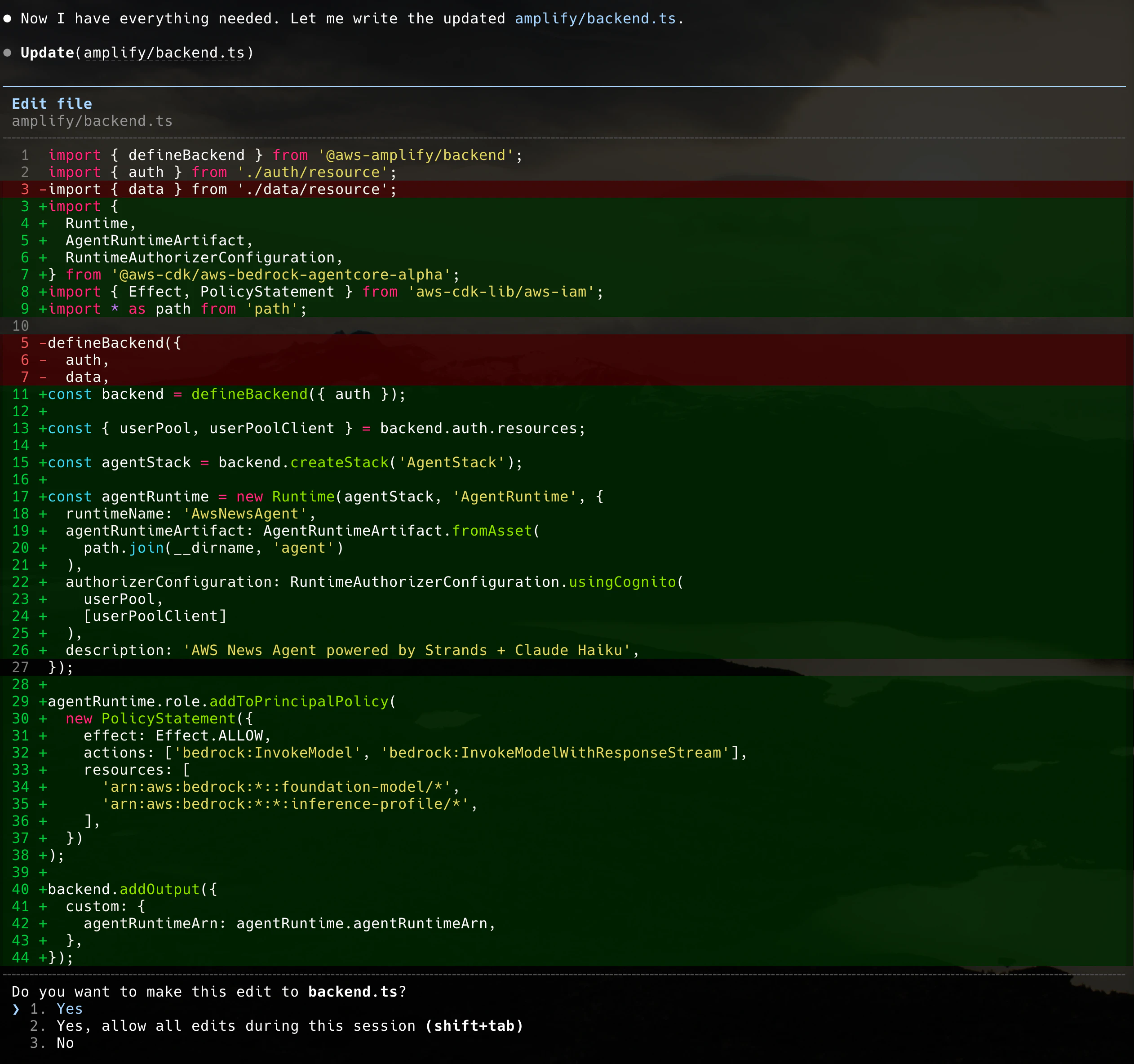
この後いくつかエラーを修正していく途中で tsx パッケージが無いと怒られたので npm でインストールします。
$ npm install tsx --save-dev
最終的に Claude Code が出力した IaC のコードは以下のとおりです。
import { defineAuth } from '@aws-amplify/backend';

/**
 * Define and configure your auth resource
 * @see https://docs.amplify.aws/gen2/build-a-backend/auth
 */
export const auth = defineAuth({
  loginWith: {
    email: true,
  },
});
import { defineBackend } from '@aws-amplify/backend';
import { auth } from './auth/resource';
import {
  Runtime,
  AgentRuntimeArtifact,
  RuntimeAuthorizerConfiguration,
} from '@aws-cdk/aws-bedrock-agentcore-alpha';
import { Effect, PolicyStatement } from 'aws-cdk-lib/aws-iam';
import * as path from 'path';
import { fileURLToPath } from 'url';
const __dirname = path.dirname(fileURLToPath(import.meta.url));

const backend = defineBackend({ auth });

const { userPool, userPoolClient } = backend.auth.resources;

const agentStack = backend.createStack('AgentStack');

const agentRuntime = new Runtime(agentStack, 'AgentRuntime', {
  runtimeName: 'AwsNewsAgent',
  agentRuntimeArtifact: AgentRuntimeArtifact.fromAsset(
    path.join(__dirname, 'agent')
  ),
  authorizerConfiguration: RuntimeAuthorizerConfiguration.usingCognito(
    userPool,
    [userPoolClient]
  ),
  description: 'AWS News Agent powered by Strands + Claude Haiku',
});

agentRuntime.role.addToPrincipalPolicy(
  new PolicyStatement({
    effect: Effect.ALLOW,
    actions: ['bedrock:InvokeModel', 'bedrock:InvokeModelWithResponseStream'],
    resources: [
      'arn:aws:bedrock:*::foundation-model/*',
      'arn:aws:bedrock:*:*:inference-profile/*',
    ],
  })
);

backend.addOutput({
  custom: {
    agentRuntimeArn: agentRuntime.agentRuntimeArn,
  },
});
元のハンズオンのコードとは異なりますが、基本となる部分はおおよそ同様のコードとなっていました。
ここまでの変更を Git リポジトリをコミットし、Github へ push しておきます。
AWS Amplify へのデプロイ
ここからは Claude Code を離れてマネジメントコンソールで作業しました。
CI/CD で連携する Github を選択します。

途中 Github へページが遷移し、AWS Amplify に対して与える許可を設定する画面が表示されるので、適切に許可を設定すると、接続する Github リポジトリが選択できるようになります。ブランチは main としました。

Amplify へのデプロイに必要な権限を持ったサービスロールを作成します。

内容に問題がなければ「保存してデプロイ」します。

デプロイに成功しました。

デプロイ画面に表示されている URL にアクセスすると、Amazon Cognito のユーザープールの画面が表示され、メールアドレスでサインアップ、サインインをすると AI エージェントの画面が無事表示されました。

今回 AWS Amplify へのデプロイはマネジメントコンソールから実施しましたが、Github Personal access token と gh コマンドを使えるようにしておけば、そのまま Claude Code に CLI で操作させてデプロイまで行わせることも可能です。
まとめ
Claude Code と Agent Plugins for AWS を使うと、アプリケーションを分析してアーキテクチャの提案から IaC の作成まで行えます。
実は私は AWS CDK も TypeScript もほとんど経験がない状態でしたが、Claude Code と Agent Plugins for AWS を使うことで今回の環境構築について全くつまずくことはありませんでした。(都度出力された内容を調べながら進めたので時間はかかりましたが……。)
Amazon Bedrock AgentCore のように開発が楽になるサービスと組み合わせると非常に強力なツールだと感じました。
ガバメントクラウド環境でもこれらが簡単に使えるようになれば、自治体職員が簡単に PoC をデプロイして業務改善に繋げるといった未来も描けるのではないかと思いますので期待したいですね。