Ubuntuにpsqlをインストールする方法
環境
- wsl上のUbuntu
takeo@DESKTOP-BFP1BEL:~$ cat /etc/os-release
PRETTY_NAME="Ubuntu 24.04.3 LTS"
NAME="Ubuntu"
VERSION_ID="24.04"
VERSION="24.04.3 LTS (Noble Numbat)"
VERSION_CODENAME=noble
ID=ubuntu
ID_LIKE=debian
HOME_URL="https://www.ubuntu.com/"
SUPPORT_URL="https://help.ubuntu.com/"
BUG_REPORT_URL="https://bugs.launchpad.net/ubuntu/"
PRIVACY_POLICY_URL="https://www.ubuntu.com/legal/terms-and-policies/privacy-policy"
UBUNTU_CODENAME=noble
LOGO=ubuntu-logo
インストール手順
- インストール
sudo apt update
sudo apt upgrade
sudo apt install postgresql postgresql-contrib
- 確認
$ sudo -u postgres psql
psql (16.11 (Ubuntu 16.11-0ubuntu0.24.04.1))
Type "help" for help.

postgres=# select version();
ユーザー追加
- 追加
postgres=# CREATE ROLE takeo WITH LOGIN PASSWORD 'takeo';
CREATE ROLE
postgres=# exit
- ログインを試す
$ psql -U takeo -d postgres
psql (16.11 (Ubuntu 16.11-0ubuntu0.24.04.1))
Type "help" for help.

postgres=>
外からつなぐとき
postgresql.confの修正
sudo vim /etc/postgresql/16/main/postgresql.conf
- listen_addressesを修正する
listen_addresses = '*' # what IP address(es) to listen on;
pg_hba.confの修正
sudo vim /etc/postgresql/16/main/pg_hba.conf
- IPv4 local connectionsを修正する
# IPv4 local connections:
host    all             all             all            scram-sha-256
psqlを再起動する
sudo systemctl restart postgresql.service
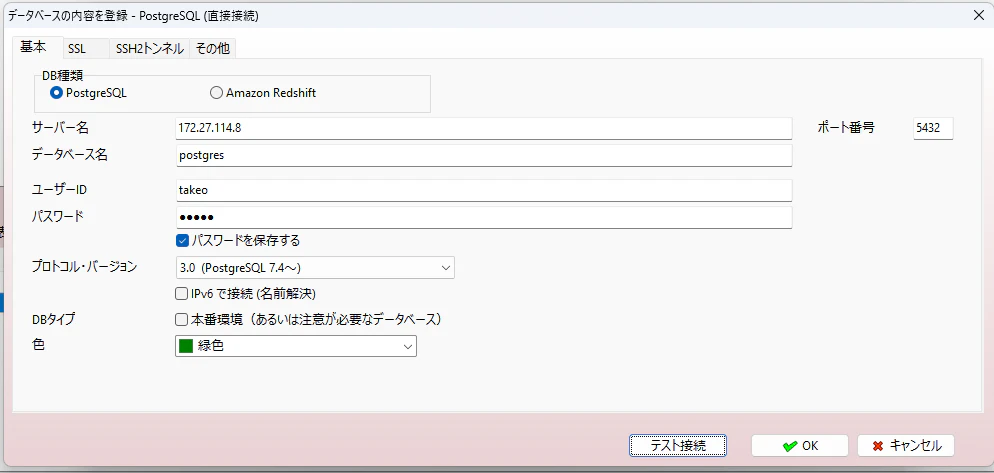
windowsからpsqlに接続
- WindowsのPowershellで実行してipaddressを得る
wsl -d Ubuntu hostname -I
172.27.114.8
- A5などを使って接続する