
目的
v12.0を12.2にアップデートしようと思ったけれども最初のhelthcheckパッチインストールでエラーに遭遇。その後12.2へのアップデートでも躓いたので調査した結果を記録する目的として執筆。Guardiumのバージョンアップについては癖があるので見返して対処方法を探る意味でも有意義な記録になっていることを望む
概要
Guardiumアプライアンス向けパッチは、Guardiumが作成した正規のパッチであることを保証するため、内部証明書で署名されている。パッチを装置へアップロードする際、この証明書の検証が実行される。
(https://www.ibm.com/support/pages/node/7168698) によると2025年3月29日 18:00GMTにGuardiumアプライアンス内部署名証明書が失効しているとのこと。
こちらを執筆している現在2026年7月7日時点においてアプライアンスバージョンが10.6,11.x,12.0の場合でパッチ(バージョンアップ、不具合修正)適用を行う場合にはこちらの手順が必要になる。
共通の調査方法
fileserverを起動して以下に詳細ログを確認する
ヘルスチェックのエラー
以下にヘルスチェックで何がERRORとなってパッチがインストールできないのか記録される
https://<コレクターのIPアドレス>:8445/log/opt-ibm-guardium-log/diag/current/health_check.yyyymmddhhmm.log
パッチエラー
https://<コレクターのIPアドレス>:8445/log/opt-ibm-guardium-log/install_patch.log
show system patch statusの結果ログcsv形式
https://<コレクターのIPアドレス>:8445/log/opt-ibm-guardium-log/show_patch_status/
アプライアンス証明書失効時のエラー
パッチをアップロードすると以下のように「Patch signature verification failed」エラーが出る。
guard.example.com> fileserver 192.168.20.1 3600

Starting the file server...
The file server is ready at https://guard.example.com:8445
The timeout has been set to 3600 seconds and it may timeout during the uploading.

The upload will only be accessible from the IP you are logged in from: 192.168.20.1

Press ENTER to stop the file server.

Stopping process

Register patch files in the directory:
SqlGuard-12.0p9997.tgz.enc.sig
Patch signature verification failed
Register failed
ok
対応
GUIの停止
guard.example.com> stop gui
Are you sure you want to stop GUI (y/n)?
y <--yを押す
Stopped GUI
ok
stop inspection core
guard.example.com> stop inspection-core
Are you sure you want to stop inspection core (y/n)?
y<--yを押す
Stopping inspection core
Please do not forget to manually start the Inspection Core after maintenance
is done.
ok
NTP停止
guard.example.com> store system time_server state off
chrony service is not active.
Command ran on: Tue Jul  7 16:11:17 2026
ok
時間を手動でパッチ署名証明書期限時間前に戻す
guard.example.com> store system clock datetime 2025-03-28 12:00:00
Clock changed. Please proceed with the 'restart gui' command as soon as
possible in order to complete the process.
Command ran on: Fri Mar 28 12:00:00 2025
ok
対処するためのpatch インストール
guard.example.com> fileserver 192.168.20.1 3600

Starting the file server...
The file server is ready at https://guard.example.com:8445
The timeout has been set to 3600 seconds and it may timeout during the uploading.

The upload will only be accessible from the IP you are logged in from: 192.168.20.1

Press ENTER to stop the file server.
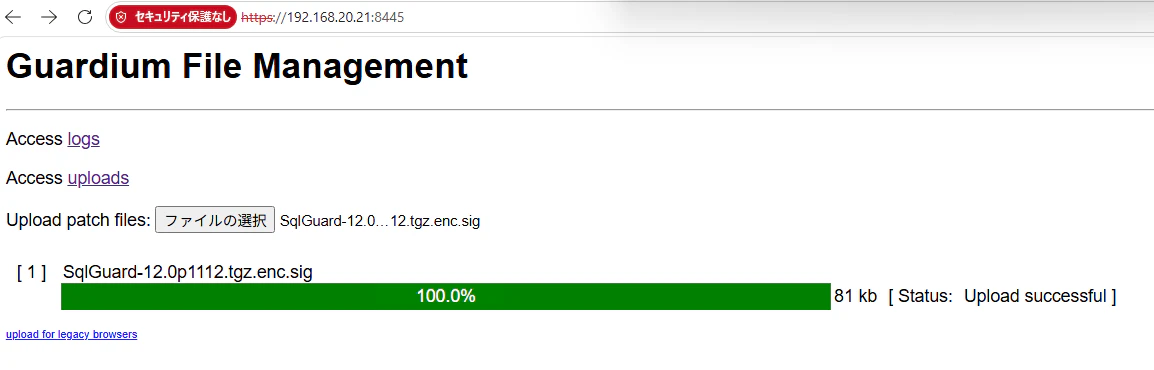
Enterを押してコマンド画面でのfileserverを停止する
Stopping process

Register patch files in the directory:
SqlGuard-12.0p1112.tgz.enc.sig
Register succeeded
ok
この後「store system patch install sys」コマンドで12.0p1112パッチをインストール試みるもエラーとなった。結果的にsystem restartで再起動が必要だった
パッチインストール
以下は、1-4でいろいろパッチ名が表示されているが、事前にfileserverでアップロード済み
guard.example.com> store system patch install sys

Patches:

1. SqlGuard-12.0p100_GPU_Sep_2024_V12.1.tgz.enc.sig
2. SqlGuard-12.0p1012.tgz.enc.sig
3. SqlGuard-12.0p1112.tgz.enc.sig
4. SqlGuard-12.0p9997.tgz.enc.sig

Please choose patches to install (1-4, or multiple numbers separated by ",", or q to quit): 3
Install item 3

Patch has been submitted, and will be installed according to the request time,
please check installed patches report or CLI (show system patch installed).
Command ran on: Fri Mar 28 12:00:49 2025
ok
guard.example.com>
guard.example.com> show system patch installed
P#      Who       Description                     Request Time         Status
1012    CLI       Patch Signing Update            2025-03-28 12:01:00  DONE: Patch installation Succeeded.
1112    CLI       Patch signing certificate updat 2025-03-28 12:00:43  DONE: Patch installation Succeeded.
ok
guard.example.com>
元に戻す
以下エラーが出る。後続のパッチを当てるとシステム再起動走るので今は無視
guard.example.com>  store system clock datetime 2026-07-07 16:21:00
Clock changed. Please proceed with the 'restart gui' command as soon as
possible in order to complete the process.
Command ran on: Tue Jul  7 16:21:00 2026
ok
guard.example.com> restart gui
Are you sure you want to restart GUI (y/n)?
Restarting GUI.  This could take several minutes...
Can't execute SQL statement: Lost connection to MySQL server during query
Error reconfiguring the GUI.
GUI restart unsuccessfulerr
guard.example.com> start inspection-core
Starting inspection core
Started.
ok
パッチ9997インストール
guard.example.com> store system patch install sys

Patches:

1. SqlGuard-12.0p100_GPU_Sep_2024_V12.1.tgz.enc.sig
2. SqlGuard-12.0p1012.tgz.enc.sig
3. SqlGuard-12.0p9997.tgz.enc.sig

Please choose patches to install (1-3, or multiple numbers separated by ",", or q to quit): 3
Install item 3

Patch has been submitted, and will be installed according to the request time,
please check installed patches report or CLI (show system patch installed).
Command ran on: Tue Jul  7 16:44:35 2026
ok

guard.example.com> show system patch installed
P#      Who       Description                     Request Time         Status
1012    CLI       Patch Signing Update            2025-03-28 12:01:00  DONE: Patch installation Succeeded.
1112    CLI       Patch signing certificate updat 2025-03-28 12:00:43  DONE: Patch installation Succeeded.
9997    CLI       Health Check for GPU and Bundle 2026-07-07 16:44:28  WARNING: Potential problems were found. Please check the details of the Health Check Log rep
ok
guard.example.com>
v12.0->12.1へのバージョンアップ(成功すると勝手に再起動される)
uard.example.com> store system patch install sys

Patches:

1. SqlGuard-12.0p100_GPU_Sep_2024_V12.1.tgz.enc.sig
2. SqlGuard-12.0p1012.tgz.enc.sig

Please choose patches to install (1-2, or multiple numbers separated by ",", or q to quit): 1
Install item 1

Patch has been submitted, and will be installed according to the request time,
please check installed patches report or CLI (show system patch installed).
Command ran on: Tue Jul  7 16:48:43 2026
ok
guard.example.com> show system patch installed
P#      Who       Description                     Request Time         Status
1012    CLI       Patch Signing Update            2025-03-28 12:01:00  DONE: Patch installation Succeeded.
1112    CLI       Patch signing certificate updat 2025-03-28 12:00:43  DONE: Patch installation Succeeded.
9997    CLI       Health Check for GPU and Bundle 2026-07-07 16:44:28  WARNING: Potential problems were found. Please check the details of the Health Check Log rep
100     CLI       SqlGuard-12.0p100_GPU_Sep_2024_ 2026-07-07 16:47:38  Preparing to install patch.
ok
guard.example.com> show system patch installed
ERROR: can't execute Lost connection to MySQL server during query
No patch installed or scheduled to install.
ok
再起動後
guard.example.com> show system patch installed
P#      Who       Description                     Request Time         Status
1012    CLI       Patch Signing Update            2025-03-28 12:01:00  DONE: Patch installation Succeeded.
1112    CLI       Patch signing certificate updat 2025-03-28 12:00:43  DONE: Patch installation Succeeded.
9997    CLI       Health Check for GPU and Bundle 2026-07-07 16:44:28  WARNING: Potential problems were found. Please check the details of the Health Check Log rep
100     CLI       Guardium Patch Update (GPU) for 2026-07-07 16:47:38  DONE: Patch installation Succeeded.
ok
Bundle Patch適用(成功すると勝手に再起動される)
v12.2にアップデートを試みたときにヘルスチェックのエラーの中に「ERROR for p200: Bundle 115 or higher required.」と出力されていたので115を適用する
guard.example.com> store system patch install sys

Patches:

1. SqlGuard-12.0p1012.tgz.enc.sig
2. SqlGuard-12.0p115_Bundle_Mar_25_2025.tgz.enc.sig
3. SqlGuard-12.0p230_GPU_Jun_2026_V12.2.3_FC.tgz.enc.sig

Please choose patches to install (1-3, or multiple numbers separated by ",", or q to quit): 2
Install item 2

Patch has been submitted, and will be installed according to the request time,
please check installed patches report or CLI (show system patch installed).
Command ran on: Tue Jul  7 18:37:02 2026
ok
v12.1->12.2へのバージョンアップ(成功すると勝手に再起動される)
もう一度9997パッチインストールが必要
guard.example.com> store system patch install sys

Patches:

1. SqlGuard-12.0p1012.tgz.enc.sig
2. SqlGuard-12.0p200_GPU_Sep_2025_V12.2.tgz.enc.sig
3. SqlGuard-12.0p9997.tgz.enc.sig

Please choose patches to install (1-3, or multiple numbers separated by ",", or q to quit): 3
Install item 3
Patch 12.0 9997 has already installed successfully. Don't need to install it again.
Do you really want to install again (yes or no)?
y

Patch has been submitted, and will be installed according to the request time,
please check installed patches report or CLI (show system patch installed).
Command ran on: Tue Jul  7 17:13:04 2026
ok
ヘルスチェックログを確認すると「libidn is installed - ready for GPU 200.」と記録があるので12.2パッチインストールに進む
guard.example.com> store system patch install sys

Patches:

1. SqlGuard-12.0p1012.tgz.enc.sig
2. SqlGuard-12.0p200_GPU_Sep_2025_V12.2.tgz.enc.sig

Please choose patches to install (1-2, or multiple numbers separated by ",", or q to quit): 2
Install item 2

Patch has been submitted, and will be installed according to the request time,
please check installed patches report or CLI (show system patch installed).
Command ran on: Tue Jul  7 17:15:58 2026
ok
guard.example.com> show system patch installed
P#      Who       Description                     Request Time         Status
1012    CLI       Patch Signing Update            2025-03-28 12:01:00  DONE: Patch installation Succeeded.
1112    CLI       Patch signing certificate updat 2025-03-28 12:00:43  DONE: Patch installation Succeeded.
100     CLI       Guardium Patch Update (GPU) for 2026-07-07 16:47:38  DONE: Patch installation Succeeded.
9997    CLI       Health Check for GPU and Bundle 2026-07-07 17:12:49  WARNING: Potential problems were found. Please check the details of the Health Check Log rep
200     CLI       Guardium Patch Update (GPU) for 2026-07-07 17:14:42  Preparing to install patch.
ok
guard.example.com>
↓自動再起動後
Latest patch status log: /var/IBM/Guardium/log/diag/depot/status-12.0p200_GPU_Sep_2025_V12.2_20260707190044.log
----------------------------------------------------------------------
2026-07-07 19:00:44: Started patch 12.0p200_GPU_Sep_2025_V12.2 installation.
2026-07-07 19:00:44: Validating patch and system requirements.
2026-07-07 19:00:45: Stopping services: ecosystem, datastreams, rds, snif, sender, guard-kafka-connect-uc, guard-kafka-uc, guard-zookeeper-uc, nanny, snif-bufusage, classifier, tomcat, guard-uc
2026-07-07 19:02:06: Executing pre-install actions.
2026-07-07 19:02:13: Applying updates.
2026-07-07 19:02:14: POST: Executing post-install actions.
2026-07-07 19:02:14: POST: IMPORTANT: Do not reboot appliance during patch installation. If patch appears to be stuck contact Guardium support.
2026-07-07 19:02:15: POST: Removing old rpms.
2026-07-07 19:02:18: POST: Stopping mysql.
2026-07-07 19:02:31: POST: Upgrading and installing new rpms.
2026-07-07 19:06:15: POST: Stopping mysql.
2026-07-07 19:07:14: POST: Main rpm handling completed. Applying post-rpm changes.
2026-07-07 19:07:15: POST: Starting mysql.
2026-07-07 19:07:16: POST: Restarting mysql.
2026-07-07 19:08:34: DB_PATCH: Starting database patching process.
2026-07-07 19:08:34: DB_PATCH: Updating database schema and metadata.
2026-07-07 19:08:34: DB_PATCH: Running mysql_init_db_maint.sql
2026-07-07 19:08:35: DB_PATCH: Running populate_unique_id_prefix.sh
2026-07-07 19:08:39: DB_PATCH: Running upgradeTurbineAndCustom.sql
2026-07-07 19:09:08: DB_PATCH: Running UpgradeFixColumnsOrder.sql
2026-07-07 19:09:08: DB_PATCH: Running mysqlinit.sql.production
2026-07-07 19:09:09: DB_PATCH: Running mysql_patch_meta_data.sql
2026-07-07 19:09:24: DB_PATCH: Running mysql_upgrade_procs.sql
2026-07-07 19:09:25: DB_PATCH: Running call_AGG_SET_AUTO_INCREMENT.sql
2026-07-07 19:09:25: DB_PATCH: Database patching succeeded.
2026-07-07 19:09:35: POST: Running VA Cleanup Scripts
2026-07-07 19:09:35: POST: Running VA Reset Assessment Threshold Script
2026-07-07 19:10:17: POST: Reboot scheduled after patch installation.
2026-07-07 19:10:17: POST: Post-install actions completed.
2026-07-07 19:10:19: Starting services.
2026-07-07 19:10:27: SUCCESS: Patch 12.0p200_GPU_Sep_2025_V12.2 installation successful.
----------------------------------------------------------------------

No patch installation is currently running.

ok
v12.2.0->12.2.3へアップデート(成功すると勝手に再起動される)
もう一度9997パッチインストールが必要
guard.example.com> store system patch install sys

Patches:

1. SqlGuard-12.0p1012.tgz.enc.sig
2. SqlGuard-12.0p230_GPU_Jun_2026_V12.2.3_FC.tgz.enc.sig
3. SqlGuard-12.0p9997.tgz.enc.sig

Please choose patches to install (1-3, or multiple numbers separated by ",", or q to quit): 3
Install item 3
Patch 12.0 9997 has already installed successfully. Don't need to install it again.
Do you really want to install again (yes or no)?
y

Patch has been submitted, and will be installed according to the request time,
please check installed patches report or CLI (show system patch installed).
Command ran on: Tue Jul  7 19:24:06 2026
ok
今回はhealthcheckがsucceeded! ログに「Appliance is ready for GPU installation.」と記録あり
guard.example.com> show system patch installed
P#      Who       Description                     Request Time         Status
1012    CLI       Patch Signing Update            2025-03-28 12:01:00  DONE: Patch installation Succeeded.
1112    CLI       Patch signing certificate updat 2025-03-28 12:00:43  DONE: Patch installation Succeeded.
100     CLI       Guardium Patch Update (GPU) for 2026-07-07 16:47:38  DONE: Patch installation Succeeded.
4015    CLI       Snif Update (Nov 20 2025)       2026-07-07 17:40:22  DONE: Patch installation Succeeded.
115     CLI       Update Bundle for v12.1 (Mar 25 2026-07-07 18:36:36  DONE: Patch installation Succeeded.
200     CLI       Guardium Patch Update (GPU) for 2026-07-07 18:57:15  DONE: Patch installation Succeeded.
230     CLI       Guardium Patch Update (GPU) for 2026-07-07 19:14:15  ERROR: Patch Installation Failed - Health Check must be reinstalled after last GPU or Bundle
9997    CLI       Health Check for GPU and Bundle 2026-07-07 19:24:00  DONE: Patch installation Succeeded.
ok
12.2.3パッチのインストール
guard.example.com> store system patch install sys

Patches:

1. SqlGuard-12.0p1012.tgz.enc.sig
2. SqlGuard-12.0p230_GPU_Jun_2026_V12.2.3_FC.tgz.enc.sig

Please choose patches to install (1-2, or multiple numbers separated by ",", or q to quit): 2
Install item 2

Patch has been submitted, and will be installed according to the request time,
please check installed patches report or CLI (show system patch installed).
Command ran on: Tue Jul  7 19:26:54 2026
ok
guard.example.com> show system patch installed
P#      Who       Description                     Request Time         Status
1012    CLI       Patch Signing Update            2025-03-28 12:01:00  DONE: Patch installation Succeeded.
1112    CLI       Patch signing certificate updat 2025-03-28 12:00:43  DONE: Patch installation Succeeded.
100     CLI       Guardium Patch Update (GPU) for 2026-07-07 16:47:38  DONE: Patch installation Succeeded.
4015    CLI       Snif Update (Nov 20 2025)       2026-07-07 17:40:22  DONE: Patch installation Succeeded.
115     CLI       Update Bundle for v12.1 (Mar 25 2026-07-07 18:36:36  DONE: Patch installation Succeeded.
200     CLI       Guardium Patch Update (GPU) for 2026-07-07 18:57:15  DONE: Patch installation Succeeded.
9997    CLI       Health Check for GPU and Bundle 2026-07-07 19:24:00  DONE: Patch installation Succeeded.
230     CLI       Guardium Patch Update (GPU) for 2026-07-07 19:25:21  Preparing to install patch.
ok
↓再起動後
guard.example.com>  show system patch installed
P#      Who       Description                     Request Time         Status
1012    CLI       Patch Signing Update            2025-03-28 12:01:00  DONE: Patch installation Succeeded.
1112    CLI       Patch signing certificate updat 2025-03-28 12:00:43  DONE: Patch installation Succeeded.
100     CLI       Guardium Patch Update (GPU) for 2026-07-07 16:47:38  DONE: Patch installation Succeeded.
4015    CLI       Snif Update (Nov 20 2025)       2026-07-07 17:40:22  DONE: Patch installation Succeeded.
115     CLI       Update Bundle for v12.1 (Mar 25 2026-07-07 18:36:36  DONE: Patch installation Succeeded.
200     CLI       Guardium Patch Update (GPU) for 2026-07-07 18:57:15  DONE: Patch installation Succeeded.
9997    CLI       Health Check for GPU and Bundle 2026-07-07 19:24:00  DONE: Patch installation Succeeded.
230     CLI       Guardium Patch Update (GPU) for 2026-07-07 19:25:21  DONE: Patch installation Succeeded.
ok
guard.example.com> show system patch status
Latest patch status log: /var/IBM/Guardium/log/diag/depot/status-12.0p230_GPU_Jun_2026_V12.2.3_FC_20260707192921.log
----------------------------------------------------------------------
2026-07-07 19:29:21: Started patch 12.0p230_GPU_Jun_2026_V12.2.3_FC installation.
2026-07-07 19:29:21: Validating patch and system requirements.
2026-07-07 19:29:22: Stopping services: rds, snif, sender, guard-kafka-connect-uc, guard-kafka-uc, guard-zookeeper-uc, nanny, snif-bufusage, classifier, tomcat, guard-uc, alerter
2026-07-07 19:29:52: Executing pre-install actions.
2026-07-07 19:29:59: Applying updates.
2026-07-07 19:30:00: POST: Executing post-install actions.
2026-07-07 19:30:00: POST: IMPORTANT: Do not reboot appliance during patch installation. If patch appears to be stuck contact Guardium support.
2026-07-07 19:30:01: POST: Stopping mysql.
2026-07-07 19:30:17: POST: Upgrading and installing new rpms.
2026-07-07 19:34:41: POST: Stopping mysql.
2026-07-07 19:35:32: POST: Main rpm handling completed. Applying post-rpm changes.
2026-07-07 19:40:43: POST: Starting mysql.
2026-07-07 19:41:02: POST: Restarting mysql.
2026-07-07 19:41:23: DB_PATCH: Starting database patching process.
2026-07-07 19:41:23: DB_PATCH: Updating database schema and metadata.
2026-07-07 19:41:23: DB_PATCH: Running mysql_init_db_maint.sql
2026-07-07 19:41:23: DB_PATCH: Running populate_unique_id_prefix.sh
2026-07-07 19:41:27: DB_PATCH: Running upgradeTurbineAndCustom.sql
2026-07-07 19:42:03: DB_PATCH: Running mysqlinit.sql.production
2026-07-07 19:42:03: DB_PATCH: Running mysql_patch_meta_data.sql
2026-07-07 19:42:21: DB_PATCH: Running mysql_upgrade_procs.sql
2026-07-07 19:42:22: DB_PATCH: Running call_AGG_SET_AUTO_INCREMENT.sql
2026-07-07 19:42:22: DB_PATCH: Database patching succeeded.
2026-07-07 19:43:07: POST: Reboot scheduled after patch installation.
2026-07-07 19:43:07: POST: Post-install actions completed.
2026-07-07 19:43:09: Starting services.
2026-07-07 19:43:15: SUCCESS: Patch 12.0p230_GPU_Jun_2026_V12.2.3_FC installation successful.
----------------------------------------------------------------------

No patch installation is currently running.

ok
参考資料
https://www.ibm.com/support/pages/node/7168698
https://www.ibm.com/support/pages/node/7242908
https://www.ibm.com/docs/en/gdp/12.x?topic=installing-your-guardium-system
https://www.ibm.com/docs/en/gdp/12.x?topic=upgrade-identifying-correct-path