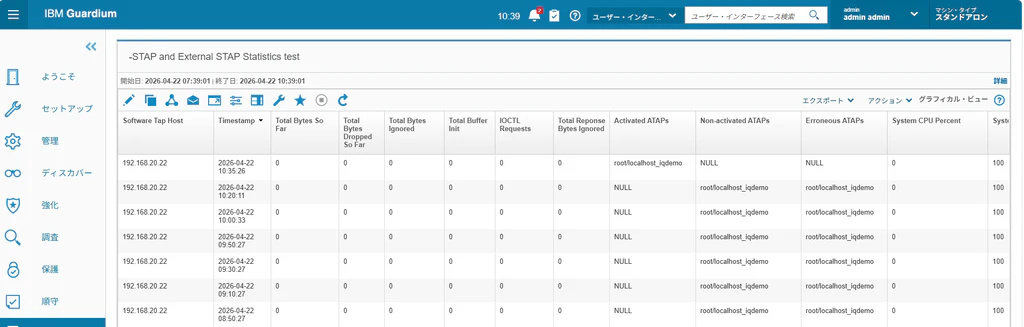
環境
SAPIQ サーバ・スイート 16.1 SP05.10 (64-bit)
RHEL 5.14.0-427.13.1.el9_4.x86_64
GIM/STAP 12.1.1.2_r119073_v12_1_1-rhel-9-linux
SAPIQ DBを監視するためにKTAPが必要。Linux Kernelのバージョンアップによってはサポートされておらず動作しないものがあるので事前に調査を行うこと
[root@localhost demo]# uname -a
Linux localhost.localdomain 5.14.0-427.13.1.el9_4.x86_64 #1 SMP PREEMPT_DYNAMIC Wed Apr 10 10:29:16 EDT 2024 x86_64 x86_64 x86_64 GNU/Linux
Finding the correct K-TAP version for your Linux kernel
https://ibm.github.io/guardium-ktap/index.html のサイトで検索して表示されるのでOK

評価版のSAPIQファイル解凍
[root@localhost ~]# tar -zxvf Linux64-iq1610_eval.tgz
Cover.SP05.10.txt
archives/
archives/cfw/
archives/cfw/Disk1/
archives/cfw/Disk1/InstData/
archives/cfw/Disk1/InstData/MediaId.properties
~~省略~~
sysam_utilities/locales/unicode/sylapi/zh_cn/sylapi.lcu
sysam_utilities/log/
sysam_utilities/log/empty
[root@localhost ~]# ls -la
合計 976944
dr-xr-x---.  5 root root      4096  4月 13 10:07 .
dr-xr-xr-x. 18 root root       235  4月  6 18:29 ..
-rw-r--r--.  1 root root        18  8月 11  2021 .bash_logout
-rw-r--r--.  1 root root       141  8月 11  2021 .bash_profile
-rw-r--r--.  1 root root       429  8月 11  2021 .bashrc
-rw-r--r--.  1 root root       100  8月 11  2021 .cshrc
drwx------.  2 root root         6  4月  6 18:29 .ssh
-rw-r--r--.  1 root root       129  8月 11  2021 .tcshrc
-rwxrwxrwx.  1 1000 1000     77795 12月  1  2023 Cover.SP05.10.txt
-rw-r--r--.  1 root root 907289420  4月  7 09:03 Linux64-iq1610_eval.tgz
-rw-------.  1 root root       960  4月  6 18:33 anaconda-ks.cfg
drwxrwxrwx. 22 1000 1000      4096  9月 21  2023 archives
-rwxrwxrwx.  1 1000 1000      2560 12月  1  2023 installer.properties
-rwxrwxrwx.  1 1000 1000       298 12月  1  2023 readme.txt
-rwxrwxrwx.  1 1000 1000       377 12月  1  2023 readme_ja.txt
-rwxrwxrwx.  1 1000 1000       251 12月  1  2023 readme_zh.txt
-rwxrwxrwx.  1 1000 1000  92970248 12月  1  2023 setup.bin
drwxrwxrwx.  6 1000 1000        59  9月 21  2023 sysam_utilities
[root@localhost ~]#
SAPIQ インストールスクリプト実行
[root@localhost ~]# ./setup.bin -i console
インストールの準備
インストーラー アーカイブから JRE を抽出しています...
JRE を展開しています...
インストーラー アーカイブからインストール リソースを抽出しています...
このシステム環境のインストーラーを構成しています...

インストーラーを起動しています...

===============================================================================
ロケールを選択します...
-------------

    1- English
  ->2- 日本語

ロケールを番号で選択してください:
===============================================================================
SAP IQ サーバ・スイート                                           (InstallAnywhere で作成)
-------------------------------------------------------------------------------

コンソール モード インストールの準備中...


===============================================================================
タイトル
----

CONSOLE

続行するには ENTER キーを押します:


===============================================================================
開始画面
----

InstallAnywhere の指示に従って操作を行い、SAP IQ
サーバ・スイート 16.1 SP05.10 (64-bit)  を
インストールすることができます。

このインストールを続行する前に、
すべてのプログラムを終了することをお勧めします。

各指示に従って操作すると、
次のインストール手順へ進むことができます。
前の手順で指定した内容を変更する場合は、
「戻る」ボタンをクリックしてください。

「終了」ボタンをクリックすると、
いつでもインストールをキャンセルできます。

続行するには ENTER キーを押します:
===============================================================================

インストール・フォルダーの選択

---------------

インストール先を指定してください。

  デフォルトのインストール フォルダー:

絶対パスを入力するか、ENTER
   キーを押してデフォルトを使用してください。
      : /opt/IQ

インストール フォルダー: /opt/IQ
   正しいですか? (Y/N): Y
ディレクトリ /opt/IQ が存在しません。 作成しますか?
    (Y/N): Y


===============================================================================

インストール・セットの選択

-------------

このインストーラーでインストールするインストール
セットを選択してください。

  ->1- 標準

    2- カスタム

インストール セットの番号を入力するか、
   デフォルトを使用する場合は ENTER キーを押してください。
   : 1


===============================================================================

ソフトウェアライセンスの種類の選択

-----------------

処理方法を指定してください。

    1- SAP IQ サーバ・スイート 16.1 SP05.10 (64-bit)  のライセンス取得済みコピーのインストール

  ->2- SAP IQ サーバ・スイート 16.1 SP05.10 (64-bit)  の評価


上記のいずれかのオプションを入力: 2


===============================================================================

エンドユーザライセンス契約

-------------

1)  すべての地域

インストールを実行している地域の番号を入力してくださ
   い。(1-1) (デフォルト: 1): 1


SOFTWARE TRIAL LICENSE AGREEMENT
SAP(r) IQ
VERSION 16.0.x

Scroll down and read this 30-Day Trial License Agreement
(this "Agreement") carefully.  This is a legally binding
Agreement between you (or your employer or company, as
applicable) ("Licensee" or "You") and the SAP entity
authorized to distribute the Trial Software (as defined
below) in the country in which you are located ("SAP").
By clicking "Accept" or "Agree," You agree to all of the
terms and conditions stated in this Agreement.   If You do
not agree to these terms, do not click "Accept" or "Agree."
If You are entering into this Agreement on behalf of your
employer or company, You represent and warrant that You have
the authority to bind your employer or company to the terms
of this Agreement.
The following terms and conditions apply exclusively to Your

テキストを参照するには [Enter] を押してください
   [テキストの参照を省略するには、「back」と入力して
   [Enter] キーを押します]:   <Enterを押す

30-day trial of SAP IQ v16.0.x ("Trial Software").
1. Definitions:

"Documentation" means SAP's documentation which is delivered
or made available to Licensee with the Trial Software under
this Agreement.

"Intellectual Property Rights" means patents of any type,
design rights, utility models or other similar invention
rights, copyrights, mask work rights, trade secret or
confidentiality rights, trademarks, trade names and service
marks and any other intangible property rights, including
applications and registrations for any of the foregoing, in
any country, arising under statutory or common law or by
contract and whether or not perfected, now existing or
hereafter filed, issued, or acquired.

"SAP Materials" means any software, programs, tools,
systems, data or other materials made available by SAP to
Licensee in the course of the performance under this

テキストを参照するには [Enter] を押してください
   [テキストの参照を省略するには、「back」と入力して
   [Enter] キーを押します]: <Enterを押す

Agreement including, but not limited to, the Trial Software
and Documentation, as well as any information, materials or
feedback provided by Licensee to SAP relating to the Trial
Software and Documentation.

2. License:

Subject to Licensee's compliance with all the terms and
conditions of this Agreement, SAP grants to Licensee a
non-exclusive, non-transferable, limited term license to use
the Trial Software, Documentation, and other SAP Materials
solely for non-productive use to trial and test the Trial
Software licensed under this Agreement for a period of
thirty (30) days from Your acceptance of this Agreement
("Trial Period").

This license does not permit You to: (i) use the SAP
Materials to provide services to third parties (e.g.,
business process outsourcing, service bureau applications or
third party training); (ii) lease, loan, resell, sublicense

テキストを参照するには [Enter] を押してください
   [テキストの参照を省略するには、「back」と入力して
   [Enter] キーを押します]: <Enterを押す

or otherwise distribute the SAP Materials,; (iii) distribute
or publish keycode(s); (iv) make any use of or perform any
acts with respect to the SAP Materials other than as
expressly permitted in accordance with the terms of this
Agreement; (v) use software components other than those
specifically identified herein as the Trial Software, even
if it is also technically possible for Licensee to access
other SAP software components or (vi) modify the Trial
Software (vii) use the Trial Software or SAP Materials for
any purposes that are competitive with SAP.
You understand and agree that the Trial Software is subject
to additional or supplemental terms and conditions ("Product
Specific License Terms") that are posted on
www.sybase.com/pslt as of the Effective Date of this
Agreement.  You acknowledge and agree that You have read,
understood and agreed to the applicable Product Specific
License Terms.  The Effective Date of this Agreement is the
date the Agreement is accepted by Licensee.
The Trial Software shall not be used for any purposes other
than evaluation and testing of the Trial Software.

テキストを参照するには [Enter] を押してください
   [テキストの参照を省略するには、「back」と入力して
   [Enter] キーを押します]: <Enterを押す

Configurations created for non-productive use, evaluation
and testing shall not be used for projects outside the trial
period.
The Trial Software is licensed solely for Standalone Use.
"Standalone Use" means that any component of the Trial
Software may not be used to access, directly or indirectly,
in any manner whatsoever, any other SAP software and/or
third party software licensed from SAP, or an authorized
reseller, distributor, OEM or other authorized partner of
SAP, unless such software or third party software explicitly
allows such access.
Please note that the productive use version of the Trial
Software ("Productive Software") may not include all
Software Components included in the Trial Software and You
may need to license some Software Components separately as
part of Your use of the Productive Software for an
additional fee.
3. Warranty:

3.1     If Licensee is located outside the US or Canada: As the

テキストを参照するには [Enter] を押してください
   [テキストの参照を省略するには、「back」と入力して
   [Enter] キーを押します]: <Enterを押す

Trial Software is provided to Licensee free of charge, SAP
does not guarantee or warrant any features or qualities of
Trial Software or give any undertaking with regard to any
other quality. No such warranty or undertaking shall be
implied by Licensee from any description in the Trial
Software or any available documentation or any other
communication or advertisement for the Trial Software except
to the extent that SAP has expressly confirmed a specific
quality in writing. All warranty claims are subject to the
limitation of liability stipulated in section 4.1 below.

3.2     If Licensee is located in the US or Canada: THE TRIAL
SOFTWARE IS LICENSED TO THE LICENSEE "AS IS", WITHOUT ANY
WARRANTY, ESCROW, TRAINING, MAINTENANCE, OR SERVICE
OBLIGATIONS WHATSOEVER ON THE PART OF SAP.  SAP MAKES NO
EXPRESS OR IMPLIED WARRANTIES OF ANY TYPE WHATSOEVER,
INCLUDING BUT NOT LIMITED TO THOSE RELATED TO
NON-INFRINGEMENT, IMPLIED WARRANTIES OF MERCHANTABILITY AND
OF FITNESS FOR A PARTICULAR PURPOSE.  LICENSEE ASSUME ALL
RISKS ASSOCIATED WITH THE USE OF THE TRIAL SOFTWARE,

テキストを参照するには [Enter] を押してください
   [テキストの参照を省略するには、「back」と入力して
   [Enter] キーを押します]: <Enterを押す

INCLUDING WITHOUT LIMITATION RISKS RELATING TO QUALITY,
AVAILABILITY, PERFORMANCE, DATA LOSS, AND UTILITY IN A
PRODUCTION ENVIRONMENT. In particular, SAP does not warrant
that the Trial Software will be error free.   ALL WARRANTY
CLAIMS ARE SUBJECT TO THE LIMITATION OF LIABILITY STIPULATED
IN SECTION 4.2 BELOW.
4. Liability:

4.1     If Licensee is located outside the US or Canada:
Irrespective of the legal reasons, SAP shall only be liable
for damages incurred under this Agreement if such damage (i)
can be claimed under the German Product Liability Act or
(ii) is caused by intentional misconduct of SAP or (iii)
consists of personal injury. In all other cases, neither SAP
nor its employees, agents and subcontractors shall be liable
for any kind of damage or claims hereunder.

4.2     If Licensee is located in the US or Canada: IN NO EVENT
SHALL SAP BE LIABLE TO LICENSEE OR TO ANY THIRD PARTY FOR
ANY DAMAGES IN AN AMOUNT IN EXCESS OF $100 ARISING IN

テキストを参照するには [Enter] を押してください
   [テキストの参照を省略するには、「back」と入力して
   [Enter] キーを押します]: <Enterを押す

CONNECTION WITH LICENSEE'S USE OF OR INABILITY TO USE THE
TRIAL SOFTWARE OR IN CONNECTION WITH SAP'S PROVISION OF OR
FAILURE TO PROVIDE SERVICES PERTAINING TO THE TRIAL
SOFTWARE, OR AS A RESULT OF ANY DEFECT IN THE TRIAL
SOFTWARE.  THIS DISCLAIMER OF LIABILITY SHALL APPLY
REGARDLESS OF THE FORM OF ACTION THAT MAY BE BROUGHT AGAINST
SAP, WHETHER IN CONTRACT OR TORT, INCLUDING WITHOUT
LIMITATION ANY ACTION FOR NEGLIGENCE.  LICENSEE'S SOLE
REMEDY IN THE EVENT OF BREACH OF THIS AGREEMENT BY SAP OR
FOR ANY OTHER CLAIM RELATED TO THE TRIAL SOFTWARE OR SAP
MATERIALS SHALL BE TERMINATION OF THIS AGREEMENT.
NOTWITHSTANDING ANYTHING TO THE CONTRARY HEREIN, UNDER NO
CIRCUMSTANCES SHALL SAP AND ITS LICENSORS BE LIABLE TO
LICENSEE OR ANY OTHER PERSON OR ENTITY FOR ANY SPECIAL,
INCIDENTAL, CONSEQUENTIAL, OR INDIRECT DAMAGES, LOSS OF GOOD
WILL OR BUSINESS PROFITS, WORK STOPPAGE, DATA LOSS, COMPUTER
FAILURE OR MALFUNCTION, ANY AND ALL OTHER COMMERCIAL DAMAGES
OR LOSS, OR EXEMPLARY OR PUNITIVE DAMAGES.
5. Intellectual Property Rights:


テキストを参照するには [Enter] を押してください
   [テキストの参照を省略するには、「back」と入力して
   [Enter] キーを押します]: <Enterを押す

5.1     Reservation of Rights.  The SAP Materials, and all
Intellectual Property Rights embodied in the foregoing,
shall be the sole and exclusive property of SAP, SAP AG, one
or more of their subsidiaries or affiliated companies,  or
their licensors, subject to any rights expressly granted to
Licensee in Section 2 above.  Licensee is not permitted to
modify or otherwise make derivative works of the Trial
Software.  Any such unauthorized works developed by
Licensee, and any Intellectual Property Rights embodied
therein, shall be the sole and exclusive property of SAP or
SAP AG.

5.2     Protection of Rights.  Licensee shall not copy,
translate, disassemble, or decompile, nor create or attempt
to create the source code from the object code of the Trial
Software in any manner.  Reverse engineering of the Trial
Software and other SAP Materials is prohibited.  Licensee is
permitted to back up data in accordance with good
information technology practice and for this purpose to
create the necessary backup copies of the Trial Software.

テキストを参照するには [Enter] を押してください
   [テキストの参照を省略するには、「back」と入力して
   [Enter] キーを押します]: <Enterを押す

Backup copies on transportable discs or other data media
must be marked as backup copies and bear the same copyright
and authorship notice as the original discs or other data
media. Licensee must not change or remove SAP's copyright
and authorship notices.

6. Indemnification:

Licensee shall defend (at its sole expense) SAP and its
affiliates and licensors against claims brought against SAP
by any third party arising from or related to (i) any use of
the Trial Software or service used to host the Trial
Software in violation of any applicable law or regulation;
or (ii) an allegation that Licensee's use of the Trial
Software or service used to host the Trial Software in
violation of this Agreement violates, infringes or
misappropriates the rights of a third party.  Licensee will
pay damages finally awarded against SAP (or the amount of
any settlement Licensee enters into) with respect to such
claims, and will pay reasonable attorney's fees in

テキストを参照するには [Enter] を押してください
   [テキストの参照を省略するには、「back」と入力して
   [Enter] キーを押します]: <Enterを押す

connection with such defense.  The foregoing shall apply
regardless of whether such damage is caused by the conduct
of Licensee or by the conduct of a third party using
Licensee's credentials.

7. Export:

The Trial Software is subject to German, EU and US export
control regulations. Licensee confirms that: a) Licensee
will not use the Trial Software for, and will not allow the
Trial Software to be used for, any purposes prohibited by
German, EU and US law, including, without limitation, for
the development, design, manufacture or production of
nuclear, chemical or biological weapons of mass destruction,
b) Licensee is not located in a country that is subject to a
U.S. Government embargo, or that has been designated by the
U.S. Government as a "terrorist supporting" country, c)
employees of Licensee are not a citizen, national or
resident of, and are not under the control of, the
government of: Cuba, Iran, Sudan, Iraq, North Korea, Syria,

テキストを参照するには [Enter] を押してください
   [テキストの参照を省略するには、「back」と入力して
   [Enter] キーを押します]: <Enterを押す

nor any other country to which the United States has
prohibited export, d) Licensee will not download or
otherwise export or re-export the Trial Software, directly
or indirectly, neither to the above-mentioned countries nor
to citizens, nationals or residents of those countries, e)
employees of Licensee are not listed on the United States
Department of Treasury lists of Specially Designated
Nationals, Specially Designated Terrorists, and Specially
Designated Narcotic Traffickers, nor listed on the United
States Department of Commerce Table of Denial Orders or any
other U.S. government list of prohibited or restricted
parties, and f) Licensee will not download or otherwise
export or re-export the Trial Software, directly or
indirectly, to persons on the above-mentioned lists.
8. Support:

SAP has no obligation to provide maintenance and support for
the Trial Software and no service level agreements apply.
SAP may offer support for the Trial Software - at its sole
discretion - by e.g. provisioning of updates, patches, bug

テキストを参照するには [Enter] を押してください
   [テキストの参照を省略するには、「back」と入力して
   [Enter] キーを押します]: <Enterを押す

fixes and new versions according to SAP then current
existing support offerings without notice to Licensee.
9. Term and Termination:

SAP shall be entitled to terminate Licensee's licenses to
use the Trial Software if Licensee fails to comply with any
of the terms of this Agreement. This Agreement terminates
automatically upon the expiration of the Trial Period. In
case of termination or expiration of this Agreement,
Licensee must immediately cease use of and/or destroy all
copies of the Trial Software in its possession, if any.
SAP reserves the right to audit Your compliance with the
terms of this Agreement upon prior written notice to
Licensee.  Licensee will cooperate reasonably with SAP's
audit request and procedures.
10. Law/Venue:

This Agreement is governed by and construed under the laws
of the state, territory and/or country in which SAP, as
defined herein, is located, without reference to its

テキストを参照するには [Enter] を押してください
   [テキストの参照を省略するには、「back」と入力して
   [Enter] キーを押します]: <Enterを押す

conflicts of law principles.
11. Assignment:

Licensee may not, without SAP's prior written consent,
assign, delegate, pledge, or otherwise transfer this
Agreement, or any of its rights or obligations under this
Agreement, or the SAP Materials or the Trial Software, to
any party, whether voluntarily or by operation of law,
including by way of sale of assets, merger or consolidation.
SAP may assign this Agreement to any of its affiliates.

12. Miscellaneous:

This Agreement is the complete Agreement for the Trial
Software.  This Agreement supersedes all prior or
contemporaneous agreements or representations with regards
to the subject matter of this Agreement.  If any term of
this Agreement is found to be invalid or unenforceable, the
surviving provisions shall remain effective. SAP�s failure
to enforce any right or provisions stipulated in this

テキストを参照するには [Enter] を押してください
   [テキストの参照を省略するには、「back」と入力して
   [Enter] キーを押します]: <Enterを押す

Agreement will not constitute a waiver of such provision, or
any other provision of this Agreement.
Licensee and SAP agree that: (a) this Agreement is between
SAP and Licensee, and (b) that SAP is solely responsible for
the Trial Software and the content thereof.


SAP Confidential        4
IQ 16.0.x  30-day Trial License (Mar.2014)


SAP Confidential
Order Form LE enUS v5-2011 (local of Global Field v.3-2011)


テキストを参照するには [Enter] を押してください
   [テキストの参照を省略するには、「back」と入力して
   [Enter] キーを押します]: <Enterを押す


指定されたインストール地域に関する SAP
   ライセンスの条項に同意します。 (Y/N): y

===============================================================================

プリインストールの要約

-----------

続行するには ENTER キーを押してください。
情報が間違っている場合は、
「戻る」をクリックして変更を行ってください。

製品名:
    SAP IQ サーバ・スイート 16.1 SP05.10 (64-bit)

インストール フォルダー:
    /opt/IQ

製品機能:
    SAP IQ Client,
    Sybase IQ ODBC ドライバ,
    SAP IQ サーバ,
    Additional Connectivity Language Modules,
    SAP IQ,
    SAP IQ Web ドライバ,
    Cockpit Framework,
    SAP IQ Cockpit,
    SySAM License Utilities,
    Remote Command and Control Agent for SAP IQ,
    jConnect 7.0 for JDBC

ディスク容量情報 (インストール先):
    必要なディスク容量:    1,112,164,701 バイト
    使用可能なディスク容量: 60,733,939,712 バイト

続行するには ENTER キーを押します: <Enterを押す


===============================================================================

インストール準備完了

----------

お使いのシステムに SAP IQ サーバ・スイート 16.1 SP05.10
(64-bit)  をインストールする準備が整いました。
インストール先:

   /opt/IQ

インストールするには ENTER キーを押してください: <Enterを押す


===============================================================================

インストール中...

----------

 [==================|==================|==================|==================]
 [------------------|------------------|------------------|------------------]


===============================================================================

Cockpit - RMI ポートの設定

--------------------

RMI サービスは、このシステム上の他のアプリケーションま
たはサービスによって使用されていないポートを使用する
必要があります。デフォルトのポートを使用するか、
未使用のポートを指定します。

RMI ポート [整数値 (1025 から -65535)] (デフォルト: 4992):
ポート番号 "4992" は、すでに
Unified Agent または SAP/Sybase Control Center の
"RMI サービス" に割り当てられています。
続行するには ENTER キーを押します:
RMI ポート [整数値 (1025 から -65535)] (デフォルト: 4992): 5500 <Copilotで調査してお勧めのポート番号を指定


===============================================================================

Cockpit - TDS ポートの設定

--------------------

TDS サービスは、このシステム上の他のアプリケーションま
たはサービスによって使用されていないポートを使用する
必要があります。デフォルトのポートを使用するか、
未使用のポートを指定します。

TDS ポート [整数値 (1025 から -65535)] (デフォルト: 4998):
ポート番号 "4998" は、すでに
Unified Agent または SAP/Sybase Control Center の
"TDS サービス" に割り当てられています。
続行するには ENTER キーを押します:
TDS ポート [整数値 (1025 から -65535)] (デフォルト: 4998): 5501 <Copilotで調査してお勧めのポート番号を指定


===============================================================================

Cockpit の起動

-----------


Cockpit サーバを起動しますか?

  ->1- はい
    2- いいえ(O)

上記のいずれかのオプションを入力: <Enterを押す


===============================================================================

インストール完了

--------

SAP IQ サーバ・スイート 16.1 SP05.10 (64-bit)
のインストールは完了しましたが、
インストール中にいくつかのエラーが発生しました。
詳細は、次のインストールログを確認してください。

/opt/IQ/log/IQ_Suite.log

インストーラを終了すると、
このログファイルを参照できるようになります。
詳細については、SAP プライマリサポート
(http//www.service.sap.com) を参照してください。
SAP Product Download Center Web サイトを起動しますか? (Y/N): y
SAPIQ DBを動かすためのライブラリーインストール
kshのインストール
[root@localhost demo]# dnf install -y ksh
tcshのインストール
[root@localhost demo]# dnf install -y tcsh
libnslのインストール
[root@localhost demo]# dnf install -y libnsl
SAPIQ 評価用DB作成
[root@localhost demo]# ./mkiqdemo.sh -dba user1 -pwd <任意のパスワード>
Warning:  You are running this script as 'root'.
          Sybase strongly recommend that servers not be run with root privileges.


This script will create the iqdemo database in the current
directory.  An existing iqdemo database in this directory
will need to be shutdown and over-written.

Continue <Y/N>? y

Checking system ...

There are no servers running on this system


Starting Server ...


Starting server bld_demo_9781 on localhost at port 9781 (04/13 13:20:33)

Run Directory       : /opt/IQ/IQ-16_1/demo
Server Executable   : /opt/IQ/IQ-16_1/bin64/iqsrv16
Server Output Log   : /opt/IQ/IQ-16_1/logfiles/bld_demo_9781.0001.srvlog
Server Version      : 16.1.050.2435/SP05.10
Open Client Version : 16.0 SP04 PL04
User Parameters     : '@bld_demo_9781.cfg'
Default Parameters  : -gc 20 -gl all -ti 4400 -gn 25

I. 04/13 13:20:35.503546 SAP IQ
I. 04/13 13:20:35.504652 バージョン 16.1
I. 04/13 13:20:35.504708 (64 ビットモード)
SAP IQ
I. 04/13 13:20:35.504744 Copyright 1992-2017 by SAP AG or an SAP affiliate company.All rights reserved
I. 04/13 13:20:35.504764 Copyright (c) 2023 SAP SE or an SAP affiliate company.
I. 04/13 13:20:35.504778 All rights reserved.
I. 04/13 13:20:35.504793 このソフトウェアの使用には SAP ソフトウェア使用権利契約が適用されます。
I. 04/13 13:20:35.504807 参照: http://global.sap.com/corporate-en/our-company/agreements/index.epx
I. 04/13 13:20:35.504821
I. 04/13 13:20:35.504844 検出されたプロセッサ: 2 個の物理プロセッサ上の 2 個のコアにある 2 個の論理プロセッサ
I. 04/13 13:20:35.504861 このサーバでライセンス許可されている使用: システム内のすべての論理プロセッサ
I. 04/13 13:20:35.504877 サーバによって使用中のプロセッサ: 2 個の物理プロセッサ上の 2 個のコアにある 2 個の論理プロセッサ
I. 04/13 13:20:35.504894 X86_64 で Linux 5.14.0-427.13.1.el9_4.x86_64 #1 SMP PREEMPT_DYNAMIC Wed Apr 10 10:29:16 EDT 2024 を実行中です。
I. 04/13 13:20:35.504908 サーバは X86_64 プロセッサのアーキテクチャ用に構築されています。
I. 04/13 13:20:35.504992 Number of heap pools: 4バージョン 16.1

(64 ビットモード)
Copyright 1992-2017 by SAP AG or an SAP affiliate company.All rights reserved
Copyright (c) 2023 SAP SE or an SAP affiliate company.
All rights reserved.
このソフトウェアの使用には SAP ソフトウェア使用権利契約が適用されます。
参照: http://global.sap.com/corporate-en/our-company/agreements/index.epx

検出されたプロセッサ: 2 個の物理プロセッサ上の 2 個のコアにある 2 個の論理プロセッサ
このサーバでライセンス許可されている使用: システム内のすべての論理プロセッサ
サーバによって使用中のプロセッサ: 2 個の物理プロセッサ上の 2 個のコアにある 2 個の論理プロセッサ
X86_64 で Linux 5.14.0-427.13.1.el9_4.x86_64 #1 SMP PREEMPT_DYNAMIC Wed Apr 10 10:29:16 EDT 2024 を実行中です。
サーバは X86_64 プロセッサのアーキテクチャ用に構築されています。
Number of heap pools: 4
I. 04/13 13:20:35.509208 49712K のメモリがキャッシュに使用されています。
I. 04/13 13:20:35.509331 最小キャッシュサイズ: 49728K、最大キャッシュサイズ: 262144K
49712K のメモリがキャッシュに使用されています。
I. 04/13 13:20:35.509372 最大ページサイズ 4096 バイトを使用します。
最小キャッシュサイズ: 49728K、最大キャッシュサイズ: 262144K
最大ページサイズ 4096 バイトを使用します。
I. 04/13 13:20:35.513560 マルチプログラミングレベル: 25
I. 04/13 13:20:35.513690 マルチプログラミングレベルの自動チューニングは無効です
マルチプログラミングレベル: 25
マルチプログラミングレベルの自動チューニングは無効です


=============================================================
IQ server starting with:
     10 connections         (       -gm )
     14 cmd resources       ( -iqgovern )
    173 threads             (     -iqmt )
    512 Kb thread stack size   (   -iqtss  )
  88576 Kb thread memory size ( -iqmt * -iqtss )
      2 IQ number of cpus  ( -iqnumbercpus )
      0 MB maximum size of IQMSG file ( -iqmsgsz )
      0 copies of IQMSG file archives ( -iqmsgnum )
     64 MB maximum size of main buffer cache ( -iqmc )
     64 MB maximum size of temp buffer cache ( -iqtc )
   2048 MB maximum size of large memory pool ( -iqlm )
      0 MB maximum size of heap memory ( -iqmem )
   2048 MB maximum size of RLV memory ( -iqrlvmem )
=============================================================

I. 04/13 13:20:35.537812 データベースサーバは Mon Apr 13 2026 13:20 に起動します。
HOS_MEMMGR: Heap memory tracking is enabled.
[hos_InMemMsgLog] Using perThreadBufferLength=1048576 bytes...
データベースサーバは Mon Apr 13 2026 13:20 に起動します。
I. 04/13 13:20:35.538419 SharedMemory リンクを開始しています...
SharedMemory リンクを開始しています...
I. 04/13 13:20:35.538866    SharedMemory リンクは正常に開始しました。
I. 04/13 13:20:35.538935 TCPIP リンクを開始しています...
   SharedMemory リンクは正常に開始しました。
TCPIP リンクを開始しています...
I. 04/13 13:20:35.541057 ポート 9781 で起動します。
ポート 9781 で起動します。
I. 04/13 13:20:40.543820    TCPIP リンクは正常に開始しました。
   TCPIP リンクは正常に開始しました。
I. 04/13 13:20:40.544421 要求を受信中です。
要求を受信中です。
新しいプロセス ID は 39622 です。

Server started successfully

Started.
Connecting to server via TCPIP ...
Using: uid=DBA;pwd=sql123;eng=bld_demo_9781;dbn=utility_db;links=tcpip{host=localhost;port=9781}

Creating database ...
Demo database created.

Shutting down server ...
SQL Anywhere サーバ停止ユーティリティバージョン 17.0.11.2435

-rw-r--r--. 1 root root       534  4月 13 13:20 iqdemo.cfg
-r--r--r--. 1 root root   4632576  4月 13 13:20 iqdemo.db
-rw-r--r--. 1 root root 104857600  4月 13 13:20 iqdemo.iq
-rw-r--r--. 1 root root     58336  4月 13 13:20 iqdemo.iqmsg
-rw-r--r--. 1 root root  26214400  4月 13 13:20 iqdemo.iqtmp
-rw-r--r--. 1 root root       115  4月 13 13:20 iqdemo.lmp
-r--------. 1 root root    327680  4月 13 13:20 iqdemo.log
-rw-r--r--. 1 root root 104857600  4月 13 13:20 iqdemo_main.iq

Demo database created successfully
SAPIQ 評価用DBの起動
[root@localhost demo]# start_iq @iqdemo.cfg iqdemo.db
Starting server localhost_iqdemo on localhost at port 2638 (04/13 13:34:49)

Run Directory       : /opt/IQ/IQ-16_1/demo
Server Executable   : /opt/IQ/IQ-16_1/bin64/iqsrv16
Server Output Log   : /opt/IQ/IQ-16_1/logfiles/localhost_iqdemo.0003.srvlog
Server Version      : 16.1.050.2435/SP05.10
Open Client Version : 16.0 SP04 PL04
User Parameters     : '@iqdemo.cfg' 'iqdemo.db'
Default Parameters  : -ti 4400 -gn 25

I. 04/13 13:34:51.010574 SAP IQ
I. SAP IQ
04/13 13:34:51.011274 バージョン 16.1
バージョン 16.1
I. 04/13 13:34:51.011544 (64 ビットモード)
(64 ビットモード)
I. 04/13 13:34:51.011784 Copyright 1992-2017 by SAP AG or an SAP affiliate company.All rights reserved
Copyright 1992-2017 by SAP AG or an SAP affiliate company.All rights reserved
I. 04/13 13:34:51.012006 Copyright (c) 2023 SAP SE or an SAP affiliate company.
Copyright (c) 2023 SAP SE or an SAP affiliate company.
I. 04/13 13:34:51.012213 All rights reserved.
All rights reserved.
I. 04/13 13:34:51.012406 このソフトウェアの使用には SAP ソフトウェア使用権利契約が適用されます。
このソフトウェアの使用には SAP ソフトウェア使用権利契約が適用されます。
I. 04/13 13:34:51.012600 参照: http://global.sap.com/corporate-en/our-company/agreements/index.epx
参照: http://global.sap.com/corporate-en/our-company/agreements/index.epx
I. 04/13 13:34:51.012787

I. 04/13 13:34:51.013002 検出されたプロセッサ: 2 個の物理プロセッサ上の 2 個のコアにある 2 個の論理プロセッサ
検出されたプロセッサ: 2 個の物理プロセッサ上の 2 個のコアにある 2 個の論理プロセッサ
I. 04/13 13:34:51.013255 このサーバでライセンス許可されている使用: システム内のすべての論理プロセッサ
このサーバでライセンス許可されている使用: システム内のすべての論理プロセッサ
I. 04/13 13:34:51.013447 サーバによって使用中のプロセッサ: 2 個の物理プロセッサ上の 2 個のコアにある 2 個の論理プロセッサ
サーバによって使用中のプロセッサ: 2 個の物理プロセッサ上の 2 個のコアにある 2 個の論理プロセッサ
I. 04/13 13:34:51.013674 X86_64 で Linux 5.14.0-427.13.1.el9_4.x86_64 #1 SMP PREEMPT_DYNAMIC Wed Apr 10 10:29:16 EDT 2024 を実行中です。
X86_64 で Linux 5.14.0-427.13.1.el9_4.x86_64 #1 SMP PREEMPT_DYNAMIC Wed Apr 10 10:29:16 EDT 2024 を実行中です。
I. 04/13 13:34:51.013895 サーバは X86_64 プロセッサのアーキテクチャ用に構築されています。
サーバは X86_64 プロセッサのアーキテクチャ用に構築されています。
I. 04/13 13:34:51.014944 Number of heap pools: 4
Number of heap pools: 4
I. 04/13 13:34:51.018152 49712K のメモリがキャッシュに使用されています。
49712K のメモリがキャッシュに使用されています。
I. 04/13 13:34:51.018430 最小キャッシュサイズ: 49728K、最大キャッシュサイズ: 262144K
最小キャッシュサイズ: 49728K、最大キャッシュサイズ: 262144K
I. 04/13 13:34:51.018628 最大ページサイズ 4096 バイトを使用します。
最大ページサイズ 4096 バイトを使用します。
I. 04/13 13:34:51.024704 マルチプログラミングレベル: 25
I. マルチプログラミングレベル: 25
04/13 13:34:51.025155 マルチプログラミングレベルの自動チューニングは無効です
マルチプログラミングレベルの自動チューニングは無効です


=============================================================
IQ server starting with:
     10 connections         (       -gm )
     14 cmd resources       ( -iqgovern )
    173 threads             (     -iqmt )
    512 Kb thread stack size   (   -iqtss  )
  88576 Kb thread memory size ( -iqmt * -iqtss )
      2 IQ number of cpus  ( -iqnumbercpus )
      0 MB maximum size of IQMSG file ( -iqmsgsz )
      0 copies of IQMSG file archives ( -iqmsgnum )
     64 MB maximum size of main buffer cache ( -iqmc )
     64 MB maximum size of temp buffer cache ( -iqtc )
   2048 MB maximum size of large memory pool ( -iqlm )
      0 MB maximum size of heap memory ( -iqmem )
   2048 MB maximum size of RLV memory ( -iqrlvmem )
=============================================================

I. 04/13 13:34:51.050185 Mon Apr 13 2026 13:34 にデータベース "iqdemo" (/opt/IQ/IQ-16_1/demo/iqdemo.db) を起動しています。
HOS_MEMMGR: Heap memory tracking is enabled.
[hos_InMemMsgLog] Using perThreadBufferLength=1048576 bytes...
Mon Apr 13 2026 13:34 にデータベース "iqdemo" (/opt/IQ/IQ-16_1/demo/iqdemo.db) を起動しています。
I. 04/13 13:34:51. IQ OpenDatabase, checkpointblock: 2594, recover: 1
I. 04/13 13:34:51. Main buffer manager using 2 partition(s).
I. 04/13 13:34:51. Using AIO based prefetch manager
I. 04/13 13:34:51. Temp buffer manager using 2 partition(s).
I. 04/13 13:34:51. Using AIO based prefetch manager
Warning: Using default value for -iqmc or -iqtc is insufficient for most applications
I. 04/13 13:34:51. 140100286527040 [MpxTrace-GFLSHT]-stcxtlib/st_globalFlMgr.cxx:00076 The Diagnostic toggle value for st_globalFlMgr is set to 0
UTC time zone offset for "iqdemo" set to 540 minutes
I. 04/13 13:34:51.156788 UTC time zone offset for "iqdemo" set to 540 minutes
トランザクションログ: iqdemo.log
I. 04/13 13:34:51.157282 トランザクションログ: iqdemo.log
Mon Apr 13 2026 13:34 に "iqdemo" (iqdemo.db) のチェックポイントを開始しています。
I. 04/13 13:34:51.161373 Mon Apr 13 2026 13:34 に "iqdemo" (iqdemo.db) のチェックポイントを開始しています。
Mon Apr 13 2026 13:34 に "iqdemo" (iqdemo.db) のチェックポイントを終了しました。
I. 04/13 13:34:51.166618 Mon Apr 13 2026 13:34 に "iqdemo" (iqdemo.db) のチェックポイントを終了しました。
I. 04/13 13:34:53.442381 以前のログ GUID の更新先: 07afdb3e-3787-11f1-8000-e0284e393b54
現在のログ GUID の更新先: fd9124a8-3788-11f1-8000-e56c30c96c0c
I. 04/13 13:34:51. 140100286527040 [MpxTrace-GFLSHT]-stcxtlib/st_globalFlMgr.cxx:00076 The Diagnostic toggle value for st_globalFlMgr is set to 0
I. 04/13 13:34:53. IQ OpenDatabase, checkpointblock: 2610, recover: 0
I. 04/13 13:34:53. Main buffer manager using 2 partition(s).
I. 04/13 13:34:53. Using AIO based prefetch manager
I. 04/13 13:34:53. Temp buffer manager using 2 partition(s).
I. 04/13 13:34:53. Using AIO based prefetch manager
Warning: Using default value for -iqmc or -iqtc is insufficient for most applications
Using licenses from: /usr/local/flexlm/licenses/license.dat
Checked out graced license for 1 IQ_CORE (2023.0911) will expire 2026年07月12日 00時00分00秒.
Failed to obtain license(s) for IQ_CORE feature from license file(s) or server(s).
Cannot find license file.
 The license files (or license server system network addresses) attempted are listed below.
License feature name:  IQ_CORE
License filename:      /opt/IQ/SYSAM-2_0/licenses:/opt/IQ/IQ-16_1/demo
License search path:   /opt/IQ/SYSAM-2_0/licenses:/opt/IQ/IQ-16_1/demo
FlexNet Licensing error:-1,359.  System Error: 2 "そのようなファイルやディレクトリはありません"
WARNING: IQ functionality that requires the IQ_CORE license will be disabled on 2026年07月12日 00時00分00秒, unless a suitable IQ_CORE license is obtained before that date.
以前のログ GUID の更新先: 07afdb3e-3787-11f1-8000-e0284e393b54
現在のログ GUID の更新先: fd9124a8-3788-11f1-8000-e56c30c96c0c
I. 04/13 13:34:53.444144 Mon Apr 13 2026 13:34 にデータベース "iqdemo" (iqdemo.db) が起動しました。
Mon Apr 13 2026 13:34 にデータベース "iqdemo" (iqdemo.db) が起動しました。
I. 04/13 13:34:53.450957 IQ Server localhost_iqdemo.
IQ Server localhost_iqdemo.
I. 04/13 13:34:53.451518 Mon Apr 13 2026 13:34 に "iqdemo" (iqdemo.db) のチェックポイントを開始しています。
Mon Apr 13 2026 13:34 に "iqdemo" (iqdemo.db) のチェックポイントを開始しています。
I. 04/13 13:34:53.455216 Mon Apr 13 2026 13:34 に "iqdemo" (iqdemo.db) のチェックポイントを終了しました。
Mon Apr 13 2026 13:34 に "iqdemo" (iqdemo.db) のチェックポイントを終了しました。
I. 04/13 13:34:53.455701 データベースサーバは Mon Apr 13 2026 13:34 に起動します。
I. 04/13 13:34:53.455804 SharedMemory リンクを開始しています...
データベースサーバは Mon Apr 13 2026 13:34 に起動します。
SharedMemory リンクを開始しています...
I. 04/13 13:34:53.456082    SharedMemory リンクは正常に開始しました。
I. 04/13 13:34:53.456100 TCPIP リンクを開始しています...
I. 04/13 13:34:53.456406 ポート 2638 で起動します。
   SharedMemory リンクは正常に開始しました。
TCPIP リンクを開始しています...
ポート 2638 で起動します。
I. 04/13 13:34:58.456213    TCPIP リンクは正常に開始しました。
   TCPIP リンクは正常に開始しました。
I. 04/13 13:34:58.456882 要求を受信中です。
要求を受信中です。
新しいプロセス ID は 40931 です。

Server started successfully
SAPIQ DBの停止
[root@localhost demo]# stop_iq -stop all
Checking system ...

The following 1 server(s) are owned by 'root'

## Owner          PID   Started  CPU Time  Additional Information
-- ---------  -------  --------  --------  ------------------------------------
1: root         40931     13:34  00:00:00
              /opt/IQ/IQ-16_1/bin64/iqsrv16 @iqdemo.cfg iqdemo.db -ti 4400 -gn 25 -o /opt/IQ/IQ-16_1/logfiles/localhost_iqdemo.0003.srvlog -hn 5
--

Shutting down server (40931) ...
Checkpointing server (40931) ...
Server shutdown.
Guardium GIMの導入
GIMは、STAPをインストールするためのサーバモジュール
最初だけ以下のように、DBサーバ側での導入が必要。以降のバージョンアップは、Guardiumコレクターから実施ができる。
[root@localhost GIM_Agents]# ./guard-bundle-GIM-12.1.1.2_r119073_v12_1_1-rhel-9-linux-x86_64.gim.sh -- --dir /usr/local/guardium --sqlguardip 192.168.20.21 --tapip 192.168.20.22
--sqlguardip は、コレクターのIPアドレス
--tapip は、STAPを導入する先のサーバIPアドレス
Verifying archive integrity... All good.
Uncompressing Guard BUNDLE-GIM Installer....
perl used : /usr/bin/perl
This product is subject to the license terms associated with the IBM Security Guardium product purchased.
Installing modules ....
Installation completed successfully

[root@localhost GIM_Agents]# ps -ef | grep guard
root        2066       1  0 14:15 ?        00:00:00 /usr/local/guardium/modules/perl /usr/local/guardium/modules/GIM/12.1.1.2_r119073_1-1776057338/gim_client.pl
root        2181    2066  0 14:15 ?        00:00:00 ../../perl ./guard_gimd.pl
root        2595       1  0 14:15 ?        00:00:00 /usr/local/guardium/modules/perl /usr/local/guardium/modules/SUPERVISOR/12.1.1.2_r119073_1-1776057340/guard_supervisor
root        2994    1200  0 14:16 pts/0    00:00:00 grep --color=auto guard
[root@localhost GIM_Agents]#
Guardium GIM導入後の確認(プロセス確認)
[root@localhost GIM_Agents]# ps -ef | grep guard
root        2066       1  0 14:15 ?        00:00:00 /usr/local/guardium/modules/perl /usr/local/guardium/modules/GIM/12.1.1.2_r119073_1-1776057338/gim_client.pl
root        2181    2066  0 14:15 ?        00:00:00 ../../perl ./guard_gimd.pl
root        2595       1  0 14:15 ?        00:00:00 /usr/local/guardium/modules/perl /usr/local/guardium/modules/SUPERVISOR/12.1.1.2_r119073_1-1776057340/guard_supervisor
root        2994    1200  0 14:16 pts/0    00:00:00 grep --color=auto guard
[root@localhost GIM_Agents]#
Guardium GIM導入後の確認(サービス確認)
[root@localhost GIM_Agents]# ls -l /etc/systemd/system | grep guard
-rw-r--r--  1 root root  322  4月 13 14:15 guard_gim.service
-rw-r--r--  1 root root  343  4月 13 14:15 guard_gsvr.service
-rw-r--r--  1 root root  282  4月 13 14:15 guard_upguard.service
Guardiumコレクター側での確認
[レポート]->[Guardium運用レポート]->[GIMインストール済みモジュール] (画像は、12.1.0.0で古い)
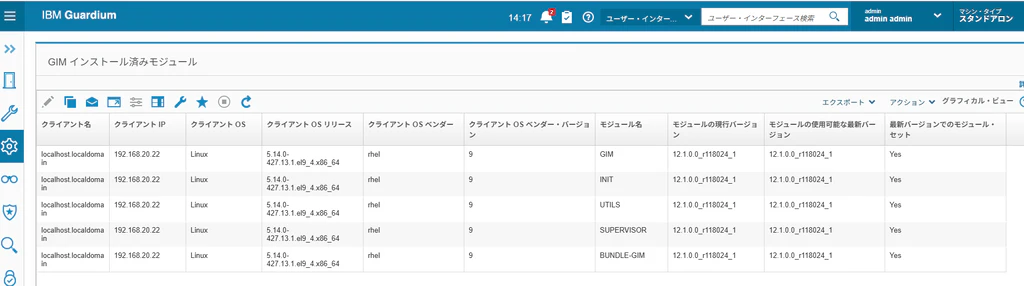
[管理]->[モジュール・インストール]->[GIMプロセスのモニター] (画像は、12.1.0.0で古い)

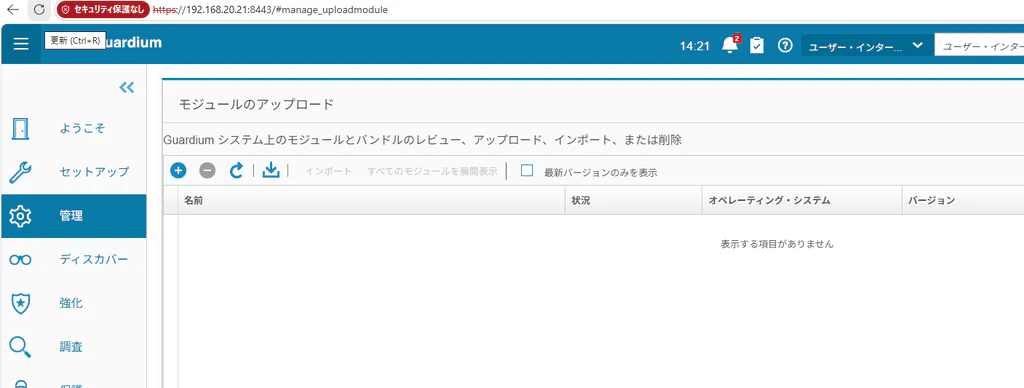
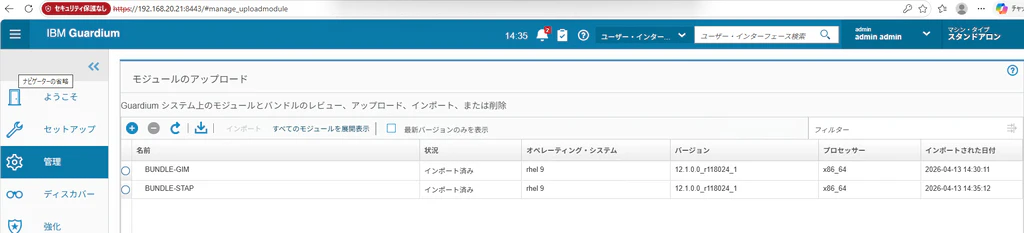
[管理]->[モジュール・インストール]->[モジュールのアップロード] (画像は、12.1.0.0で古い)
+ボタンを押す
ここで、STAP 12.1.1.2_r119073_v12_1_1-rhel-9-linux-x86_64をアップロードする。(画像は、12.1.0.0で古い)
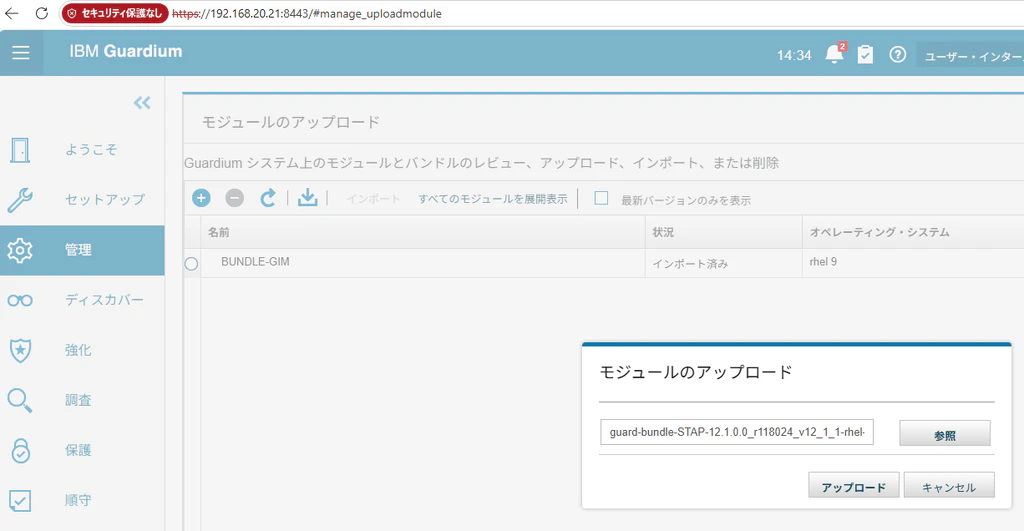
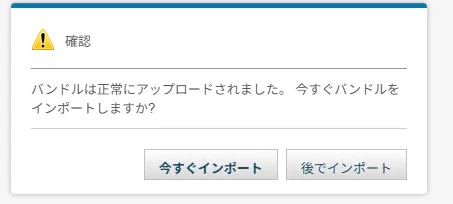
今すぐインポートを押す
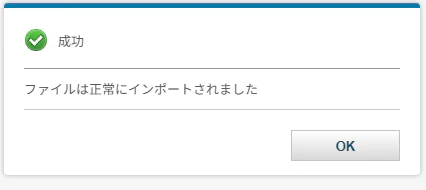
Okを押す
アップロードされたGIM及びSTAPを確認する。(画像は、12.1.0.0で古い)
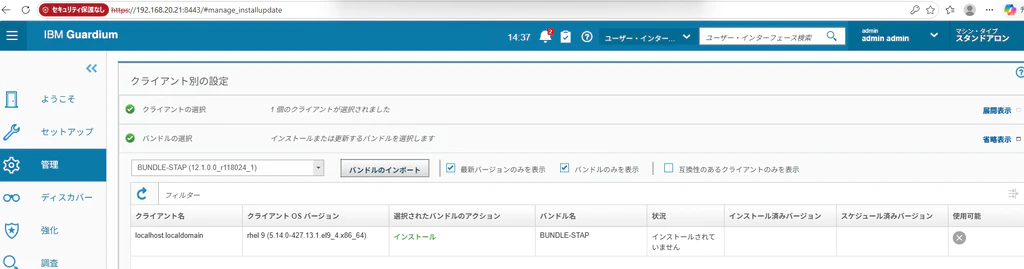
[管理]->[モジュール・インストール]->[クライアント別の設定] (画像は、12.1.0.0で古い)
バンドルがGIMになっているので、STAPに変更する

緑色で[インストール]と表示されることを確認し「次へ」をクリックする (画像は、12.1.0.0で古い)
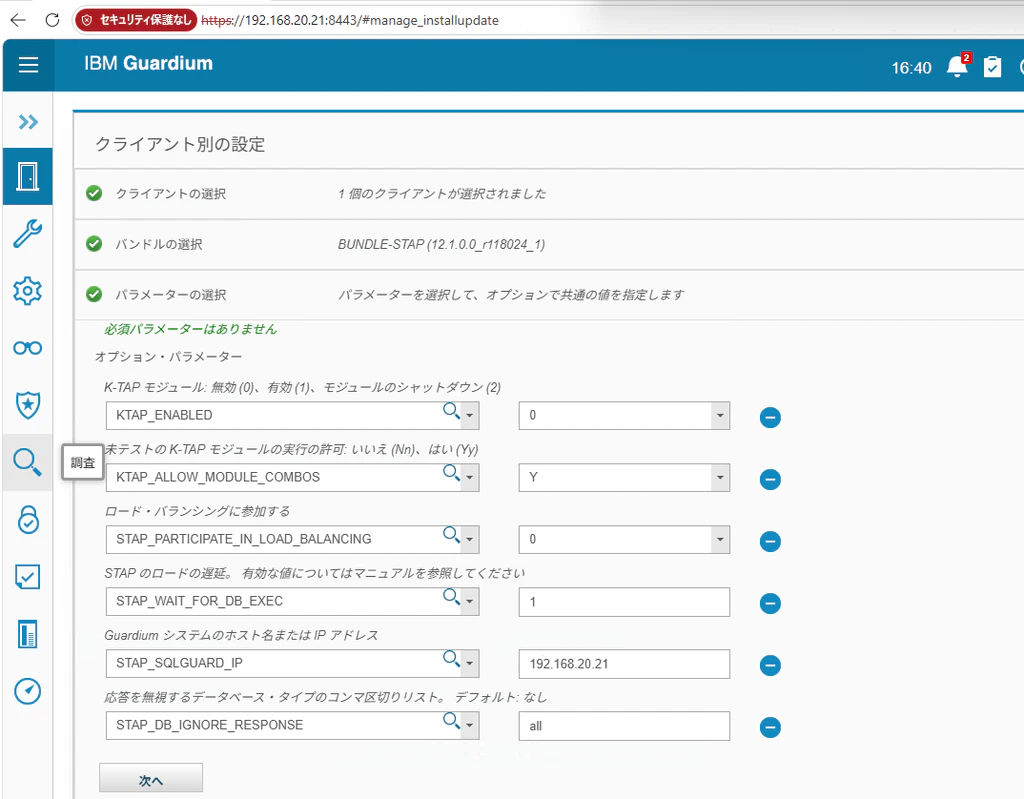
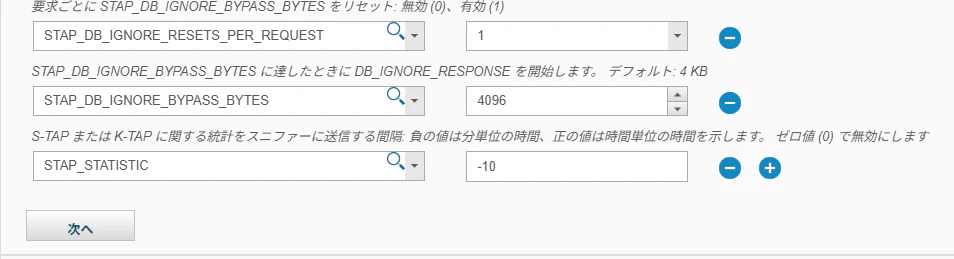
パラメータの選択で以下のように入れる。KTAPは未だ入れていないので、KTAP_ENABLE 0 (無効)としている。「次へ」をクリックする。
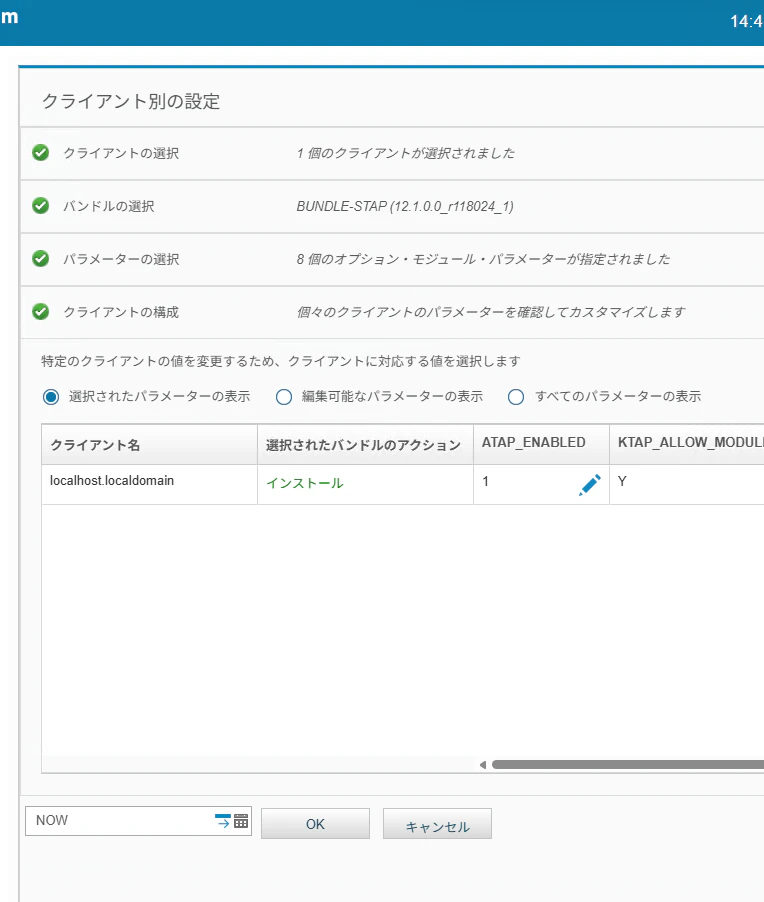
緑色で「インストール」と表示されていることを確認して「NOW」と表示されている状態でOKボタンを押す
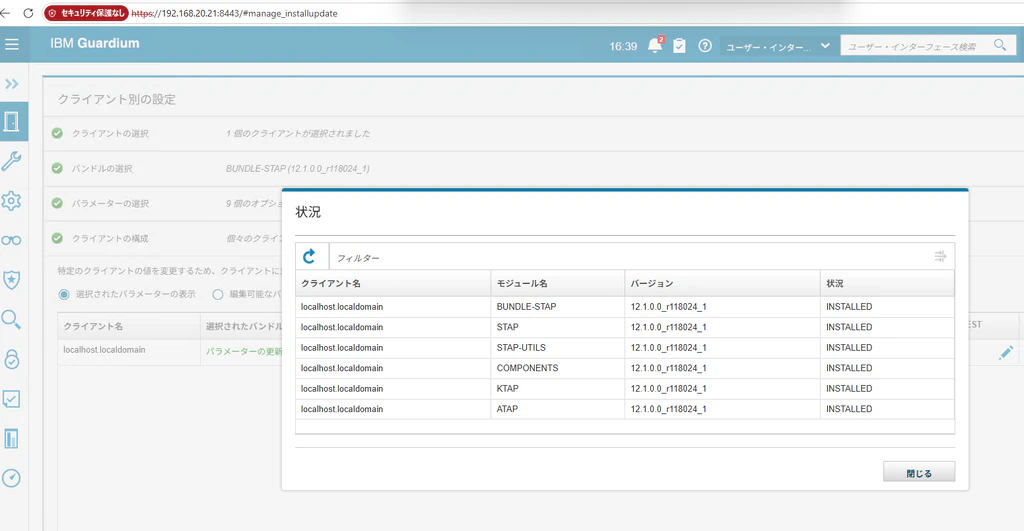
インストール状況を確認し、「INSTALLED」と表示されることを確認する
Guardium KTAP導入
Linux-UNIX: Enrolling a K-TAP signing key
https://www.ibm.com/docs/en/gdp/12.x?topic=tap-linux-unix-enrolling-k-signing-key
[root@localhost IQ]# mokutil --sb-state
SecureBoot enabled
STAPのフォルダー内にある[guardium_module_signing]ファイルをコピーする
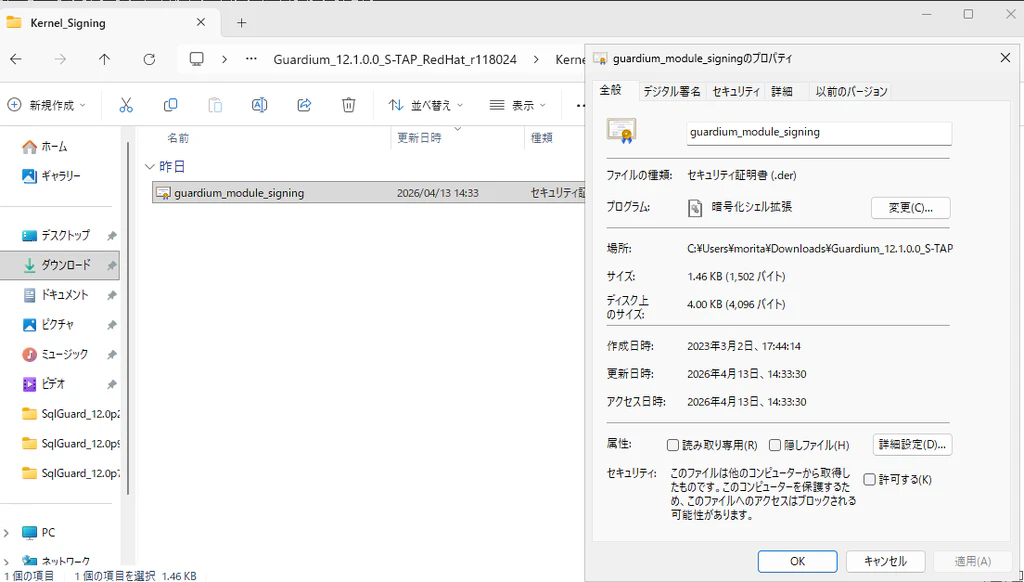
[guardium_module_signing]ファイルをインポートする
[root@localhost ~]# mokutil --import guardium_module_signing.der
再起動する
[root@localhost ~]# reboot
一瞬だけ再起動後のBIOS画面に以下表示されるのでその際にEnterキーを押す
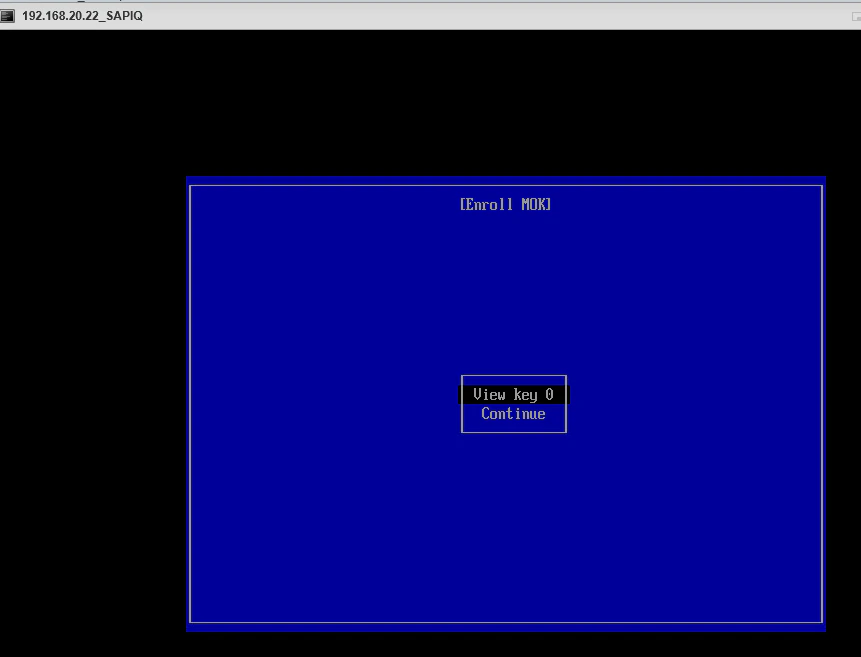

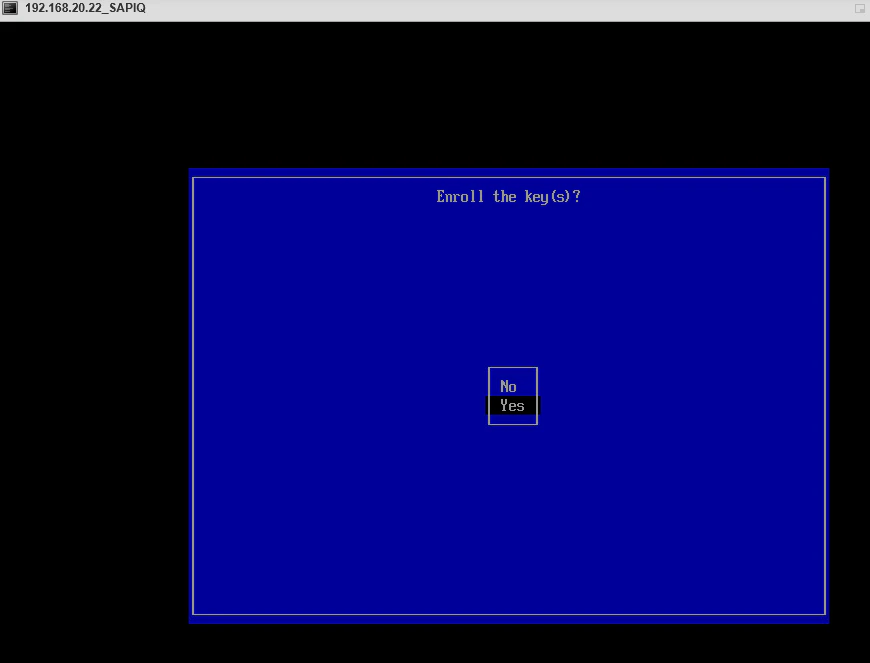
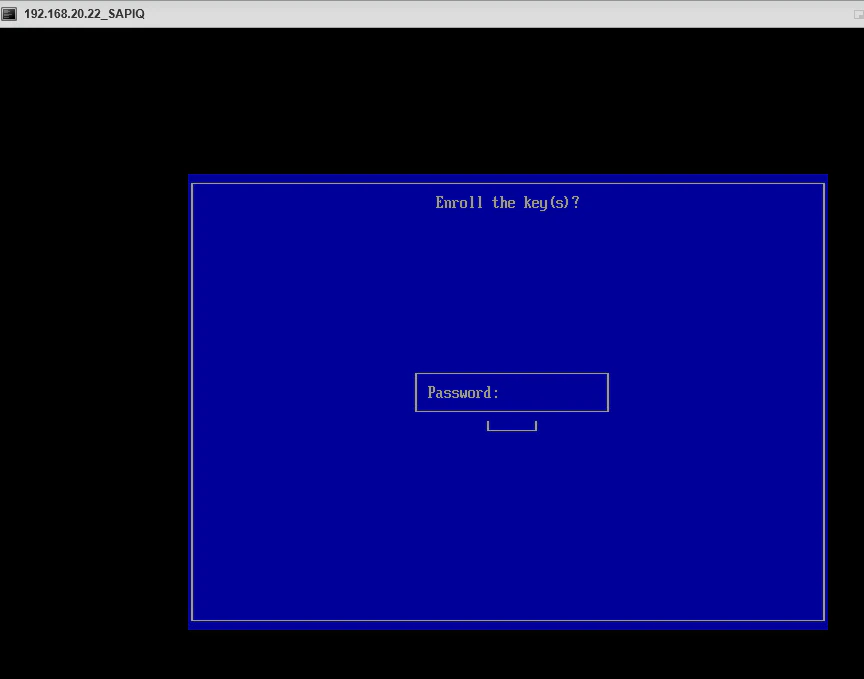
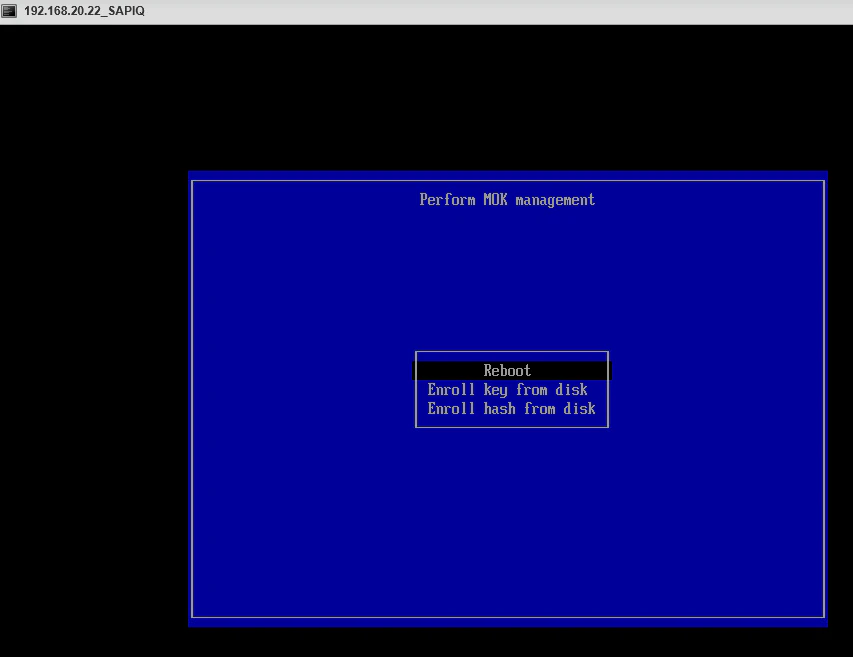
上記のキーをインストールした後でSTAPをインストールしないとKtapをロードしないそうだが、クライアント別の設定を見てもSTAPのアンインストールボタンが表示されない。
ログを確認
more /usr/local/guardium/modules/STAP/current/STAP.log
copilotに相談してkernelが足りな問いの事でインストール
dnf install -y kernel-devel-$(uname -r) kernel-headers-$(uname -r)
コマンドからstapの再インストール
/usr/local/guardium/modules/STAP/current/rc uninstall by_gim
/usr/local/guardium/modules/STAP/current/rc install by_gim
グループとユーザがguardiumが足りないとのメッセージから以下を追加
groupadd guradium
useradd -r -g guardium -d /usr/local/guardium -s /sbin/nologin guardium
/usr/local/guardium/modules/STAP/current/rc uninstall by_gim
/usr/local/guardium/modules/STAP/current/rc install by_gim
なぜかこれ以降で、クライアント別からSTAPのアンインストールボタンが出る。アンインストールしインストール実施
A TAP導入
Linux ユーザ追加
[root@localhost bin]# adduser user1
[root@localhost bin]# usermod -aG guardium user1
[root@localhost bin]# /usr/local/guardium/modules/ATAP/current/files/bin/guardctl authorize_user user1
Authorizing user 'user1' to log traffic
[root@localhost bin]# id user1
uid=1001(user1) gid=1002(user1) groups=1002(user1),1000(guardium)
DBユーザ追加
[root@localhost bin]# dbisql -c "uid=user1;pwd=<任意のパスワード>" -nogui
A-TAP起動の前にDBを停止が必要
https://www.ibm.com/docs/en/gdp/12.x?topic=lutm-linux-unix-tap-activate-deactivate-db-stop-restart-guidelines
Linux-UNIX: A-TAP activate, deactivate and DB stop, restart guidelines - IBM Documentation
stop_iq -stop all

[root@localhost demo]# /usr/local/guardium/modules/ATAP/current/files/bin/guardctl show-ies
Currently configured IEs in /usr/local/guardium/modules/STAP/current/guard_tap.ini
[DB_0]
connect_to_ip=127.0.0.1
db2_fix_pack_adjustment=80
db2_shmem_client_position=0
db2_shmem_size=131072
db2bp_path=NULL
db_exec_file=/opt/IQ/IQ-16_1/bin64/dbspawn
db_install_dir=/opt/IQ
db_type=SYBASE
db_user=user1
encryption=0
db_version=7
instance_running=1
intercept_types=NULL
load_balanced=1
port_range_end=2638
port_range_start=2638
priority_count=20
real_db_port=2638
tap_identifier=SYBASE_192.168.20.22(2638,2638,DB_0)
tee_listen_port=0
unix_domain_socket_marker=NULL
networks=0.0.0.0/0.0.0.0,::/0
exclude_networks=
A TAPのActivate
[root@localhost current]# /usr/local/guardium/modules/ATAP/current/files/bin/guardctl --db-user=user1 --db-type=sybaseiq --db_home=/opt/IQ --db-instance=localhost_iqdemo --db-version=16 --db-base=/opt/IQ/ --verbose activate
Matching module found - sybaseiq is supported by /usr/lib64/libguard-atap-sybaseiq-any
Instance root/localhost_iqdemo is not active
Installing library /usr/lib64/libguard-atap-sybaseiq-any-64.so in /usr/lib
Creating permissions
Set 811 bytes for 'executor/env' in file '/opt/IQ/IQ-16_1/bin64/dbspawn-guard-executor'
db_exec_file=/opt/IQ/IQ-16_1/bin64/dbspawn
Instance root/localhost_iqdemo is active
SAPIQ DBの起動
[root@localhost current]# cd /opt/IQ
source ./IQ.sh
cd /opt/IQ/IQ-16_1/demo
../bin64/start_iq @iqdemo.cfg iqdemo.db
ログの確認