
環境
IBM Cloud Classic Infrastructure Cluster
Windows Powershell
事前準備
 IBM CloudコマンドがローカルPCで実施できること
ocコマンドがローカルPCで実施できること
helmコマンドがローカルPCで実施できること
yamlコマンドがローカルPCで実施できること
gitコマンドがローカルPCで実施できること
ログイン
OpenshiftのWebUIにログインして右の【IAM】をクリックする

【Copylogin command】をクリックする
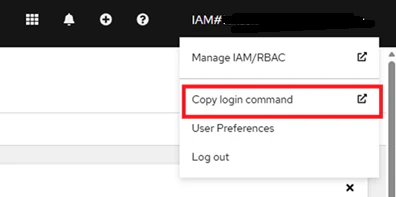
【Display Token】をクリックする

【oc login】という部分をコピーする
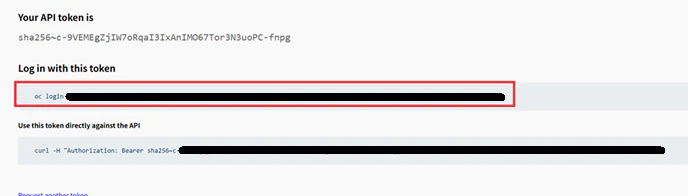
コピーした文字列をpowershellに張り付ける

プロジェクトの作成
oc new project <プロジェクト名>
Guardium External STAPのchartsファイルをダウンロード
git clone https://github.com/IBM/Guardium_External_S-TAP
cd Guardium_External_S-TAP/charts
chartsディレクトリ直下のoverride_example.yamlをコピーして編集する
cp override_example.yaml<コピー後のファイル名>
yamlファイルの編集
使う部分だけコメントアウト
# This is a YAML-formatted file.
# vim: ts=2:sw=2:et

# Please review all "Required" parameters and set them as appropriate
# for your environment

# Global Settings
global:
  # Registry location for the container image
  # Optional
  dockerRegistryPrefix: "icr.io/guardium/"

  # Container image name in repository
  # Optional
  image: "guardium_external_s-tap"

  # Container image tag
  # Optional
  tag: "v12.2"

  # Pull policy for container image
  # Optional
  imagePullPolicy: Always

  # Secret to use when pulling container image
  # Optional
  #imagePullSecret : "docker-regcred"

  # Kubernetes secret
  # - can contain static credentials
  #   - tls.crt and tls.key are the certificate/key pair that e-stap
  #     presents to both the client and the service
  #   - client.crt and client.key are the certificate/key pair that
  #     e-stap presents /to/ the server /as/ a client
  #   - server.crt and server.key are the certificate/key pair that
  #     e-stap presents /to/ a client /as/ the server
  #   - ca.pem is the root CA that signed the e-stap certificate(s)
  #   - ca_bundle.pem is the CA bundle used for verifying certificates
  # - can contain multiple secret tokens which are used to
  #   - pull a specific certificate and key from the collector
  #   - send automatically generated CSRs to the collector to
  #     be signed by a specific intermediate signing certificate
  # Optional, default is to not use the secret which means
  # only clear text traffic will be intercepted.  If specified
  # and does not exist, will be automatically created
  secret: "estap-secret"

  # Service account to use for creating the default secret
  # Will be created if it does not exist
  # Optional, default is "estap-secret-writer"
  secretWriterServiceAccountName: "estap-secret-writer"

  # With restrictive deployer permissions, it may not be possible to
  # get roles, rolebindings, and serviceaccounts in kubernetes.  If
  # the default secret needs to be created and the serviceaccount,
  # role, and rolebinding already exist, uncomment these to prevent
  # helm from trying to 'get' the objects, which may be prohibited
  # by the user's role
  # NB: if dontMakeServiceAccount is set to true, neither the Role
  # nor the RoleBinding will be created, either.  if dontMakeRole
  # is set to true, then the RoleBinding will not be created
  # Default is to create serviceAccount, Role, and Rolebinding
  # if they do not exist and, if they do, to inherit them into
  # the deployment
  #dontMakeServiceAccount: false
  #dontMakeRole: false
  #dontMakeRoleBinding: false

  # Persistent volume claim
  # - required to support persisting configuration changes from
  #   the collector after deployment
  # Optional, default is to not mount a PVC.  PVC must support
  # ReadWriteMany if used
  #volumeName: "estap-pv"

# Estap Settings
estap:
  # Name for this deployment
  # Optional, must be a valid component of a resource name
  #name: "estap"

  # NodePort to expose
  # Optional, random port will be used when unspecified
  # NB: Parameter is ignored when estap.route.name is
  # specified
  #nodePort: 33000

  # Create an OpenShift route instead of a nodePort
  # service
  #route:
    # name is required when using a route.  It will be appended to
    # the service name and will be the DNS endpoint for using E-STAP
    #name:
    #tls:
      # These parameters are optional and the default is to not
      # terminate SSL and to do straight passthrough
      #insecureEdgeTerminationPolicy: None
      #termination: passthrough
    #annotations:
      # Whatever you put under here is going to be added to the annotations
      # and is dependent on what is implementing the route
      #haproxy.router.openshift.io/timeout: 90s
  #service:
    # Optional, annotations to add to the service.  Typically used
    # to link with Kubernetes provider's load balancer
    # Annotations need to be string encoded.
    #annotations:
      #service.beta.kubernetes.io/aws-load-balancer-type: "external"
      #service.beta.kubernetes.io/aws-load-balancer-nlb-target-type: "ip"
    # Optional, external traffic policy for load balancer service
    #externalTrafficPolicy: Local
    # Optional, a load balancer source range to allow traffic from
    #loadBalancerSourceRanges: []
    # Optional, internal traffic policy for load balancer service
    #internalTrafficPolicy: Cluster

  # Optional, ingress to use with E-STAP.  Used to specify a load balancer
  # to be used with AWS to avoid multiple NLBs being created
  #ingress:
    # Optional, annotations to specify for ingress
    #annotations:
      #alb.ingress.kubernetes.io/scheme: internet-facing
      #alb.ingress.kubernetes.io/target-type: ip
      #alb.ingress.kubernetes.io/load-balancer-name: YOUR_INGRESS_LB_NAME
      #alb.ingress.kubernetes.io/group.name: YOUR_INGRESS_GROUP_NAME
    #className: alb
    #host: YOUR_DNS_HOST_NAME

  # Number of replicas to deploy initially
  # Optional, default is 2
  #replicas: 2

  # Service account to use
  # Optional, default is default
  #serviceAccountName: "default"

  # Requests/Limits for External S-TAP container
  # Optional, not recommended to change
  #requests:
    #cpu: 100m
    #memory: 512Mi
  #limits:
    #cpu: 500m
    #memory: 2096Mi

  # UID for container user
  # Optional, default is 1000.  If changed, 0 will be added automatically
  # to supplementalGroups
   uid: 1000680000

  # FS group for container mounts
  # Optional, default is 1000
   fsGroup: 1000680000

  # An additional group membership for container user
  # Optional, default is no additional supplemental group.
  # fsGroup is always added, only specify a single
  # additional group
  #supplementalGroups: 2000

  # Set [ TAP ] section parameters tap_ip to this value and force_server_ip=1
  # Optional, default is to not enable
  #override_server_ip: "10.10.10.10"

  # Set [ TAP ] section parameter participate_in_load_balancing
  # - 0: Failover - Switch to the next secondary in case of primary failure
  # - 1: Load balancing - Connect to all collectors and split traffic by session
  # - 2: Duplicate - Connect to all collectors and send all traffic to each
  # - 3: External LB - Collectors are behind an external LB (e.g. F5, HAProxy, etc)
  #                    always send failover data on reconnect.  Only specify one
  #                    sqlguard section
  # Optional, default is 0
   participate_in_load_balancing: 0

  # Verify the collector's certificate.  Requires the CA certificate to be in
  # the container at the specified path
  # Optional, default is to not verify
  #verify_guardium:
    #cn: "my_collector_cn"
    #ca_path: "/etc/guardium/guardium_ca.crt"

  #proxy:
    # For debugging purposes only
    # Optional, not recommended to set
    # debug: 0

    # UUID with which to group this deployment.
    # Optional, random UUID will be created and stored in a configmap if unset.
    #group_uuid: "9d2c34ab-e392-02fd1-872ae892ea94"

    # Number of worker threads.  Do not exceed number of CPUs on worker nodes.
    # Optional, default is 1, max is 10.
    #num_workers: 5

    # Expect proxy protocol to be present in the data stream.
    # Optional, default is 0 (no)
    #proxy_protocol: 0

    # Verify certificates and disconnect if they are invalid
    # Optional, default is 0 (no)
    #disconnect_on_invalid_certificate: false

    # Verify certificates and send a message to the STAP event log
    # if they are invalid
    # Optional, default is 0 (no)
    #notify_on_invalid_certificate: false

    # Internal listen port in the container, cluster port for load
    # balancer service
    # Optional, default is 8888.  Must be a non-privileged port.
    #listen_port: 8888

    # Key for token stored in global.secret to use when referencing
    # signed or signing certificates on the collector
    # Optional, default is to not use a token
    #secret: estap-token

    # CSR fields to use when using signing certificates on the
    # collector
    # Optional, default is to not generate CSRs
    #csr:
      #name: "db.example.com"
      #country: "us"
      #province: "massachusetts"
      #city: "littleton"
      #organization: "IBM"
      #keylength: 2048
   db:
    # DB host endpoint IP/address
    # Required
    host : "<DBのホスト名もしくはIP>"

    # DB host endpoint port
    # Required
    port : <DBのポート番号>

    # DB host endpoint type
    # Required
    type : "例:pgsql"

   guardium:
    # Guardium appliance IP/address
    # Required
    host : "<コレクターのIP>"

    # Guardium appliance base port number
    # Optional, default is 16016.  External S-TAP communicates to the collector
    # via TLS ONLY, so the port that needs to be open between the External S-TAP
    # pods and the appliance is base port + 2 (typically 16018).
    #port: 16016

    # Number of connection pool threads to use
    # Optional, default is 0.  If set to non-zero, base port + 5 (typically 16021)
    # needs to be open between the External S-TAP pods and the appliance as well.
    #connection_pool_size: 0

    # Number of connections to make to this collector
    # Optional, default is 1
    #num_main_thread: 1

    # The list of secondary collectors to configure
    # Same parameters as the above.  Must be specified in order (e.g. if s2 is to
    # be specified, s1 must be as well).
    secondaries:
       s1:
         host: "<コレクター2号機のIP>"
        #port: 16016
        #connection_pool_size: 0
        #num_main_thread: 1
      #s2:
        #host: ""
        #port: 16016
        #connection_pool_size: 0
        #num_main_thread: 1
      #s3:
        #host: ""
        #port: 16016
        #connection_pool_size: 0
        #num_main_thread: 1
      #s4:
        #host: ""
        #port: 16016
        #connection_pool_size: 0
        #num_main_thread: 1
      #s5:
        #host: ""
        #port: 16016
        #connection_pool_size: 0
        #num_main_thread: 1
      #s6:
        #host: ""
        #port: 16016
        #connection_pool_size: 0
        #num_main_thread: 1
      #s7:
        #host: ""
        #port: 16016
        #connection_pool_size: 0
        #num_main_thread: 1
      #s8:
        #host: ""
        #port: 16016
        #connection_pool_size: 0
        #num_main_thread: 1
      #s9:
        #host: ""
        #port: 16016
        #connection_pool_size: 0
        #num_main_thread: 1

  # Liveness probe script to use
  # Optional, not recommended to set.
  #livenessProbe:
    #command: "/usr/sbin/gproxy_live"
    #initialDelaySeconds: 0
    #periodSeconds: 10
    #failureThreshold: 4
    #disableBackendLivenessProbe: 1


  # Readiness probe script to use
  # Optional, not recommended to set.
  #readinessProbe:
    #command: "/usr/sbin/gproxy_ready"
    #initialDelaySeconds: 0
    #periodSeconds: 5
    #failureThreshold: 5
上記の編集した部分を以下にまとめる
global
dockerRegistryPrefix: "icr.io/guardium/" <External Stapコンテナダウンロード元
image: "guardium_external_s-tap" <コンテナイメージ
tag: "v12.2" <コンテナイメージバージョン
imagePullPolicy: Always <コンテナ作成する度にイメージダウンロード
secret: "estap-secret" <コレクターとExternal STAP間で使うシークレット
secretWriterServiceAccountName: "estap-secret-writer" <コレクターとExternal STAP間で使うシークレット作成するためのジョブ
estap:
uid: 1000660000 <HelmでExternal STAPインストールすると必ず不一致が発生するuid
fsGroup: 1000660000 <HelmでExternal STAPインストールすると必ず不一致が発生するfsGroup
participate_in_load_balancing: 0 <コレクターに対してExternal STAPをフェイルオーバさせる
db:
host: <監視対象DBホストIPもしくはホスト名
port: <監視対象DBに接続するためのポート番号
type: <監視対象DBのタイプ
guardium
host: <コレクター1号機のIP
secondaries:
s1:
host: <コレクター2号機のIP
External STAPのデプロイ
helm install <デプロイメント名> .\estap -f <上記で編集したyamlファイル>
NAME: my-estap-deployment-postgre
LAST DEPLOYED: Mon Mar  2 09:12:47 2026
NAMESPACE: postgre
STATUS: deployed
REVISION: 1
TEST SUITE: None
OC コマンドでNLB(Network Load Balancer)の状態を確認する。
上記helm installするとExternal Stapが入った形でNLBがデプロイされる
ここに出てくるEXTERNAL-IPが、ユーザもしくはアプリ(DBアクセスクライアント)が通信する先のIPとなる
ポートは、デフォルトで8888
PS C:\Users\xxxxx\Guardium_External_S-TAP\charts> oc get svc
            NAME                         TYPE           CLUSTER-IP      EXTERNAL-IP      PORT(S)          AGE
estap-my-estap-deployment-postgre-lb   LoadBalancer   172.21.99.105   xxx.xxx.xxx.xxx   8888:32683/TCP   7s
oc describeコマンドを使ってエラー確認
PS C:\Users\xxxxx\Guardium_External_S-TAP\charts>oc describe deploy my-estap-deployment-postgre -n postgre

最後に以下のようなログが必ず表示される
  Warning  FailedCreate  98s (x17 over 4m22s)  replicaset-controller  Error creating: pods "estap-postgre-556bd7555c-" is forbidden: unable to validate against any security context constraint: [provider "anyuid": Forbidden: not usable by user or serviceaccount, provider restricted-v2: .spec.securityContext.fsGroup: Invalid value: []int64{1000680000}: 1000680000 is not an allowed group, provider restricted-v2: .initContainers[0].runAsUser: Invalid value: 1000680000: must be in the ranges: [1000660000, 1000669999], provider restricted-v2: .containers[0].runAsUser: Invalid value: 1000680000: must be in the ranges: [1000660000, 1000669999], provider "restricted": Forbidden: not usable by user or serviceaccount, provider "ibm-restricted-scc": Forbidden: not usable by user or serviceaccount, provider "nonroot-v2": Forbidden: not usable by user or serviceaccount, provider "nonroot": Forbidden: not usable by user or serviceaccount, provider "ibm-anyuid-scc": Forbidden: not usable by user or serviceaccount, provider "hostmount-anyuid": Forbidden: not usable by user or serviceaccount, provider "ibm-anyuid-hostpath-scc": Forbidden: not usable by user or serviceaccount, provider "hostnetwork-v2": Forbidden: not usable by user or serviceaccount, provider "hostnetwork": Forbidden: not usable by user or serviceaccount, provider "hostaccess": Forbidden: not usable by user or serviceaccount, provider "ibm-anyuid-hostaccess-scc": Forbidden: not usable by user or serviceaccount, provider "hostmount-logger-logs-agent": Forbidden: not usable by user or serviceaccount, provider "sysdig-agent": Forbidden: not usable by user or serviceaccount, provider "node-exporter": Forbidden: not usable by user or serviceaccount, provider "ibm-privileged-scc": Forbidden: not usable by user or serviceaccount, provider "privileged": Forbidden: not usable by user or serviceaccount]
ここで表示された値の範囲[1000660000, 1000669999]をyamlのuidとfsGroupに記録する
oc get eventsコマンドでログを確認する
上記と同じログが確認できる
PS C:\Users\xxxxx\Guardium_External_S-TAP\charts>oc get events -n postgre --sort-by=.metadata.creationTimestamp
yamlを更新した後で、helmコマンドでExternal STAPを更新する
PS C:\Users\xxxxx\Guardium_External_S-TAP\charts> helm upgrade my-estap-deployment-postgre .\estap -n postgre -f .\pg-estap.yaml
NLB配下で動作するpodの状態確認を行う。Runnningとなっていることを確認する
PS C:\Users\xxxxx\Guardium_External_S-TAP\charts> oc get pods
NAME                                       READY   STATUS    RESTARTS   AGE
estap-my-estap-deployment-estap-7684df78fb-cf8kz   1/1     Running   0          119s
estap-my-estap-deployment-estap-7684df78fb-sgbcn   1/1     Running   0          111s