

はじめに
日報を手で書くのをやめ、仕組みで生成する形にチャレンジしました。
既に存在している行動ログをAPI経由で取得し、Notionに集約する仕組みを作りました。
取得対象は以下です。
- Slack: 自分の発言(仕事、コミュニティ)
- Google Calendar: 当日の予定(仕事、プライベート)
- GitHub: Publicアクティビティ(個人開発)
- Notion: 学習記録(別データベースから取得)
アーキテクチャ
以下構成です。
- Amazon EventBridge: 毎日定時実行
- AWS Lambda(Python 3.11): 取得・整形
- 外部API: GitHub / Google Calendar / Slack / Notion
- Notion API: 保存先
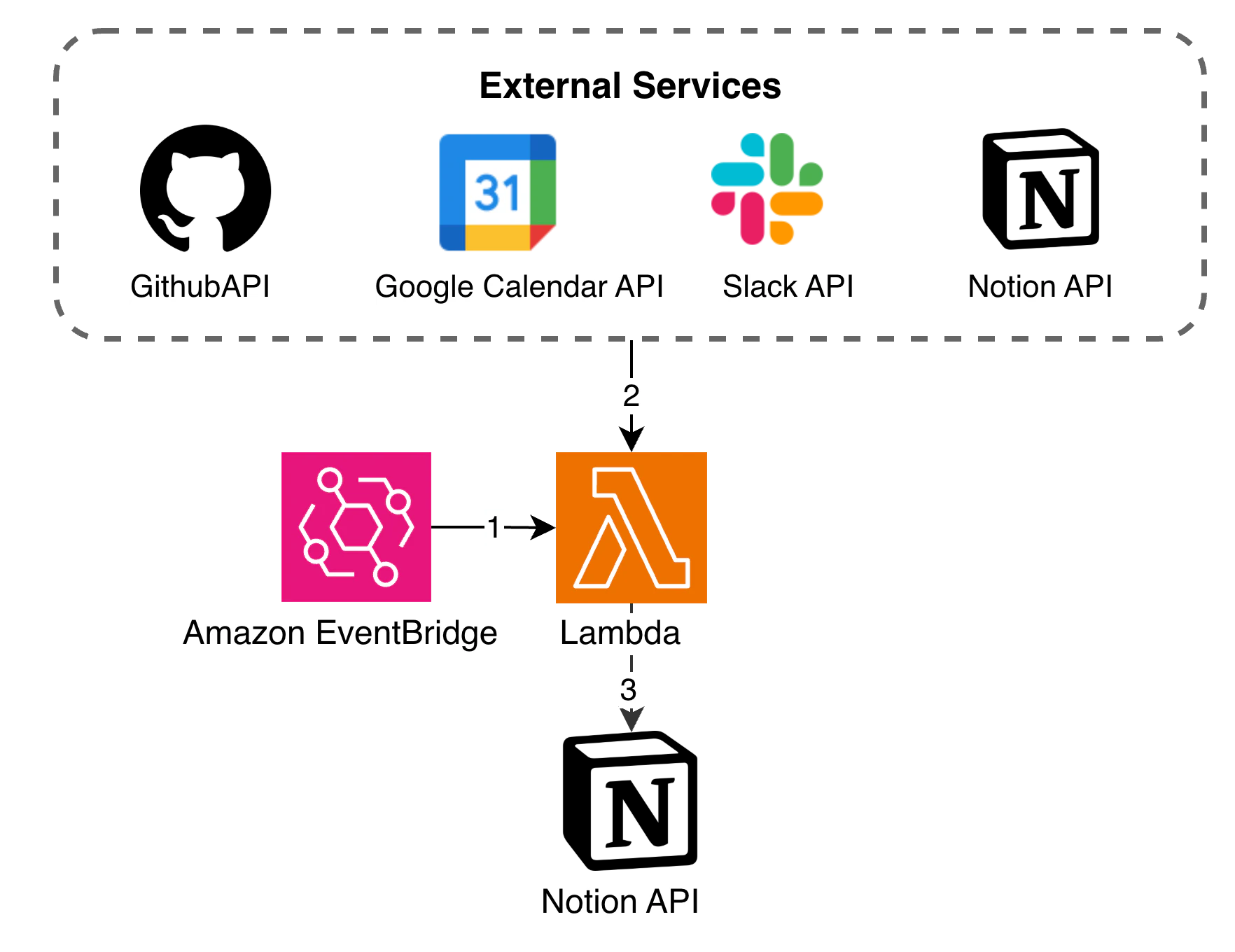
token などの機密情報は AWS Systems Manager Parameter Store に保存し、 Lambda 実行時に取得しています。
実装のポイント
1. Slack
search.messages API を使用して自分の発言のみを検索します。
User Token を利用しています。
query = f"from:<@{user_id}> after:{after_date} before:{before_date}"
result = client.search_messages(query=query)
取得したメッセージはチャンネル単位でグルーピングし、時系列順に整形しています。
2. Google Calendar
サービスアカウントで events().list() を実行します。
複数カレンダーをまとめて取得し、統合ソートしています。
events = service.events().list(
    calendarId=calendar_id,
    timeMin=day_start_jst.isoformat(),
    timeMax=day_end_jst.isoformat(),
    singleEvents=True,
    orderBy="startTime",
).execute()
サービスアカウントには、事前に各 Google Calenday への閲覧権限を付与する必要があります。
3. GitHub
リポジトリ一覧を取得後、各リポジトリのコミット履歴を取得します。
# リポジトリ一覧取得
repos_url = f"https://api.github.com/users/{username}/repos?type=owner&sort=pushed"
repos = requests.get(repos_url, headers=headers).json()

# 各リポジトリのコミット取得
commits_url = f"https://api.github.com/repos/{repo_name}/commits"
params = {
    "author": username,
    "since": day_start_jst.isoformat(),
    "until": day_end_jst.isoformat()
}
commits = requests.get(commits_url, headers=headers, params=params).json()
注意: この方法ではPublicリポジトリのみが対象です。業務リポジトリのprivate情報は取得していません。
4. Notion
MarkdownはそのままNotionに送信できません。1行ずつblockに変換して保存します。
# Markdown行をNotion Blockに変換
def line_to_block(line):
    if line.startswith("## "):
        return {
            "type": "heading_2",
            "heading_2": {"rich_text": [{"type": "text", "text": {"content": line[3:]}}]}
        }
    elif line.startswith("- "):
        return {
            "type": "bulleted_list_item",
            "bulleted_list_item": {"rich_text": [{"type": "text", "text": {"content": line[2:]}}]}
        }
    # ...

# ページ作成
notion.pages.create(
    parent={"database_id": database_id},
    properties={"title": {"title": [{"text": {"content": f"{today} 日報"}}]}},
    children=blocks
)
Notion APIはchildren(block)を100件までしか一度に送信できないため、それを超える場合は分割して blocks.children.append() で追加します。
出力データ構造
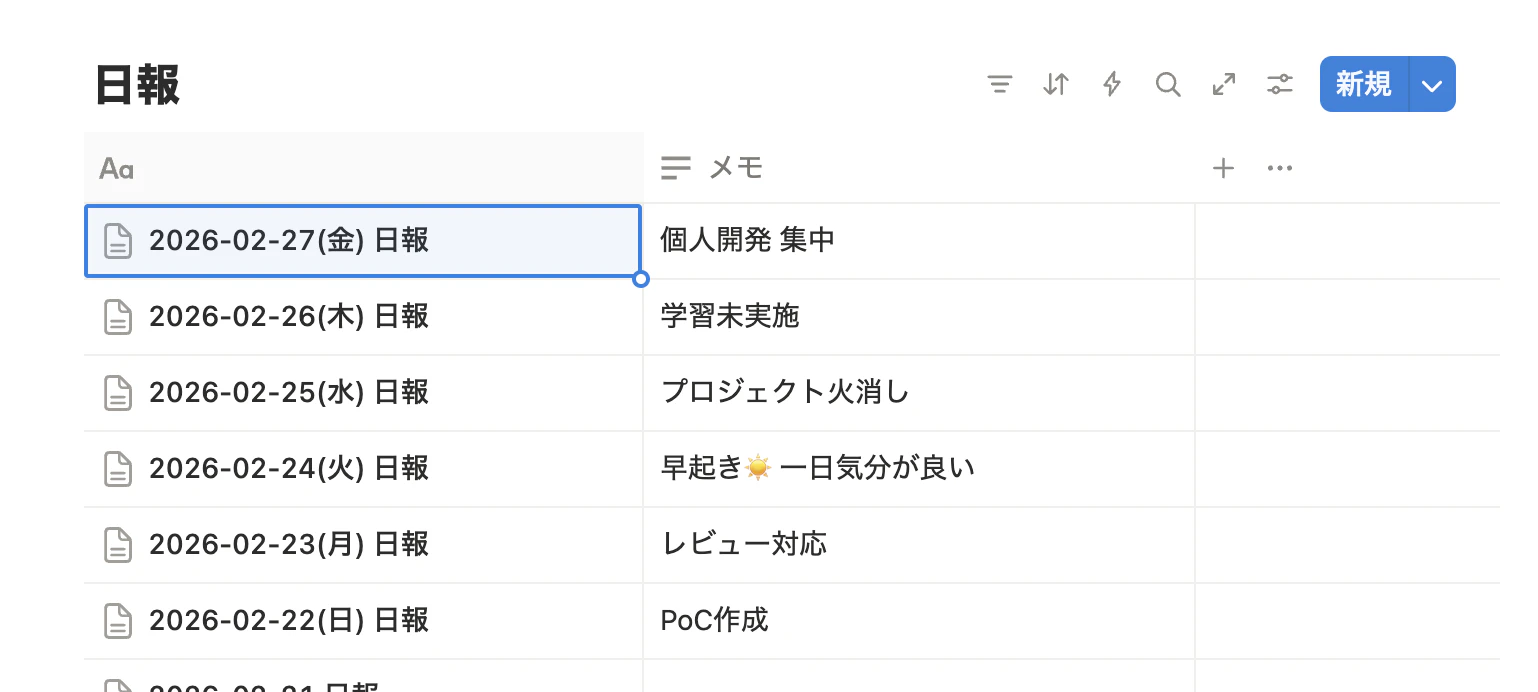
データベース一覧
- 日付: タイトルフィールド
- 今日の学び: 手書きで追記するフィールド
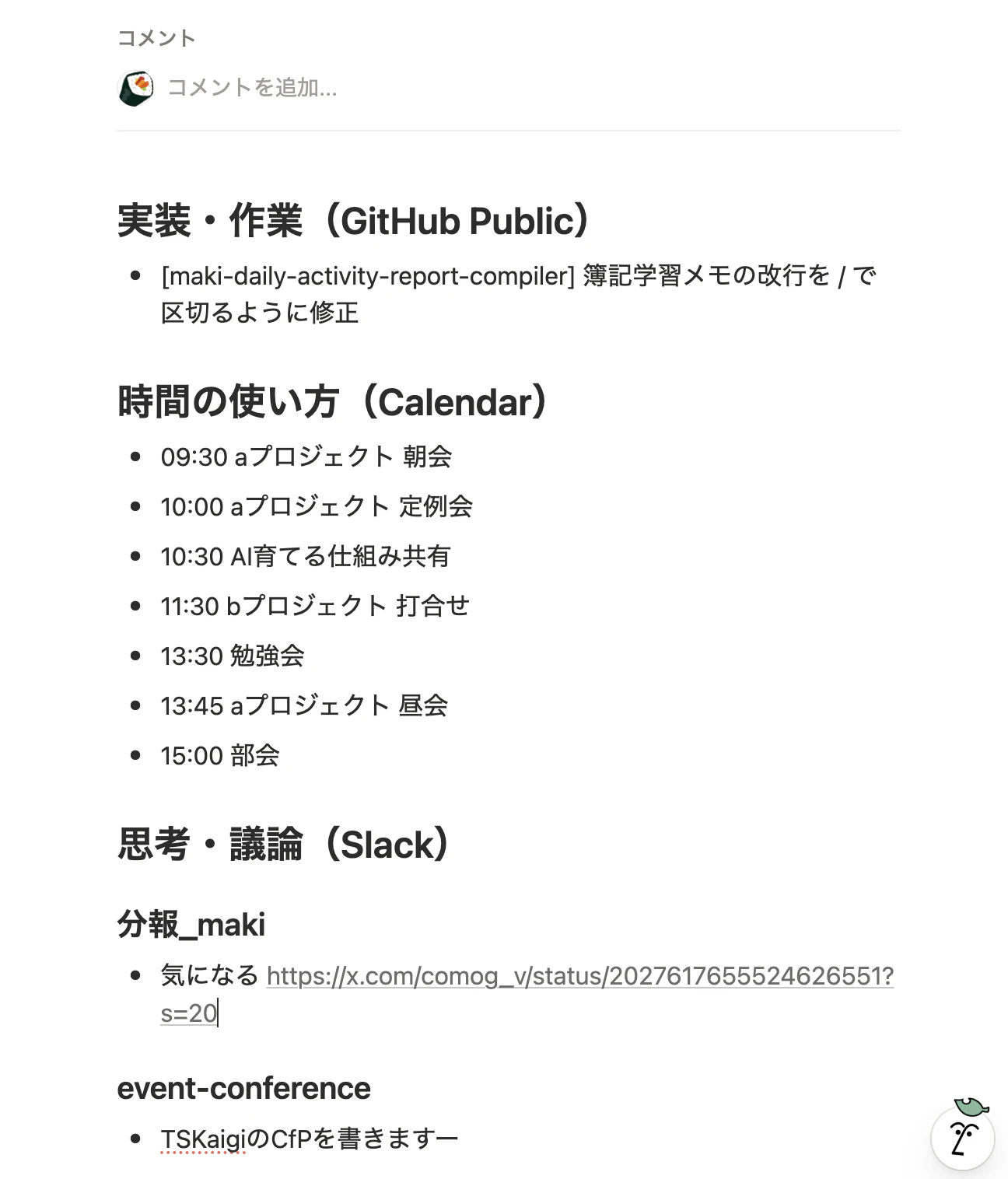
ページ本文
- 実装・作業(GitHub Public)
- 時間の使い方(Calendar)
- 思考・議論(Slack)
運用コスト
- Lambda: 無料枠内(月1回 × 30日 × 10秒程度)
- EventBridge: ほぼ無料(月30回のスケジュール実行)
- Parameter Store: 無料枠内(10パラメータ程度)
実質コストはゼロに近いです。
今後やりたいこと
この仕組みはまだログ収集段階なので、今後は「活用」に寄せていきたいです。
1. 習慣の継続記録
- 早起き連続日数
- 学習連続日数
- 運動・瞑想の実施率
チェックリストではなく、既存データから算出する形にしたいです。
2. Slack・メモの分析
Slackや日報メモから、以下を集計。
- ポジティブワードの出現頻度
- トラブル関連ワードの増減
感情分析まではやらず、まずはキーワードベースで傾向を見るところから始めたいです。将来的にLLMを使用することを検討中。
3. 週報・月報への展開
蓄積したデータを使って、以下を作成。
- 週報ドラフト生成
- 月次振り返りテンプレ生成
ログを貯めるだけでなく、アウトプットとして変換できる仕組みにするのが目標です。
おわりに
日報を手で書くのをやめ、仕組みで生成する形にしました。
Slack、Google Calendar、GitHubなど、すでに存在している行動ログをAPI経由で取得し、Notionに集約しています。
新しく入力を増やすのではなく、すでにあるデータをまとめる形です。
日報を書く仕組みではなく、日報が生成される仕組みを目指しました。
参考リンク
- Notion API Documentation
- Slack API Documentation
- Google Calendar API Overview
- GitHub REST API Documentation
- AWS SAM Documentation
リポジトリ