

はじめに
検証環境のクラウドインスタンス、起動しっぱなしになってませんか?
AWSやOCIなどのクラウド環境は、サーバを起動している時間に応じて費用が発生します。
でも、「使うときだけ起動して、終わったら止める」ってわかっていても、手動対応だと絶対に止め忘れる。かといって「毎日9時〜18時」みたいな定刻スケジュールだと、ちょっと遅くまで作業したい日や土日だけ使いたい日に対応できない。
ネットで調べてみても、「毎日◯~◯時に起動する」とか、「◯曜日に起動する」っていう情報は多くあるけど、「使いたいときにスポットで」という記事があまりありませんでした。
さらにマルチクラウド構成を一つのシステムでやっている記事は見つけられませんでした。
そこで 「ブラウザから任意の日時を指定してスポット予約できる」 かつ 「定刻起動・停止ができる」 自動起動・停止システムを自作しました。
AWSとOCIのマルチクラウド環境をひとつの画面で一元管理しています。
システム構成
技術スタック
- フロントエンド: PHP(素のPHP、フレームワークなし)
- バックエンド処理: Bash シェルスクリプト
- DB: PostgreSQL
- クラウド操作: AWS CLI / OCI CLI + jq
構成概要
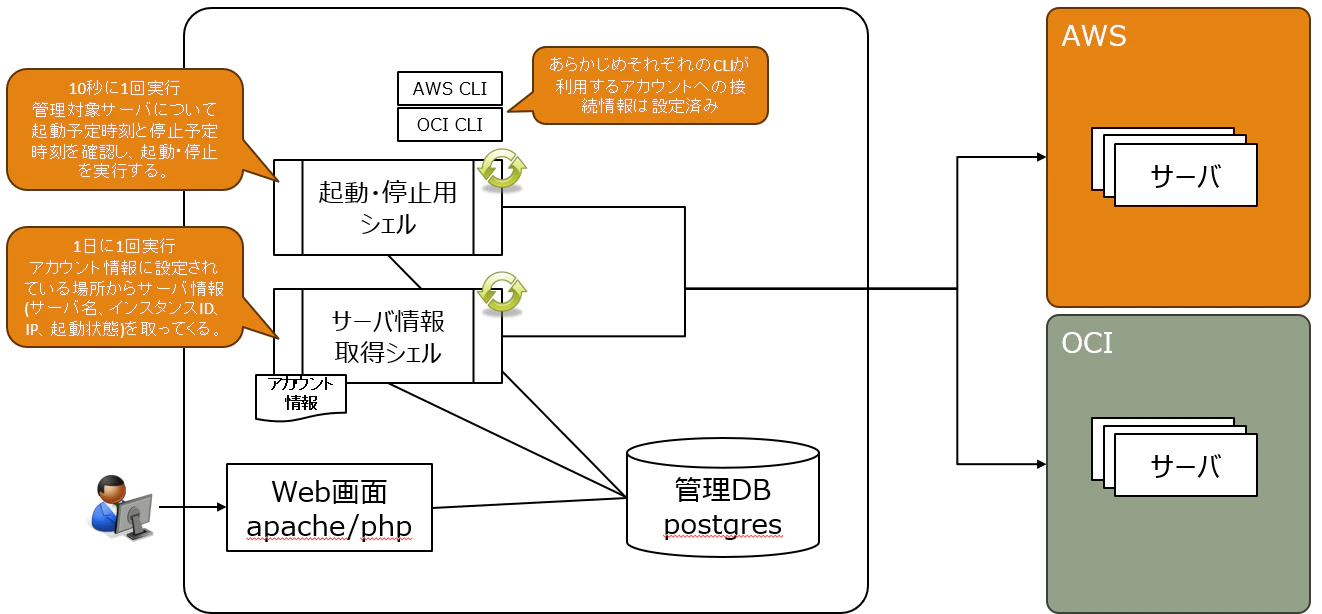
各コンポーネントの役割はこの通りです:
| コンポーネント | 役割 |
|---|---|
| apache/php(Web画面) | 予約・管理UIの提供、DBへのスケジュール登録 |
| PostgreSQL | 管理DB。インスタンス情報・スケジュールの一元管理 |
| 起動・停止用シェル | cronで定期実行、スケジュールに応じて起動・停止をクラウドCLI経由で指示 |
| サーバ情報取得シェル | クラウドからインスタンス情報を取得してDBに同期 |
DB テーブル構造(tm_cloud_servers)
| カラム | 内容 |
|---|---|
| bender | クラウド種別(aws / oci) |
| account | プロファイル名(コンパートメント) |
| instance_id | インスタンスID(OCID / InstanceID) |
| instance_name | インスタンス名 |
| ip | プライベートIP |
| status | 現在の状態(running / stopped 等) |
| kanri_flg | このシステムで管理するか |
| delete_flg | 論理削除フラグ(クラウドから消えた場合 true) |
| group_id | 所属する定刻スケジュールグループ(NULL=なし) |
| start_schedule | 起動予定日時(スポット予約) |
| stop_schedule | 停止予定日時(スポット予約) |
インスタンスの一意キーは bender + instance_id です。account(コンパートメント)は移動で変わりうる属性なので、一意キーには含めず更新対象として扱っています。
スケジュールグループ(tm_schedule_group)
| カラム | 内容 |
|---|---|
| group_name | グループ名 |
| days_of_week | 稼働曜日("1,2,3,4,5" のカンマ区切り、0=日〜6=土) |
| start_time | 起動時刻("09:00") |
| stop_time | 停止時刻("18:00") |
スケジュールの優先順位
- スポット予約(start_schedule/stop_schedule)があればそれを最優先
- スポット予約がなく、グループ所属していればグループの定刻スケジュールで判定
これにより「普段は平日9-18時のグループ運用、でも今日だけ22時まで」といった柔軟な運用ができます。
工夫したポイント
1. AWS / OCI を同一インターフェースで管理
クラウドごとにAPIが全然違いますが、DBとシェルで吸収しています。
if [ "${cloud_name}" = "aws" ];then
  # AWS CLI でインスタンス起動
  /usr/local/bin/aws ec2 --profile ${profile_name} start-instances \
    --instance-ids=${instance_id}

elif [ "${cloud_name}" = "oci" ];then
  # OCI CLI でインスタンス起動
  /root/oci/bin/oci compute instance action \
    --profile ${profile_name} \
    --instance-id ${instance_id} \
    --action "START"
fi

# どちらも同じ関数でDB更新
statusUpdate ${cloud_name} ${profile_name} ${instance_id} starting
PHP側からは cloud_name を渡すだけで、クラウドの差異を意識しなくて済みます。
2. スポット予約のスケジューラ実装
起動・停止用シェル が cron で10秒毎に起動し、DBのスケジュールを現在時刻と比較して起動・停止を制御します。
start_schedule の3分前に起動開始するようにしており、インスタンスの起動時間を考慮しています。
# serverAutoExec.sh(抜粋)
now=$(date +%s)

# start_scheduleの3分前になったら起動(バックグラウンド実行)
if [ ${now} -ge $((${start_schedule}-180)) \
  -a ${now} -lt ${stop_schedule} \
  -a "${status}" = "stopped" ];then
  ${MYDIR}/kidou.sh ${cloud_name} ${profile_name} ${instance_id} &
fi

# stop_scheduleを過ぎていたら停止(バックグラウンド実行)
if [ ${stop_schedule} -le ${now} -a "${status}" = "running" ];then
  ${MYDIR}/teishi.sh ${cloud_name} ${profile_name} ${instance_id} &
fi
3. ポーリングで起動完了を検知してからDB更新
起動コマンドを叩いて終わりではなく、実際にインスタンスが使える状態になるまで監視してからDB上のステータスを running に更新します。AWSはインスタンスチェック・システムチェックも含めて3つのOKを確認します。
# AWS 抜粋
# 最大10分(10秒 × 60回)ポーリング
MAX_RETRY=60
retry=0
while [ ${retry} -lt ${MAX_RETRY} ]
do
  # インスタンス状態・インスタンスチェック・システムチェックを取得
  instance_state=$(echo "${status_json}" | jq -r \
    '.[][]|select(has("InstanceState"))|.InstanceState')
  instance_status=$(echo "${status_json}" | jq -r \
    '.[][]|select(has("InstanceStatus"))|.InstanceStatus')
  system_status=$(echo "${status_json}" | jq -r \
    '.[][]|select(has("SystemStatus"))|.SystemStatus')

  # 3つ全てOKになったら起動完了
  if [ "${instance_state}" = "running" \
    -a "${instance_status}" = "ok" \
    -a "${system_status}" = "ok" ] ; then
    statusUpdate ${cloud_name} ${profile_name} ${instance_id} running
    exit 0
  fi
  retry=$((retry + 1))
  sleep 10
done
4. インスタンス情報の自動同期と論理削除
サーバ情報取得シェル を定期実行することで、クラウド側で変更が加えられた場合もDB情報が自動的に追いつきます。クラウドから消えたインスタンスは物理削除せず delete_flg = true の論理削除にして、復活もできるようにしています。
管理対象は accountList.txt で一元管理しています:
# クラウド種別, プロファイル名, インスタンスID(all で全件取得)
aws,aws-dev,all
oci,oci-dev,all
aws,hoge-account,i-XXXXXX
aws,piyo-account,i-YYYYYY
5. 曜日ベースの定刻グループスケジュール
スポット予約とは別に、「グループ」を作って曜日・時刻の定刻スケジュールを設定できます。スポット予約がないインスタンスはグループのスケジュールで起動・停止することができます。
# 現在の曜日(0=日〜6=土)を取得
today_dow=$(date +%w)
now_hm=$(date +%H:%M)

# 今日が稼働曜日に含まれるか判定(days_of_week例: "1,2,3,4,5")
for dow in $(echo "${days_of_week}" | tr ',' ' '); do
  if [ "${dow}" = "${today_dow}" ]; then is_active_day=1; fi
done

# 稼働時間内かどうか(HH:MM文字列の辞書順比較で判定)
if [ "${now_hm}" \> "${grp_start_time}" -o "${now_hm}" = "${grp_start_time}" ] \
  && [ "${now_hm}" \< "${grp_stop_time}" ]; then
  # 稼働時間内 → stoppedなら起動
fi
6. ステータスの自動更新
予約画面では、ステータスバッジを10秒ごとにAjaxで自動更新します。statusApi.php がJSONを返し、JS側で変化したバッジだけを書き換えます。起動予約したサーバが stopped → starting → running と変わっていくのを、リロードせずに眺められます。
使い方
予約画面

管理対象サーバの一覧から使いたいサーバをチェックして、日時を入力するだけです。2パターンに対応しています:
- 今すぐ起動 — 停止日時だけ指定して即時起動
- 起動予約 — 起動・停止の両方の日時を指定してスケジュール登録
管理画面

サーバ情報取得シェル で自動同期されたインスタンス一覧を表示します。AWS と OCI のインスタンスが混在していても一覧で確認でき、チェックボックスでまとめて管理対象の切り替えができます。管理対象外(kanri_flg = false)のインスタンスは自動起動・停止の対象から除外されます。
使用しているCLIコマンド一覧
AWS CLI
| コマンド | 用途 |
|---|---|
aws ec2 describe-instances |
インスタンスの現在の状態を取得 |
aws ec2 start-instances |
インスタンスを起動 |
aws ec2 stop-instances |
インスタンスを停止 |
aws ec2 describe-instance-status |
インスタンスのヘルスチェック状態を取得 |
ポイント:describe-instances と describe-instance-status の使い分け
起動完了の検知に describe-instance-status を使っている理由があります。
describe-instances は State が running になった時点で応答しますが、この時点ではまだOSが完全に起動していないことがあります。describe-instance-status はインスタンスチェック・システムチェックという2段階のヘルスチェックも含んでいるため、実際にSSH接続できる状態まで確認できます。
# 3つ全てOKになって初めて「使える状態」と判断
if [ "${instance_state}" = "running" \
  -a "${instance_status}" = "ok" \
  -a "${system_status}" = "ok" ] ; then
--query オプションによるJSON絞り込み
AWS CLIは --query オプションで JMESPath 式を使ってレスポンスを絞り込めます。
# インスタンスの状態だけ取り出す
aws ec2 describe-instances \
  --instance-ids i-xxxxxxxxxx \
  --query "Reservations[].Instances[].State.Name" \
  --output json | jq -r .[]

# 複数の情報をまとめて取得(serverInfoGet.sh)
aws ec2 describe-instances \
  --query 'Reservations[].Instances[].{
    InstanceId: InstanceId,
    PrivateIp: join(`, `, NetworkInterfaces[].PrivateIpAddress),
    State: State.Name,
    Name: Tags[?Key==`Name`].Value|[0]
  }'
OCI CLI
| コマンド | 用途 |
|---|---|
oci compute instance get |
特定インスタンスの状態・情報を取得 |
oci compute instance action --action START |
インスタンスを起動 |
oci compute instance action --action SOFTSTOP |
インスタンスをソフトストップ(OS正常シャットダウン) |
oci compute instance list |
コンパートメント内のインスタンス一覧を取得 |
oci compute instance list-vnics |
インスタンスのVNIC(IPアドレス等)を取得 |
ポイント:list と get の使い分け
oci compute instance list はコンパートメント単位で一覧を返すコマンドで、--instance-id で特定インスタンスを絞ることはできません。特定インスタンスを取得したいときは oci compute instance get --instance-id を使います。
-
list→.dataが配列(jq '.data[]') -
get→.dataが単一オブジェクト(jq '.data')
JSON構造が違うので jq のパースも変える必要があります。
ポイント:STOP と SOFTSTOP の違い
OCI の停止アクションには STOP(強制停止)と SOFTSTOP(ソフトシャットダウン)があります。本システムでは SOFTSTOP を使っています。
-
STOP— 電源を強制カット。OSのシャットダウン処理なし -
SOFTSTOP— ACPIシグナルを送ってOSに正常シャットダウンを要求
検証環境とはいえ DB やアプリが動いている場合もあるため、データ破損リスクを避けるために SOFTSTOP を選択しています。
lifecycle-state の小文字変換
OCI CLI のレスポンスは状態が RUNNING / STOPPED と大文字で返ってきます。AWS CLI は小文字(running / stopped)なので、OCI 側は tr で統一しています。
state=$(/root/oci/bin/oci compute instance get ... \
  | jq -r '.data["lifecycle-state"]' \
  | tr '[A-Z]' '[a-z]')  # RUNNING → running に変換
jq による JSON パース
AWS CLI・OCI CLI はどちらも JSON でレスポンスを返します。シェルスクリプトでの JSON パースに jq を使っています。
# 配列の最初の要素を取り出す
jq -r '.[]'

# 特定キーを持つオブジェクトだけ選択して値を取得
jq -r '.[][]|select(has("InstanceState"))|.InstanceState'

# ネストしたキーを取り出す(キー名にハイフンが含まれる場合)
jq -r '.data["lifecycle-state"]'

# TSV形式で複数フィールドを出力
jq -r '.data[] | [.["id"], .["display-name"], .["lifecycle-state"]] | @tsv'
まとめ
| 機能 | 実装方法 |
|---|---|
| スポット予約UI | PHP + PostgreSQL |
| 定刻グループスケジュール | 曜日・時刻をDBで管理、cronで判定 |
| 自動起動・停止 | Bash + cron |
| マルチクラウド対応 | AWS CLI / OCI CLI を if/elif で吸収 |
| 起動完了検知 | ポーリング(最大10分) |
| インスタンス情報同期 | サーバ情報取得シェル を定期実行 |
| 論理削除 | delete_flg カラムで管理、復活も可能 |
| ステータス自動更新 | Ajax + JSON API で10秒ごとに更新 |
「毎日この時間に起動・停止」ではなく「この日のこの時間帯だけ使いたい」というスポット予約のニーズは、既製品ではカバーしにくい部分です。定刻グループスケジュールと組み合わせることで「普段は平日9-18時自動運用、今日だけ延長」といった柔軟な使い方もできます。
シンプルな構成ですが、マルチクラウド環境での検証コスト削減に役立てています。同じような課題を抱えている方の参考になれば幸いです。
ソースコード
各ファイルを掲載します。
📁 ディレクトリ構成
/
├── kidou.sh                  # インスタンス起動
├── teishi.sh                 # インスタンス停止
├── serverAutoExec.sh         # スケジュール監視・自動実行(cron登録)
├── serverInfoGet.sh          # クラウドからインスタンス情報を同期
├── function/
│   ├── common.func           # 共通設定読み込み関数
│   └── db.func               # DB更新共通関数
├── sysconf/
│   ├── common.sh             # DB接続情報・プロキシ設定(.gitignore除外)
│   ├── common.sh.example     # ↑のサンプル
│   └── accountList.txt       # 管理対象クラウドアカウント一覧
└── web/
    ├── Dockerfile
    ├── docker-compose.yml
    ├── common.php            # PHP共通関数
    ├── Paging.php            # ページネーション(MIT License / kinocolog.com)
    ├── serverReserve.php     # サーバ予約画面
    ├── serverKanri.php       # サーバ管理画面
    ├── serverReserveKakunin.php # 予約確認・確定画面
    ├── serverDeleted.php     # 削除済みインスタンス一覧
    ├── groupKanri.php        # スケジュールグループ管理
    ├── statusApi.php         # ステータス取得API
    └── css/
        ├── style.css
        └── Paging.css
Paging.php, Paging.cssは以下を参考にさせていただきました:
PHPでページング(ページ送り)を簡単に実装
🐚 serverAutoExec.sh — スケジュール監視・自動起動停止
#!/bin/bash
# 概要: DBに登録されたスケジュール情報をもとに、インスタンスの自動起動・停止を行うスクリプト
#       cronで定期実行することを想定している

MYDIR=$(dirname "$0")
. ${MYDIR}/function/common.func
load_config ${MYDIR}

now=$(date +%s)

query="SELECT \
        s.id \
        ,s.bender \
        ,s.account \
        ,s.instance_id \
        ,s.instance_name \
        ,s.ip \
        ,s.status \
        ,s.kanri_flg \
        ,COALESCE(CAST(EXTRACT(EPOCH FROM s.start_schedule AT TIME ZONE 'Asia/Tokyo') AS bigint)::text, '-') AS start_schedule \
        ,COALESCE(CAST(EXTRACT(EPOCH FROM s.stop_schedule AT TIME ZONE 'Asia/Tokyo') AS bigint)::text, '-') AS stop_schedule \
        ,COALESCE(NULLIF(g.days_of_week, ''), '-') AS days_of_week \
        ,COALESCE(NULLIF(g.start_time, ''), '-') AS grp_start_time \
        ,COALESCE(NULLIF(g.stop_time, ''), '-') AS grp_stop_time \
       FROM tm_cloud_servers s \
       LEFT JOIN tm_schedule_group g ON s.group_id = g.id \
       WHERE s.delete_flg = false;"
res=$(/usr/bin/psql -U "${DB_USER}" -d "${DB_NAME}" -h "${DB_HOST}" -p "${DB_PORT}" -c "${query}" -A -F $'\t' -t )

today_dow=$(date +%w)
now_hm=$(date +%H:%M)

if [ -z "${res}" ];then
 exit
fi

while IFS=$'\t' read id cloud_name profile_name instance_id instance_name ip status kanri_flg start_schedule stop_schedule days_of_week grp_start_time grp_stop_time
do
 if [ "${kanri_flg}" = "f" ];then
  continue
 fi

 [ "${start_schedule}" = "-" ] && start_schedule=""
 [ "${stop_schedule}" = "-" ]  && stop_schedule=""
 [ "${days_of_week}" = "-" ]   && days_of_week=""
 [ "${grp_start_time}" = "-" ] && grp_start_time=""
 [ "${grp_stop_time}" = "-" ]  && grp_stop_time=""

 start_schedule=${start_schedule%.*}
 stop_schedule=${stop_schedule%.*}

 # 【優先度1】スポット予約あり
 if [ -n "${start_schedule}" -a -n "${stop_schedule}" ];then
  if [ ${now} -ge $((${start_schedule}-180)) -a ${now} -lt ${stop_schedule} -a "${status}" = "stopped" ];then
   echo "$instance_name spot start!!"
   ${MYDIR}/kidou.sh ${cloud_name} ${profile_name} ${instance_id} </dev/null &
   continue
  fi
  if [ ${stop_schedule} -le ${now} -a "${status}" = "running" ];then
   echo "$instance_name spot stop!!"
   ${MYDIR}/teishi.sh ${cloud_name} ${profile_name} ${instance_id} </dev/null &
   continue
  fi
  continue
 fi

 # 【不正状態】片方だけNULL
 if [ -n "${start_schedule}" -o -n "${stop_schedule}" ];then
  if [ "${status}" = "stopped" ];then
   statusScheduleUpdate ${cloud_name} ${profile_name} ${instance_id} stopped null null
   continue
  else
   ${MYDIR}/teishi.sh ${cloud_name} ${profile_name} ${instance_id} </dev/null
   if [ $? -eq 0 ];then continue
   else statusUpdate ${cloud_name} ${profile_name} ${instance_id} stopped; continue
   fi
  fi
 fi

 # 【優先度2】グループの定刻スケジュール
 if [ -n "${days_of_week}" -a -n "${grp_start_time}" -a -n "${grp_stop_time}" ];then
  is_active_day=0
  for dow in $(echo "${days_of_week}" | tr ',' ' '); do
   if [ "${dow}" = "${today_dow}" ];then is_active_day=1; break; fi
  done

  if [ ${is_active_day} -eq 1 ];then
   if [ "${now_hm}" \> "${grp_start_time}" -o "${now_hm}" = "${grp_start_time}" ] && [ "${now_hm}" \< "${grp_stop_time}" ];then
    if [ "${status}" = "stopped" ];then
     echo "$instance_name group start!!"
     ${MYDIR}/kidou.sh ${cloud_name} ${profile_name} ${instance_id} </dev/null &
    fi
   else
    if [ "${status}" = "running" ];then
     echo "$instance_name group stop!!"
     ${MYDIR}/teishi.sh ${cloud_name} ${profile_name} ${instance_id} </dev/null &
    fi
   fi
  else
   if [ "${status}" = "running" ];then
    echo "$instance_name group stop!! (non-active day)"
    ${MYDIR}/teishi.sh ${cloud_name} ${profile_name} ${instance_id} </dev/null &
   fi
  fi
  continue
 fi

 # 【スケジュールなし】起動中なら停止
 if [ "${status}" != "stopped" ];then
  ${MYDIR}/teishi.sh ${cloud_name} ${profile_name} ${instance_id} </dev/null
  if [ $? -ne 0 ];then
   statusUpdate ${cloud_name} ${profile_name} ${instance_id} stopped
  fi
 fi
done < <(echo "${res}")
🐚 kidou.sh — インスタンス起動・完了監視
#!/bin/bash
# 引数: cloud_name(aws|oci)  profile_name  instance_id

MYDIR=$(dirname "$0")
. ${MYDIR}/function/common.func
load_config ${MYDIR}

cloud_name=$1
profile_name=$2
instance_id=$3

if [ -z "${cloud_name}" -o -z "${profile_name}" -o -z "${instance_id}" ];then
 exit 1
fi

MAX_RETRY=60

# ----- AWS -----
if [ "${cloud_name}" = "aws" ];then
 state=$(/usr/local/bin/aws ec2 --profile ${profile_name} describe-instances --output=json --instance-ids ${instance_id} --query "Reservations[].Instances[].State.Name"|/usr/bin/jq -r .[])
 if [ "${state}" != "stopped" ];then exit 1; fi

 /usr/local/bin/aws ec2 --profile ${profile_name} start-instances --instance-ids=${instance_id}
 statusUpdate ${cloud_name} ${profile_name} ${instance_id} starting

 retry=0
 while [ ${retry} -lt ${MAX_RETRY} ]
 do
  status_json=$(/usr/local/bin/aws ec2 --profile ${profile_name} describe-instance-status --instance-ids ${instance_id} --output json \
   --query "[InstanceStatuses[*].{InstanceId:InstanceId},InstanceStatuses[*].InstanceState[].{InstanceState:Name},InstanceStatuses[*].InstanceStatus[].{InstanceStatus:Status},InstanceStatuses[*].SystemStatus[].{SystemStatus:Status}]")
  instance_state=$(echo "${status_json}"|/usr/bin/jq -r '.[][]|select(has("InstanceState"))|.InstanceState')
  instance_status=$(echo "${status_json}"|/usr/bin/jq -r '.[][]|select(has("InstanceStatus"))|.InstanceStatus')
  system_status=$(echo "${status_json}"|/usr/bin/jq -r '.[][]|select(has("SystemStatus"))|.SystemStatus')
  if [ "${instance_state}" = "running" -a "${instance_status}" = "ok" -a "${system_status}" = "ok" ] ; then
   statusUpdate ${cloud_name} ${profile_name} ${instance_id} running
   exit 0
  fi
  retry=$((retry + 1))
  sleep 10
 done
 echo "ERROR: ${instance_id} timeout" >&2; exit 1

# ----- OCI -----
elif [ "${cloud_name}" = "oci" ];then
 state=$(/root/oci/bin/oci compute instance get --profile ${profile_name} --instance-id ${instance_id} 2>/dev/null |/usr/bin/jq -r '.data["lifecycle-state"]'| tr '[A-Z]' '[a-z]')
 if [ "${state}" != "stopped" ];then exit 1; fi

 /root/oci/bin/oci compute instance action --profile ${profile_name} --instance-id ${instance_id} --action "START"
 statusUpdate ${cloud_name} ${profile_name} ${instance_id} starting

 retry=0
 while [ ${retry} -lt ${MAX_RETRY} ]
 do
  state=$(/root/oci/bin/oci compute instance get --profile ${profile_name} --instance-id ${instance_id} 2>/dev/null |/usr/bin/jq -r '.data["lifecycle-state"]'| tr '[A-Z]' '[a-z]')
  if [ "${state}" = "running" ];then
   statusUpdate ${cloud_name} ${profile_name} ${instance_id} running
   exit 0
  fi
  retry=$((retry + 1))
  sleep 10
 done
 echo "ERROR: ${instance_id} timeout" >&2; exit 1
fi
🐚 teishi.sh — インスタンス停止・完了監視
#!/bin/bash
# 引数: cloud_name(aws|oci)  profile_name  instance_id

MYDIR=$(dirname "$0")
. ${MYDIR}/function/common.func
load_config ${MYDIR}

cloud_name=$1
profile_name=$2
instance_id=$3

if [ -z "${cloud_name}" -o -z "${profile_name}" -o -z "${instance_id}" ];then
 exit 1
fi

MAX_RETRY=60

# ----- AWS -----
if [ "${cloud_name}" = "aws" ];then
 state=$(/usr/local/bin/aws ec2 --profile ${profile_name} describe-instances --output=json --instance-ids ${instance_id} --query "Reservations[].Instances[].State.Name"|/usr/bin/jq -r .[])
 if [ "${state}" != "running" ];then exit 1; fi

 /usr/local/bin/aws ec2 --profile ${profile_name} stop-instances --instance-ids=${instance_id}
 statusUpdate ${cloud_name} ${profile_name} ${instance_id} stopping

 retry=0
 while [ ${retry} -lt ${MAX_RETRY} ]
 do
  status_json=$(/usr/local/bin/aws ec2 --profile ${profile_name} describe-instances --output=json --instance-ids ${instance_id} --query "Reservations[].Instances[].State.Name"|/usr/bin/jq -r .[])
  if [ "${status_json}" = "stopped" ] ; then
   statusScheduleUpdate ${cloud_name} ${profile_name} ${instance_id} stopped null null
   exit 0
  fi
  retry=$((retry + 1))
  sleep 10
 done
 echo "ERROR: ${instance_id} timeout" >&2; exit 1

# ----- OCI -----
elif [ "${cloud_name}" = "oci" ];then
 state=$(/root/oci/bin/oci compute instance get --profile ${profile_name} --instance-id ${instance_id} 2>/dev/null |/usr/bin/jq -r '.data["lifecycle-state"]'| tr '[A-Z]' '[a-z]')
 if [ "${state}" != "running" ];then exit 1; fi

 /root/oci/bin/oci compute instance --profile ${profile_name} action --action "SOFTSTOP" --instance-id ${instance_id}
 statusUpdate ${cloud_name} ${profile_name} ${instance_id} stopping

 retry=0
 while [ ${retry} -lt ${MAX_RETRY} ]
 do
  status_json=$(/root/oci/bin/oci compute instance get --profile ${profile_name} --instance-id ${instance_id} 2>/dev/null |/usr/bin/jq -r '.data["lifecycle-state"]'| tr '[A-Z]' '[a-z]')
  if [ "${status_json}" = "stopped" ] ; then
   statusScheduleUpdate ${cloud_name} ${profile_name} ${instance_id} stopped null null
   exit 0
  fi
  retry=$((retry + 1))
  sleep 10
 done
 echo "ERROR: ${instance_id} timeout" >&2; exit 1
fi
🐚 serverInfoGet.sh — クラウドからインスタンス情報を同期
#!/bin/bash
# デバッグモード: 引数に "--debug" を渡すと詳細ログを出力

DEBUG=0
if [ "$1" = "--debug" ]; then DEBUG=1; fi

debug_log() {
 if [ "${DEBUG}" -eq 1 ]; then echo "[DEBUG] $*" >&2; fi
}

MYDIR=$(dirname "$0")
. ${MYDIR}/function/common.func
load_config ${MYDIR}

ACCOUNT_LIST=${MYDIR}/sysconf/accountList.txt

query="SELECT * FROM tm_cloud_servers WHERE delete_flg = false;"
res=$(/usr/bin/psql -U "${DB_USER}" -d "${DB_NAME}" -h "${DB_HOST}" -p "${DB_PORT}" -c "${query}" -A -F $'\t')

cloud_instance_list=""

while IFS=, read cloud profile target_instance
do
 echo "INFO: 処理開始 cloud=${cloud} profile=${profile} target=${target_instance}"

 if [ "${cloud}" = "oci" ];then
  if [ "${target_instance}" = "all" ];then
   server_list=$(/root/oci/bin/oci compute instance list --profile ${profile} 2>/dev/null |/usr/bin/jq -r '.data[] | [.["id"], .["display-name"], .["lifecycle-state"]] | @tsv')
  else
   server_list=$(/root/oci/bin/oci compute instance get --profile ${profile} --instance-id ${target_instance} 2>/dev/null |/usr/bin/jq -r '.data | [.["id"], .["display-name"], .["lifecycle-state"]] | @tsv')
  fi

  if [ -z "${server_list}" ]; then
   echo "INFO: [OCI] 対象インスタンスが見つかりませんでした"; continue
  fi

  while IFS=$'\t' read instance_id display_name state
  do
   [ -z "${instance_id}" ] && continue
   ip=$(/root/oci/bin/oci compute instance list-vnics --instance-id ${instance_id} --profile ${profile} 2>/dev/null|/usr/bin/jq -r '.data[]|.["private-ip"]')
   state=$(echo ${state}| tr 'A-Z' 'a-z')
   cloud_instance_list="${cloud_instance_list}${cloud}	${profile}	${instance_id}
"
   result=$(upsertInstance "${cloud}" "${profile}" "${instance_id}" "${display_name}" "${ip}" "${state}")
   echo "INFO: ${result^^} cloud=${cloud} instance_id=${instance_id}"
  done < <(echo "${server_list}")

 elif [ "${cloud}" = "aws" ];then
  if [ "${target_instance}" = "all" ];then
   server_list=$(/usr/local/bin/aws ec2 --profile ${profile} describe-instances --output json \
    --query 'Reservations[].Instances[].{InstanceId:InstanceId,PrivateIp:join(`, `,NetworkInterfaces[].PrivateIpAddress),State:State.Name,Name:Tags[?Key==`Name`].Value|[0]}'|/usr/bin/jq -r '.[]|[.["InstanceId"],.["Name"],.["PrivateIp"],.["State"]]|@tsv')
  else
   server_list=$(/usr/local/bin/aws ec2 --profile ${profile} describe-instances --instance-ids ${target_instance} --output json \
    --query 'Reservations[].Instances[].{InstanceId:InstanceId,PrivateIp:join(`, `,NetworkInterfaces[].PrivateIpAddress),State:State.Name,Name:Tags[?Key==`Name`].Value|[0]}'|/usr/bin/jq -r '.[]|[.["InstanceId"],.["Name"],.["PrivateIp"],.["State"]]|@tsv')
  fi

  if [ -z "${server_list}" ]; then
   echo "INFO: [AWS] 対象インスタンスが見つかりませんでした"; continue
  fi

  while IFS=$'\t' read instance_id display_name ip state
  do
   [ -z "${instance_id}" ] && continue
   cloud_instance_list="${cloud_instance_list}${cloud}	${profile}	${instance_id}
"
   result=$(upsertInstance "${cloud}" "${profile}" "${instance_id}" "${display_name}" "${ip}" "${state}")
   echo "INFO: ${result^^} cloud=${cloud} instance_id=${instance_id}"
  done < <(echo "${server_list}")
 fi

done < <(cat ${ACCOUNT_LIST}|grep -v "#"|grep -v ^$)

# 論理削除処理(bender + instance_id で照合)
echo "INFO: 論理削除チェック開始"
while IFS=$'\t' read db_id db_cloud db_profile db_instance_id rest
do
 exists=$(echo "${cloud_instance_list}" | awk -v cloud=${db_cloud} -v instance_id=${db_instance_id} \
  'BEGIN{FS="\t"} {if($1==cloud && $3==instance_id) print $0}')
 if [ -z "${exists}" ];then
  echo "INFO: 論理削除対象 ${db_cloud}/${db_instance_id}"
  query="UPDATE tm_cloud_servers SET delete_flg=true WHERE bender='${db_cloud}' AND instance_id='${db_instance_id}'"
  /usr/bin/psql -U "${DB_USER}" -d "${DB_NAME}" -h "${DB_HOST}" -p "${DB_PORT}" -c "${query}"
 fi
done < <(echo "${res}")
echo "INFO: 処理完了"
🐚 function/db.func — DB更新共通関数
# statusUpdate: statusのみ更新
statusUpdate() {
 local cloud_name=$1; local profile_name=$2; local instance_id=$3; local status=$4
 local query="UPDATE tm_cloud_servers SET status='${status}' WHERE bender='${cloud_name}' AND account='${profile_name}' AND instance_id='${instance_id}'"
 /usr/bin/psql -U "${DB_USER}" -d "${DB_NAME}" -h "${DB_HOST}" -p "${DB_PORT}" -c "${query}" -A -t
}

# statusScheduleUpdate: status + スケジュールを更新("null"を渡すとNULL)
statusScheduleUpdate() {
 local cloud_name=$1; local profile_name=$2; local instance_id=$3
 local status=$4; local start_schedule=$5; local stop_schedule=$6
 local start_value="NULL"; local stop_value="NULL"
 [ "${start_schedule}" != "null" ] && start_value="'${start_schedule}'"
 [ "${stop_schedule}" != "null" ]  && stop_value="'${stop_schedule}'"
 local query="UPDATE tm_cloud_servers SET status='${status}', start_schedule=${start_value}, stop_schedule=${stop_value} WHERE bender='${cloud_name}' AND account='${profile_name}' AND instance_id='${instance_id}'"
 /usr/bin/psql -U "${DB_USER}" -d "${DB_NAME}" -h "${DB_HOST}" -p "${DB_PORT}" -c "${query}" -A -t
}

# instanceExists: DBに存在するか確認(一意キー: bender + instance_id)
instanceExists() {
 local cloud_name=$1; local instance_id=$2
 local cnt=$(/usr/bin/psql -U "${DB_USER}" -d "${DB_NAME}" -h "${DB_HOST}" -p "${DB_PORT}" -A -t \
  -c "SELECT count(*) FROM tm_cloud_servers WHERE bender='${cloud_name}' AND instance_id='${instance_id}'")
 cnt=$(echo "${cnt}" | tr -d '[:space:]')
 [ "${cnt}" -gt 0 ] 2>/dev/null && return 0 || return 1
}

# upsertInstance: 存在すればUPDATE(account更新・delete_flg=false)、なければINSERT
upsertInstance() {
 local cloud_name=$1; local profile_name=$2; local instance_id=$3
 local instance_name=$4; local ip=$5; local status=$6
 [ -z "${cloud_name}" ] || [ -z "${profile_name}" ] || [ -z "${instance_id}" ] && echo "skip" && return
 if instanceExists "${cloud_name}" "${instance_id}"; then
  local query="UPDATE tm_cloud_servers SET account='${profile_name}', instance_name='${instance_name}', ip='${ip}', status='${status}', delete_flg=false WHERE bender='${cloud_name}' AND instance_id='${instance_id}'"
  /usr/bin/psql -U "${DB_USER}" -d "${DB_NAME}" -h "${DB_HOST}" -p "${DB_PORT}" -c "${query}" -A -t
  echo "update"
 else
  local query="INSERT INTO tm_cloud_servers (bender,account,instance_id,instance_name,ip,status,kanri_flg,delete_flg) VALUES('${cloud_name}','${profile_name}','${instance_id}','${instance_name}','${ip}','${status}',false,false)"
  /usr/bin/psql -U "${DB_USER}" -d "${DB_NAME}" -h "${DB_HOST}" -p "${DB_PORT}" -c "${query}" -A -t
  echo "insert"
 fi
}
🐚 function/common.func — 共通設定読み込み
load_config() {
 local base_dir=$1
 local sysconf_dir=${base_dir}/sysconf
 local function_dir=${base_dir}/function
 for file in ${sysconf_dir}/*.sh; do . ${file}; done
 for file in ${function_dir}/*.func; do
  [ "$(basename ${file})" = "common.func" ] && continue
  . ${file}
 done
}
🐚 sysconf/common.sh — 共通設定サンプル
#!/bin/bash

export AWS_SHARED_CREDENTIALS_FILE=~/.aws/credentials

# プロキシ設定(不要な場合はコメントアウト)
# export http_proxy=http://your-proxy.example.com:8080
# export https_proxy=http://your-proxy.example.com:8080

DB_NAME="your_db_name"
DB_USER="your_db_user"
DB_HOST="your-db-host.example.com"
DB_PORT="your-db-port"
🐚 sysconf/accountList.txt — 管理対象アカウント一覧
# クラウド種別, プロファイル名, インスタンスID(all で全件取得)
aws,your-aws-profile,all
oci,your-oci-profile,all
aws,your-aws-profile,i-XXXXXXXX
🐘 web/common.php — PHP共通関数
<?php
define('DB_HOST', 'your-db-host.example.com');
define('DB_PORT', '5432');
define('DB_NAME', 'your_db_name');
define('DB_USER', 'your_db_user');
define('DB_PASS', 'your_db_password');

function db_connect() {
 $db_con = pg_connect("host=".DB_HOST." port=".DB_PORT." dbname=".DB_NAME." user=".DB_USER." password=".DB_PASS);
 if (!$db_con) { die('DB接続に失敗しました。'); }
 return $db_con;
}
function h($str) { return htmlspecialchars($str, ENT_QUOTES, 'UTF-8'); }
function status_badge_parts($status) {
 $map = ['running'=>['class'=>'badge-running','label'=>'● running'],'stopped'=>['class'=>'badge-stopped','label'=>'■ stopped'],'starting'=>['class'=>'badge-starting','label'=>'▲ starting'],'stopping'=>['class'=>'badge-stopping','label'=>'▼ stopping']];
 $s = strtolower(trim($status));
 return ['class'=>isset($map[$s])?$map[$s]['class']:'badge-other','label'=>isset($map[$s])?$map[$s]['label']:h($status)];
}
function status_badge($status) { $p=status_badge_parts($status); return '<span class="badge '.$p['class'].'">'.$p['label'].'</span>'; }
function cloud_badge($bender) {
 $map=['aws'=>['class'=>'cloud-aws','label'=>'🟧 AWS'],'oci'=>['class'=>'cloud-oci','label'=>'🔴 OCI']];
 $b=strtolower(trim($bender)); $cls=isset($map[$b])?$map[$b]['class']:''; $label=isset($map[$b])?$map[$b]['label']:h($bender);
 return '<span class="cloud-badge '.$cls.'">'.$label.'</span>';
}
function group_days_label($days_str) {
 $week=['0'=>'日','1'=>'月','2'=>'火','3'=>'水','4'=>'木','5'=>'金','6'=>'土'];
 $nums=array_filter(explode(',',$days_str),'strlen');
 $jp=array_map(function($n) use ($week){ return isset($week[$n])?$week[$n]:$n; },$nums);
 return implode('・',$jp);
}
function safe_ids($ids) { $f=array_filter($ids,function($v){return ctype_digit(strval($v));}); return implode(', ',$f); }
function get_page() {
 $page=1;
 if(isset($_GET['page'])&&is_numeric($_GET['page'])){$page=(int)$_GET['page'];}
 if(!$page){$page=1;}
 return $page;
}
🐘 web/serverReserve.php — サーバ予約画面
[serverReserve.php の全文は記事の分量の都合上、主要部分のみ掲載。完全版は上記 common.php と合わせて動作します]
主要クエリ部分:
/* グループ情報をJOINして取得 */
$sql = "
 select s.id, s.bender, s.account, s.instance_name, s.instance_id,
        s.ip, s.status, s.start_schedule, s.stop_schedule,
        g.group_name, g.days_of_week, g.start_time as grp_start_time, g.stop_time as grp_stop_time
 from tm_cloud_servers s
 left join tm_schedule_group g on s.group_id = g.id
 where s.kanri_flg = 't' and s.delete_flg = false
 order by s.bender, s.account, s.instance_name
 LIMIT $row_count OFFSET " . (($page-1)*$row_count);

/* グループバッジ表示 */
if (!empty($rows['group_name'])) {
 $tip = group_days_label($rows['days_of_week']).' '.$rows['grp_start_time'].'-'.$rows['grp_stop_time'];
 echo '<span class="group-badge" title="'.h($tip).'">'.h($rows['group_name']).'</span>';
}
ステータス自動更新JS:
(function() {
 var INTERVAL = 10000;
 function refreshStatus() {
  fetch('statusApi.php', { cache: 'no-store' })
   .then(function(res) { return res.json(); })
   .then(function(list) {
    list.forEach(function(item) {
     var cell = document.querySelector('.status-cell[data-instance-id="' + item.id + '"]');
     if (!cell) return;
     var badge = cell.querySelector('.badge');
     if (!badge) return;
     var newClass = 'badge ' + item.class;
     if (badge.className !== newClass) {
      badge.className = newClass;
      badge.textContent = item.label;
     }
    });
   });
 }
 refreshStatus();
 setInterval(refreshStatus, INTERVAL);
})();
🐘 web/statusApi.php — ステータス取得API
<?php
include("./common.php");
header('Content-Type: application/json; charset=utf-8');
$db_con = db_connect();
$sql = "select id, status from tm_cloud_servers where kanri_flg='t' and delete_flg=false";
$result = pg_query($db_con, $sql);
if (!$result) { http_response_code(500); echo json_encode(['error'=>'query failed']); exit; }
$data = [];
while ($rows = pg_fetch_array($result, NULL, PGSQL_ASSOC)) {
 $parts = status_badge_parts($rows['status']);
 $data[] = ['id'=>(int)$rows['id'],'status'=>$rows['status'],'class'=>$parts['class'],'label'=>$parts['label']];
}
echo json_encode($data);
🐘 web/groupKanri.php — スケジュールグループ管理(抜粋)
/* 新規作成・更新の共通バリデーション */
$group_name = trim(isset($_POST['group_name']) ? $_POST['group_name'] : '');
$days = isset($_POST['days']) && is_array($_POST['days'])
      ? array_filter($_POST['days'], function($v){ return ctype_digit(strval($v)) && (int)$v >= 0 && (int)$v <= 6; })
      : [];
$days_str = implode(',', $days);
$start_time = isset($_POST['start_time']) ? $_POST['start_time'] : '';
$stop_time  = isset($_POST['stop_time']) ? $_POST['stop_time'] : '';

/* 更新SQL */
$sql = "update tm_schedule_group
        set group_name='".$gn."', days_of_week='".$dw."', start_time='".$st."', stop_time='".$sp."'
        where id = ".(int)$edit_id;

/* グループ削除時は所属サーバのgroup_idもNULLに */
pg_query($db_con, "update tm_cloud_servers set group_id=NULL where group_id=".$gid);
pg_query($db_con, "delete from tm_schedule_group where id=".$gid);