Aurora MySQLの不要データを削除するにあたり、データ数が多すぎて手動での削除は効率が悪いので、自動化を検討しました。今回は月単位のデータを日毎にバッチ処理で自動削除する仕組みを構築しました。
当初はEventBridge + Lambdaでバッチ処理を行うつもりだったのですが、よく考えたらLambdaの最大実行時間(15分)以内に処理が完了しないことに気がついたので、Lambdaの使用を諦めました。
そこで、ECS on FargateのタスクをEventBridgeのスケジューラーで毎日定期的に起動する構成に変更しました。
また、どのデータを削除したかの進捗管理のために、無料枠でいけそうなDynamoDBを使ってみることにしました。
構築手順
1. DynamoDBテーブルの作成
削除進捗を管理するためにDynamoDBを使用します。以下の設定でテーブルを作成します(他はデフォルトのまま)。
- テーブル名:
deletion_progress - パーティションキー:
id(文字列)

2. DynamoDB操作用のIAMポリシー作成
ECSタスクからDynamoDBへのデータ取得・保存・更新が必要なため、DynamoDB操作用のIAMポリシーを作成し、ECSタスク実行ロール(ecsTaskExecutionRole)にアタッチします。
以下のポリシーを作成し、ecsTaskExecutionRoleにアタッチします。Resourceには先ほど作成したDynamoDBテーブルのARNを指定します。
{
    "Version": "2012-10-17",
    "Statement": [
        {
            "Effect": "Allow",
            "Action": [
                "dynamodb:GetItem",
                "dynamodb:PutItem",
                "dynamodb:UpdateItem"
            ],
            "Resource": "arn:aws:dynamodb:your-region:your-account-id:table/your-table-name"
        }
    ]
}
3. ECS用セキュリティグループの作成
ECSタスクからAuroraとDynamoDBにアクセスできるように、セキュリティグループを設定します。Auroraにはポート3306、DynamoDBにはポート443を許可します。
以下は参考のTerraformコードです。
resource "aws_security_group_rule" "ecs_sg_egress_rds" {
  type                     = "egress"
  from_port                = 3306
  to_port                  = 3306
  protocol                 = "tcp"
  security_group_id        = aws_security_group.ecs_sg.id
  source_security_group_id = aws_security_group.rds_sg.id
}

resource "aws_security_group_rule" "ecs_sg_egress_https" {
  type              = "egress"
  from_port         = 443
  to_port           = 443
  protocol          = "tcp"
  security_group_id = aws_security_group.ecs_sg.id
  cidr_blocks       = ["0.0.0.0/0"]
}
4. ECRリポジトリの作成
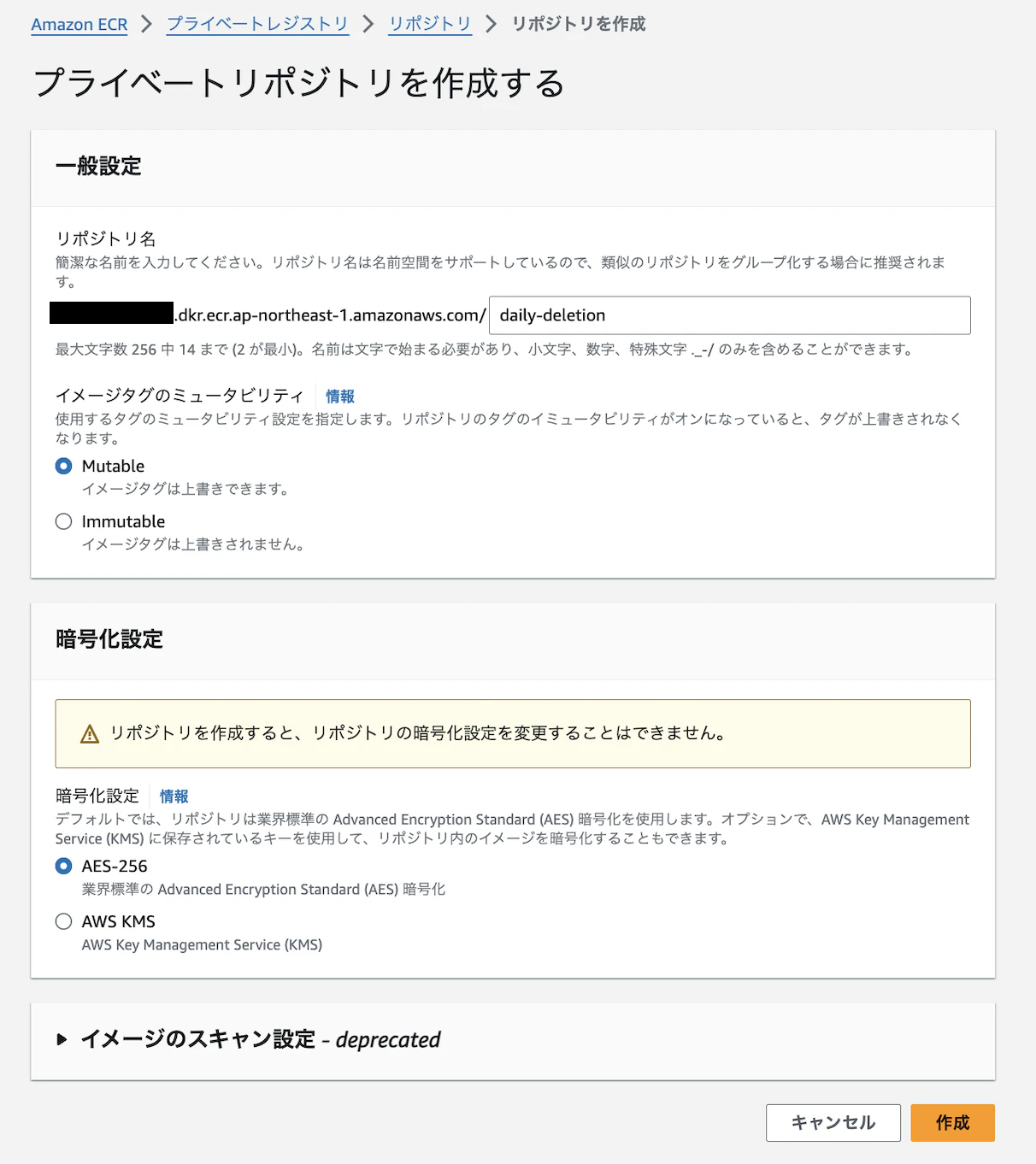
ECSタスク用のDockerイメージを保管するため、ECRリポジトリdaily-deletionを作成します。
5. アプリケーションコードの作成(Python)
Aurora MySQLのoperationsテーブルから、2022年4月~2024年5月のレコードを月単位で削除するスクリプトです。DynamoDBで削除進行状況(last_year, last_month)を保存し、次回の処理に利用します。
import os
import decimal
import pymysql
import boto3
from datetime import datetime, timedelta
from logging import INFO, Formatter, StreamHandler, getLogger

RDS_HOST = os.getenv('RDS_HOST')
DB_USER = os.getenv('DB_USER')
DB_PASSWORD = os.getenv('DB_PASSWORD')
DB_NAME = os.getenv('DB_NAME')
DYNAMODB_TABLE = os.getenv('DYNAMODB_TABLE')


dynamodb = boto3.resource('dynamodb')
table = dynamodb.Table(DYNAMODB_TABLE)

logger = getLogger()
logger.setLevel(INFO)

if not logger.hasHandlers():
    handler = StreamHandler()
    logger.addHandler(handler)

    formatter = Formatter(
        '[%(levelname)s]\t%(asctime)s\t%(message)s\n',
        '%Y-%m-%d %H:%M:%S'
    )

    for handler in logger.handlers:
        handler.setFormatter(formatter)


def connect_to_db():  # MySQLに接続する関数
    try:
        logger.info("Attempting to connect to the database with retries")
        connection = pymysql.connect(host=RDS_HOST,
                                     port=3306,
                                     user=DB_USER,
                                     password=DB_PASSWORD,
                                     db=DB_NAME,
                                     cursorclass=pymysql.cursors.DictCursor)
        logger.info("Database connection established successfully")
        return connection
    except pymysql.MySQLError as e:
        logger.error(f"Database connection failed: {e}")
        raise


def get_deletion_progress():  # 進行状況をDynamoDBから取得
    response = table.get_item(Key={'id': 'progress'})
    if 'Item' in response:
        last_year = int(response['Item']['last_year'])
        last_month = int(response['Item']['last_month'])

        logger.info(
            f"Retrieved from DynamoDB - last_year: {last_year} (type: {type(last_year)}), last_month: {last_month} (type: {type(last_month)})")

        return last_year, last_month
    else:
        # 初回の場合は2022年4月を設定(進行状況がない場合はまだ何も削除されていない)
        return 2022, 3  # 2022年4月を最初に削除するため、初回は3月として扱う


def update_deletion_progress(year, month):  # 進行状況をDynamoDBに保存
    table.put_item(Item={
        'id': 'progress',
        'last_year': year,
        'last_month': month
    })


def delete_records(year, month):  # 月単位でレコードを削除する関数
    try:
        logger.info(
            f"Starting record deletion for year: {year}, month: {month}")

        connection = connect_to_db()
        with connection.cursor() as cursor:
            start_date = f'{year}-{month:02d}-01'
            logger.info(f"Start Date generated: {start_date}")
            end_date = (datetime(year, month, 1) + timedelta(days=32)
                        ).replace(day=1).strftime('%Y-%m-%d')
            logger.info(
                f"Deleting records for the period {start_date} to {end_date}")

            delete_query = f"""
                DELETE {DB_NAME}.operations
                FROM {DB_NAME}.operations
                WHERE operations.created_at >= %s
                AND operations.created_at < %s;
            """

            cursor.execute(
                delete_query, (start_date, end_date))

            connection.commit()
            logger.info(f"Deleted records for {year}-{month:02d}")
    except Exception as e:
        logger.error(f"Error deleting records: {e}")
    finally:
        if connection:
            connection.close()


def main():
    last_year, last_month = get_deletion_progress()
    logger.info(
        f"get_deletion_progress: {last_year}, month: {last_month}")

    if last_month == 12:
        next_year = last_year + 1
        next_month = 1
    else:
        next_year = last_year
        next_month = last_month + 1

    if next_year > 2024 or (next_year == 2024 and next_month > 5):
        logger.info(
            "Deletion process has completed. No more records to delete.")
        return

    try:
        delete_records(next_year, next_month)

        update_deletion_progress(next_year, next_month)
        logger.info(
            f"Deletion progress updated to {next_year}-{next_month:02d}")

    except Exception as e:
        logger.error(f"Error during deletion process: {e}")
        import traceback
        logger.error(traceback.format_exc())


if __name__ == "__main__":
    main()
セキュリティのため、MySQL接続情報は環境変数から読み込みます。
connection = pymysql.connect(host=RDS_HOST,
                             port=3306,
                             user=DB_USER,
                             password=DB_PASSWORD,
                             db=DB_NAME,
また、DynamoDBから取得したlast_yearとlast_monthがDecimal型になっているので、Pythonで数値計算できるようにIntに変換します。
last_year = int(response['Item']['last_year'])
last_month = int(response['Item']['last_month'])
6. Dockerイメージのビルドおよびプッシュ
ECSタスクで参照するDockerイメージをローカル環境でビルドし、先ほど作成したECRリポジトリにプッシュします。
まず、main.pyと同階層にDockerfileとrequiments.txtを作成します。
FROM python:3.12-slim

WORKDIR /usr/src/app

COPY requirements.txt ./
RUN pip install --no-cache-dir -r requirements.txt

COPY . .

CMD ["python", "./main.py"]
boto3
pymysql
ローカル環境でビルドします。buildxをつかっているのは、自環境がMac M2(Arm)のためです。
docker buildx build --platform linux/amd64 -f Dockerfile -t <account_id>.dkr.ecr.ap-northeast-1.amazonaws.com/daily-deletion:latest .
ECR認証します。
aws ecr get-login-password --region ap-northeast-1 | docker login --username AWS --password-stdin <accound_id>.dkr.ecr.ap-northeast-1.amazonaws.com
ビルドしたイメージをプッシュします。
docker push <accound_id>.dkr.ecr.ap-northeast-1.amazonaws.com/daily-deletion:latest
プッシュしたらECRリポジトリを確認します。

7. ECSタスク定義の作成
JSONでタスク定義を作成します。
アプリケーションで使用する環境変数はenvironmentに定義します。
また、データ量によってはmemoryやcpuをもっと小さい値にできます(検証してみないとわからないですが)。
あと、"awslogs-create-group": "true”がないと初回のタスク実行でCloudWatchロググループの作成に失敗してエラーが出るので、注意が必要です。
{
  "family": "daily-deletion-task",
  "networkMode": "awsvpc",
  "containerDefinitions": [
    {
      "name": "daily-deletion-container",
      "image": "<account_id>.dkr.ecr.ap-northeast-1.amazonaws.com/daily-deletion:latest",
      "essential": true,
      "memory": 512,
      "cpu": 256,
      "environment": [
        { "name": "RDS_HOST", "value": "<cluster_endpoint_name>" },
        { "name": "DB_USER", "value": "<mysql_user_name>" },
        { "name": "DB_PASSWORD", "value": "<mysql_user_password>" },
        { "name": "DB_NAME", "value": "<db_schema_name>" },
        { "name": "DYNAMODB_TABLE", "value": "deletion_progress" }
      ],
      "logConfiguration": {
        "logDriver": "awslogs",
        "options": {
          "awslogs-group": "/ecs/daily-deletion",
          "awslogs-create-group": "true”,
          "awslogs-region": "ap-northeast-1",
          "awslogs-stream-prefix": "ecs"
        }
      }
    }
  ],
  "requiresCompatibilities": ["FARGATE"],
  "cpu": "256",
  "memory": "512",
  "taskRoleArn": "arn:aws:iam::<account_name>:role/ecsTaskRole",
  "executionRoleArn": "arn:aws:iam::<account_name>:role/ecsTaskExecutionRole"
}

8. EventBridgeスケジュールの作成
これまでECSタスクを立ち上げる前にECSサービスを構築していたので、今回もそうするものだと思いこんでいたのですが、バッチ処理をする際はEventBridgeから直接ECSタスクを立ち上げるということを初めて知りました。
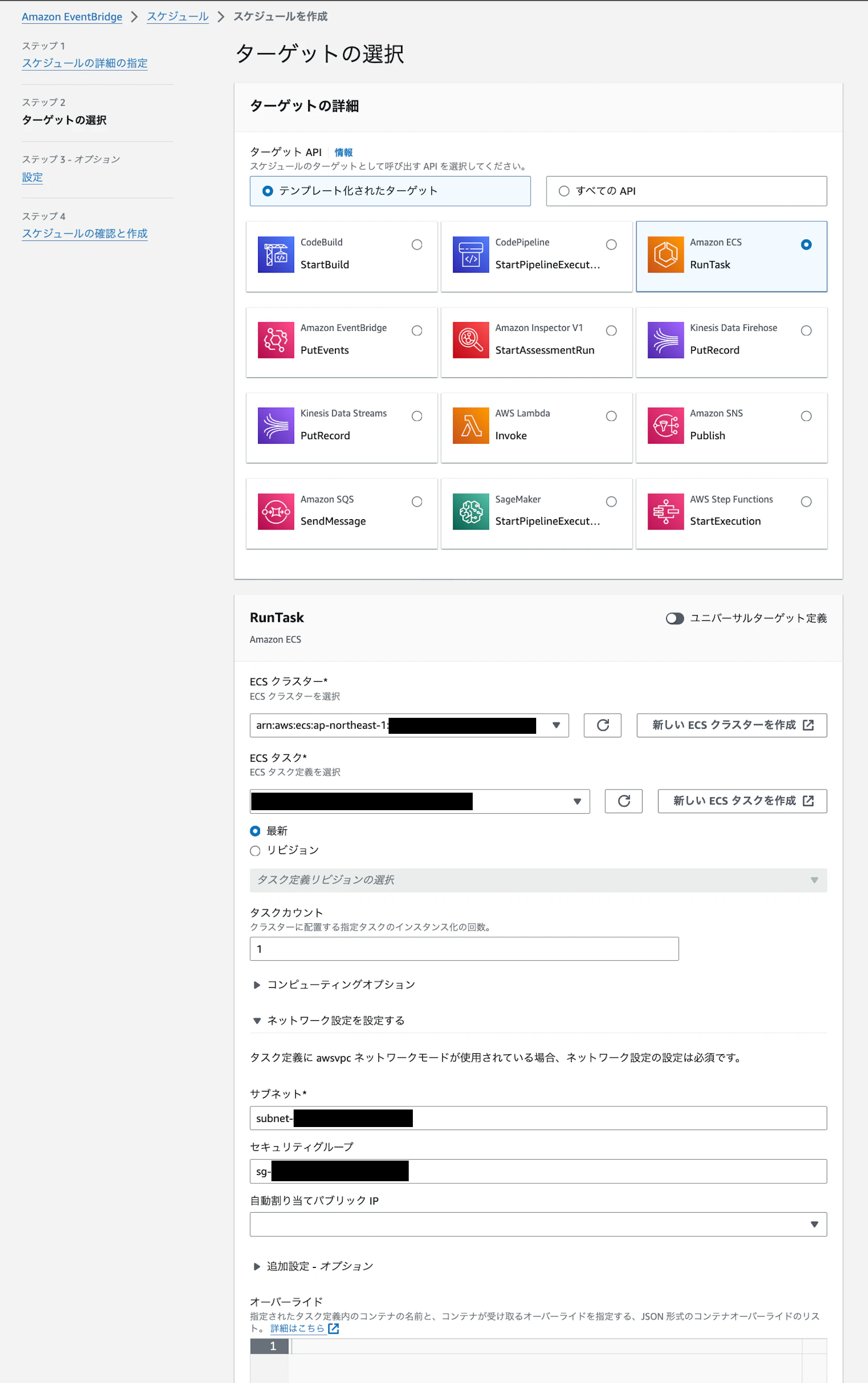
「EventBridge > スケジュール」からスケジュールパターン(今回は毎日AM3:00)、タスク定義、サブネット、セキュリティグループなどを選択します。

動作確認
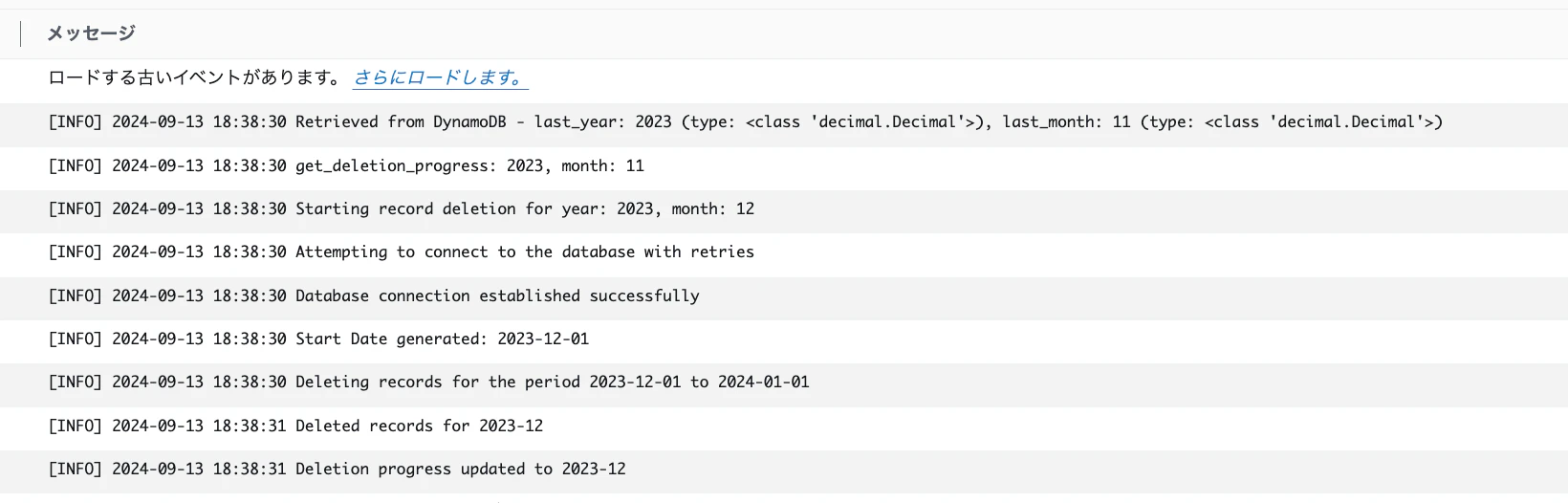
CloudWatch Logsでレコードが正しく削除されたことを確認しました。