
概要
dToFセンサーを使う仕事があるので、
これを使って慣れる。
シングルポイントなので、用途は限られそうだけど、何に使えるだろうか。
ダウンロード
上記のスイッチサイエンスのクイックスタートはリンク切れしているので、
でドキュメントをダウンロードする。
初回はユーザ名等の入力を求められるので、素直に入れる。
すると、zipをダウンロードできる。
Windows用のグラフプログラムとDriverも用意されているが、Windows使わないので、
ユーザマニュアルだけありがたく参照する。
接続
USB変換ボードのTSD10専用コネクタとモジュールをつなげる。
変換ボードにありったけのケーブルが入ってるので、合うやつを使う。
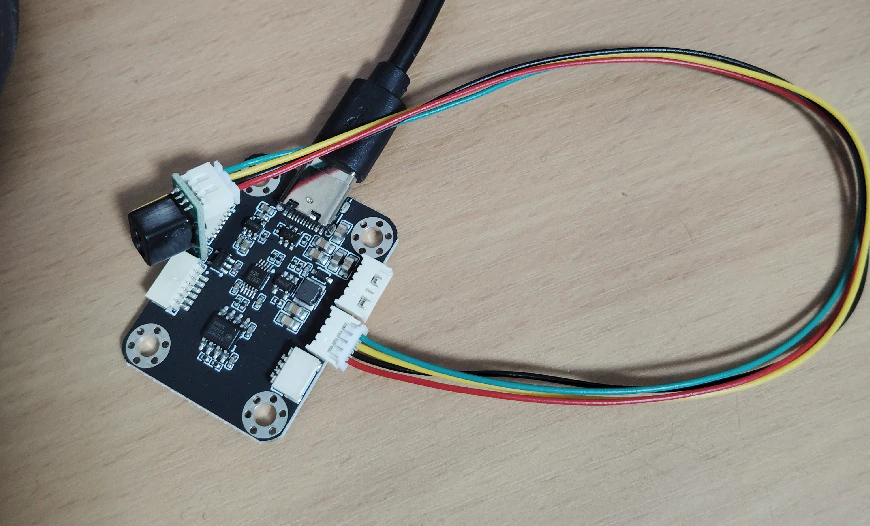
USBはRaspberry pi 4bのUSBにつなげる。
動作確認
ls /dev/ttyUSB*
でUARTデバイスととして認識されていることを確認する。
import serial

ser = serial.Serial(
    "/dev/ttyUSB0",
    baudrate=460800,
    timeout=1
)

while True:
    data = ser.read(4)

    if len(data) != 4:
        continue

    print(data.hex(" "))

    if data[0] != 0x5c:
        continue

    distance = data[1] | (data[2] << 8)

    if distance == 0xffff:
        print("Out of range")
    else:
        print(f"Distance: {distance} mm")
を動作させる。pyserialは入れておくこと。
結果
$ python3 test.py
5c b1 01 4d
Distance: 433 mm
5c ae 01 50
Distance: 430 mm
5c ac 01 52
Distance: 428 mm
5c ac 01 52
Distance: 428 mm
5c ac 01 52
Distance: 428 mm
5c ac 01 52
Distance: 428 mm
5c ac 01 52
Distance: 428 mm
5c ac 01 52
Distance: 428 mm
5c ac 01 52
Distance: 428 mm
5c ac 01 52
Distance: 428 mm
5c a9 01 55
Distance: 425 mm
5c ac 01 52
Distance: 428 mm
5c ac 01 52
Distance: 428 mm
センサを動かすと、ちゃんと距離が取れている。
何に使うといいかを検討中。
後はArduinoでも使えるようにする。
Windowsで使うことは無いでしょう。
追記
これに繋ぎ変えても動いた。
TSD20はI2Cも動くので、
TSD10は近距離用でUART接続。
TSD20は中距離用でI2C接続。
これを両方使った面白いものを考えよう。