
フルコードはgithubにあります。
週末レイトレーシングのここをやります。
カメラの視野
カメラを方向を視野角で指定するようにCameraモジュールを修正。aspect_rationは引数として渡されるようになった。
pub fn new(vfov: f64, aspect_ratio: f64) -> Camera {
    let theta = degrees_to_radians(vfov);
    let h = (theta / 2.0).tan();
    let viewport_height = 2.0 * h;
    let viewport_width = aspect_ratio * viewport_height;
    let focal_length = 1.0;

    let origin = Point3::new(0.0, 0.0, 0.0);
    let horizontal = Vec3::new(viewport_width, 0.0, 0.0);
    let vertical = Vec3::new(0.0, viewport_height, 0.0);
    let lower_left_corner =
        origin - horizontal / 2.0 - vertical / 2.0 - Vec3::new(0.0, 0.0, focal_length);

    Camera {
        origin,
        lower_left_corner,
        horizontal,
        vertical,
    }
}
さらにカメラ位置と視点位置で指定できるように変更。追加で、レンズを回転できるようにする。
pub fn new(
    lookfrom: Point3,
    lookat: Point3,
    vup: Vec3,
    vfov: f64, // vertical field of view in degrees
    aspect_ratio: f64,
) -> Camera {
    let theta = degrees_to_radians(vfov);
    let h = (theta / 2.0).tan();
    let viewport_height = 2.0 * h;
    let viewport_width = aspect_ratio * viewport_height;

    let w = (lookfrom - lookat).unit_vector();
    let u = vup.cross(w).unit_vector();
    let v = w.cross(u);

    let origin = lookfrom;
    let horizontal = viewport_width * u;
    let vertical = viewport_height * v;
    let lower_left_corner = origin - horizontal / 2.0 - vertical / 2.0 - w;

    Camera {
        origin,
        lower_left_corner,
        horizontal,
        vertical,
    }
}
パラメーターいじって、小首をかしげてみる。
@@ -93,7 +93,7 @@ fn main() {
     let cam = Camera::new(
         Point3::new(0.0, 0.0, 0.0),
         Point3::new(0.0, 0.0, -1.0),
-        Vec3::new(0.0, 1.0, 0.0),
+        Vec3::new(0.1, 0.9, 0.0),
         90.0,
         ASPECT_RATIO,
     );
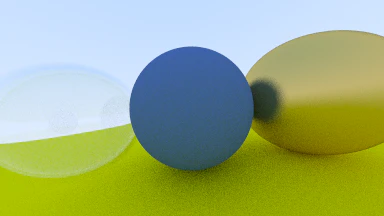
ズームアウト。ちゃんと両側の球体も丸かった。
let cam = Camera::new(
    Point3::new(-2.0, 2.0, 1.0),
    Point3::new(0.0, 0.0, -1.0),
    Vec3::new(0.0, 1.0, 0.0),
    90.0,
    ASPECT_RATIO,
);
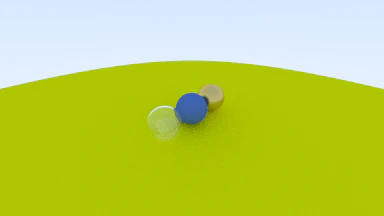
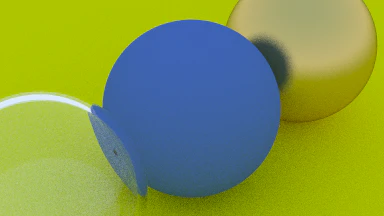
他のパラメーターはいじらずに視野角だけを20度にして、ズームイン。
let cam = Camera::new(
    Point3::new(-2.0, 2.0, 1.0),
    Point3::new(0.0, 0.0, -1.0),
    Vec3::new(0.0, 1.0, 0.0),
    20.0,
    ASPECT_RATIO,
);
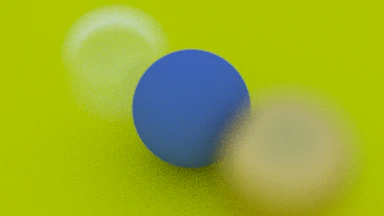
焦点ぼけ
被写界深度に対応。diffを見てなんとなく分かった気になる。
pub fn new(
    lookfrom: Point3,
    lookat: Point3,
    vup: Vec3,
    vfov: f64, // vertical field of view in degrees
    aspect_ratio: f64,
    aperture: f64,
    focus_dist: f64,
) -> Camera {
    let theta = degrees_to_radians(vfov);
    let h = (theta / 2.0).tan();
    let viewport_height = 2.0 * h;
    let viewport_width = aspect_ratio * viewport_height;

    let w = (lookfrom - lookat).unit_vector();
    let u = vup.cross(w).unit_vector();
    let v = w.cross(u);

    let origin = lookfrom;
    let horizontal = focus_dist * viewport_width * u;
    let vertical = focus_dist * viewport_height * v;
    let lower_left_corner = origin - horizontal / 2.0 - vertical / 2.0 - focus_dist * w;
    let lens_radius = aperture / 2.0;

    Camera {
        origin,
        lower_left_corner,
        horizontal,
        vertical,
        u,
        v,
        lens_radius,
    }
}

pub fn get_ray(&self, s: f64, t: f64) -> Ray {
    let rd = self.lens_radius * Vec3::random_in_unit_disk();
    let offset = self.u * rd.x + self.v * rd.y;

    Ray::new(
        self.origin + offset,
        self.lower_left_corner + s * self.horizontal + t * self.vertical - self.origin - offset,
    )
}
ボケすぎ。
ランダムな球をたくさん配置する
第一章の計算周りは終了。main.rs側をいじって、ランダムな球をたくさん配置する。
平面に小さいボールをランダムに置くだけなので、コードは省略。このcommitです。
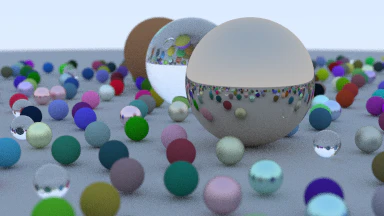
これで週末レイトレーシングの第一章は完了。
この記事はもうちっとだけ続くんじゃ。
その9へ。