0
0

Delete article

Deleted articles cannot be recovered.

Draft of this article would be also deleted.

Are you sure you want to delete this article?

More than 3 years have passed since last update.

Windows10で実行中のVMRC経由でESXi上のUbuntuの音を出力する

0
Posted at

問題

  • VMware ESXi上のUbuntu(ゲストOS)にWindows10のVMRCからアクセスすると、Windows10の端末のスピーカーから音が出ない
    ※ゲストOSのサウンド出力が「ダミー出力」になっている

手順

  • Windowsの「ステレオミキサー」を有効化する
  • ゲストOSの「仮想ハードウェア」に「サウンドカード」を追加する

以下のWebサイトを参考に解決しました
http://blawat2015.no-ip.com/~mieki256/diary/202007101.html

詳細

  1. 構成

    • ホスト:Intel NUC (NUC11PAHi3)
    • ハイパーバイザー:VMware ESXi 7.0 Update 2
    • ゲストOS:Ubuntu 20.04 LTS
    • クライアント:Windows10 21H2 (Panasonic CF-RZ6)
  2. 手順

    1. Windowsのコントロールパネルから「サウンド」を開き、「録音」の「ステレオミキサー」を有効化する
      image.png

    2. Windowsを再起動する

    3. ESXiの「ナビゲータ」から対象の仮想マシンを選択する

    4. 「アクション」から「設定の編集」を開く

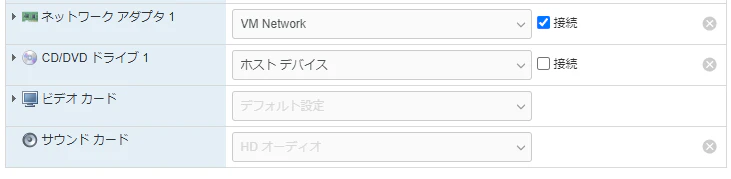
    5. 「その他のデバイスの追加」から「サウンドカード」を追加する
      ※以下の画像はすでに追加済みのため、グレーアウトされている
      image.png

    6. 「設定の編集」に「サウンドカード」が表示されていることを確認する
      image.png

    7. VMRCを起動する

    8. Ubuntuの設定から、サウンドの出力が「ライン出力-HD Audio Controller」等になり、Windowsのスピーカーから音が出ることを確認する。
      image.png

以上です。お疲れさまでした。
※ほかのWebサイトも見ていると、上の方法で解決しないときもあるようで…

0
0
0

Register as a new user and use Qiita more conveniently

  1. You get articles that match your needs
  2. You can efficiently read back useful information
  3. You can use dark theme
What you can do with signing up
0
0

Delete article

Deleted articles cannot be recovered.

Draft of this article would be also deleted.

Are you sure you want to delete this article?