

はじめに
この記事ではAWSサービスを使って、動画ファイル(mp4)から文字起こしと要約をする機能を作成します。
この記事の対象者
- AWSでLambdaを使ったことがある人
- Bedrockを使ってみたい人
- Transcribeを使ってみたい人
- Step FunctionsでLambdaの連携処理を組んでみたい人
この記事を書いた理由
お仕事で文字起こしと要約を組み合わせる処理をしたいと希望をいただき、そのための検証を行いました。BedrockでいろいろなAIモデルが使えるということはなんとなく知ってはいたのですが、APIの場合どうやって使うか、利用した場合ログがどうなるかなど不明点を潰すために検証をしています。
私はAWSコンソールでBedrockとTranscribeは試したことがあり、Step Functionsを触ったのは今回初めてです。
準備物
- AWSアカウント
- aws cli/sam cliの利用環境
- 文字起こしする動画(mp4)
動画ファイルは実際に文字起こしと要約内容を精度を確認したかったため、会社のインターン生をインタビューした際に録画したデータ(Google Meetの録画)を利用しました。
AWS利用サービス
()は利用用途
- Amazon Bedrock (要約)
- Amazon Transcribe (文字起こし)
- API Gateway (API)
- Lambda (Bedrock, Transcribeの実行)
- Step Functions (Lambda実行管理)
- S3 (動画、文字起こし、要約ファイルの管理)
実行フロー
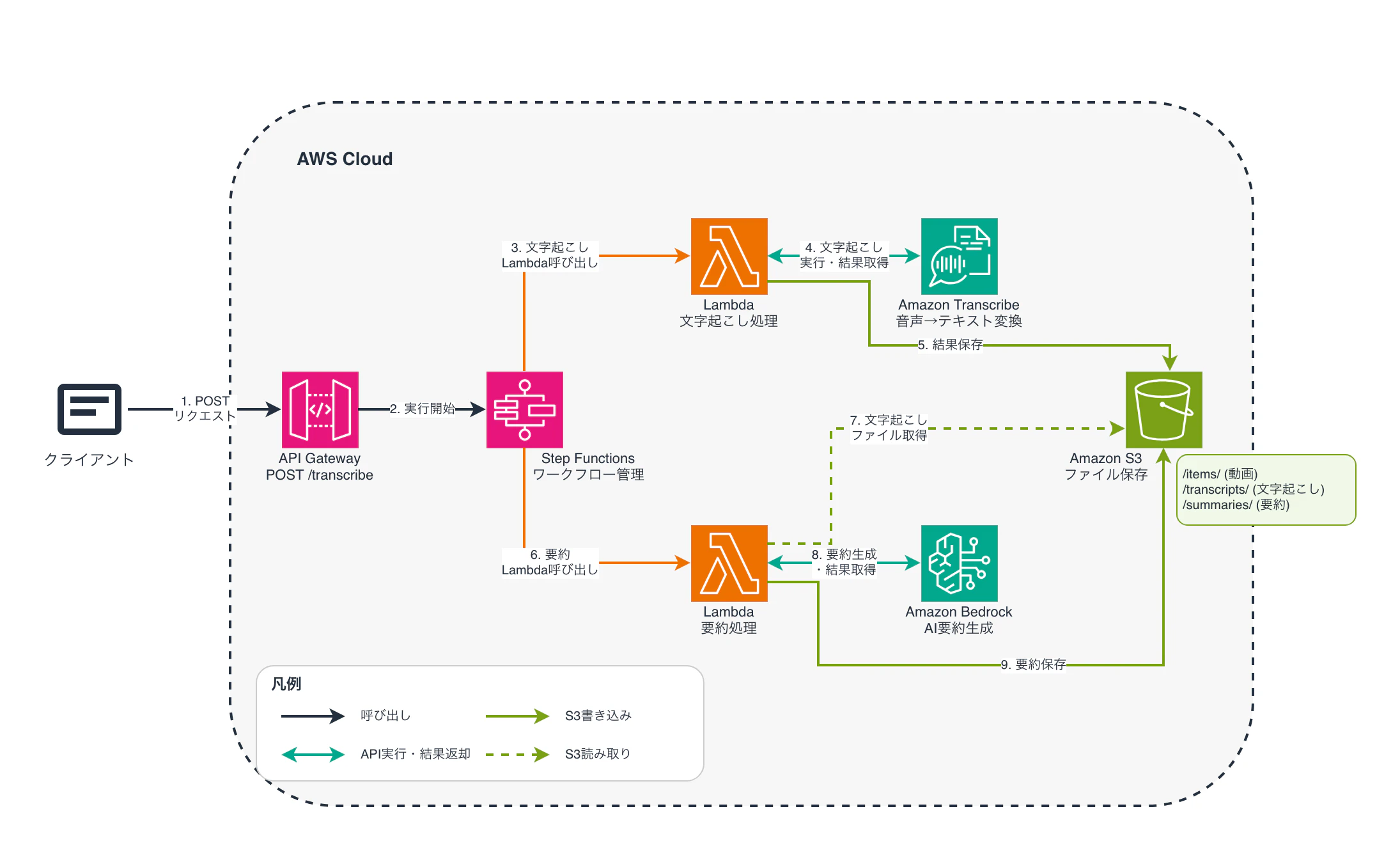
今回は文字起こしから要約を検証するため、下記の実行フローで作成を行いました
- S3に文字起こしする動画配置
- APIでS3のパスをリクエスト
- Lambdaで文字起こしファイルを作成しS3に保存
- Lambdaで文字起こししたファイルから要約ファイルを作成しS3に保存
APIは検証用のため今回は認証を設定しないで作成します
全体図
実践
最初にS3にバケットを作成しサンプル動画をセットアップします
例: s3://sample-bucket/items/sample.mp4
文字起こし
文字起こし用のLambdaとして test-transcribe-functionをPython 3.14環境で作成します。
動画時間によりますが時間が多少かかるためタイムアウトを15分で設定しています。
Transcribeによる文字起こし時に言語、話者数を指定可能なため日本語と最大5人話者としてプログラムを作成します。
import boto3
import json
import os
import time
import urllib.request
import urllib.parse
from datetime import datetime

# クライアント初期化
transcribe = boto3.client('transcribe')
s3 = boto3.client('s3')

# 環境変数(デフォルト値設定)
OUTPUT_BUCKET = os.environ.get('OUTPUT_BUCKET', 'sample-bucket')
OUTPUT_PREFIX = os.environ.get('OUTPUT_PREFIX', 'transcripts/')

def lambda_handler(event, context):
    """
    S3イベントトリガーまたは手動実行
    動画をTranscribeで文字起こし→結果をS3に保存
    """
    try:
        # イベントの種類判定
        if 'Records' in event:
            # S3イベントトリガー
            bucket = event['Records'][0]['s3']['bucket']['name']
            key = urllib.parse.unquote_plus(event['Records'][0]['s3']['object']['key'])
        elif 'bucket' in event and 'key' in event:
            # 手動実行(テスト用)
            bucket = event['bucket']
            key = event['key']

        print(f"処理開始: s3://{bucket}/{key}")

        # 1. Transcribeジョブ開始
        job_name = start_transcription_job(bucket, key)

        # 2. 完了待機
        transcript_uri = wait_for_transcription(job_name)

        # 3. 文字起こし結果取得
        transcript_json = get_transcript(transcript_uri)

        # 4. 話者情報付きに整形
        formatted_result = format_transcript_with_speakers(transcript_json)

        # 5. S3に保存
        output_key = f"{OUTPUT_PREFIX}{os.path.splitext(os.path.basename(key))[0]}_transcript.json"
        save_to_s3(formatted_result, OUTPUT_BUCKET, output_key)

        print(f"完了: s3://{OUTPUT_BUCKET}/{output_key}")

        return {
            'statusCode': 200,
            'body': json.dumps({
                'message': '文字起こし完了',
                'input': f"s3://{bucket}/{key}",
                'output': f"s3://{OUTPUT_BUCKET}/{output_key}",
                'transcriptKey': output_key,
                'bucket': OUTPUT_BUCKET,
                'job_name': job_name,
                'segments_count': len(formatted_result.get('segments', [])),
                'speakers': formatted_result.get('statistics', {}).get('speakers', [])
            }, ensure_ascii=False)
        }

    except Exception as e:
        print(f"エラー: {str(e)}")
        import traceback
        traceback.print_exc()

        return {
            'statusCode': 500,
            'body': json.dumps({
                'error': str(e),
                'error_type': type(e).__name__
            }, ensure_ascii=False)
        }

def start_transcription_job(bucket_name, video_key):
    """Transcribeジョブを開始"""
    # ジョブ名生成(英数字とハイフンのみ)
    timestamp = str(int(time.time()))
    safe_key = video_key.replace('/', '-').replace('.', '-').replace('_', '-')
    job_name = f"transcribe-{safe_key}-{timestamp}"[:200]

    video_uri = f"s3://{bucket_name}/{video_key}"

    # ファイル拡張子から形式判定
    file_extension = video_key.split('.')[-1].lower()
    media_format_map = {
        'mp4': 'mp4',
    }
    media_format = media_format_map.get(file_extension, 'mp4')

    try:
        response = transcribe.start_transcription_job(
            TranscriptionJobName=job_name,
            Media={'MediaFileUri': video_uri},
            MediaFormat=media_format,
            LanguageCode='ja-JP',
            Settings={
                'ShowSpeakerLabels': True,
                'MaxSpeakerLabels': 5
            }
        )

        print(f"Transcribeジョブ開始: {job_name}")
        print(f"入力: {video_uri}")
        print(f"フォーマット: {media_format}")

        return job_name

    except Exception as e:
        print(f"Transcribeジョブ開始エラー: {str(e)}")
        raise

def wait_for_transcription(job_name, max_wait_time=840):
    """
    Transcribeジョブの完了を待機
    Lambda実行時間制限: 900秒(15分)を考慮して840秒でタイムアウト
    """
    print("文字起こし処理中...")
    start_time = time.time()
    check_interval = 10  # 10秒ごとにチェック

    while True:
        elapsed_time = time.time() - start_time

        # タイムアウトチェック
        if elapsed_time > max_wait_time:
            raise Exception(f"タイムアウト: {max_wait_time}秒以内に完了しませんでした。ジョブ名: {job_name}")

        try:
            response = transcribe.get_transcription_job(
                TranscriptionJobName=job_name
            )

            status = response['TranscriptionJob']['TranscriptionJobStatus']
            print(f"ステータス: {status} (経過時間: {int(elapsed_time)}秒)")

            if status == 'COMPLETED':
                print("文字起こし完了!")
                transcript_uri = response['TranscriptionJob']['Transcript']['TranscriptFileUri']
                return transcript_uri

            elif status == 'FAILED':
                failure_reason = response['TranscriptionJob'].get('FailureReason', '不明')
                raise Exception(f"Transcribeジョブ失敗: {failure_reason}")

        except transcribe.exceptions.BadRequestException as e:
            raise Exception(f"Transcribeジョブが見つかりません: {job_name}")

        time.sleep(check_interval)

def get_transcript(transcript_uri):
    """文字起こし結果をHTTPで取得"""
    print(f"文字起こし結果取得: {transcript_uri}")

    try:
        with urllib.request.urlopen(transcript_uri) as response:
            transcript_json = json.loads(response.read())
        return transcript_json

    except Exception as e:
        print(f"文字起こし結果取得エラー: {str(e)}")
        raise

def format_transcript_with_speakers(transcript_json):
    """
    Transcribe結果を話者情報付きで整形
    """
    result = {
        'job_name': transcript_json.get('jobName'),
        'account_id': transcript_json.get('accountId'),
        'status': transcript_json.get('status'),
        'created_at': datetime.now().isoformat(),
        'full_transcript': '',
        'segments': []
    }

    # 全文テキスト
    transcripts = transcript_json.get('results', {}).get('transcripts', [])
    if transcripts:
        result['full_transcript'] = transcripts[0].get('transcript', '')

    # 話者情報付きセグメント
    segments = transcript_json['results'].get('speaker_labels', {}).get('segments', [])
    items = transcript_json['results'].get('items', [])

    for segment in segments:
        speaker = segment['speaker_label']
        start_time = float(segment['start_time'])
        end_time = float(segment['end_time'])

        # セグメント内のテキストを取得
        segment_items = []
        for item in items:
            if 'start_time' in item:
                item_start = float(item['start_time'])
                if start_time <= item_start <= end_time:
                    segment_items.append(item)

        # テキスト結合
        text = ' '.join([
            item['alternatives'][0]['content']
            for item in segment_items
            if item.get('alternatives')
        ])

        result['segments'].append({
            'speaker': speaker,
            'start_time': start_time,
            'end_time': end_time,
            'start_time_formatted': format_time(start_time),
            'end_time_formatted': format_time(end_time),
            'text': text
        })

    # 統計情報
    result['statistics'] = {
        'total_segments': len(result['segments']),
        'total_duration': float(segments[-1]['end_time']) if segments else 0,
        'speakers': list(set([s['speaker'] for s in result['segments']]))
    }

    return result

def format_time(seconds):
    """秒をHH:MM:SS形式に変換"""
    hours = int(seconds // 3600)
    minutes = int((seconds % 3600) // 60)
    secs = int(seconds % 60)

    if hours > 0:
        return f"{hours:02d}:{minutes:02d}:{secs:02d}"
    else:
        return f"{minutes:02d}:{secs:02d}"

def save_to_s3(data, bucket, key):
    """結果をS3に保存"""
    try:
        s3.put_object(
            Bucket=bucket,
            Key=key,
            Body=json.dumps(data, ensure_ascii=False, indent=2),
            ContentType='application/json',
            ContentEncoding='utf-8'
        )
        print(f"S3保存完了: s3://{bucket}/{key}")

    except Exception as e:
        print(f"S3保存エラー: {str(e)}")
        raise
Lambdaの実行ロールにポリシーを設定します
{
  "Version": "2012-10-17",
  "Statement": [
      {
          "Effect": "Allow",
          "Action": [
              "s3:ListBucket"
          ],
          "Resource": "arn:aws:s3:::sample-bucket"
      },
      {
          "Effect": "Allow",
          "Action": [
              "s3:GetObject",
              "s3:PutObject"
          ],
          "Resource": "arn:aws:s3:::sample-bucket/*"
      },
      {
          "Effect": "Allow",
          "Action": [
              "transcribe:StartTranscriptionJob",
              "transcribe:GetTranscriptionJob"
          ],
          "Resource": "*"
      }
  ]
}
コマンドから実行テストします
実行のイベントファイルを作成
// s3-upload-event.json
{
  "bucket": "sample-bucket",
  "key": "items/sample.mp4"
}
# 実行
$ aws lambda invoke \
  --function-name test-transcribe-function \
  --payload file://s3-upload-event.json \
  --region ap-northeast-1 \
  response.json
s3://sample-bucket/transcripts フォルダに transcript.json が作成されていれば成功です。
中身の一部サンプルです
{
  "job_name": "transcribe-items-sample-mp4-1765190507",
  "account_id": "603514171564",
  "status": "COMPLETED",
  "created_at": "2025-12-08T10:43:38.967391",
  "full_transcript": "えっと、記事の方を見ていただいているということなので、全体の流れはだいたい、あの、把握されているかなと思います。はい。では最初に、えっと、略歴のところからお聞きしたいので、....",
  "segments": [
    {
      "speaker": "spk_0",
      "start_time": 1.009,
      "end_time": 12.489,
      "start_time_formatted": "00:01",
      "end_time_formatted": "00:12",
      "text": "えっ と、 記事 の 方 を 見 て いただい て いる と いう こと な の で、 全体 の 流れ は だいたい、 あの、 把握 さ れ て いる か な と 思い ます。 はい。 で は 最初 に、 えっ と、 略歴 の ところ から お 聞き し たい の で、 "
    },    {
      "speaker": "spk_1",
      "start_time": 20.879,
      "end_time": 23.0,
      "start_time_formatted": "00:20",
      "end_time_formatted": "00:23",
      "text": "はい。 と"
    },
    ...
  ],
  "statistics": {
    "total_segments": 195,
    "total_duration": 1444.9,
    "speakers": [
      "spk_0",
      "spk_1"
    ]
  }
}
要約
要約用のLambdaとして test-summarize-functionをPython 3.14環境で作成します。
動画時間によりますが時間が多少かかるためタイムアウトを15分で設定しています。
また今回は要約するAIモデルとして gpt-oss-120b を利用します。
import boto3
import json
import os
from datetime import datetime

# クライアント初期化
s3 = boto3.client('s3', region_name='ap-northeast-1')
bedrock = boto3.client('bedrock-runtime', region_name='ap-northeast-1')

# 環境変数
INPUT_BUCKET = os.environ.get('INPUT_BUCKET', 'sample-bucket')
OUTPUT_BUCKET = os.environ.get('OUTPUT_BUCKET', 'sample-bucket')
BEDROCK_MODEL_ID = os.environ.get('BEDROCK_MODEL_ID', 'openai.gpt-oss-120b-1:0')

def lambda_handler(event, context):
    """
    S3のTranscribe結果を読み込んでBedrockで要約
    """
    try:
        # イベントからファイル情報取得
        if 'Records' in event:
            bucket = event['Records'][0]['s3']['bucket']['name']
            key = event['Records'][0]['s3']['object']['key']
        elif 'bucket' in event and 'key' in event:
            bucket = event['bucket']
            key = event['key']

        print(f"処理開始: s3://{bucket}/{key}")

        # 1. Transcribe結果をS3から取得
        transcript_data = get_transcript_from_s3(bucket, key)

        # 2. Bedrockで要約
        summary = summarize_with_bedrock(transcript_data)

        # 3. 結果をS3に保存
        base_name = os.path.splitext(os.path.basename(key))[0]
        output_key = f"summaries/{base_name}_summary.json"

        result = {
            'source': {
                'bucket': bucket,
                'key': key
            },
            'processed_at': datetime.now().isoformat(),
            'model': BEDROCK_MODEL_ID,
            'summary': summary
        }

        save_to_s3(result, OUTPUT_BUCKET, output_key)

        print(f"完了: s3://{OUTPUT_BUCKET}/{output_key}")

        return {
            'statusCode': 200,
            'body': json.dumps({
                'message': '要約完了',
                'input': f"s3://{bucket}/{key}",
                'output': f"s3://{OUTPUT_BUCKET}/{output_key}",
                'model': BEDROCK_MODEL_ID
            }, ensure_ascii=False)
        }

    except Exception as e:
        print(f"エラー: {str(e)}")
        import traceback
        traceback.print_exc()

        return {
            'statusCode': 500,
            'body': json.dumps({
                'error': str(e),
                'error_type': type(e).__name__
            }, ensure_ascii=False)
        }

def get_transcript_from_s3(bucket, key):
    """S3からTranscribe結果を取得"""
    print(f"Transcribe結果取得: s3://{bucket}/{key}")

    try:
        response = s3.get_object(Bucket=bucket, Key=key)
        transcript_json = json.loads(response['Body'].read().decode('utf-8'))
        return transcript_json

    except Exception as e:
        print(f"S3読み込みエラー: {str(e)}")
        raise

def summarize_with_bedrock(transcript_data):
    """Bedrock (GPT-OSS-120B) で要約"""

    # Transcriptデータから要約用テキストを作成
    segments = transcript_data.get('segments', [])

    # セグメント情報を整形
    formatted_segments = []
    for segment in segments:
        formatted_segments.append(
            f"[{segment['start_time_formatted']}] "
            f"{segment['speaker']}: {segment['text']}"
        )

    segments_text = "\n".join(formatted_segments)

    # プロンプト作成(reasoning出力を抑制)
    prompt = f"""以下は動画の文字起こしテキストです。話者と時間情報が含まれています。
この内容を日本語で要約してください。

文字起こし:
{segments_text}

以下のJSON形式で出力してください。JSONのみを出力し、それ以外の説明や思考過程は出力しないでください:
{{
  "summary": "全体の要約(3-5文程度)",
  "key_points": [
    {{
      "timestamp": "MM:SS",
      "speaker": "話者",
      "point": "重要なポイント"
    }}
  ],
  "topics": ["トピック1", "トピック2", "..."],
  "action_items": ["アクションアイテム1", "アクションアイテム2", "..."]
}}"""

    print(f"Bedrock API呼び出し: {BEDROCK_MODEL_ID}")

    # OpenAI互換モデル用のリクエスト形式
    request_body = {
        "messages": [
            {
                "role": "system",
                "content": "あなたは会議や動画の文字起こしを要約する専門家です。JSON形式で正確に出力してください。思考過程や説明は不要で、JSONのみを出力してください。"
            },
            {
                "role": "user",
                "content": prompt
            }
        ],
        "max_tokens": 4000,
        "temperature": 0.3,
        "top_p": 0.9
    }

    try:
        import time
        import re
        start_time = time.time()

        response = bedrock.invoke_model(
            modelId=BEDROCK_MODEL_ID,
            body=json.dumps(request_body)
        )

        elapsed_time = time.time() - start_time
        response_body = json.loads(response['body'].read())

        print(f"Bedrock呼び出し完了: {elapsed_time:.2f}秒")
        print(f"レスポンス構造: {list(response_body.keys())}")

        summary_text = ""

        if 'choices' in response_body:
            # OpenAI形式
            summary_text = response_body['choices'][0]['message']['content']
        elif 'completion' in response_body:
            summary_text = response_body['completion']
        elif 'text' in response_body:
            summary_text = response_body['text']
        elif 'output' in response_body:
            summary_text = response_body['output']
        else:
            print(f"予期しないレスポンス形式: {json.dumps(response_body, ensure_ascii=False, indent=2)}")
            raise Exception(f"未知のレスポンス形式: {list(response_body.keys())}")

        print(f"レスポンステキスト長: {len(summary_text)} 文字")

        # レスポンスのクリーニング
        clean_text = summary_text.strip()

        # <reasoning>タグを削除
        if '<reasoning>' in clean_text:
            # <reasoning>...</reasoning>の部分を削除
            clean_text = re.sub(r'<reasoning>.*?</reasoning>', '', clean_text, flags=re.DOTALL)
            clean_text = clean_text.strip()
            print("reasoning部分を削除しました")

        # マークダウンコードブロックを削除
        if clean_text.startswith('```json'):
            clean_text = clean_text[7:]
        if clean_text.startswith('```'):
            clean_text = clean_text[3:]
        if clean_text.endswith('```'):
            clean_text = clean_text[:-3]
        clean_text = clean_text.strip()

        print(f"クリーニング後のテキスト長: {len(clean_text)} 文字")
        print(f"クリーニング後の最初の200文字: {clean_text[:200]}...")

        # JSONとしてパース
        try:
            summary_json = json.loads(clean_text)

            # 正しくパースできたか確認
            if isinstance(summary_json, dict) and 'summary' in summary_json:
                print("JSON解析成功")
                return summary_json
            else:
                print(f"JSONの構造が不正: {list(summary_json.keys())}")
                # フォールバック
                return {
                    'summary': str(summary_json),
                    'key_points': summary_json.get('key_points', []),
                    'topics': summary_json.get('topics', []),
                    'action_items': summary_json.get('action_items', [])
                }

        except json.JSONDecodeError as e:
            print(f"JSON解析失敗: {e}")
            print(f"解析対象テキスト: {clean_text[:500]}...")

            # 再度reasoningタグの確認と削除
            if '<reasoning>' in clean_text or '</reasoning>' in clean_text:
                clean_text = re.sub(r'</?reasoning>', '', clean_text)
                clean_text = clean_text.strip()

                # JSON部分のみを抽出({ で始まり } で終わる最初の完全なJSON)
                json_match = re.search(r'\{.*\}', clean_text, re.DOTALL)
                if json_match:
                    clean_text = json_match.group(0)
                    print("JSON部分を抽出しました")

                    try:
                        summary_json = json.loads(clean_text)
                        print("再試行でJSON解析成功")
                        return summary_json
                    except:
                        pass

            # それでも失敗したらフォールバック
            return {
                'summary': clean_text[:500],  # 最初の500文字のみ
                'key_points': [],
                'topics': [],
                'action_items': [],
                'raw_response': clean_text,
                'parse_error': str(e)
            }

    except Exception as e:
        print(f"Bedrock API呼び出しエラー: {str(e)}")
        print(f"リクエストボディ: {json.dumps(request_body, ensure_ascii=False, indent=2)}")
        raise

def save_to_s3(data, bucket, key):
    """結果をS3に保存"""
    try:
        s3.put_object(
            Bucket=bucket,
            Key=key,
            Body=json.dumps(data, ensure_ascii=False, indent=2),
            ContentType='application/json',
            ContentEncoding='utf-8'
        )
        print(f"S3保存完了: s3://{bucket}/{key}")

    except Exception as e:
        print(f"S3保存エラー: {str(e)}")
        raise
Lambdaの実行ロールにポリシーを設定します
{
  "Version": "2012-10-17",
  "Statement": [
      {
          "Effect": "Allow",
          "Action": [
              "s3:ListBucket"
          ],
          "Resource": "arn:aws:s3:::sample-bucket"
      },
      {
          "Effect": "Allow",
          "Action": [
              "s3:GetObject",
              "s3:PutObject"
          ],
          "Resource": "arn:aws:s3:::sample-bucket/*"
      },
      {
          "Effect": "Allow",
          "Action": [
              "bedrock:InvokeModel"
          ],
          "Resource": [
              "arn:aws:bedrock:ap-northeast-1::foundation-model/openai.gpt-oss-120b-1:0"
          ]
      }
  ]
}
コマンドから実行テストします
実行のイベントファイルを作成
// transcribe-event.json
{
    "bucket": "sample-bucket",
    "key": "transcripts/sample_transcript.json"
}
# 実行
$ aws lambda invoke \
  --function-name test-summarize-function \
  --payload file://transcribe-event.json \
  --region ap-northeast-1 \
  response.json
s3://sample-bucket/summaries フォルダに summary.json が作成されていれば成功です。
要約サンプル
{
  "source": {
    "bucket": "sample-bucket",
    "key": "transcripts/sample_transcript.json"
  },
  "processed_at": "2025-12-08T10:43:52.469401",
  "model": "openai.gpt-oss-120b-1:0",
  "summary": {
    "summary": "インタビューでは、大学2年生の学生が高校卒業から大学入学までの経歴、IoT・A=....",
    "key_points": [
      {
        "timestamp": "00:24",
        "speaker": "spk_1",
        "point": "高校卒業後、大学に入学し現在2年生であることを報告。"
      },
      ...
=    ],
    "topics": [
      "学歴と現在の在籍",
      ...
    ],
    "action_items": [
      "IoTセンサー網の設置とデータ公開システムを完成させる。",
      "インターンでのコード修正・テスト業務を継続し、実装実績を増やす。",
      ...
    ]
  }
}
APIエンドポイント
API GatewayとStep Functionsを使って2つのLambdaを続けて実行できるようにします。
Step Functions
Step Functionsで実行フローの定義を行いましょう
Step Functions用のIAM Role StepFunctionsExecutionRole を作成して許可設定します
{
  "Version": "2012-10-17",
  "Statement": [
    {
      "Effect": "Allow",
      "Action": [
        "lambda:InvokeFunction"
      ],
      "Resource": [
        "arn:aws:lambda:ap-northeast-1:*:function:test-transcribe-function",
        "arn:aws:lambda:ap-northeast-1:*:function:test-summarize-function"
      ]
    },
    {
      "Effect": "Allow",
      "Action": [
        "logs:CreateLogGroup",
        "logs:CreateLogStream",
        "logs:PutLogEvents"
      ],
      "Resource": "arn:aws:logs:*:*:*"
    }
  ]
}
また、信頼関係にAssumeRoleを追加しておきましょう
{
  "Version": "2012-10-17",
  "Statement": [
    {
      "Effect": "Allow",
      "Principal": {
        "Service": "states.amazonaws.com"
      },
      "Action": "sts:AssumeRole"
    }
  ]
}
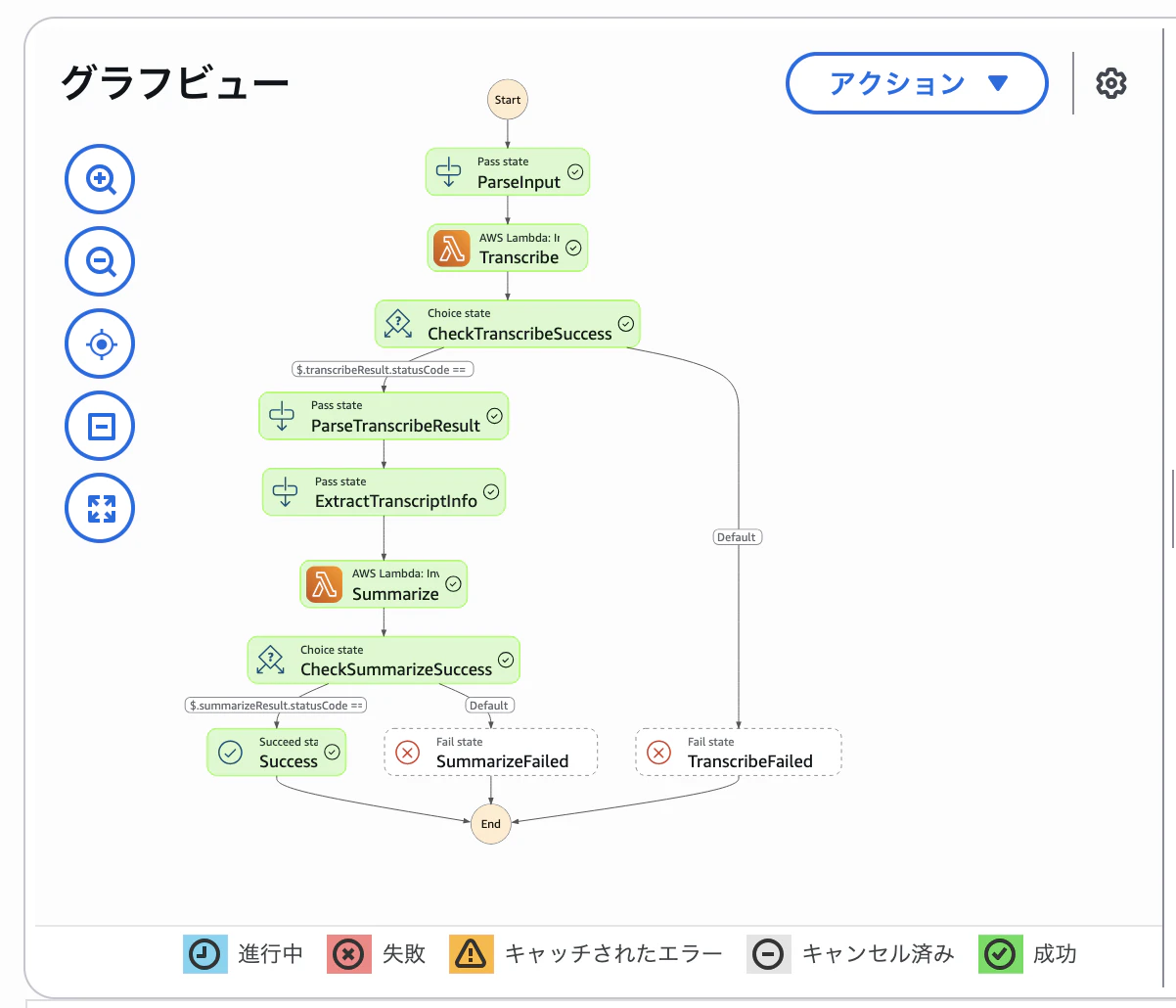
ステートマシーンを定義します。パラメータとしてbucketとkeyを受け取りLambdaを連続して実行するように定義しています。
// state-machine.json
{
    "Comment": "動画文字起こし→要約パイプライン",
    "StartAt": "ParseInput",
    "States": {
      "ParseInput": {
        "Type": "Pass",
        "Parameters": {
          "bucket.$": "$.bucket",
          "key.$": "$.key"
        },
        "Next": "Transcribe"
      },
      "Transcribe": {
        "Type": "Task",
        "Resource": "arn:aws:states:::lambda:invoke",
        "Parameters": {
          "FunctionName": "test-transcribe-function",
          "Payload": {
            "bucket.$": "$.bucket",
            "key.$": "$.key"
          }
        },
        "ResultSelector": {
          "statusCode.$": "$.Payload.statusCode",
          "body.$": "$.Payload.body"
        },
        "ResultPath": "$.transcribeResult",
        "Next": "CheckTranscribeSuccess",
        "TimeoutSeconds": 900
      },
      "CheckTranscribeSuccess": {
        "Type": "Choice",
        "Choices": [
          {
            "Variable": "$.transcribeResult.statusCode",
            "NumericEquals": 200,
            "Next": "ParseTranscribeResult"
          }
        ],
        "Default": "TranscribeFailed"
      },
      "ParseTranscribeResult": {
        "Type": "Pass",
        "Parameters": {
          "transcribeBody.$": "States.StringToJson($.transcribeResult.body)"
        },
        "Next": "ExtractTranscriptInfo"
      },
      "ExtractTranscriptInfo": {
        "Type": "Pass",
        "Parameters": {
          "bucket.$": "$.transcribeBody.bucket",
          "key.$": "$.transcribeBody.transcriptKey"
        },
        "Next": "Summarize"
      },
      "Summarize": {
        "Type": "Task",
        "Resource": "arn:aws:states:::lambda:invoke",
        "Parameters": {
          "FunctionName": "test-summarize-function",
          "Payload": {
            "bucket.$": "$.bucket",
            "key.$": "$.key"
          }
        },
        "ResultSelector": {
          "statusCode.$": "$.Payload.statusCode",
          "body.$": "$.Payload.body"
        },
        "ResultPath": "$.summarizeResult",
        "Next": "CheckSummarizeSuccess",
        "TimeoutSeconds": 300
      },
      "CheckSummarizeSuccess": {
        "Type": "Choice",
        "Choices": [
          {
            "Variable": "$.summarizeResult.statusCode",
            "NumericEquals": 200,
            "Next": "Success"
          }
        ],
        "Default": "SummarizeFailed"
      },
      "Success": {
        "Type": "Succeed",
        "OutputPath": "$.summarizeResult"
      },
      "TranscribeFailed": {
        "Type": "Fail",
        "Error": "TranscribeError",
        "Cause": "文字起こし処理に失敗しました"
      },
      "SummarizeFailed": {
        "Type": "Fail",
        "Error": "SummarizeError",
        "Cause": "要約処理に失敗しました"
      }
    }
  }
デプロイします
$ aws stepfunctions create-state-machine
    --name "video-transcribe-summarize" \
    --definition file://state-machine.json \
    --role-arn arn:aws:iam::{{アカウントID}}:role/StepFunctionsExecutionRole
API Gateway
API Gatewayをyamlで定義し、Step Functionsを起動するようにします。
パスは POST /prod/transcribe の形式で作成します
# api-gateway.yaml
AWSTemplateFormatVersion: '2010-09-09'
Transform: AWS::Serverless-2016-10-31

Parameters:
  StateMachineArn:
    Type: String
    Description: Step Functions State Machine ARN

Resources:
  TranscribeApi:
    Type: AWS::Serverless::Api
    Properties:
      StageName: prod
      Cors:
        AllowMethods: "'POST,OPTIONS'"
        AllowHeaders: "'Content-Type,X-Amz-Date,Authorization,X-Api-Key'"
        AllowOrigin: "'*'"
      DefinitionBody:
        openapi: 3.0.0
        info:
          title: Video Transcribe API
          version: 1.0.0
        paths:
          /transcribe:
            post:
              summary: 動画の文字起こしと要約を実行
              requestBody:
                required: true
                content:
                  application/json:
                    schema:
                      type: object
                      required:
                        - bucket
                        - key
                      properties:
                        bucket:
                          type: string
                          example: sample-bucket
                        key:
                          type: string
                          example: items/video.mp4
              responses:
                '200':
                  description: 処理開始
              x-amazon-apigateway-integration:
                type: aws
                uri: !Sub 'arn:aws:apigateway:${AWS::Region}:states:action/StartExecution'
                credentials: !GetAtt ApiGatewayStepFunctionsRole.Arn
                httpMethod: POST
                requestTemplates:
                  application/json: !Sub |
                    {
                      "input": "$util.escapeJavaScript($input.json('$'))",
                      "stateMachineArn": "${StateMachineArn}"
                    }
                responses:
                  default:
                    statusCode: 200
                    responseTemplates:
                      application/json: |
                        {
                          "executionArn": "$input.path('$.executionArn')",
                          "startDate": "$input.path('$.startDate')"
                        }

  ApiGatewayStepFunctionsRole:
    Type: AWS::IAM::Role
    Properties:
      AssumeRolePolicyDocument:
        Version: '2012-10-17'
        Statement:
          - Effect: Allow
            Principal:
              Service: apigateway.amazonaws.com
            Action: sts:AssumeRole
      Policies:
        - PolicyName: InvokeStepFunctions
          PolicyDocument:
            Version: '2012-10-17'
            Statement:
              - Effect: Allow
                Action:
                  - states:StartExecution
                Resource: !Ref StateMachineArn

Outputs:
  ApiUrl:
    Description: API Gateway URL
    Value: !Sub 'https://${TranscribeApi}.execute-api.${AWS::Region}.amazonaws.com/prod/transcribe'
デプロイをします
$ sam deploy \
  --template-file "api-gateway.yaml" \
  --stack-name video-transcribe-api \
  --parameter-overrides "StateMachineArn=arn:aws:states:ap-northeast-1:{{アカウントID}}:stateMachine:video-transcribe-summarize" \
  --capabilities CAPABILITY_IAM \
  --region ap-northeast-1 \
  --no-confirm-changeset \
  --no-fail-on-empty-changeset
これでAPI Gatewayを定義したので実際にリクエストをしましょう。
API Endpointを取得します
API_URL=$(aws cloudformation describe-stacks \
  --stack-name video-transcribe-api \
  --query 'Stacks[0].Outputs[?OutputKey==`ApiUrl`].OutputValue' \
  --output text \
  --region ap-northeast-1)
リクエストします
$ curl -X POST $API_URL \
  -H 'Content-Type: application/json' \
  -d '{"bucket":"sample-bucket","key":"items/sample.mp4"}'
StepFunctionですべて実行できれば完了です
まとめ
初めてStep Functionsを利用した処理を構築したため、連携エラー時のデバッグに苦労しました。Step Functionsで値受け渡しのステップが作成できますが、あまり難しいことはせずにLambda側に処理を寄せた方が良さそうです。
基本的な実行フローは作成できたのでそもそもの要約や認証などを今後は詰めていきたいです。
お知らせ
技術ブログを週1〜2本更新中、ソーイをフォローして最新記事をチェック!
https://qiita.com/organizations/sewii