
Springで、ログイン画面に入力されたID・パスワードをDBに確認し、ユーザーの権限で特定のURLへのアクセスを禁止する機能を簡単に作成しましょう〜♪
前回、ホーム画面への直リンクを禁止しましたので、今回はログイン処理を実装していきます!
【Java・SpringBoot】Springセキュリティ① - 直リンク禁止
SecurityConfig.javaにログイン処理を追加
ログイン処理
- ログイン処理を追加するには、**http.formLogin()**にメソッドチェーンで条件を追加
-
loginProcessingUrl("<リンク先>")- ログイン処理をするURLを指定。ログイン画面のhtmlにあるフォームタグのaction="/login"の部分と一致させる
-
loginPage("<リンク先>")- ログインページのリンク先を設定。これを設定しないと、自分でログインページを用意しても、Springセキュリティのデフォルトログインページが表示されてしまう!(下記の画像参考)
- ログイン画面のコントローラークラスにある**@GetMapping("/login")**の部分に一致させます。
-
failureUrl("<リンク先>")
- ログインが失敗した場合の遷移先
-
usernameParameter("<パラメーター名>")
- ログインページのユーザーID入力エリアのパラメーター名を指定
- DBからユーザーデータを取得するときに使う。指定するパラメータ名は、htmlファイルから探す。
- 今回の例ではlogin.htmlで、ユーザーIDを入力する以下の箇所
<input type="text" name="userId" /><br/>
- このname属性に設定されているuserId文字列を、SecurityConfigのusernameParameter("<パラメーター名>")にセット
SecurityConfig.java
@EnableWebSecurity
@Configuration
public class SecurityConfig extends WebSecurityConfigurerAdapter {

    @Override
    public void configure(WebSecurity web) throws Exception {

        //静的リソースへのアクセスには、セキュリティを適用しない
        web.ignoring().antMatchers("/webjars/∗∗", "/css/∗∗");
    }

    @Override
    protected void configure(HttpSecurity http) throws Exception {

//中略(全文は下記参考)
        //ログイン処理
        http
            .formLogin()
                .loginProcessingUrl("/login") //ログイン処理のパス
                .loginPage("/login") //ログインページの指定
                .failureUrl("/login") //ログイン失敗時の遷移先
                .usernameParameter("userId") //ログインページのユーザーID
                .passwordParameter("password") //ログインページのパスワード
                .defaultSuccessUrl("/home", true); //ログイン成功後の遷移先

        //CSRF対策を無効に設定(一時的)
        http.csrf().disable();
    }

}
login画面を作成
- login.htmlのユーザーID、パスワードの入力エリアにname属性を追加。また、ログイン失敗時のメッセージを出すように修正
ログインエラーメッセージの表示
- ログインエラーメッセージを表示するためには、
th:if属性を使う<p th:if="${session['SPRING_SECURITY_LAST_EXCEPTION']} != null" th:text="${session['SPRING_SECURITY_LAST_EXCEPTION'].message}" class="text-danger"></p>
- 上記では、セッションにセキュリティのエラーがあれば、エラーメッセージを表示する、という内容
login.html
<!DOCTYPE html>
<html xmlns:th="http://www.thymeleaf.org">
<head>
    <meta charset="UTF-8"></meta>

    <!-- Bootstrapの設定 -->
    <link th:href="@{/webjars/bootstrap/3.3.7-1/css/bootstrap.min.css}" rel="stylesheet"></link>
    <script th:src="@{/webjars/jquery/1.11.1/jquery.min.js}"></script>
    <script th:src="@{/webjars/bootstrap/3.3.7-1/js/bootstrap.min.js}"></script>

    <title>Login</title>
</head>
<body class="text-center">
    <h1>Login</h1>
    <form method="post" action="/login">
        <!-- エラーメッセージ -->
        <p th:if="${session['SPRING_SECURITY_LAST_EXCEPTION']} != null"
            th:text="${session['SPRING_SECURITY_LAST_EXCEPTION'].message}"
            class="text-danger">
            ログインエラーメッセージ
        </p>
        <!-- ユーザーID -->
        <label>ユーザーID</label>
        <input type="text" name="userId" /><br/>
        <br />
        <!-- パスワード -->
        <label>パスワード</label>
        <input type="password" name="password" /><br/>
        <br />
        <!-- ログインボタン -->
        <button class="btn btn-primary" type="submit">ログイン</button>
    </form>
    <br />
    <!-- ユーザー登録画面へのリンク -->
    <a th:href="@{'/signup'}">ユーザー新規登録はこちら</a>
</body>
</html>
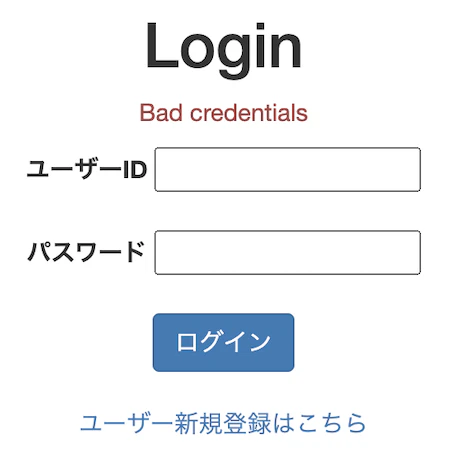
起動してログイン画面/Springセキュリティのデフォルトのログイン画面を確認!
- http://localhost:8080/login
- 何も入力せずログインボタンを押すと、"Bad credentials"が表示されました^^
- 現時点では、入力したユーザーID・パスワードを、どのDBのカラムと一致するのかを設定していないので、次回実装します。また、エラーメッセージの日本語化も行います
- また、Springセキュリティのデフォルトログインページは以下のように表示されます

(参考)コード全文
SecurityConfig.java
package com.example.demo;

import org.springframework.context.annotation.Configuration;
import org.springframework.security.config.annotation.web.builders.HttpSecurity;
import org.springframework.security.config.annotation.web.builders.WebSecurity;
import org.springframework.security.config.annotation.web.configuration.EnableWebSecurity;
import org.springframework.security.config.annotation.web.configuration.WebSecurityConfigurerAdapter;

@EnableWebSecurity
@Configuration
public class SecurityConfig extends WebSecurityConfigurerAdapter {

    @Override
    public void configure(WebSecurity web) throws Exception {

        //静的リソースへのアクセスには、セキュリティを適用しない
        web.ignoring().antMatchers("/webjars/∗∗", "/css/∗∗");
    }

    @Override
    protected void configure(HttpSecurity http) throws Exception {

        // ログイン不要ページの設定
        http
            .authorizeRequests()
                .antMatchers("/webjars/**").permitAll() //webjarsへアクセス許可
                .antMatchers("/css/**").permitAll() //cssへアクセス許可
                .antMatchers("/login").permitAll() //ログインページは直リンクOK
                .antMatchers("/signup").permitAll() //ユーザー登録画面は直リンクOK
                .anyRequest().authenticated(); //それ以外は直リンク禁止

        //ログイン処理
        http
            .formLogin()
                .loginProcessingUrl("/login") //ログイン処理のパス
                .loginPage("/login") //ログインページの指定
                .failureUrl("/login") //ログイン失敗時の遷移先
                .usernameParameter("userId") //ログインページのユーザーID
                .passwordParameter("password") //ログインページのパスワード
                .defaultSuccessUrl("/home", true); //ログイン成功後の遷移先

        //CSRF対策を無効に設定(一時的)
        http.csrf().disable();
    }

}