

背景
最近、機械学習パイプラインツールとしてMetaflowを使っています。
以前はローカルでMetaflowのサーバを立てて試していたのですが、クラウドでの実験を試したいと思い、MetaflowをAWS上にデプロイして試していました。
このとき、Pythonで作ったパイプラインを用いてクラウド上でトレーニングを行うために、いくつか設定が必要だったので、実際にデプロイしたものを利用して説明します。
前提
- 今回はAWS Batchを利用したMetaflowの構成をデプロイして利用します
- コストを抑えるためにいくつかのパラメータを変更したものをデプロイしています
- 参考記事: AWS Batch版のMetaflowのデプロイを安価に試したい際に特に注意したい点
- terraform-aws-metaflow:
v0.12.1 - AWS Provider:
5.70.0
Metaflowの構成の紹介
AWS Batchを利用した構成の全体図です。
ユーザがフローを実行するとAWS Batchが起動し、インスタンス上でトレーニングを行うことができます。
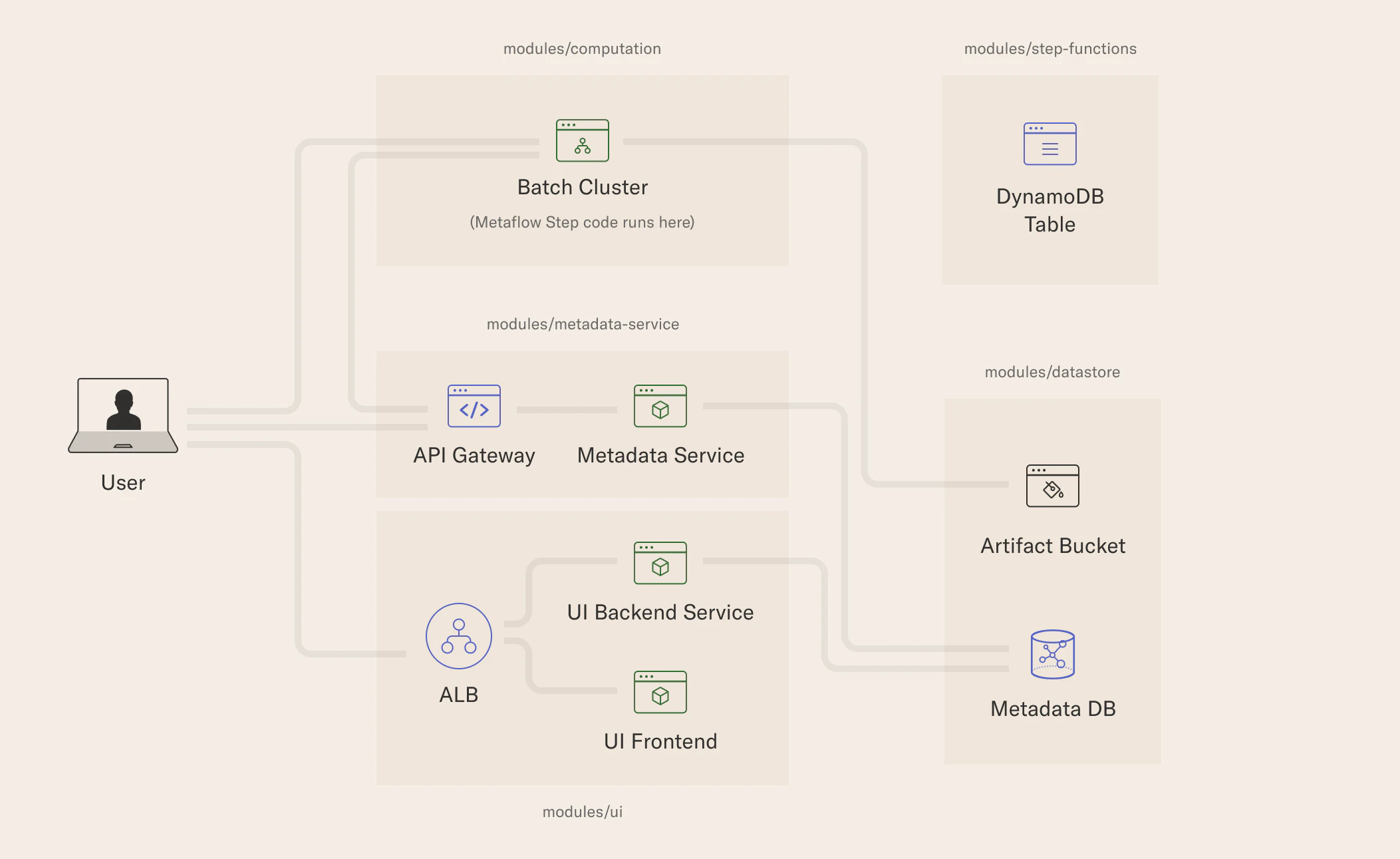
出典: AWS Batch を利用した Metaflow の構成 - Outerbounds Documentation
サンプルフロー
今回はAWSにデプロイしたMetaflowを使う方法について言及するため、実行するフローは以下のように単純なものを用います。
from metaflow import step, FlowSpec

class HelloWorldFlow(FlowSpec):

    @step
    def start(self):
        """First step"""
        print("This is the start step")
        self.next(self.hello)

    @step
    def hello(self):
        """Just saying hi"""
        self.my_greet_text = "Hello World!"
        print(self.my_greet_text)
        self.next(self.end)

    @step
    def end(self):
        """Finish line"""
        print("This is the end step")

if __name__ == '__main__':
    HelloWorldFlow()
デプロイ後の設定
APIキーの設定
Metaflowをデプロイした際に、 metaflow_profile.json が出力されていると思います。
Pythonで記述されたパイプラインを用いて機械学習をする際には、特定のパスに置かれたこのプロファイルを使って接続先等を決定します。
ただし、このデプロイ時に生成された metaflow_profile.json には、API Gatewayに登録されたMetaflowのメタデータサービスへアクセスするためのAPIキーが書かれていません。
{"METAFLOW_SERVICE_AUTH_KEY":"## Replace with output from 'aws apigateway get-api-key --api-key <api-key-id> --include-value | grep value' ##",}
そのため、 metaflow_profile.json に記載されたaws apigateway get-api-key --api-key <api-key-id> --include-value | grep valueコマンドを実行し、取得したAPIキーに置き換えておく必要があります。
環境変数の設定
次に、使用するプロファイル名と設定ディレクトリを環境変数として設定します。
Pythonコードを実行するシェル上で以下のコマンドを実行しておきます。
PROFILE_NAME="dev"
export METAFLOW_HOME=~/.metaflowconfig
export METAFLOW_PROFILE="${PROFILE_NAME}"
PythonコードからMetaflowにアクセスする際は、 METAFLOW_HOME 以下の config_${METAFLOW_PROFILE}.json を参照します。
デフォルトでは ~/.metaflowconfig/config_default.jsonを読み込みますが、環境変数で明示的にプロファイル名を設定すると複数環境を管理するのに便利です。
プロファイルの配置
APIキーを置き換えた後、上で設定した環境変数を使って metaflow_profile.json をコピーします。
ファイル名は config_プロファイル名.json とする必要があります。
これは、Metaflowが起動時に ${METAFLOW_HOME}/config_${METAFLOW_PROFILE}.json というパスでプロファイルを探すため、この命名規則に従う必要があります。
cp metaflow_profile.json "${METAFLOW_HOME}/config_${PROFILE_NAME}.json"
実行方法
AWS Batchでの実行
設定が完了したら、以下のコマンドを用いてAWS Batch上でフローを実行できます。
python hello.py run --with batch
以下は実行結果の例です。
python hello.py run --with batch の実行ログを表示
python hello.py run --with batch
Metaflow 2.18.13 executing HelloWorldFlow for user:user
Validating your flow...
    The graph looks good!
Running pylint...
    Pylint not found, so extra checks are disabled.
2025-12-22 15:51:45.132 Workflow starting (run-id 3):
2025-12-22 15:51:47.783 [3/start/4 (pid 12345)] Task is starting.
2025-12-22 15:51:50.047 [3/start/4 (pid 12345)] [<task-id>] Task is starting (status SUBMITTED)...
2025-12-22 15:52:00.678 [3/start/4 (pid 12345)] [<task-id>] Task is starting (status RUNNABLE)...
2025-12-22 15:52:30.813 [3/start/4 (pid 12345)] [<task-id>] Task is starting (status RUNNABLE)...
2025-12-22 15:53:00.855 [3/start/4 (pid 12345)] [<task-id>] Task is starting (status RUNNABLE)...
2025-12-22 15:53:08.060 [3/start/4 (pid 12345)] [<task-id>] Task is starting (status STARTING)...
2025-12-22 15:53:35.073 [3/start/4 (pid 12345)] [<task-id>] Task is starting (status RUNNING)...
2025-12-22 15:53:34.339 [3/start/4 (pid 12345)] [<task-id>] Setting up task environment.
2025-12-22 15:53:38.404 [3/start/4 (pid 12345)] [<task-id>] Downloading code package...
2025-12-22 15:53:39.258 [3/start/4 (pid 12345)] [<task-id>] Code package downloaded.
2025-12-22 15:53:39.302 [3/start/4 (pid 12345)] [<task-id>] Task is starting.
2025-12-22 15:53:41.098 [3/start/4 (pid 12345)] [<task-id>] This is the start step
2025-12-22 15:53:44.458 [3/start/4 (pid 12345)] [<task-id>] Task finished with exit code 0.
2025-12-22 15:53:45.174 [3/start/4 (pid 12345)] Task finished successfully.
2025-12-22 15:53:45.942 [3/hello/5 (pid 12346)] Task is starting.
2025-12-22 15:53:48.164 [3/hello/5 (pid 12346)] [<task-id>] Task is starting (status SUBMITTED)...
2025-12-22 15:53:52.353 [3/hello/5 (pid 12346)] [<task-id>] Task is starting (status RUNNABLE)...
2025-12-22 15:53:55.702 [3/hello/5 (pid 12346)] [<task-id>] Task is starting (status STARTING)...
2025-12-22 15:54:00.033 [3/hello/5 (pid 12346)] [<task-id>] Task is starting (status RUNNING)...
2025-12-22 15:53:58.937 [3/hello/5 (pid 12346)] [<task-id>] Setting up task environment.
2025-12-22 15:54:03.085 [3/hello/5 (pid 12346)] [<task-id>] Downloading code package...
2025-12-22 15:54:03.865 [3/hello/5 (pid 12346)] [<task-id>] Code package downloaded.
2025-12-22 15:54:03.912 [3/hello/5 (pid 12346)] [<task-id>] Task is starting.
2025-12-22 15:54:05.694 [3/hello/5 (pid 12346)] [<task-id>] Hello World!
2025-12-22 15:54:09.218 [3/hello/5 (pid 12346)] [<task-id>] Task finished with exit code 0.
2025-12-22 15:54:09.858 [3/hello/5 (pid 12346)] Task finished successfully.
2025-12-22 15:54:10.591 [3/end/6 (pid 12347)] Task is starting.
2025-12-22 15:54:12.524 [3/end/6 (pid 12347)] [<task-id>] Task is starting (status SUBMITTED)...
2025-12-22 15:54:14.472 [3/end/6 (pid 12347)] [<task-id>] Task is starting (status RUNNABLE)...
2025-12-22 15:54:17.717 [3/end/6 (pid 12347)] [<task-id>] Task is starting (status STARTING)...
2025-12-22 15:54:22.035 [3/end/6 (pid 12347)] [<task-id>] Task is starting (status RUNNING)...
2025-12-22 15:54:21.016 [3/end/6 (pid 12347)] [<task-id>] Setting up task environment.
2025-12-22 15:54:25.497 [3/end/6 (pid 12347)] [<task-id>] Downloading code package...
2025-12-22 15:54:26.275 [3/end/6 (pid 12347)] [<task-id>] Code package downloaded.
2025-12-22 15:54:26.317 [3/end/6 (pid 12347)] [<task-id>] Task is starting.
2025-12-22 15:54:27.954 [3/end/6 (pid 12347)] [<task-id>] This is the end step
2025-12-22 15:54:31.195 [3/end/6 (pid 12347)] [<task-id>] Task finished with exit code 0.
2025-12-22 15:54:31.894 [3/end/6 (pid 12347)] Task finished successfully.
2025-12-22 15:54:32.206 Done!
終わりに
ローカルのサーバを立てた場合とは少し違った設定が必要だったため、設定に少し困りましたが、参考になれば幸いです。
今後はデータ管理と合わせて活用する手法等も調査したいと思います。