0
0

Delete article

Deleted articles cannot be recovered.

Draft of this article would be also deleted.

Are you sure you want to delete this article?

More than 3 years have passed since last update.

Cockpitを使い、virt-managerと同様の処理をする。

0
Posted at

Cockpitって?

Cockpitは、WebUIで Linux サーバの管理ができるツール。
以下のサイトから見てみると、CentOS,Ubuntuなどに対応しており、最新のWebブラウザに対応している。

  • PCのリソースの管理
  • 仮想ゲストの管理

ができるので、是非とも試してみよう

設定方法

とても簡単。yuminstallして、firewallのポート(9090)を開けるだけ

cockpitのインストール。

コマンド
sudo yum install cockpit

cockpitサービスの有効化

コマンド
sudo systemctl enable --now cockpit.socket

使用するポートをfirewallで許可する。

コマンド
sudo firewall-cmd --add-service=cockpit
sudo firewall-cmd --add-service=cockpit --permanent

その後、https://サーバのIPアドレス:9090をWebブラウザに入力し、
アクセスする。

以下のような画面になるので、ログインする。
ログインに必要なパスワードは、普段サーバにアクセスするときに使うユーザ名とパスワードで大丈夫
image.png

ログイン直後、管理者アクセスをオンにすると、仮想マシンへのアクセス等ができたりする。
image.png

なお、CPUやメモリの使用量なども確認できる。*写真は公式サイトから見たイメージ。
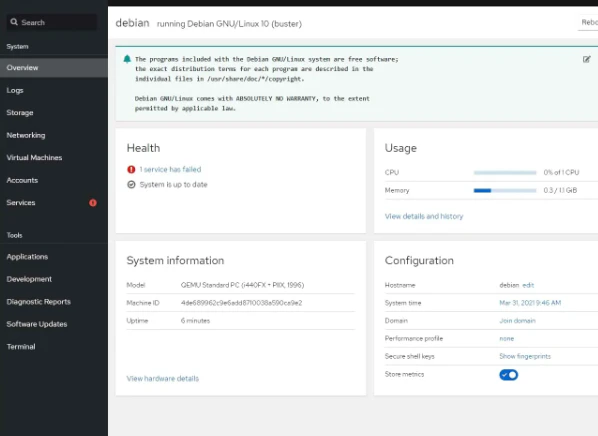
image.png

参考サイト

0
0
0

Register as a new user and use Qiita more conveniently

  1. You get articles that match your needs
  2. You can efficiently read back useful information
  3. You can use dark theme
What you can do with signing up
0
0

Delete article

Deleted articles cannot be recovered.

Draft of this article would be also deleted.

Are you sure you want to delete this article?